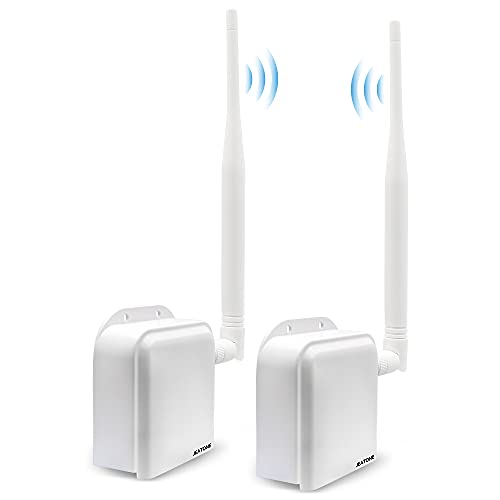
VONETS Industrial Mini 2.4GHz WiFi Bridge/Repeater/Hotspot Extender/WiFi to Wired/AP Signal Booster with 1 RJ45 Male (10/100Mbps) DC/USB Powered for DVR PLC Network Printer VAP11G-300(Two Units)


Key features
- •Simple start - simple set-up can be done via laptop, smartphone or tablet device
- •WiFi intelligent bridge function, Wireless switch wired, wired switch wireless, intelligent switch
- •Extend Wi-Fi coverage - delivers Wi-Fi signal to hard to reach areas of your home or office virtually eliminating dead spots
- •Great ideal for Dreambox, Xbox, PS3, Network Printer, IP camera, Electronic scales,Pos, Access Control, Blu-ray player, HDTV
- •100 meters transmission distance(without obstacle) ; Have any set up questions, just feel free to contact us. [email protected]
VONETS Industrial Mini 2.4GHz WiFi Bridge/Repeater/Hotspot Extender/WiFi to Wired/AP Signal Booster with 1 RJ45 Male (10/100Mbps) DC/USB Powered for DVR PLC Network Printer VAP11G-300(Two Units)
List Price: $77.26$69.53DEALYou Save: $7.73 (10%)
Free shippingFree Returns – 30 daysFree Order CancellationSecure Payment2–3 Days DeliveryGet It October 28, 2026In Stock (1)No marketing spamNo account requiredFulfilment by FedEx / Amazon / UPS / ShipwirePayPal / Card Buyer Protection
Customer Reviews
Reviews sourced from verified Amazon purchasers3.9
out of 5
Based on 10 reviews
5★
50%
4★
50%
3★
0%
2★
0%
1★
0%
Simple solution to add WiFi to an iMac
J. Stanard✓ Verified Purchase•November 2, 2023
My mom's WiFi stopped working on her iMac, and Apple charges an arm and a leg to fix it. I looked at various USB adapters, but none seemed to support more recent macOS versions. Since her Ethernet still worked, I picked up this device to act as a bridge. It was very easy for me to install, takes very little space, and doesn't need extra cables. It's very tidy! The downside is it takes an above average knowledge of networking terms to configure it for your needs. But I was pleased. It only took a couple minutes to setup, and the iMac was back in business!
Perfect.
James C.✓ Verified Purchase•October 23, 2023
Used on a Raspberry Pi4 and works perfectly.
Great Way To Add WiFi To A Wired Ethernet Device
Bruce E. Layne✓ Verified Purchase•October 17, 2023
I was a bit disappointed that the Elegoo Neptune 4 Pro 3D printer has an Ethernet port but no WiFi. I thought everyone uses WiFi these days so the lack of WiFi seemed like a big oversight. The Vonets WiFi bridge made it easy to add WiFi to the 3D printer. It was so intuitive that I was up and running in a few minutes without reading any instructions. For the last two months, the connection has been rock steady and reliable even though the 3D printer is fairly far from the WiFi router. It's been as good as a wired Ethernet connection. Zero complaints. I haven't needed to touch it since installing it. It's powered from the 3D printer's USB port, so the power to the WiFi bridge cycles with the 3D printer. It never has a problem quickly connecting to the WiFi router. I love being able to send jobs to the 3D printer from a Fluidd tab in my web browser or from the PrusaSlicer software. I supply the IP address (192.168.212.12) and everything connects automagically. It's WAY better than transferring files via a USB thumb drive or (much worse) a micro SD card.
Bright lights
D_at_the_Lake✓ Verified Purchase•October 7, 2023
This unit solves the loss of connection problem with the Logitech Squeezebox Radio. With the introduction of WiFi6, these older devices get dodgy and lose connection"” even if you don't have WiFi6, but a neighbor does! This piece features a power pass-through, so you won't need an additional power cord. You associate the unit with your SSID, then plug the Ethernet pigtail into the Radio and set the radio for a "wired" network.
It would be a 5-star device if there were a way to turn off the blinky/flashy activity LEDs. They're annoying at night! I "solved" this with black tape over the lights once operation was confirmed
UPDATE: It's now April of 2023, and I've been running three of these on Squeezebox Radios since last August. 100% reliability. If you've been experiencing WiFi disconnects, this will give your Squeezebox a new life.
It would be a 5-star device if there were a way to turn off the blinky/flashy activity LEDs. They're annoying at night! I "solved" this with black tape over the lights once operation was confirmed
UPDATE: It's now April of 2023, and I've been running three of these on Squeezebox Radios since last August. 100% reliability. If you've been experiencing WiFi disconnects, this will give your Squeezebox a new life.
Not the easiest to configure, here is my cookbook
Keninca✓ Verified Purchase•September 28, 2023
I need this to interface to a couple of wired Ethernet printers for a restaurant application. I'm not sure if I'm going to put a switch behind this or just get another one for the second printer. They're pretty cheap.....
I must have reset the device to factory configurations 6+ times as I worked through the manual configuration.
To get it to repeatedly and easily configure, attach it to you computer's Ethernet port, plug the power source into a usb connector, turn on airplane mode (wireless off), go in to the IPV4 properties for your computers wired Ethernet, turn off DHCP, set your computer address to 192.168.254.1, and set the gateway to the device 192.168.254.254. Once I did that, I could quickly and easily access the login page (192.165.254.254) after device resets with the reset button.
My Mifi's network is 192.168.1.xxx. I found that if I gave the device a static IP address of 192.168.1.254 (way out of DHCP range), and set up the gateway and dns server in the device to be 192.168.1.1 (the router), once the device was rebooted and connected to the wireless I could easily access, upgrade, and manage it from the 192.168.1.254 address through my MiFi.
Don't do too much more configuring until you have it working the first time and download and upgrade to the latest firmware (April 2019) as the saved configuration file becomes useless. The upgrade also says you must reset the device to the new factory settings (with the button on the back) to ensure that upgrade fully takes effect.
Once I got the firmware upgraded, the wireless repeater off, the new IP address configured, a new admin password set, the device rebooted, and my computer IPv4 reset to DHCP everything now seems to work perfectly: my computer gets a DHCP address from the router through the device. and I can access and manage the access point if I need to in the future.
I will update this as we put the device into service.
Good Luck!
I must have reset the device to factory configurations 6+ times as I worked through the manual configuration.
To get it to repeatedly and easily configure, attach it to you computer's Ethernet port, plug the power source into a usb connector, turn on airplane mode (wireless off), go in to the IPV4 properties for your computers wired Ethernet, turn off DHCP, set your computer address to 192.168.254.1, and set the gateway to the device 192.168.254.254. Once I did that, I could quickly and easily access the login page (192.165.254.254) after device resets with the reset button.
My Mifi's network is 192.168.1.xxx. I found that if I gave the device a static IP address of 192.168.1.254 (way out of DHCP range), and set up the gateway and dns server in the device to be 192.168.1.1 (the router), once the device was rebooted and connected to the wireless I could easily access, upgrade, and manage it from the 192.168.1.254 address through my MiFi.
Don't do too much more configuring until you have it working the first time and download and upgrade to the latest firmware (April 2019) as the saved configuration file becomes useless. The upgrade also says you must reset the device to the new factory settings (with the button on the back) to ensure that upgrade fully takes effect.
Once I got the firmware upgraded, the wireless repeater off, the new IP address configured, a new admin password set, the device rebooted, and my computer IPv4 reset to DHCP everything now seems to work perfectly: my computer gets a DHCP address from the router through the device. and I can access and manage the access point if I need to in the future.
I will update this as we put the device into service.
Good Luck!
Page 1 of 2