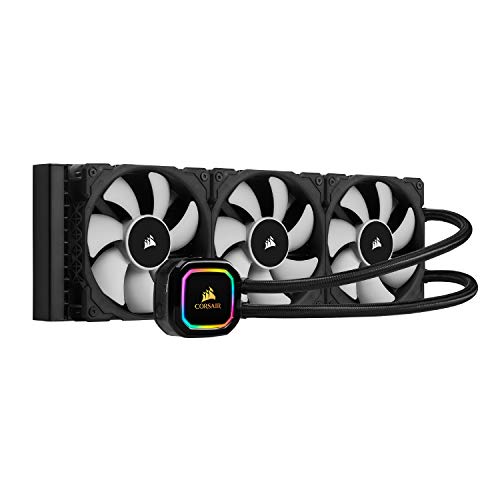
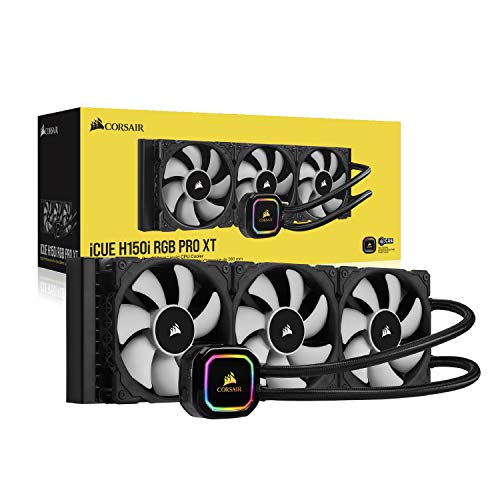
Corsair Hydro Series H150i PRO RGB AIO Liquid CPU Cooler, 360mm Radiator, Triple 120mm ML Series PWM Fans, Advanced RGB Lighting and Fan Software Control, Intel 115x/2066 and AMD AM4 com



Key features
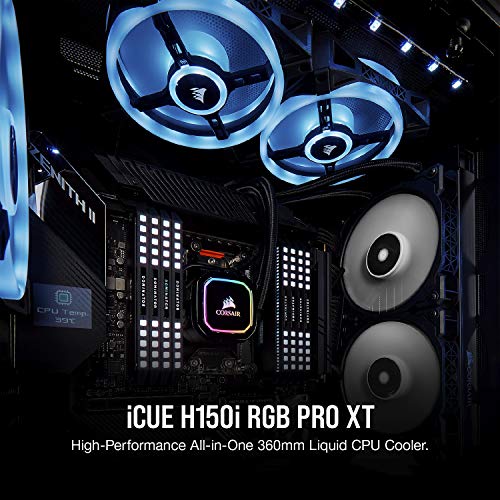
- •Customizable RGB backlit pump head produces vivid lighting effects to match your build. Air flow - 47.3 CFM. Noise level - 25.0 decibels
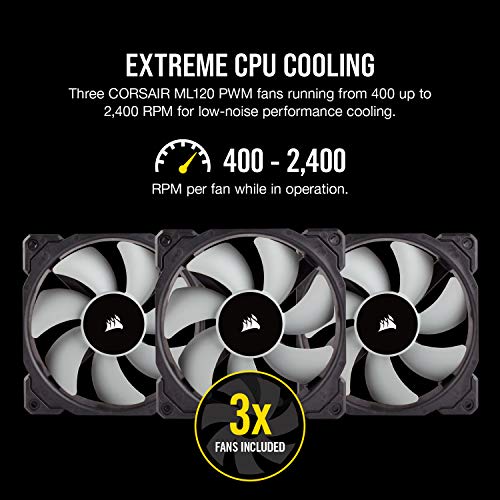
- •Powered by magnetic Levitation: two Low-Noise 140mm ML series magnetic Levitation PWM fans deliver incredible airflow and produce just 20 dB of noise at full speed
- •Powerful software: Corsair iCUE software allows you to adjust RGB lighting, individual fan speeds, and pump speed while monitoring CPU and coolant temperatures
- •Zero RPM mode: zero RPM cooling profiles allow fans to stop entirely at low temperatures, completely eliminating fan noise
- •Compatible Sockets: Intel LGA 1150, 1151, 1155, 1156, 1366, 2011, 2011-3, 2066 and AMD AM2, AM3, AM4, FM1, FM2.
Corsair Hydro Series H150i PRO RGB AIO Liquid CPU Cooler, 360mm Radiator, Triple 120mm ML Series PWM Fans, Advanced RGB Lighting and Fan Software Control, Intel 115x/2066 and AMD AM4 com
List Price: $580.55$522.50DEALYou Save: $58.05 (10%)
Free shippingFree Returns – 30 daysFree Order CancellationSecure Payment2–3 Days DeliveryGet It October 27, 2026In Stock (2)No marketing spamNo account requiredFulfilment by FedEx / Amazon / UPS / ShipwirePayPal / Card Buyer Protection
Customer Reviews
Reviews sourced from verified Amazon purchasers4.7
out of 5
Based on 10 reviews
5★
50%
4★
50%
3★
0%
2★
0%
1★
0%
Substantial improvement over standard air cooler
M. Walker✓ Verified Purchase•October 3, 2023
I installed this a few days ago as an upgrade from a Cooler Master Hyper 212 I installed when I built this system a year ago. The system is an I7-9700K with a modified FE GTX 1080 (I replaced the FE case/cooler with an Arctic Xtreme III third party cooler that discharges into the case) The case is a very basic Thermaltake Versa H22 - a mini-tower - with a MSI Tomahawk MB.
- First off, be careful to make sure this will fit in your case - it is fairly large and extends quite a bit beyond the footprint of the original two fans - more than I was expecting. I got it to fit just barely - it was not as clean as I would have liked.
- My only option is to install this at the top of the case - in most mini-towers the front fans directly face the drive cage and there isn't any room for a radiator - that is the situation with the Thermaltake Versa.
- I installed this as specified, with two "pull" fans below the radiator oriented to pull in cool air from the top of the case and eject the warm air into the case itself. I started with the reverse, but it cools far better if starting with external air - duh!
- But in doing this I unbalanced my airflow - I have a total capacity of 5 fans and before this install I had two directing air into the case from the front and three removing it - the two at the top now behind the radiator and the one at the rear top. Now I have four directing air in the case and what is more, I had to replace my original rear fan with a slim-line 15mm fan because my original fan would no longer fit. I thought about reversing my front fans but there is an air-filter there and it is clear that the intention is to push air into the case.
- However, the four fans directing air into the case all face pressure-dropping obstructions - the radiator on the top, and the filter and drive cage on the front - while the rear fan has no obstructions. In addition I increased the spin of the rear fan to somewhat compensate for the unbalanced set of fans - I think it is ok.
The long and short of it is a large improvement in CPU temperatures under heavy load (10-15C) and a much quieter system for CPU intensive tasks - I am running "balanced" mode in iCue. While running Prime95 small FFTs the CPU will never exceed 70C and most cores stay in the mid 60s and the system is quite quiet. With the Hyper 212 I was in the 80s and had a lot of fan noise. For gaming (for example AC Odyssey @1440, 60 fps, ultra or high), the CPU stays in the 50s and the GPU peaks at about 62C when pegged with moderate OC - although there is also moderate fan noise to achieve these temperatures - not loud, but not silent - but the GPU cooling is what is making the noise, not the CPU cooler.
For most people I will say I don't think this is worth the investment over the Hyper 212, which costs less than 1/3 the coin and is a very nice conventional cooler. It is an improvement to be sure, but it is for the picky rather than what is absolutely necessary unless you have a specific situation that demands it - heavy overclocking for example.
- First off, be careful to make sure this will fit in your case - it is fairly large and extends quite a bit beyond the footprint of the original two fans - more than I was expecting. I got it to fit just barely - it was not as clean as I would have liked.
- My only option is to install this at the top of the case - in most mini-towers the front fans directly face the drive cage and there isn't any room for a radiator - that is the situation with the Thermaltake Versa.
- I installed this as specified, with two "pull" fans below the radiator oriented to pull in cool air from the top of the case and eject the warm air into the case itself. I started with the reverse, but it cools far better if starting with external air - duh!
- But in doing this I unbalanced my airflow - I have a total capacity of 5 fans and before this install I had two directing air into the case from the front and three removing it - the two at the top now behind the radiator and the one at the rear top. Now I have four directing air in the case and what is more, I had to replace my original rear fan with a slim-line 15mm fan because my original fan would no longer fit. I thought about reversing my front fans but there is an air-filter there and it is clear that the intention is to push air into the case.
- However, the four fans directing air into the case all face pressure-dropping obstructions - the radiator on the top, and the filter and drive cage on the front - while the rear fan has no obstructions. In addition I increased the spin of the rear fan to somewhat compensate for the unbalanced set of fans - I think it is ok.
The long and short of it is a large improvement in CPU temperatures under heavy load (10-15C) and a much quieter system for CPU intensive tasks - I am running "balanced" mode in iCue. While running Prime95 small FFTs the CPU will never exceed 70C and most cores stay in the mid 60s and the system is quite quiet. With the Hyper 212 I was in the 80s and had a lot of fan noise. For gaming (for example AC Odyssey @1440, 60 fps, ultra or high), the CPU stays in the 50s and the GPU peaks at about 62C when pegged with moderate OC - although there is also moderate fan noise to achieve these temperatures - not loud, but not silent - but the GPU cooling is what is making the noise, not the CPU cooler.
For most people I will say I don't think this is worth the investment over the Hyper 212, which costs less than 1/3 the coin and is a very nice conventional cooler. It is an improvement to be sure, but it is for the picky rather than what is absolutely necessary unless you have a specific situation that demands it - heavy overclocking for example.
H150 PRO. The Good. The Bad.
An0th3r Cu5t0m3R✓ Verified Purchase•September 27, 2023
The Good.
Lower temperatures than an H60.
It's a 360mm Radiator and can hold 3, 120mm Fans. Noise Level is almost silent on idle. I use mine in a Phanteks Enthoo Evolv X ATX Glass. I keep the pump in "performance mode" 24/7. Mounting/install difficulty falls heavily onto the case that you are putting the radiator into. I didn't have any issues installing in into my PC case. My temperatures never exceed 72C at Max Load in 48 hours of Prime 95. Processor is an I7 6700k 4.6Ghz 1.345VCore. This keeps temperatures in check. My old H60 only managed 81C in 48 hours of Prime 95.
The Bad.
Unfortunately there is more here than I want to write because the pump does it's job but here's the full story. This "Pro" Unit uses a cheap ABS backplate while the mainstream consumer H60 backplate is made out a sturdy metal. This was an unexpected and frankly an anti-pro move by Corsair. I was blown away by this and ended up just reusing the H60 Backplate on the H150 Pro.
The plug-in to operate the RGB is convenient and not completely ugly but it uses Micro USB. The Pump Power and mess of Fan cords is ugly. It protrudes from the top and takes away from the sleek design of the pump. At the time of purchase USB C was widely being used and transitioned towards. I'm completely miffed why they didn't create a USB C to 12V SATA cable that could draw power for the Pump and have a small splitter or central hub for PWM.
I had to get out a tap and die set to thread the screw holes on the radiator. (I guess this item is intended for Pros after all...) This was pretty disappointing.
I'm worried about how much longer it will last. I leave my computer on and have it complete tasks throughout the day. My computer is shut off maybe 4 days out of each year for cleaning. Otherwise it's is on 24/7. Recently (~6 months after warranty ran out) I get horrible Pump Grinding open wake up if my automated systems and procedures put the computer into sleep mode. This grinding is almost like the pump is running out of liquid while starting up from sleep. (Pump is at the bottom of the loop...)
The pre-applied thermal paste was rock solid. I had to soak the paste in a small plastic container full of Isopropyl for 5 minutes just to be able to even scrape it off with a Q-tip. I let it sit another 10 minutes until I could finally use a cotton swab and a microfiber cloth.
Opinion:
I would have preferred the RGB be software optional. A button on board the pump that switches presets or Writes to a small NAND Flash and applies right away on booting to prevent needing yet another startup item and to have software constantly in the background would have been a much better option. (Program must be started in order to change LED color)
Conclusion.
It's a great AIO cooler. That said it had a huge amount of things that could have been done better. I joked earlier that this item is for Pros with the amount of things I had to do to it in order to make it work for me and function properly with good temperatures... I wouldn't recommend it unless you are an enthusiast who doesn't mind some extra elbow grease.
I like it a lot though. I stay idle at 25C while overclocked to 4.6Ghz on an I7 6700k. I have a huge amount of thermal headroom but ironically this cooler is so good after the work I put into making it work for me... I'm stuck on overclocking do to voltage constraints. I can get 5Ghz with 1.435V unfortunately I just don't feel comfortable running that level of voltage on Skylake for 24/7 use.
If you are good at making things work against all odds this is the cooler for you. If not just steer clear. Plenty of non elbow grease AIO's around.
Lower temperatures than an H60.
It's a 360mm Radiator and can hold 3, 120mm Fans. Noise Level is almost silent on idle. I use mine in a Phanteks Enthoo Evolv X ATX Glass. I keep the pump in "performance mode" 24/7. Mounting/install difficulty falls heavily onto the case that you are putting the radiator into. I didn't have any issues installing in into my PC case. My temperatures never exceed 72C at Max Load in 48 hours of Prime 95. Processor is an I7 6700k 4.6Ghz 1.345VCore. This keeps temperatures in check. My old H60 only managed 81C in 48 hours of Prime 95.
The Bad.
Unfortunately there is more here than I want to write because the pump does it's job but here's the full story. This "Pro" Unit uses a cheap ABS backplate while the mainstream consumer H60 backplate is made out a sturdy metal. This was an unexpected and frankly an anti-pro move by Corsair. I was blown away by this and ended up just reusing the H60 Backplate on the H150 Pro.
The plug-in to operate the RGB is convenient and not completely ugly but it uses Micro USB. The Pump Power and mess of Fan cords is ugly. It protrudes from the top and takes away from the sleek design of the pump. At the time of purchase USB C was widely being used and transitioned towards. I'm completely miffed why they didn't create a USB C to 12V SATA cable that could draw power for the Pump and have a small splitter or central hub for PWM.
I had to get out a tap and die set to thread the screw holes on the radiator. (I guess this item is intended for Pros after all...) This was pretty disappointing.
I'm worried about how much longer it will last. I leave my computer on and have it complete tasks throughout the day. My computer is shut off maybe 4 days out of each year for cleaning. Otherwise it's is on 24/7. Recently (~6 months after warranty ran out) I get horrible Pump Grinding open wake up if my automated systems and procedures put the computer into sleep mode. This grinding is almost like the pump is running out of liquid while starting up from sleep. (Pump is at the bottom of the loop...)
The pre-applied thermal paste was rock solid. I had to soak the paste in a small plastic container full of Isopropyl for 5 minutes just to be able to even scrape it off with a Q-tip. I let it sit another 10 minutes until I could finally use a cotton swab and a microfiber cloth.
Opinion:
I would have preferred the RGB be software optional. A button on board the pump that switches presets or Writes to a small NAND Flash and applies right away on booting to prevent needing yet another startup item and to have software constantly in the background would have been a much better option. (Program must be started in order to change LED color)
Conclusion.
It's a great AIO cooler. That said it had a huge amount of things that could have been done better. I joked earlier that this item is for Pros with the amount of things I had to do to it in order to make it work for me and function properly with good temperatures... I wouldn't recommend it unless you are an enthusiast who doesn't mind some extra elbow grease.
I like it a lot though. I stay idle at 25C while overclocked to 4.6Ghz on an I7 6700k. I have a huge amount of thermal headroom but ironically this cooler is so good after the work I put into making it work for me... I'm stuck on overclocking do to voltage constraints. I can get 5Ghz with 1.435V unfortunately I just don't feel comfortable running that level of voltage on Skylake for 24/7 use.
If you are good at making things work against all odds this is the cooler for you. If not just steer clear. Plenty of non elbow grease AIO's around.
Decent AIO Unit For the Money, But Performs Better with Higher RPM Fans.
Rusty Ship✓ Verified Purchase•September 13, 2023
I use the H115i PRO RGB AIO with Intel Core i9-7920X CPU on a Gigabyte X299 Gaming 7 PRO in a Phanteks Enthoo Luxe Tempered Glass Case.
Installation---
By their nature a water cooler is a little harder to install than an air cooler, but this unit was not bad at all, especially if one is building the PC from the ground up. I originally installed this unit in a conventional manner on the top, INSIDE the steel frame of the case, with the fans blowing out. There was sufficient room for the motherboard, but it left access to top connectors a little cramped once the fans were connected. Later, when I replaced fans (more on that later) I realized that there was enough room to install the radiator on the top OUTSIDE the steel frame, but under the plastic panel and mesh air filter (so it was still protected and covered) and the fans could still be installed inside on the top to push the air through the radiator out. I just had to run the screws through the fans, case frame, and into the radiator so the fan screws were effectively holding the fans and radiator to the case. Fortunately, the fan screws provided with the kit were long enough. This also eliminated what I thought was a hot air pocket between the steel frame and the panel/filter.
Performance-FANS--
Note that after a lot of comparison between the 280mm H115i and and 370mm H150i models I opted for the 280mm H115i model because 2 140mm fans cool about as well as the 3 120mm fans and are much quieter.
Out of the box, it did a very adequate job of cooling the CPU running at stock speeds in "Balanced" mode, even when stress testing with OCCT and P95 (never got above low 70s even with the smallest sizes). In Extreme Mode and overclocking to 4.5 or 4.6 it did adequate for most things (e.g, video games), staying mostly in the 60s, but did not hold up well to stress testing and would thermally throttle (~95 degrees) on a couple of cores at the most stressful of tests.
Clearly Corsair made a decision for quiet over extreme performance. One thing that really annoyed me was that while the fans provided were of the basic 1200 RPM ML140 design, seems like they could have provided the PRO 2000 RPM fans. Yes, I know that 2000 RPM would be as loud as heck at full speed, but the whole point of PMW control is the control. Having a bigger speed range allows the user to balance airflow vs noise, and running at 1200 RPM produces the same noise volume, whether it is maxed at 1200 RPM or controlled down from 2000 RPM to 1200. In fact, as provided, in balanced mode at idle the stock fans ran at just below 1100 RPM and only got up to about 1150 RPM at the highest temps. Why even bother with a fan temp curve with less than a 100 RPM range?
I did some research, and while ML140 PRO fans were in the running, I opted to replace them with 2 Noctua NF A14 industrialPPC-2000 PWM fans. These fans have always scored very well in testing, particularly in terms of air flow through radiators and noise vs airflow, and have one of the best warranties around (German engineering and all that). I tried to create a fan curve using Corsair's iCUE software, but got frustrated when it appeared that fan control was extremely non-linear above 1200 RPM. I finally decided to hook the fans to mobo control on the CPU and CPU OPT headers. I use the mobo BIOS and fan control software to setup the fan control curves. The only drawback is the mobo CPU temp reading (rather than the cpu itself) is the only real temp option to control the fans. Not a big deal since the response time is pretty fast and probably faster than the cooler liquid temp that the iCUE uses.
Below about 1300 RPM that fans are not audible to me based on my physical setup. At 1600 RPM the fans are very audible, but not to the point of annoying (especially if I am gaming).
Performance-PUMP--
The PUMP does not appear to work on a temp curve. Basically if you set to Balance mode it runs at ~2100 RPM and at Extreme mode it runs at ~2800 RPM. I feel like that it would be better to run based on a temp curve, so I don't have to switch modes when I overclock.
Performance-TEMPS-Idle--
Stock: Fans=1054/1080 RPM; CPU (mobo)=28 C; Case Ambient=27 C [Diff=1 C]
Noctua Static ~1500 RPM: Fans=1530/1510 RPM; CPU(mobo)=25C; Case Ambient=24C [Diff=1C] - Note that it appears to lower the overall temp inside the case pulling so much air in.
Noctua My Temp Curve: Fans=1002/994 RPM; CPU=30; Amb=25 [Diff=5C]
Performance-TEMPS--Heat Torture (Prime95-96K In Place After 15 minutes):
Stock: Fans= 1121/1152 RPM; CPU= 66C; Amb= 27C [Diff= 39C]
Noctua ~1500 RPM: Fans=1530/1510 RPM; CPU= 55C; Amb= 23C [Diff= 32C]
Noctua Temp Curve: Fans= 1308/1285 RPM; CPU= 58C; Amb= 25C [Diff= 33C]
So it appears that not only does increased fan speed reduce the delta between CPU and ambient temps, but also reduces inner temps [though I should reiterate that the radiator placement moved when I installed the Noctuas, so that might have some effect].
Appearance-Control--
Looks great. Makes a much neater looking system than when using an air cooler. iCUE is very flexible and easy to use. Lots of flexibility in programming color. I have it set to color based in temperature of the CPU.
Installation---
By their nature a water cooler is a little harder to install than an air cooler, but this unit was not bad at all, especially if one is building the PC from the ground up. I originally installed this unit in a conventional manner on the top, INSIDE the steel frame of the case, with the fans blowing out. There was sufficient room for the motherboard, but it left access to top connectors a little cramped once the fans were connected. Later, when I replaced fans (more on that later) I realized that there was enough room to install the radiator on the top OUTSIDE the steel frame, but under the plastic panel and mesh air filter (so it was still protected and covered) and the fans could still be installed inside on the top to push the air through the radiator out. I just had to run the screws through the fans, case frame, and into the radiator so the fan screws were effectively holding the fans and radiator to the case. Fortunately, the fan screws provided with the kit were long enough. This also eliminated what I thought was a hot air pocket between the steel frame and the panel/filter.
Performance-FANS--
Note that after a lot of comparison between the 280mm H115i and and 370mm H150i models I opted for the 280mm H115i model because 2 140mm fans cool about as well as the 3 120mm fans and are much quieter.
Out of the box, it did a very adequate job of cooling the CPU running at stock speeds in "Balanced" mode, even when stress testing with OCCT and P95 (never got above low 70s even with the smallest sizes). In Extreme Mode and overclocking to 4.5 or 4.6 it did adequate for most things (e.g, video games), staying mostly in the 60s, but did not hold up well to stress testing and would thermally throttle (~95 degrees) on a couple of cores at the most stressful of tests.
Clearly Corsair made a decision for quiet over extreme performance. One thing that really annoyed me was that while the fans provided were of the basic 1200 RPM ML140 design, seems like they could have provided the PRO 2000 RPM fans. Yes, I know that 2000 RPM would be as loud as heck at full speed, but the whole point of PMW control is the control. Having a bigger speed range allows the user to balance airflow vs noise, and running at 1200 RPM produces the same noise volume, whether it is maxed at 1200 RPM or controlled down from 2000 RPM to 1200. In fact, as provided, in balanced mode at idle the stock fans ran at just below 1100 RPM and only got up to about 1150 RPM at the highest temps. Why even bother with a fan temp curve with less than a 100 RPM range?
I did some research, and while ML140 PRO fans were in the running, I opted to replace them with 2 Noctua NF A14 industrialPPC-2000 PWM fans. These fans have always scored very well in testing, particularly in terms of air flow through radiators and noise vs airflow, and have one of the best warranties around (German engineering and all that). I tried to create a fan curve using Corsair's iCUE software, but got frustrated when it appeared that fan control was extremely non-linear above 1200 RPM. I finally decided to hook the fans to mobo control on the CPU and CPU OPT headers. I use the mobo BIOS and fan control software to setup the fan control curves. The only drawback is the mobo CPU temp reading (rather than the cpu itself) is the only real temp option to control the fans. Not a big deal since the response time is pretty fast and probably faster than the cooler liquid temp that the iCUE uses.
Below about 1300 RPM that fans are not audible to me based on my physical setup. At 1600 RPM the fans are very audible, but not to the point of annoying (especially if I am gaming).
Performance-PUMP--
The PUMP does not appear to work on a temp curve. Basically if you set to Balance mode it runs at ~2100 RPM and at Extreme mode it runs at ~2800 RPM. I feel like that it would be better to run based on a temp curve, so I don't have to switch modes when I overclock.
Performance-TEMPS-Idle--
Stock: Fans=1054/1080 RPM; CPU (mobo)=28 C; Case Ambient=27 C [Diff=1 C]
Noctua Static ~1500 RPM: Fans=1530/1510 RPM; CPU(mobo)=25C; Case Ambient=24C [Diff=1C] - Note that it appears to lower the overall temp inside the case pulling so much air in.
Noctua My Temp Curve: Fans=1002/994 RPM; CPU=30; Amb=25 [Diff=5C]
Performance-TEMPS--Heat Torture (Prime95-96K In Place After 15 minutes):
Stock: Fans= 1121/1152 RPM; CPU= 66C; Amb= 27C [Diff= 39C]
Noctua ~1500 RPM: Fans=1530/1510 RPM; CPU= 55C; Amb= 23C [Diff= 32C]
Noctua Temp Curve: Fans= 1308/1285 RPM; CPU= 58C; Amb= 25C [Diff= 33C]
So it appears that not only does increased fan speed reduce the delta between CPU and ambient temps, but also reduces inner temps [though I should reiterate that the radiator placement moved when I installed the Noctuas, so that might have some effect].
Appearance-Control--
Looks great. Makes a much neater looking system than when using an air cooler. iCUE is very flexible and easy to use. Lots of flexibility in programming color. I have it set to color based in temperature of the CPU.
Significant upgrade from H100i v2
Y. Wang✓ Verified Purchase•August 4, 2023
I recently upgraded my system from i5 3570k to 9700k. I reused my old H100i v2 but noticed temperatures were a bit high. Running overclocked at 5.0ghz on PRIME 95 I was topping out 92+ C on several cores after a few short minutes. It's not great for my overclock and not great for my chip life. I decided to upgrade my cooler and I am definitely happy that I did.
First off, the size of the H115i pro is much bigger than the H100i v2. Not only is it longer ( 280mm versus 240mm) and slightly wider, the radiator is much THICKER as well. Radiator thickness is an important aspect of cooling, sometimes more so than overall length and width. Even a little bit more thickness adds significant more cooling surface area as it multiplies the extended length and width.
Additionally, the pump included in the H115i Pro seems more capable but louder. Holding my ear to the motherboard, there is a lot more noise coming from the H115i Pro pump than the H100i v2. I assume this is because the pump is more powerful and the noise comes with the territory.
Speaking of noise, the noise from the H115i Pro fans are SIGNIFICANTLY better than the previous incarnations. The newer "Pro" versions use Corsairs ML or magnetic levitation fans. This means that there is a no contact surface between the spinning surfaces. The previous versions of all Corsair AIOs were all normal sleeve-bearing fans that were very noisy depending on the fan orientation. I previously purchased the H110i (the previous version of the H115i) which used the aforementioned sleeve bearing fans and if the fans were upside down or on its side, the fans were incredibly noisy. I returned it because of this fact. All previous versions of the Corsair AIOs had an annoying habit of spinning up full speed on system startup before the software kicked in and dampened the fans down. The new ML fans spin at a maximum speed of 1200 rpm and at this speed they are almost inaudible to me, the only thing I can hear is a slight humming. At lower settings (performance, balanced, and quiet) they are whisper quiet. The H115i Pro uses 2x 140mm fans versus 2x 120mm on the H100i v2. The larger fans move more air at much lower RPMs and are quieter.
Overall, the cooling capabilities of the H115i pro is much better than my h100i v2. With 30 min PRIME 95 benchmark, my H100i v2 had 92, 92, 90, and 93C on four cores cores. With the new H115i, only one core reached 90C after 30 min even after burn in. The radiator temperature stayed flatter for far longer than previously. I am definitely happy with my upgrade and would not hesitate recommending this to others.
If this review was helpful for you, please give me a helpful vote. Thanks! :)
First off, the size of the H115i pro is much bigger than the H100i v2. Not only is it longer ( 280mm versus 240mm) and slightly wider, the radiator is much THICKER as well. Radiator thickness is an important aspect of cooling, sometimes more so than overall length and width. Even a little bit more thickness adds significant more cooling surface area as it multiplies the extended length and width.
Additionally, the pump included in the H115i Pro seems more capable but louder. Holding my ear to the motherboard, there is a lot more noise coming from the H115i Pro pump than the H100i v2. I assume this is because the pump is more powerful and the noise comes with the territory.
Speaking of noise, the noise from the H115i Pro fans are SIGNIFICANTLY better than the previous incarnations. The newer "Pro" versions use Corsairs ML or magnetic levitation fans. This means that there is a no contact surface between the spinning surfaces. The previous versions of all Corsair AIOs were all normal sleeve-bearing fans that were very noisy depending on the fan orientation. I previously purchased the H110i (the previous version of the H115i) which used the aforementioned sleeve bearing fans and if the fans were upside down or on its side, the fans were incredibly noisy. I returned it because of this fact. All previous versions of the Corsair AIOs had an annoying habit of spinning up full speed on system startup before the software kicked in and dampened the fans down. The new ML fans spin at a maximum speed of 1200 rpm and at this speed they are almost inaudible to me, the only thing I can hear is a slight humming. At lower settings (performance, balanced, and quiet) they are whisper quiet. The H115i Pro uses 2x 140mm fans versus 2x 120mm on the H100i v2. The larger fans move more air at much lower RPMs and are quieter.
Overall, the cooling capabilities of the H115i pro is much better than my h100i v2. With 30 min PRIME 95 benchmark, my H100i v2 had 92, 92, 90, and 93C on four cores cores. With the new H115i, only one core reached 90C after 30 min even after burn in. The radiator temperature stayed flatter for far longer than previously. I am definitely happy with my upgrade and would not hesitate recommending this to others.
If this review was helpful for you, please give me a helpful vote. Thanks! :)
Bad Thermal Compound
PbLead✓ Verified Purchase•August 1, 2023
My prior Corsair H100 died on me causing CPU temps to go through the roof, but it lasted about 5 years so I figured it was par for the course and knowing Corsair products I didn't mind throwing another one on. I have an old 4790k and the installation wasn't as seamless as the old one as the newer cooler wasn't exactly a nice fit for my socket. The tabs for the mount didn't offer enough movement to fit the slightly smaller hole pattern of the socket, but I got it to fit none the less. I ran the computer and temps were lower than they were with the inoperable AIO, but they were still reaching 80+C, 90C with Cinebench. The old cooler wouldn't let them get above 70. I wasn't happy. I spent months working with these temps until I figured I'd try new compound. I had some old Best Buy Dynex compound laying around and decided to try it out. INSTANT and MEASURABLE difference. Even with a cheap thermal compound my max temps were reaching 70C on Cinebench. My recommendation is if you get this cooler, get a different thermal compound because what comes with it is just junk. I would expect more from Corsair, but these days everyone is trying to cut corners and cost. Do yourself a favor, if you can restore a cut corner yourself, and in this case the thermal compound, do it. I am also not a fan of the software controlled pump and fans. Fans I can deal with but the pump control I didn't like. I had no way of controlling it manually, instead you have set of parameters that runs the pump at different speeds, kind of like an audio equalizer. I don't like it. It doesn't give me absolute control over the cooler as I used to. Instead I have to put my trust in the pump to know when to do its job. Also the temperature displayed by iCue (and subsequently commands the pump speed), isn't the CPU temp but instead is the coolant temp, so it's partly useless. It is nice to know the coolant temp, but CPU temp is critical. And I would prefer the pump to be commanded by the CPU temp rather than the coolant temp.
Other than that, the cooler performs well. It does it's job but this is probably the last time I purchase a cooler from Corsair. I just don't like the direction they're headed with their coolers.
Other than that, the cooler performs well. It does it's job but this is probably the last time I purchase a cooler from Corsair. I just don't like the direction they're headed with their coolers.
Page 1 of 2