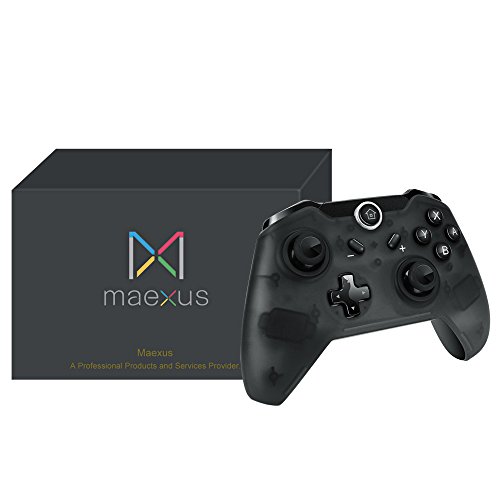
Maexus Switch Controller Wireless Switch Pro Controller Gamepad Support Gyro Motion Controls Dual Shock for Switch Zelda/Splatoon 2/Star Allies/Mario Odyssey etc.



Key features
- •Gyro Axis and Dual Vibration Supported, Super fit The Legend of Zelda: Breath of the Wild, Super Mario Odyssey
- •Compatible with Nintendo Switch: Supports Latest 4.1.0 , and Firmware Update Supported
- •Compatible with PC: Designed for Nintendo Switch, also compatible with PC (Windows XP / 7 / 10), Plug and Play.
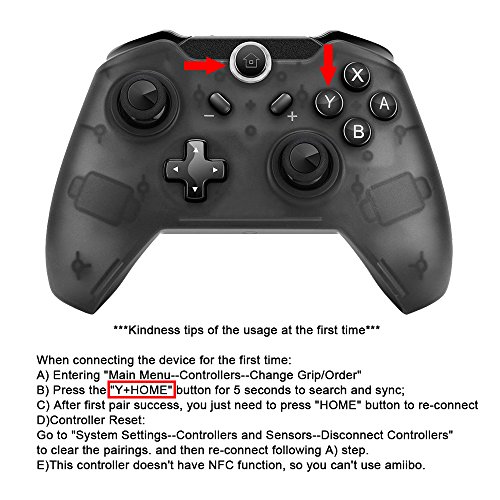
- •Easy to Use: Bluetooth Pairing up with Nintendo Switch
- •Ergonomic Design: Light weight at 202 grams only. Stable Bluetooth Connection with Console.
Maexus Switch Controller Wireless Switch Pro Controller Gamepad Support Gyro Motion Controls Dual Shock for Switch Zelda/Splatoon 2/Star Allies/Mario Odyssey etc.
List Price: $59.35$53.42DEALYou Save: $5.93 (10%)
Free shippingFree Returns – 30 daysFree Order CancellationSecure Payment2–3 Days DeliveryGet It October 25, 2026In Stock (1)No marketing spamNo account requiredFulfilment by FedEx / Amazon / UPS / ShipwirePayPal / Card Buyer Protection
Customer Reviews
Reviews sourced from verified Amazon purchasers4.1
out of 5
Based on 10 reviews
5★
70%
4★
20%
3★
0%
2★
0%
1★
10%
Firmware update requires a Windows Computer, motion control doesn't work with all games
David R. Heffelfinger✓ Verified Purchase•March 28, 2018
I wanted an external controller for my Switch since detaching and attaching the included controllers was becoming a hassle, but wasn't willing to pay the $70 Nintendo wants for the pro controller.
While browsing Amazon for Switch accessories, I stumbled upon this controller, which is reasonably priced, and decided to give it a try.
As others have mentioned, you need to do a firmware update to the controller before you can pair it with your Switch. What isn't mentioned anywhere is that the program to update the firmware is a Windows program.
In this day and age, nobody should assume that everybody has a Windows machine available, Mac OS and Chrome OS have become very popular and several individuals use these as their main operating system. Personally, I run Linux as my main OS. I tried running the firmware update program under Wine, didn't work (didn't recognize the controller was plugged in to a USB port). I ended up having to borrow a Windows laptop to update the firmware, which was a hassle.
Once I was able to update the firmware the controller worked perfectly, but it loses a star because of all the firmware update hassle, it should really come ready to use out of the box.
Edit: I just realized motion control doesn't work with all games. Worked fine in Zelda, doesn't work with Resident Evil Revelations 2, and possibly other games, had to revert to the Joy Cons included with the Switch to be able to have motion control on Resident Evil. Took out another star beause of this
Edit 2: Turns out the issue with Resident Evil Revelations 2 is not the controller's fault, I recently learned that in that game motion controls don't work with the official Nintendo Pro controller either, therefore I'm going back to giving the controller 4 stars.
While browsing Amazon for Switch accessories, I stumbled upon this controller, which is reasonably priced, and decided to give it a try.
As others have mentioned, you need to do a firmware update to the controller before you can pair it with your Switch. What isn't mentioned anywhere is that the program to update the firmware is a Windows program.
In this day and age, nobody should assume that everybody has a Windows machine available, Mac OS and Chrome OS have become very popular and several individuals use these as their main operating system. Personally, I run Linux as my main OS. I tried running the firmware update program under Wine, didn't work (didn't recognize the controller was plugged in to a USB port). I ended up having to borrow a Windows laptop to update the firmware, which was a hassle.
Once I was able to update the firmware the controller worked perfectly, but it loses a star because of all the firmware update hassle, it should really come ready to use out of the box.
Edit: I just realized motion control doesn't work with all games. Worked fine in Zelda, doesn't work with Resident Evil Revelations 2, and possibly other games, had to revert to the Joy Cons included with the Switch to be able to have motion control on Resident Evil. Took out another star beause of this
Edit 2: Turns out the issue with Resident Evil Revelations 2 is not the controller's fault, I recently learned that in that game motion controls don't work with the official Nintendo Pro controller either, therefore I'm going back to giving the controller 4 stars.
NOT WORK WITH 5.0.0
Michaeng✓ Verified Purchase•March 12, 2018
Does not work with 5.0.0
Great alternative, but still needs some improvements.
Halby✓ Verified Purchase•February 6, 2018
It's a really great alternative to the pro controller. The looks and feel mimics the Xbox One controller. There are only 2 things missing from this controller. You can't turn on the switch with the controller (or at least I have't figure it out yet) and no amiibo support (which isn't a deal breaker).
So far after playing BOTW for an extended period of time with this controller I have noticed a couple of quirks with it. First the buttons feel extra springy and clicky, but not really in a good way. I find it much louder than other controllers, but when you're in the middle of fight it really doesn't matter. Second is the motion control sometimes feels like it has a mind of it's own. While aiming the motion control would sometimes start drifting to one side or the other, which I found annoying but was able to compensate with the right analog stick. Lastly the latency is much to be desired. The controller's latency is fine for games like BOTW or Mario, but not good if you're really into fighting games.
So far after playing BOTW for an extended period of time with this controller I have noticed a couple of quirks with it. First the buttons feel extra springy and clicky, but not really in a good way. I find it much louder than other controllers, but when you're in the middle of fight it really doesn't matter. Second is the motion control sometimes feels like it has a mind of it's own. While aiming the motion control would sometimes start drifting to one side or the other, which I found annoying but was able to compensate with the right analog stick. Lastly the latency is much to be desired. The controller's latency is fine for games like BOTW or Mario, but not good if you're really into fighting games.
Great controller!
Emilia✓ Verified Purchase•January 20, 2018
I have the wireless version and it is a very good controller. All the buttons feel great (although the triggers are a bit light); the analog sticks have a nice grip; and the weight is just right. Both the vibration and the gyro axis motion control work as intended. Great value for the price - I totally recommend it.
Note though that first time connection problems are likely because the instructions that come in the box are really not clear. Arm yourself with some patience and be prepared to fiddle with the thing for a while. Here is my tip:
The instructions say to turn on the switch and "finger click" on the Controllers icon. Obviously you can do that only if the switch is in handheld mode because you don't have access to it's screen when docked. If you pair the controller while in handheld mode, the controller will not be recognized if you then dock the switch.
Instead, click on the Controllers icon, then dock the switch, then pair the controller as per instructions (but make sure the controller is NOT plugged into the docking station's USB ports - else it will not pair up). This will allow you to use the controller in docked mode.
After the first time, it will work like a charm and all you'll have to do is to turn on the controller.
Note though that first time connection problems are likely because the instructions that come in the box are really not clear. Arm yourself with some patience and be prepared to fiddle with the thing for a while. Here is my tip:
The instructions say to turn on the switch and "finger click" on the Controllers icon. Obviously you can do that only if the switch is in handheld mode because you don't have access to it's screen when docked. If you pair the controller while in handheld mode, the controller will not be recognized if you then dock the switch.
Instead, click on the Controllers icon, then dock the switch, then pair the controller as per instructions (but make sure the controller is NOT plugged into the docking station's USB ports - else it will not pair up). This will allow you to use the controller in docked mode.
After the first time, it will work like a charm and all you'll have to do is to turn on the controller.
Great product.
Dave Adams✓ Verified Purchase•January 17, 2018
I'm sure I made a right choice of buying this pro controller. It's a perfect replacement for the Joy Con. The Offical Pro Controller is too expensive and I think this one is enough to me.
This one is very similar to the Xbox One Pro Controller which is my best favorate. It works very well in the Zelda and Mario Odyssey. The gyro function also works great.
It takes me some time to get paired with the Console the first time. Please remember to follow the manual so that you can easily get paired. Press Home + Y when you're in the get/grip order menu.
I think this one is best among all the Switch Controllers I used.
This one is very similar to the Xbox One Pro Controller which is my best favorate. It works very well in the Zelda and Mario Odyssey. The gyro function also works great.
It takes me some time to get paired with the Console the first time. Please remember to follow the manual so that you can easily get paired. Press Home + Y when you're in the get/grip order menu.
I think this one is best among all the Switch Controllers I used.
Page 1 of 2


![Mr.Shield [3-Pack] Screen Protector For NEW ANBERNIC WIN600 Premium Clear Screen Protector (PET Material)](https://m.media-amazon.com/images/I/41fJvp9pAYL._SL500_.jpg)