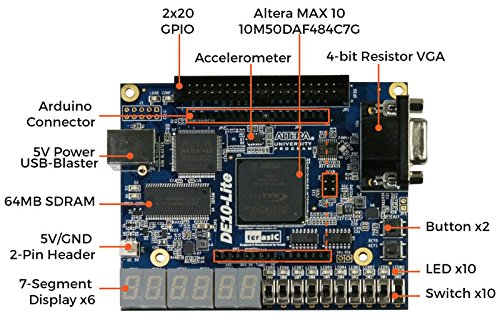
Terasic DE10-Lite



BrandTerasic Technologies
CategoryProgrammable Logic Circuits
Terasic DE10-Lite
List Price: $421.94$379.75DEALYou Save: $42.19 (10%)
Free shippingFree Returns – 30 daysFree Order CancellationSecure Payment2–3 Days DeliveryGet It October 24, 2026In Stock (1)No marketing spamNo account requiredFulfilment by FedEx / Amazon / UPS / ShipwirePayPal / Card Buyer Protection
Customer Reviews
Reviews sourced from verified Amazon purchasers4.2
out of 5
Based on 10 reviews
5★
90%
4★
10%
3★
0%
2★
0%
1★
0%
Awesome
Tony Rubio✓ Verified Purchase•July 14, 2023
The product is brand new. Good packaging. I like that there was also static warnings to protect the device. Being that I already work around electronic control boards, I understand the need to protect these sensitive devices from static shock. It comes with everything that is described on the product description. Definitely would order from Terasic again if my electrical engineering class requires more hardware from them
Work line, good solution for ramping up
Yigal Ben-Zeev✓ Verified Purchase•June 13, 2023
The board arrived well packed and worked out of the box.
It is a good solution for ramping up, learning, or prototype board.
There is a lot of documentation and coursera course.
It is a good solution for ramping up, learning, or prototype board.
There is a lot of documentation and coursera course.
Excellent!
Soapy Smith✓ Verified Purchase•June 8, 2023
I have gone up the learning curve on FPGA using this board. Very nicely done!
The compatibility with Arduino shields is a great feature. Thank you for making this board available.
The compatibility with Arduino shields is a great feature. Thank you for making this board available.
Seems to be a great starter FPGA board!
K.S.✓ Verified Purchase•May 24, 2023
I'm a beginner with FPGA so this is my first board. I was able to follow some tutorials and documentation online to get setup with the Quartus development environment, the DE10-Lite control panel, and get started with the board with some sample programs.
Some tips for you to get going quickly:
If you follow the URL on the sticker on the front of the FPGA it lets you access the CD materials for the device from Terasic's website. The most tedious part of the process wasn't even the actual setup of the FPGA. In order to access the CD materials, you must create an account on the Terasic website. Then, in order to download the Quartus software from Intel, you must create an account on Intel's website...so I spent probably 20 minutes creating accounts. However, after downloading all the materials once I had access, the setup was really simple. FYI for downloading Quartus from Intel's website, if you have the most recent version number for the software selected (which is by default), the Quartus Lite version (the FREE version) might not be available. I had to bump down to version 18.1 for the Lite version to be available to download. Spent quite a few minutes trying to figure out why I couldn't get the Lite version! Also, an FYI for drivers, on Windows 10 I had to manually point to the driver from the device manager and I'm guessing you'll have to do the same thing. To fix this you'll need to find the device in the device manager, go to update the driver and instead of searching online choose browse to manually choose your driver package. This should have been downloaded along with the Quartus software from Intel. It should be located at C:\altera\18.2\quartus\drivers (your version number might be something different than 18.1 so just keep that in mind). Once I chose the right driver for my device it worked flawlessly. Also, another thing to keep in mind, the Terasic DE10-Lite Control Panel software will only function AFTER you've installed Quartus, it's a prerequisite.
Download the sample programs from the Terasic CD online, it's under the "Demonstration" folder. The "Default" one within the sample programs appears to be the same program loaded onto the FPGA upon shipping from manufacturer. If you're completely new to FPGAs it's going to be helpful to start with a sample program. Even then you're going to have a lot to learn. (Make sure to also check out the "pin planner" in the Quartus software, very important!) Good luck.
Some tips for you to get going quickly:
If you follow the URL on the sticker on the front of the FPGA it lets you access the CD materials for the device from Terasic's website. The most tedious part of the process wasn't even the actual setup of the FPGA. In order to access the CD materials, you must create an account on the Terasic website. Then, in order to download the Quartus software from Intel, you must create an account on Intel's website...so I spent probably 20 minutes creating accounts. However, after downloading all the materials once I had access, the setup was really simple. FYI for downloading Quartus from Intel's website, if you have the most recent version number for the software selected (which is by default), the Quartus Lite version (the FREE version) might not be available. I had to bump down to version 18.1 for the Lite version to be available to download. Spent quite a few minutes trying to figure out why I couldn't get the Lite version! Also, an FYI for drivers, on Windows 10 I had to manually point to the driver from the device manager and I'm guessing you'll have to do the same thing. To fix this you'll need to find the device in the device manager, go to update the driver and instead of searching online choose browse to manually choose your driver package. This should have been downloaded along with the Quartus software from Intel. It should be located at C:\altera\18.2\quartus\drivers (your version number might be something different than 18.1 so just keep that in mind). Once I chose the right driver for my device it worked flawlessly. Also, another thing to keep in mind, the Terasic DE10-Lite Control Panel software will only function AFTER you've installed Quartus, it's a prerequisite.
Download the sample programs from the Terasic CD online, it's under the "Demonstration" folder. The "Default" one within the sample programs appears to be the same program loaded onto the FPGA upon shipping from manufacturer. If you're completely new to FPGAs it's going to be helpful to start with a sample program. Even then you're going to have a lot to learn. (Make sure to also check out the "pin planner" in the Quartus software, very important!) Good luck.
Great beginner board!
E✓ Verified Purchase•May 18, 2023
I used this with Quartus Lite and two books: Rapid Prototyping of Digital Systems and Design Recipes for FPGAs for DIY / self study.
Page 1 of 2


