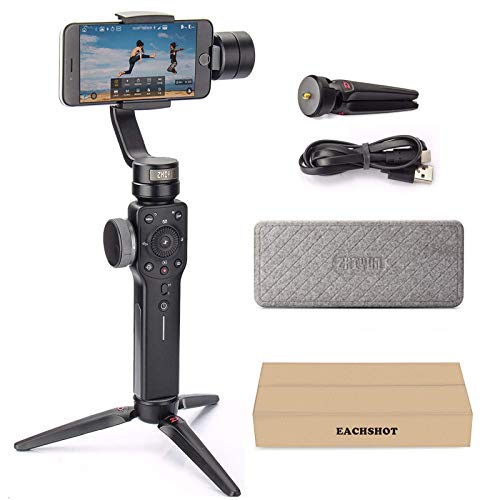
Zhiyun Smooth 4 Professional Gimbal Stabilizer for iPhone Smartphone Android Cell Phone 3-Axis Handheld Gimble Stick w/ Grip Tripod Ideal for Vlogging YouTube Vlog TikTok Instagram Live Video Kit


Key features
- •👍👍【Filmic Pro】The official APP for Smooth 4 is called ZY play. But Filmic Pro has best in class support for Smooth 4, you can use Filmic Pro as an alternative to ZY play.
- •👍👍【Control Panel】Integrated control panel design,Focus Pull & Zoom Capability
- •✅✅【MUST KNOW】Balance the gimbal before use: Slide the smartphoone in as close as possible to against the tilt axis motor. Loosen the Roll (Y) Axis Thumb Screw (which is on the back) to adjust the gravity center by sliding the horizontal arm.When phone stays in level in power OFF status, it is balanced.We recommend you VIEW the video tutorials, There are lots of tutorial videos on YOUTUBE that will help you master the gimbal.
- •👍👍【PhoneGo Mode】PhoneGo Mode for Instant Scene Transition
- •👍👍【Time Lapse & Object Tracking】Time Lapse Expert and Object Tracking available, Supports Two-way Charging with Longer Runtime
Zhiyun Smooth 4 Professional Gimbal Stabilizer for iPhone Smartphone Android Cell Phone 3-Axis Handheld Gimble Stick w/ Grip Tripod Ideal for Vlogging YouTube Vlog TikTok Instagram Live Video Kit
List Price: $144.05$129.65DEALYou Save: $14.40 (10%)
Free shippingFree Returns – 30 daysFree Order CancellationSecure Payment2–3 Days DeliveryGet It October 26, 2026In Stock (1)No marketing spamNo account requiredFulfilment by FedEx / Amazon / UPS / ShipwirePayPal / Card Buyer Protection
Customer Reviews
Reviews sourced from verified Amazon purchasers4.3
out of 5
Based on 10 reviews
5★
40%
4★
60%
3★
0%
2★
0%
1★
0%
Works very well. You need special power cable to use usb power port for phone!
shawn✓ Verified Purchase•September 6, 2023
I am very happy with the unit. But to use the usb power port you need a special power cable! zhiyun does not say this! They use this in there ads about the device as a plus, well with out the cable that port is useless! I have been using a external power pack for my phone. i was hoping to use this port and found this out today. No go! Disappointed but the gimbal has been good for me. Not for the software there is not option to save files in the sdcard if you have one which i do. You guys should fix this. zhiyun .
Happy with device though. But those 2 negatives should be addressed by zhiyun .
Happy with device though. But those 2 negatives should be addressed by zhiyun .
Great gimbal if it fits your needs!
Preston J.✓ Verified Purchase•September 2, 2023
I used the Smooth 4 with my iPhone 11 Pro Max. Like others have said, the Smooth 4 will NOT balance the phone (at least one this large) with the case on. Without the case, however, it does fine.
I'm comparing this gimbal to the Smooth Q2 and DJI OSMO 3. The Smooth Q2 has more shooting modes, a joystick button, is super compact, and has a metal and silicone build. The OSMO 3 has more flash out of the box. It's hardware and software is much more intuitive so you feel as though it works better. There is a learning curve to both the Q2 and Smooth 4 which can be frustrating. Downside of the OSMO 3 is cant hold as much weight (is really designed for small phones, though my phone did work okay in it) and it has an all plastic build. The Smooth 4 is a different beast altogether with more advanced features and its (obvious) larger (but still plastic) build. The controls are nice and give a more professional feel to the iPhone for video purposes. Unfortunately, many of its buttons (even its zoom/focus wheel) only work with the Zhiyun Play app and I believe the Filmic Pro app (which costs $15). The Zhiyun app isn't great - there's no quick option through the app, it's not very intuitive, and it has a lot of bugs. DJI's app is far superior.
As for the Smooth 4 itself, I found that it definitely earns the title of "Smooth" it does a fantastic job stabilizing the phone while moving around. It would have been nice for them to add a joystick to assist in panning, but I didn't miss it as much as I thought I would. This is a gimbal I would use for movement-heavy videos. If you just want to throw it on a tripod, it'd be a waste.
Ultimately, I went with the Smooth Q2 because of its far better build quality, more compact size, joystick, and simplified controls that more seamlessly work with native camera apps. The Smooth 4 is a great gimbal, just wasn't what I needed.
I'm comparing this gimbal to the Smooth Q2 and DJI OSMO 3. The Smooth Q2 has more shooting modes, a joystick button, is super compact, and has a metal and silicone build. The OSMO 3 has more flash out of the box. It's hardware and software is much more intuitive so you feel as though it works better. There is a learning curve to both the Q2 and Smooth 4 which can be frustrating. Downside of the OSMO 3 is cant hold as much weight (is really designed for small phones, though my phone did work okay in it) and it has an all plastic build. The Smooth 4 is a different beast altogether with more advanced features and its (obvious) larger (but still plastic) build. The controls are nice and give a more professional feel to the iPhone for video purposes. Unfortunately, many of its buttons (even its zoom/focus wheel) only work with the Zhiyun Play app and I believe the Filmic Pro app (which costs $15). The Zhiyun app isn't great - there's no quick option through the app, it's not very intuitive, and it has a lot of bugs. DJI's app is far superior.
As for the Smooth 4 itself, I found that it definitely earns the title of "Smooth" it does a fantastic job stabilizing the phone while moving around. It would have been nice for them to add a joystick to assist in panning, but I didn't miss it as much as I thought I would. This is a gimbal I would use for movement-heavy videos. If you just want to throw it on a tripod, it'd be a waste.
Ultimately, I went with the Smooth Q2 because of its far better build quality, more compact size, joystick, and simplified controls that more seamlessly work with native camera apps. The Smooth 4 is a great gimbal, just wasn't what I needed.
A great Gimbal for a small phone.
Thomas Persicketti✓ Verified Purchase•September 1, 2023
This Gimbal worked well with my sons iPhone, but not my Nokia. my larger phone was too big to keep it stabilized for long. It was unbalanced with my larger phone. With the smaller iPhone it worked great once you figure out how everything worked.
It does what I need it to do
Astrid✓ Verified Purchase•August 14, 2023
I have a Samsung Galaxy S8, GoPro 5, and my wife has the iPhone 8+. I did my homework, read the Pros/Cons, watched every YouTube video, and purchased the Smooth 4. The gimbal stabilizer by itself is well worth the money ($119.00).
Yes, the ZY Play software for Android needs work to take advantage of all the functions and modes. I would have given five Stars had the software been perfect on the Galaxy S8. I am sure Zhiyun is focusing on this issue - They will sell a lot of Smooth 4's if they can fix the Android problems.
Before you even get started: 1. Charge it. 2. Ensure you have the most updated Firmware (1.77). 3. Ensure you have the most updated ZY Play software (v1.11.4). 4. Ensure whatever you mount is balanced.
Galaxy S8: Okay - you've already read all the other reviews and I won't beat a dead horse. Couple things, 3x3 Pano does not work; it will take all 9 shots and will only stitch together the three middle pictures. On RES for S8 you only get two choices, 720p 30fps and 1080p 30fps.
iPhone 8+: Takes advantage of all the functions and capabilities. Still need to play with it more to test out everything.
GoPro Hero 5: The GoPro is point and shot, I just mount it right in the holder. I use a plastic bottle cap on top of the GoPro when putting it in the holder, it holds it fine. You can add a rubber band for more security and peace of mind. I hold the Smooth 4 handle backwards and use the gimbal stabilizer along with voice commands to start and stop video or taking a picture. Yeah, you can't see the window screen on the GoPro but it works for me. I tried to use an adapter plate but it doesn't balance very well and makes everything more bulky. Recommend a better adapter for the GoPro that will balance perfectly.
I read a lot of reviews and many are ridiculous and some hilarious. Consider the product Vs. the price Vs. what you are using it for. If you purchase something that has no reviews and pull the trigger, you are on an island by yourself. I went in on this purchase knowing the support for the Andriod was limited. I'm confident Zhiyun will fix all the bugs over time. It does what I need it to do.
Yes, the ZY Play software for Android needs work to take advantage of all the functions and modes. I would have given five Stars had the software been perfect on the Galaxy S8. I am sure Zhiyun is focusing on this issue - They will sell a lot of Smooth 4's if they can fix the Android problems.
Before you even get started: 1. Charge it. 2. Ensure you have the most updated Firmware (1.77). 3. Ensure you have the most updated ZY Play software (v1.11.4). 4. Ensure whatever you mount is balanced.
Galaxy S8: Okay - you've already read all the other reviews and I won't beat a dead horse. Couple things, 3x3 Pano does not work; it will take all 9 shots and will only stitch together the three middle pictures. On RES for S8 you only get two choices, 720p 30fps and 1080p 30fps.
iPhone 8+: Takes advantage of all the functions and capabilities. Still need to play with it more to test out everything.
GoPro Hero 5: The GoPro is point and shot, I just mount it right in the holder. I use a plastic bottle cap on top of the GoPro when putting it in the holder, it holds it fine. You can add a rubber band for more security and peace of mind. I hold the Smooth 4 handle backwards and use the gimbal stabilizer along with voice commands to start and stop video or taking a picture. Yeah, you can't see the window screen on the GoPro but it works for me. I tried to use an adapter plate but it doesn't balance very well and makes everything more bulky. Recommend a better adapter for the GoPro that will balance perfectly.
I read a lot of reviews and many are ridiculous and some hilarious. Consider the product Vs. the price Vs. what you are using it for. If you purchase something that has no reviews and pull the trigger, you are on an island by yourself. I went in on this purchase knowing the support for the Andriod was limited. I'm confident Zhiyun will fix all the bugs over time. It does what I need it to do.
Worth buying. Intuitive and Feature-Rich. Some Minor Drawbacks.
Readie McBooks✓ Verified Purchase•July 24, 2023
Used this puppy to shoot a music video in Japan. I loved all the features. It's very intuitive once you get the hang of it. Sturdy. Durable. Threw it in a hiking backpack day after day (no case, no nothing). Never got damaged.
PROS
- battery life is great
- controls/modes are great and intuitive"”many different features.
CONS
- once in a while, the gimbal goes limp and stops stabilizing in the middle of shooting. hopefully a firmware/software update will stop this. i will say it happened RARELY. not enough to really interfere with my process.
- I find the app a little frustrating - the shooting part is great but the way it archives videos is annoying. It's hard to get them onto the computer"”they sync to Photo Library relatively easily, but if I shoot 4K/60fps, the video's don't transfer to Photo library in full quality. If I want the full quality videos I have to use 3rd party software to find them on the iPhone and pull them off.
- also I wish it would connect to the phone more quickly via Bluetooth. In those last-minute moments, it's frustrating to have to wait. Sometimes I'd just keep the device in "standby" (by folding the gimbal shut) just so it'd be ready to go.
- in a future software revision, i very much hope they eliminate the pop-ups the show up when the app is running but closed. Any time i jostle the gimbal when in standby, i'd get a popup asking me to open the ZYPlay app (often when i was trying to use some other app on my phone). This may be a setting I can change...
OVERALL
Despite my complaints, I'm very happy with this product. I recommend it.
TIPS
- leave OIS turned ON (in settings) - at least on my iPhone X, the iPhone optical stabilization is a benefit, not a drawback, in combination with the stabilization that the gimbal provides.
- message them on FB for a free phone charging cable"”if they're still offering that. the gimbal battery lasts way longer than the battery on your phone. :)
PROS
- battery life is great
- controls/modes are great and intuitive"”many different features.
CONS
- once in a while, the gimbal goes limp and stops stabilizing in the middle of shooting. hopefully a firmware/software update will stop this. i will say it happened RARELY. not enough to really interfere with my process.
- I find the app a little frustrating - the shooting part is great but the way it archives videos is annoying. It's hard to get them onto the computer"”they sync to Photo Library relatively easily, but if I shoot 4K/60fps, the video's don't transfer to Photo library in full quality. If I want the full quality videos I have to use 3rd party software to find them on the iPhone and pull them off.
- also I wish it would connect to the phone more quickly via Bluetooth. In those last-minute moments, it's frustrating to have to wait. Sometimes I'd just keep the device in "standby" (by folding the gimbal shut) just so it'd be ready to go.
- in a future software revision, i very much hope they eliminate the pop-ups the show up when the app is running but closed. Any time i jostle the gimbal when in standby, i'd get a popup asking me to open the ZYPlay app (often when i was trying to use some other app on my phone). This may be a setting I can change...
OVERALL
Despite my complaints, I'm very happy with this product. I recommend it.
TIPS
- leave OIS turned ON (in settings) - at least on my iPhone X, the iPhone optical stabilization is a benefit, not a drawback, in combination with the stabilization that the gimbal provides.
- message them on FB for a free phone charging cable"”if they're still offering that. the gimbal battery lasts way longer than the battery on your phone. :)
Page 1 of 2