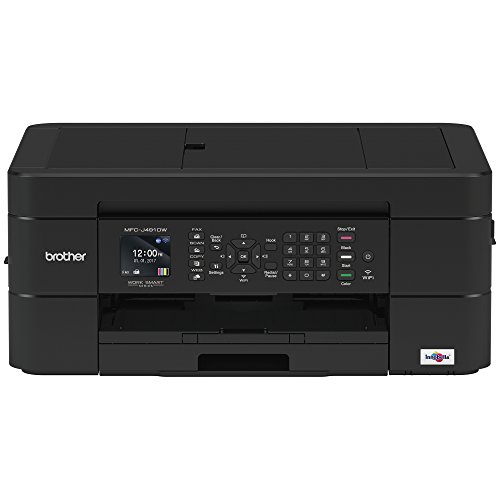
Brother Wireless All-in-One Inkjet Printer, MFC-J491DW, Multi-function Color Printer, Duplex Printing, Mobile Printing,Amazon Dash Replenishment Enabled, Black, 8.5 (MFCJ491DW)


Key features
- •SIMPLE TO CONNECT: Choose from built-in wireless or connect locally to a single PC or Mac via USB interface. MFCJ491DW offers easy-to-set-up wireless networking
- •MOBILE PRINTING: Print wirelessly from mobile devices(1) using AirPrint, Google Cloud Print, Brother iPrint&Scan, Mopria and Wi-Fi Direct
- •CLOUD CONNECTIVITY: Print-from and scan-to popular Cloud services directly from the printer including Google Drive, Dropbox, Box, OneDrive and more(2)
- •VERSATILE PAPER HANDLING: Automatic document feeder and up to 100-sheet capacity paper tray for letter/legal-size paper for flexible printing
- •FOR USE WITH BROTHER GENUINE INKS: LC3011BK, LC3011C, LC3011M, LC3011Y, LC3013BK, LC3013C, LC3013M, LC3013Y
Brother Wireless All-in-One Inkjet Printer, MFC-J491DW, Multi-function Color Printer, Duplex Printing, Mobile Printing,Amazon Dash Replenishment Enabled, Black, 8.5 (MFCJ491DW)
List Price: $533.59$480.23DEALYou Save: $53.36 (10%)
Free shippingFree Returns – 30 daysFree Order CancellationSecure Payment2–3 Days DeliveryGet It October 25, 2026In Stock (9)No marketing spamNo account requiredFulfilment by FedEx / Amazon / UPS / ShipwirePayPal / Card Buyer Protection
Customer Reviews
Reviews sourced from verified Amazon purchasers4.2
out of 5
Based on 10 reviews
5★
60%
4★
40%
3★
0%
2★
0%
1★
0%
Good Printer
Dee✓ Verified Purchase•November 12, 2023
Good printer right out of the box. Easy to set up. Works as expected. Print speed is a bit slow. Quality of print is good.
Update: This is a great printer!!
K. K. Williams✓ Verified Purchase•October 27, 2023
UPDATE: After 4 months, we love this printer. We do have to reset the wi-fi connection once in a while, but that is so easy to do, since our modem has a WPS button. Unlike HP, the ink lasts forever, and is much less expensive than HP. It is also VERY user friendly, despite our initial setup difficulties. It prints double sided with ease. It prints from both our computers. Copies and scans are a breeze. I have not used it to fax anything, but that's because I have had no need to.
UPDATE, AS PROMISED: Due to weekend we could not get support from Brother, but we DID from Amazon! Amazon techs actually stuck by us for more than an hour to get the printer up and running the way we needed it to. Solely because of their knowledge and assistance, a one star review became a 5 star. Thank you, Amazon!!
We had an HP 6500 connected to a home network. Windows 7 computers. It died. We specifically wanted a printer that we could connect to home network (ethernet to cable modem), and searched for printers that would work. This one popped up. Great idea to get away from overpriced HP ink. BUT! No ethernet connection. Wireless connection might be possible, but instructions are to connect computer to modem via USB cable. Great, except our 1 year old cable modem does not have a USB port. OK, so alternative is to set up manually. Except printer cannot be set up on network before installing ink cartridges, but I don't want to open the ink, in case this does not work for home networking, and I have to return it. Literature all talks about printing from mobile devices, which we never need to do. We want to print from 2 different computers. It is possible this might work, but no way to find out without installing ink; cannot go to "Setup" or "Wifi" or even power off--must install ink FIRST! Tech support only available on weekdays, no Saturdays. Bah. If I solve this problem and it works, I will update.
UPDATE, AS PROMISED: Due to weekend we could not get support from Brother, but we DID from Amazon! Amazon techs actually stuck by us for more than an hour to get the printer up and running the way we needed it to. Solely because of their knowledge and assistance, a one star review became a 5 star. Thank you, Amazon!!
We had an HP 6500 connected to a home network. Windows 7 computers. It died. We specifically wanted a printer that we could connect to home network (ethernet to cable modem), and searched for printers that would work. This one popped up. Great idea to get away from overpriced HP ink. BUT! No ethernet connection. Wireless connection might be possible, but instructions are to connect computer to modem via USB cable. Great, except our 1 year old cable modem does not have a USB port. OK, so alternative is to set up manually. Except printer cannot be set up on network before installing ink cartridges, but I don't want to open the ink, in case this does not work for home networking, and I have to return it. Literature all talks about printing from mobile devices, which we never need to do. We want to print from 2 different computers. It is possible this might work, but no way to find out without installing ink; cannot go to "Setup" or "Wifi" or even power off--must install ink FIRST! Tech support only available on weekdays, no Saturdays. Bah. If I solve this problem and it works, I will update.
Works Fine For me, Fantastic Price, a Few Caveats
South Texan✓ Verified Purchase•October 26, 2023
Overall impression, this is a fine printer for the price. Print quality was great for color and normal black and white. Plenty fast for both color photo and black and white. Scanner works fine, copier function works fine, prints from cell phone fine. Haven't tried NFC as I added it to my phone on the LAN and haven't tried the fax machine function using cellphone yet. I don't have a land line to hook it up to either. Printer is very compact and sturdy. Does not feel like thin plastic and nothing sticks out of it when not using scanner to snag or break. A very thoughtful design, it does not look like a big clunky office machine but certainly works aw well. Perfect for an individual or a home office .
Only because of the following setup caveats I gave it a four star rating. Overall device, print quality, speed, and other Brother software (scan) rate a five star review. But I can't do that and I do understand the frustration of lots of folks who can only follow instructions for this sort of thing - like me and any sort of plumbing, just not my thing.
LAN Setup was super easy, but there was a catch. I didn't mess with supplied CD, just uploaded latest software from the Brother site, which I recommend to get the latest version. Big hint here for setup: It couldn't find the printer via the install software (no surprise, I've never found a new printer right off, and if you think about how security and networks REALLY work, you can't without doing something physical) so I had to do it manually on the printer itself (add SSID and password) and although that would work, there is a printer control panel option for WPS. Choose it, press the WPS button on your router, tell the printer to use it and your done. No finding the SSID, entering the password via the arrows and OK buttons, etc. Then you can complete the installation normally as it sees the printer on the LAN at that point. Other PCs on the LAN will see the printer and all goes fast. I added the printer to remaining four computers in under 30 minutes, and added it to my phone at the same time. Why the quick start doesn't talk about WPS, I have no idea. Alternatively, you can hook up via Ethernet cable to the LAN or hook up via USB once to configure printer for wireless access, but you don't have to at all. Compared to other wireless printers I have (a bit older so not as feature rich I suppose) this was a 10 out of 10 install because I did not have to hook up via USB or RJ45 connection initially. WARNING: USE WPS WITH CAUTION. ONCE YOU PRESS THAT BUTTON, YOU WIFI LAN IS OPEN FOR A BIT AND IF YOU'RE IN SOMETHING LIKE A COLLEGE DORM OR APARTMENT SETTING, YOUR LAN CAN BE ENTERED AT THAT POINT. IF YOU'RE WORRIED, USE USB OR HARDWIRE TO ROUTER TO ADD IT TO YOUR LAN SECURELY.
Another LAN downside maybe - i have a slower 2.4 GHz and a fast 5GHz WiFi LAN and it doesn't see the 5GHz SSID, only the 2.4GHz one. All of my other printers only see the 2.4GHz SSID as well, so not unusual, but I'd have expected it to see the faster one.
Physical setup was simple. Do what the quick start says to do, period. Put the ink in, put the paper in, took off all the transport tape strips on doors/access panels and it worked. Again, one caveat here - when it auto registered, it prints out a test page to show that everything is aligned - reminded me of the ancient HP500C. Anyhow, see attached photo. It is SUPPOSED to look like six solid blocks as the screen on the printer shows, not the dashed and angular print. But I noticed that the image on the bottom (innobella) was properly aligned black & White and color so I said it was ok, I could always fix it later. It was OK as is. I printed out a picture and it was flawless. So the alignment thing is bogus. Again, because of the way the cartridges are detached from the print head (they're just ink tanks it looks like) it HAS to be aligned. It's not like you can align the cartridges at all so not even sure of why this is tested and part of the install process. Other color ink jets don't.
I read other reviews that gave Brother high marks because their printers will use generic cartridges with no problems. My HP (one I replaced with this one - my fault not the printer because I dropped it and it exploded into lots of plastic bits) would only use genuine HP high $$$ cartridges and that stunk. But actual Brother ink cartridges are cheap enough that I'm going to use them and not chance using knock offs. Knock offs are not that much cheaper that it's worth it to chance clogging the printer with inferior ink.
I haven't had the printer long enough to comment on ink life or sturdiness of the unit. It does appear to be more solid and feels sturdier than the one I replaced, certainly smaller for sure but not much lighter- one third the size of the monster HP 8710 I dropped.
I don't know about the reviews that say it "eats ink". But, I have to say that unless you are a low volume user (like
Only because of the following setup caveats I gave it a four star rating. Overall device, print quality, speed, and other Brother software (scan) rate a five star review. But I can't do that and I do understand the frustration of lots of folks who can only follow instructions for this sort of thing - like me and any sort of plumbing, just not my thing.
LAN Setup was super easy, but there was a catch. I didn't mess with supplied CD, just uploaded latest software from the Brother site, which I recommend to get the latest version. Big hint here for setup: It couldn't find the printer via the install software (no surprise, I've never found a new printer right off, and if you think about how security and networks REALLY work, you can't without doing something physical) so I had to do it manually on the printer itself (add SSID and password) and although that would work, there is a printer control panel option for WPS. Choose it, press the WPS button on your router, tell the printer to use it and your done. No finding the SSID, entering the password via the arrows and OK buttons, etc. Then you can complete the installation normally as it sees the printer on the LAN at that point. Other PCs on the LAN will see the printer and all goes fast. I added the printer to remaining four computers in under 30 minutes, and added it to my phone at the same time. Why the quick start doesn't talk about WPS, I have no idea. Alternatively, you can hook up via Ethernet cable to the LAN or hook up via USB once to configure printer for wireless access, but you don't have to at all. Compared to other wireless printers I have (a bit older so not as feature rich I suppose) this was a 10 out of 10 install because I did not have to hook up via USB or RJ45 connection initially. WARNING: USE WPS WITH CAUTION. ONCE YOU PRESS THAT BUTTON, YOU WIFI LAN IS OPEN FOR A BIT AND IF YOU'RE IN SOMETHING LIKE A COLLEGE DORM OR APARTMENT SETTING, YOUR LAN CAN BE ENTERED AT THAT POINT. IF YOU'RE WORRIED, USE USB OR HARDWIRE TO ROUTER TO ADD IT TO YOUR LAN SECURELY.
Another LAN downside maybe - i have a slower 2.4 GHz and a fast 5GHz WiFi LAN and it doesn't see the 5GHz SSID, only the 2.4GHz one. All of my other printers only see the 2.4GHz SSID as well, so not unusual, but I'd have expected it to see the faster one.
Physical setup was simple. Do what the quick start says to do, period. Put the ink in, put the paper in, took off all the transport tape strips on doors/access panels and it worked. Again, one caveat here - when it auto registered, it prints out a test page to show that everything is aligned - reminded me of the ancient HP500C. Anyhow, see attached photo. It is SUPPOSED to look like six solid blocks as the screen on the printer shows, not the dashed and angular print. But I noticed that the image on the bottom (innobella) was properly aligned black & White and color so I said it was ok, I could always fix it later. It was OK as is. I printed out a picture and it was flawless. So the alignment thing is bogus. Again, because of the way the cartridges are detached from the print head (they're just ink tanks it looks like) it HAS to be aligned. It's not like you can align the cartridges at all so not even sure of why this is tested and part of the install process. Other color ink jets don't.
I read other reviews that gave Brother high marks because their printers will use generic cartridges with no problems. My HP (one I replaced with this one - my fault not the printer because I dropped it and it exploded into lots of plastic bits) would only use genuine HP high $$$ cartridges and that stunk. But actual Brother ink cartridges are cheap enough that I'm going to use them and not chance using knock offs. Knock offs are not that much cheaper that it's worth it to chance clogging the printer with inferior ink.
I haven't had the printer long enough to comment on ink life or sturdiness of the unit. It does appear to be more solid and feels sturdier than the one I replaced, certainly smaller for sure but not much lighter- one third the size of the monster HP 8710 I dropped.
I don't know about the reviews that say it "eats ink". But, I have to say that unless you are a low volume user (like
Print photos on photo paper? Nope.
Candy D-G✓ Verified Purchase•September 25, 2023
Fine, basic printer, scanner, (I don't use the fax capability), but man! Trying to print a photo on photo paper: disaster. Smeary, lines dragged through the middle of the pic. Tried mightily to get product support.
Boy this Brother, hooked another Brother Up!!!
Alan Alford Sports Talk Show✓ Verified Purchase•August 29, 2023
Decided to go for this printer since most of the reviews were positive. Most of the negative reviews, I felt people were purchasing this printer which was on sale for $49.99 and thought there were getting a Laser Jet valued at $349.99. This expectation is way too high. My expectations weren't nearly that high. I print typically in a month 10-15 pages. I never print photos with any printer I buy because it eats up way too much inch and never as good as having them print at a store. The cost versus value doesn't make sense. In other words, if you're printing photos, go to Ex. Walgreens, Sams or Staples.
So regular Black & White and some color is all I need. Plus I do scan regularly and fax 2-3 times a year. I didn't need a laser jet, or high end ink jet printer. (most of those reviews for those printers were mixed just like this one). So I went for this Brother. It's a very nice printer! Prints Black & White prints very well. (with better resume paper, can be resume quality too). Color is nice too, but not professional photo quality as mentioned earlier where to go. Scans images right to my PC and with my mobile phone, can print and scan.
Haven't used the fax yet, but it ready and set up. (get a dial tone). The ink refill for this printer is also very reasonable versus $75 on my previous Canon. Laser Jets range around $179.99 to refill too. This one is about $36.99 for the original ink, not a knock off. Does it all and it's not too big versus my prior Canon. Overall I'm very pleased with this printer. I would recommend to a college student, home office, and to most people. So if you're looking for a great value grab this one!!! More professional business printing and/or commercial use, you have to come out the pocket and spend more. If you're expecting $49.99 to get you a laser ink jet valued at $349.99 keep looking. To me it's a homerun!!!
So regular Black & White and some color is all I need. Plus I do scan regularly and fax 2-3 times a year. I didn't need a laser jet, or high end ink jet printer. (most of those reviews for those printers were mixed just like this one). So I went for this Brother. It's a very nice printer! Prints Black & White prints very well. (with better resume paper, can be resume quality too). Color is nice too, but not professional photo quality as mentioned earlier where to go. Scans images right to my PC and with my mobile phone, can print and scan.
Haven't used the fax yet, but it ready and set up. (get a dial tone). The ink refill for this printer is also very reasonable versus $75 on my previous Canon. Laser Jets range around $179.99 to refill too. This one is about $36.99 for the original ink, not a knock off. Does it all and it's not too big versus my prior Canon. Overall I'm very pleased with this printer. I would recommend to a college student, home office, and to most people. So if you're looking for a great value grab this one!!! More professional business printing and/or commercial use, you have to come out the pocket and spend more. If you're expecting $49.99 to get you a laser ink jet valued at $349.99 keep looking. To me it's a homerun!!!
Page 1 of 2
![Print.Save.Repeat. Lexmark 64035HA High Yield Remanufactured Toner Cartridge for T640, T642, T644 Laser Printer [21,000 Pages]](https://m.media-amazon.com/images/I/51X5nayr+oL._SL500_.jpg)
![Print.Save.Repeat. Lexmark T650A11A Remanufactured Toner Cartridge for T650, T652, T654, T656 Laser Printer [7,000 Pages]](https://m.media-amazon.com/images/I/51CYavgHeqL._SL500_.jpg)
![Print.Save.Repeat. Lexmark 601H High Yield Remanufactured Toner Cartridge for MX310, MX410, MX510, MX511, MX610, MX611 Laser Printer [10,000 Pages]](https://m.media-amazon.com/images/I/51FkUK9ZzJL._SL500_.jpg)


![Print.Save.Repeat. Lexmark E260A21A Remanufactured Toner Cartridge for E260, E360, E460, E462 Laser Printer [3,500 Pages]](https://m.media-amazon.com/images/I/51ktV1Q1LbL._SL500_.jpg)
![Print.Save.Repeat. Dell 9GG2G Extra High Yield Remanufactured Toner Cartridge for B3460 Laser Printer [20,000 Pages]](https://m.media-amazon.com/images/I/51Y0YPsqgXL._SL500_.jpg)