Fantom Drives FD 5TB Xbox One Hard Drive Upgrade - Easy Snap-On with 3 USB Ports - Compatible with Original Xbox One Only (XBOX-5TB-SH)


Key features
- •Newest version with upgraded firmware for XBOX Update 10. 0. 18363. 9135 or newer
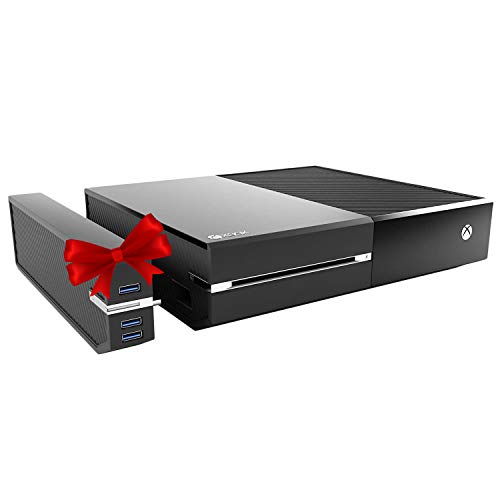
- •Xbox One Snap On is designed specifically for Xbox One (is not compatible with Xbox One S or Xbox One X). Add more games and USB ports to your Xbox One by simply attaching it to your unit
- •Easy snap on design to directly connect to Xbox One. No external power supply needed for a sleek look. Install hassle free in 1 minute (video instruction available on listing)
- •3 port USB 3 hub which can be used for additional storage or as a regular USB port expansion. Supports SuperSpeed data transfer rates of up to 5Gbps (USB 3.0) - backward compatible to USB 2.0/1.0
- •Xbox One is not included. Manual includes the proper way of installing Xbox One Snap On. Please follow the instructions on the manual and the unit will work the way it is intended to. You can also review the installation video in the listing
Fantom Drives FD 5TB Xbox One Hard Drive Upgrade - Easy Snap-On with 3 USB Ports - Compatible with Original Xbox One Only (XBOX-5TB-SH)
List Price: $250.80$225.72DEALYou Save: $25.08 (10%)
Free shippingFree Returns – 30 daysFree Order CancellationSecure Payment2–3 Days DeliveryGet It October 25, 2026In Stock (3)No marketing spamNo account requiredFulfilment by FedEx / Amazon / UPS / ShipwirePayPal / Card Buyer Protection
Customer Reviews
Reviews sourced from verified Amazon purchasers3.8
out of 5
Based on 10 reviews
5★
40%
4★
60%
3★
0%
2★
0%
1★
0%
ACTUAL PLUG AND PLAY THAT REALLY WORKS!
Placeholder✓ Verified Purchase•July 30, 2023
I was skeptical because some of the reviews were negative; however I decided to give this item a try anyway thinking if it did not work I would just send it back. I did my research looked at the installation video on Amazon and bought it. When I received it the hub was packaged in protective foam padding and it had plastic shrink wrap on the top. When in stalling I followed the video on Amazon to the "T". Then after connecting all the cables and the controller I turned the console on and went to "My games & apps" as were directed by the instructions in the manual and I saw that the console had recognized the storage hub and I had extra storage space. This was awesome because I did not have to do anything thing else I could start playing games, watching movies, etc., or whatever else I wanted right after.
The only thing I DID NOT like is that I see that there is a price reduction from $198 to $169 which makes me wish that I would have waited. But all in all the item itself is worth it and I have all the storage space that I need now. So my advice to you is take your time and CAREFULLY install the hub to you console and dont be in such of a hurry because it will bend the metal clips like I have read on other ratings. Good luck and Enjoy!
The only thing I DID NOT like is that I see that there is a price reduction from $198 to $169 which makes me wish that I would have waited. But all in all the item itself is worth it and I have all the storage space that I need now. So my advice to you is take your time and CAREFULLY install the hub to you console and dont be in such of a hurry because it will bend the metal clips like I have read on other ratings. Good luck and Enjoy!
I needed this.
Stevin Neely✓ Verified Purchase•July 18, 2023
Having a basic xbox one that only hold 500 GB of data for games is rather small. Especially because 136 GB is used up for system information. Leaving you with, roughly, 364 GB to store games, music and apps. Add up that most xbox one games use up 12 to 50 GB (and possibly more) of space and you have to install the games to play them, regardless if you bought them physically or digitally, the default Hard Disk Drive (HDD) on the system gets used up quick. Let's face it, you'll be installing, uninstalling and reinstalling games a lot. Add on internet download speed for digital games, content and updates (hey remember when games had to be as finished as possible and worked on day one. Instead of the broken buggy messes that needs day one patches!). That eats up a lot of your time. Time you wanted to play games.
Well this will help.
I don't know if the issue of it not showing up as an option if you installed it while the system is off has been fixed. I had heard that was an issue and a good work-around was just install it while the system is on. That is what I did. Just clip it on to the side of your system where the instructions show you. A quick turn off and on to see if the xbox still recognized it as an option (go to the system settings and look in storage . Also hit the A button while hovering the cursor over the new HDD/SSD/SSHD to be able to select the option to have your games install to the new storage area by default You can even move your currently installed games from the old HDD to the new storage).
So far it has worked very well. I have no complaints about this. Do remember that this unit only works with the old model xbox one and not the others (the S and X models). Add on the fact that the storage unit is easily removed and I could put this on a new console if I needed to. I am really happy with this.
Well this will help.
I don't know if the issue of it not showing up as an option if you installed it while the system is off has been fixed. I had heard that was an issue and a good work-around was just install it while the system is on. That is what I did. Just clip it on to the side of your system where the instructions show you. A quick turn off and on to see if the xbox still recognized it as an option (go to the system settings and look in storage . Also hit the A button while hovering the cursor over the new HDD/SSD/SSHD to be able to select the option to have your games install to the new storage area by default You can even move your currently installed games from the old HDD to the new storage).
So far it has worked very well. I have no complaints about this. Do remember that this unit only works with the old model xbox one and not the others (the S and X models). Add on the fact that the storage unit is easily removed and I could put this on a new console if I needed to. I am really happy with this.
Works after sending in for warranty repairs
Abby✓ Verified Purchase•July 9, 2023
Uodate: the company repaired the device as it was under warranty, it took about a month, but after sending it in, the external storage works great! None of the issues I described below. If you buy this and have issues, definitely email them and get it fixed with the warranty coverage.
Original review: do not buy this, it does not work. Games will not transfer from Xbox to drive, will only say that progress on transfer has stopped after a few seconds. Sometimes Xbox will recognize it as a valid external storage, other times it says the connection is not correct (it's supposed to be USB3.0). This was a complete waste of money. We have tried formatting the drive, we have tried hard resets, we have tried removing it and plugging it back in... this is garbage, don't fall for their misleading product description! Don't waste your money!
Original review: do not buy this, it does not work. Games will not transfer from Xbox to drive, will only say that progress on transfer has stopped after a few seconds. Sometimes Xbox will recognize it as a valid external storage, other times it says the connection is not correct (it's supposed to be USB3.0). This was a complete waste of money. We have tried formatting the drive, we have tried hard resets, we have tried removing it and plugging it back in... this is garbage, don't fall for their misleading product description! Don't waste your money!
Ends up being 4.5 Tb, not 5
Acid Burn✓ Verified Purchase•June 22, 2023
Once it was hooked up to the console, it showed 4.5 Tb. Not sure why it wasn't closer to the full 5. Whatever. We needed a new one after the WD Book died, so it'll work.
REFORMAT IT!
NIMITZ117✓ Verified Purchase•June 20, 2023
It arrived faster than I thought, and one I plugged it in I noticed that I could access it directly. I had to download a separate app to access it, only to find out it was already formatted as a media device. Only capable of pics, vids, and that's it. So I reformatted it to exfat and wiped it entirely, once I did that it let eh Xbox format it into a actually usable hard drive for games. It's nice so far but just make sure to reformat it. It came in a refurbished box and I didn't see that it was used in the description anywhere but so far works good.
Page 1 of 2