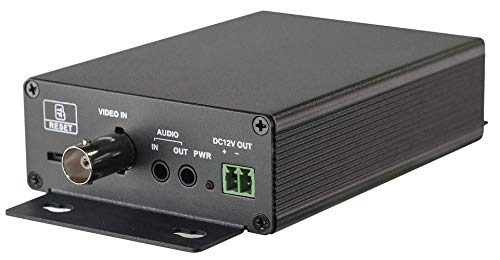
HDView Convert Analog Cameras to IP Cameras, PoE Realtime Encoder Converter Adapter, DVS, Support 4MP AHD 2MP TVI/AHD Cameras





Key features
- •4MP ( 2560 x 1440 ) full real time coding Max. resolution: 2560 x 1440 H.265, H.264 and MJPEG encoding
- •Support 4MP AHD / CVBS video access; 2MP TVI / AHD / CVBS video access Micro SD card local storage of image and record with pre-alarm recording and auto cycle recording
- •Smart analysis including line crossing, intrusion, exception detection ( optional )
- •PoE / DC12V, 1 CH alarm input and 1 CH alarm output Support three streams
- •[Recommend Same Series HDView Brand NVR] COC control Support ROI coding TVS 6000V lightning protection, surge protection
HDView Convert Analog Cameras to IP Cameras, PoE Realtime Encoder Converter Adapter, DVS, Support 4MP AHD 2MP TVI/AHD Cameras
List Price: $160.04$144.04DEALYou Save: $16.00 (10%)
Free shippingFree Returns – 30 daysFree Order CancellationSecure Payment2–3 Days DeliveryGet It October 24, 2026In Stock (2)No marketing spamNo account requiredFulfilment by FedEx / Amazon / UPS / ShipwirePayPal / Card Buyer Protection
Customer Reviews
Reviews sourced from verified Amazon purchasers3.7
out of 5
Based on 10 reviews
5★
80%
4★
20%
3★
0%
2★
0%
1★
0%
Much more than just a converter
Duckman✓ Verified Purchase•July 17, 2023
I was just looking to convert an analog camera to ONVIF. I was surprised that this little thing is also an NVR. Sure not much disk space, but it sends me alerts, has remote access and a host of other features that I did not plan on using but may pick up a few more of these. So far it's been working fine for the past month out in my garage where the temperature has gotten as high as 95°F/35°C
Worked for me with ONVIF into Synology Surveillance Station
Dave R✓ Verified Purchase•July 6, 2023
Detailed instructions were included but you basically put a client on the same subnet, install the plugin in IE and, access the unit at 192.168.226.201. You can change the network config once you are in. I could not get it to function running only on PoE so I had to use a 12V supply (not included). If you have an older coax camera running off siamese cable then chances are you probably already have a power supply which will work. I also noted that it will run on a normal non-PoE port using the separate supply as well, so if you don't have a PoE switch then it should still work with an independent power supply. My UniFi switch runs 802.3at PoE+ and it seemed to flap the port and maybe get caught in a boot loop when trying to use only the PoE, although it was reporting about 3W. Maybe it's not the compatible standard? It links up at 100Mbps. Not sure if I have the latest firmware since there is no mention of a source for this.
As others have mentioned, this is more than just a converter. It's basically a full DVR system. If you only have one camera or want to manage them independently this is great, but if it's part of a system with multiple cameras you can disable the time stamps and overlays in the config tool under OSD and just use your central IP DVR features. Although, being able to tweak a few settings before it makes it into the central DVR is nice. It's a good option instead of having powered converters on both ends of the old coax run if you were considering IP over coax. Hooked up it up on the DVR side and it did the job, no getting on ladders. Tip: the 12V power output wire screw clamps are a keystone, you can pull it straight out to make installation a bit easier, clamp the nub onto the +/- wires then just plug it back into the unit.
UPDATE: A few days later I was doing some other work near my camera cabling and figured I would just pull the 12V power supply off the converter and see if PoE would work. It stayed online this time using just the PoE! I noticed that it started pulling ~6.8W when I did this. When I plug the DC supply back in it pulls 3W. Ok, now I can say it's truly working just over PoE.
As others have mentioned, this is more than just a converter. It's basically a full DVR system. If you only have one camera or want to manage them independently this is great, but if it's part of a system with multiple cameras you can disable the time stamps and overlays in the config tool under OSD and just use your central IP DVR features. Although, being able to tweak a few settings before it makes it into the central DVR is nice. It's a good option instead of having powered converters on both ends of the old coax run if you were considering IP over coax. Hooked up it up on the DVR side and it did the job, no getting on ladders. Tip: the 12V power output wire screw clamps are a keystone, you can pull it straight out to make installation a bit easier, clamp the nub onto the +/- wires then just plug it back into the unit.
UPDATE: A few days later I was doing some other work near my camera cabling and figured I would just pull the 12V power supply off the converter and see if PoE would work. It stayed online this time using just the PoE! I noticed that it started pulling ~6.8W when I did this. When I plug the DC supply back in it pulls 3W. Ok, now I can say it's truly working just over PoE.
could not connect to DVR
scott✓ Verified Purchase•June 30, 2023
VLC Player acquired the RTSP stream, and video was ok inside the management browser, however, Synology Surveillance station could not connect.
Update. Working. Reset, Re-IP, then it connected, so not sure which one got it, but seem happy now
Update. Working. Reset, Re-IP, then it connected, so not sure which one got it, but seem happy now
Easy to use converter from Analog to IPCam
M. Cohen✓ Verified Purchase•June 24, 2023
Provides an easy way to upgrade a hard to reach camera to work in a new IPCAM setup. I put this on an old coax pinhole camera in an access box. So far it is working great and gives a decent quality picture for what is attached to it.
Analog to RTSP, yes
Swordwright the majic user✓ Verified Purchase•June 18, 2023
I am using this as an analog to RTSP adapter for a night vision monocular. I have it encoding the analog out from the monocular, to an RTSP stream that's sent wirelessly to a video analytic. I wasnt able to turn the video resolution up very high, but its addressable and works pretty good. I had to find in another review the default IP, username, and password. But ince in the interface e it has a surprisingly robust GUI. with a lot of network and video bells and whistles.
Page 1 of 2