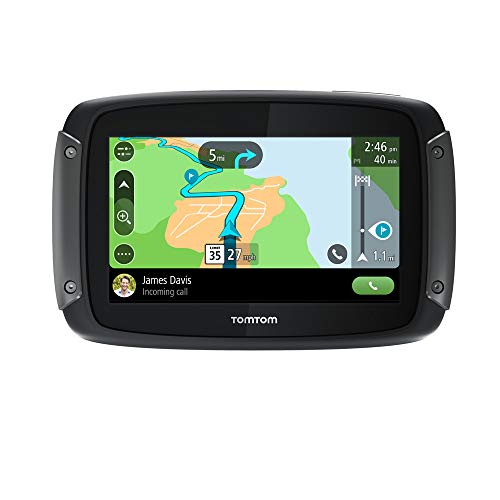
TomTom Rider 550 Motorcycle GPS Navigation Device, 4.3 Inch, with World Maps, Motorcycle Specific Winding and Hilly Roads, Updates via WiFi, Traffic and Speed Cams, Compatible with Siri and Google Now


Key features
- •Winding & hill roads: find the most exciting winding roads and climbs to avoid the boring straights
- •Updates via Wi-Fi: get the latest maps, software and easily sync new routes for your TomTom rider via built-in Wi-Fi no computer needed.
- •Compatible with Siri and Google now: unlock the full use of your smartphone via voice for on-board music access, calling, Messaging and more.
- •Smartphone messages: have smartphone messages read aloud in your headset so you stay connected but focused on the road
- •TomTom road trips: get on the road with the world's best routes available exclusively to sync to your rider 550
TomTom Rider 550 Motorcycle GPS Navigation Device, 4.3 Inch, with World Maps, Motorcycle Specific Winding and Hilly Roads, Updates via WiFi, Traffic and Speed Cams, Compatible with Siri and Google Now
List Price: $509.18$458.26DEALYou Save: $50.92 (10%)
Free shippingFree Returns – 30 daysFree Order CancellationSecure Payment2–3 Days DeliveryGet It October 28, 2026In Stock (1)No marketing spamNo account requiredFulfilment by FedEx / Amazon / UPS / ShipwirePayPal / Card Buyer Protection
Customer Reviews
Reviews sourced from verified Amazon purchasers4.2
out of 5
Based on 10 reviews
5★
30%
4★
70%
3★
0%
2★
0%
1★
0%
Great product, but steep learning curve and overwrought UI
Little Archie✓ Verified Purchase•July 18, 2023
From a hardware and functionality perspective, this is a very nice product that seems durable and high-quality.
**** UPDATE: Everything here is from my original review, and I stand by it. But I have now started going through the very long user manual, and I've already figured a bunch out. It's a very good GPS device, and I highly recommend it and I'd buy it again. But I'm still keeping this review at 4 stars for the reasons noted. The user manual is huge for a reason -- the 550 does a ton of different stuff, is versatile and the quality is high. This also means it takes a lot of words/images to explain it all, and that takes a lot of time to read and figure out, and I think many of these things could be simplified and/or consolidated in logical ways. [END OF UPDATE] ****
HOWEVER, there is a steep learning curve to figuring out how to actually use it. The user interface has all the hallmarks of a product designed in Europe. Abstract symbols with no clear logical connection to basic functionality, and things that should be basic are executed in multiple, convoluted steps.
For example, I've given the 550 access to my Contacts and created a few "My Places." BUT, when I try to create a route using the basic address/POI search field starting point and destination, the search does not cross reference the entries in My Places or Contacts. Rather, if you want to use a Contact or My Place as part of a route, you have to go to the separate My Places or Contacts data sets to use either as a starting point/destination. It's fine to have these as separate data locations, but it's simple functionality to have the search look at those data sets to identify route locations.
This is just one example of taking a simple, logical concept and turning it into an unnecessary, multi-step process, clicking around the interface,
Another odd (if not disturbing) thing is that, when creating a route and selecting My Places as the source for starting/finish locations, the search interface includes Dutch or German language options for hotels/racetracks/& other destinations, but I DO NOT have a European map installed not he device. I have no clue why I'd ever see options/locations in another language (again, I think it's Dutch but it may be German). The only language I've designated is English, and the only map I have installed is US/Canada.
When I try to delete those weird Dutch or German "My Places," the "edit" function in My Places is greyed out. Even more odd is that, when I go to the My Places data itself (not during the route creation process), these German destinations don't even show up on my list -- just the two I created. In other words, the 550 seems to engage two different sources of data for My Places, one of which is My Places itself and the other is a different list of My Places that pop up when you are creating a route.
There are more idiosyncrasies to the user interface. I'll figure it all out eventually, but the UI designers need a lesson in KISS, Keep It Simple Stupid.
**** UPDATE: Everything here is from my original review, and I stand by it. But I have now started going through the very long user manual, and I've already figured a bunch out. It's a very good GPS device, and I highly recommend it and I'd buy it again. But I'm still keeping this review at 4 stars for the reasons noted. The user manual is huge for a reason -- the 550 does a ton of different stuff, is versatile and the quality is high. This also means it takes a lot of words/images to explain it all, and that takes a lot of time to read and figure out, and I think many of these things could be simplified and/or consolidated in logical ways. [END OF UPDATE] ****
HOWEVER, there is a steep learning curve to figuring out how to actually use it. The user interface has all the hallmarks of a product designed in Europe. Abstract symbols with no clear logical connection to basic functionality, and things that should be basic are executed in multiple, convoluted steps.
For example, I've given the 550 access to my Contacts and created a few "My Places." BUT, when I try to create a route using the basic address/POI search field starting point and destination, the search does not cross reference the entries in My Places or Contacts. Rather, if you want to use a Contact or My Place as part of a route, you have to go to the separate My Places or Contacts data sets to use either as a starting point/destination. It's fine to have these as separate data locations, but it's simple functionality to have the search look at those data sets to identify route locations.
This is just one example of taking a simple, logical concept and turning it into an unnecessary, multi-step process, clicking around the interface,
Another odd (if not disturbing) thing is that, when creating a route and selecting My Places as the source for starting/finish locations, the search interface includes Dutch or German language options for hotels/racetracks/& other destinations, but I DO NOT have a European map installed not he device. I have no clue why I'd ever see options/locations in another language (again, I think it's Dutch but it may be German). The only language I've designated is English, and the only map I have installed is US/Canada.
When I try to delete those weird Dutch or German "My Places," the "edit" function in My Places is greyed out. Even more odd is that, when I go to the My Places data itself (not during the route creation process), these German destinations don't even show up on my list -- just the two I created. In other words, the 550 seems to engage two different sources of data for My Places, one of which is My Places itself and the other is a different list of My Places that pop up when you are creating a route.
There are more idiosyncrasies to the user interface. I'll figure it all out eventually, but the UI designers need a lesson in KISS, Keep It Simple Stupid.
JUNK!!!
TacMed MP✓ Verified Purchase•July 17, 2023
What an amazing thought. However the reality doesn't translate to the product or the company. Since I purchased this GPS for my motorcycle, it's been connected to power the entire time. Turns out the power doesn't pass through the cradle to the GPS and it has died. I've connected it to other 12v sources...still no charge. I've tried several times to contact customer support and can nevwr get past the dumbest chatbot I've ever encountered. It won't answer questions and won't process exchanges or returns. Chalk one up to the chinese. I'd suggest buying a Garmin.
Good support to navigation but could use some improvement
Jet Stream✓ Verified Purchase•June 28, 2023
The GPS unit itself is great, and it would be nice to have the current local time displayed on the map screen when riding without a defined destination.
The mounting system was useless in my experience. I rode for less then 25 minutes and the plastic base broke in the middle of the street, leaving the GPS unit hanging. Luckily, some tie wraps helped me getting back home. I customized the mounting system and it has been fine since then.
The touch screen sensitivity and screen brightness and contrast are all great. It would be nice to have the local time on the map screen while riding without a preset destination.
Additionally, the update process could use some improvement as well. It is very slow, even in high-speed WiFi. The update software module could have a better update installation management code, preventing the system from asking you about updates in the middle of the route, when away from a wireless connection. Considering how slow updates are on this unit, you surely do not want to execute them while riding and being prompted to do so. Kind of common sense, so I am not sure why the update routine was coded the way it was.
The mounting system was useless in my experience. I rode for less then 25 minutes and the plastic base broke in the middle of the street, leaving the GPS unit hanging. Luckily, some tie wraps helped me getting back home. I customized the mounting system and it has been fine since then.
The touch screen sensitivity and screen brightness and contrast are all great. It would be nice to have the local time on the map screen while riding without a preset destination.
Additionally, the update process could use some improvement as well. It is very slow, even in high-speed WiFi. The update software module could have a better update installation management code, preventing the system from asking you about updates in the middle of the route, when away from a wireless connection. Considering how slow updates are on this unit, you surely do not want to execute them while riding and being prompted to do so. Kind of common sense, so I am not sure why the update routine was coded the way it was.
Great GPS, but...
Diana Rypkema✓ Verified Purchase•June 25, 2023
The TomTom Rider 550 is a great GPS. But...I had issues with the BlueTooth connections. I'm sure it was my fault, but it was enough for me to return the GPS.
The TT 550 relies on the smartphone to provide support for phone calls, text messages and music playback through voice recognition. My smartphone is a Samsung Note 9, so I would think this should work seamlessly. It didn't. Google Assistant listens for your voice input and responds...sometimes. I tried to call my wife, and found it was dialing some attorney that I didn't recognize. Then I'd try to get it to play music...and even though the Google Music app was open on the phone, Google Assistant would bring up YouTube Music and stream music. When I went out of cell tower range, it had issues deciding what to do. The problems were on the smartphone end, not the GPS's end. But the GPS only provides an interface instead of having the apps built in to its own software.
I love the screen layout. You have a lot of info presented in a very readable format. The 3D view also provides a great perspective to look ahead at the curves ahead of you. It's the best I know of.
Detail level on the screen is low, but it does give you what you need and is easy to read, even in bright sunlight.
You'll also like the ability to rotate the screen on the fly. It's simple and locks into place. I found on my unit that when I went over a rough road, or leaned into a turn, the GPS thought that I was rotating the screen. What I finally did was to change a setting that locks the view. Simple fix.
Overall, I really liked the GPS. And for the price, it is wonderful.
The TT 550 relies on the smartphone to provide support for phone calls, text messages and music playback through voice recognition. My smartphone is a Samsung Note 9, so I would think this should work seamlessly. It didn't. Google Assistant listens for your voice input and responds...sometimes. I tried to call my wife, and found it was dialing some attorney that I didn't recognize. Then I'd try to get it to play music...and even though the Google Music app was open on the phone, Google Assistant would bring up YouTube Music and stream music. When I went out of cell tower range, it had issues deciding what to do. The problems were on the smartphone end, not the GPS's end. But the GPS only provides an interface instead of having the apps built in to its own software.
I love the screen layout. You have a lot of info presented in a very readable format. The 3D view also provides a great perspective to look ahead at the curves ahead of you. It's the best I know of.
Detail level on the screen is low, but it does give you what you need and is easy to read, even in bright sunlight.
You'll also like the ability to rotate the screen on the fly. It's simple and locks into place. I found on my unit that when I went over a rough road, or leaned into a turn, the GPS thought that I was rotating the screen. What I finally did was to change a setting that locks the view. Simple fix.
Overall, I really liked the GPS. And for the price, it is wonderful.
Convenient & glove friendly.
Dmak✓ Verified Purchase•June 6, 2023
Getting it setup took some time and much trial and error. The difficulty was getting it to pair with both my phone, and my Sena helmet intercom/camera. The fault might have been the intercom/camera, or the GPS. I am not sure which it was, but I tried the instructions for both, eventually resorting to online videos. Apparently the sequencing was the issue, and I tried several before I got it right, but once I did, everything worked well.
The screen responds well to a gloved finger, but one needs to be careful, since the screen is small, the icons are fairly close together, so it is easy to touch the wrong one.
In addition to the included mount, I needed to use a RAM fork stem ball mount, to mount it to my 2008 Honda VFR800.
Edit: This unit died on me twice. the first time, I thought it might have been the power cable, as I was not using the USB cable that came with it, but a shorter one i had laying around. I changed both the cable and the USB plug that fits a cigarette lighter socket attached to the steering head, and it worked after being shut down for several hours.
It died a second time. The screen would go blank, then the TomTom logo would appear, then the screen would go blank again. I disconnected the power cord, and let sit for several minutes, and when reconnected, it continued the cycling between blank screen and TomTom logo.
I have not given up!
I really like this unit, and I have two other TomTom GPSs that have served me well in my cars.
I have returned the first unit, and ordered a second one. I will update on how that one works.
The screen responds well to a gloved finger, but one needs to be careful, since the screen is small, the icons are fairly close together, so it is easy to touch the wrong one.
In addition to the included mount, I needed to use a RAM fork stem ball mount, to mount it to my 2008 Honda VFR800.
Edit: This unit died on me twice. the first time, I thought it might have been the power cable, as I was not using the USB cable that came with it, but a shorter one i had laying around. I changed both the cable and the USB plug that fits a cigarette lighter socket attached to the steering head, and it worked after being shut down for several hours.
It died a second time. The screen would go blank, then the TomTom logo would appear, then the screen would go blank again. I disconnected the power cord, and let sit for several minutes, and when reconnected, it continued the cycling between blank screen and TomTom logo.
I have not given up!
I really like this unit, and I have two other TomTom GPSs that have served me well in my cars.
I have returned the first unit, and ordered a second one. I will update on how that one works.
Page 1 of 2