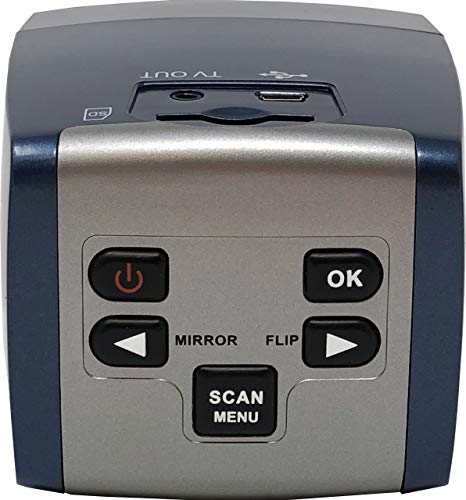
ZONOZ FS-3 22MP All-in-1 Film & Slide Converter Scanner, Speed-Load Adapters for 35mm, 126, 110 Negative & Slides, Super 8 Films - Worldwide Voltage 110V/240V AC Adapter



Key features
- •Scan your old 35mm, 110, 126 Film Slides & Negatives and Super 8 Film
- •High Resolution 22MP Image Output
- •Speed Loading Adapters Included
- •Simple Stand-Alone Operating Film & Negative Scanner - No Computer or Software Required
- •Store Images on Internal Storage or SD Memory Card (not included - compatible up to 32GB)
ZONOZ FS-3 22MP All-in-1 Film & Slide Converter Scanner, Speed-Load Adapters for 35mm, 126, 110 Negative & Slides, Super 8 Films - Worldwide Voltage 110V/240V AC Adapter
List Price: $159.98$143.98DEALYou Save: $16.00 (10%)
Free shippingFree Returns – 30 daysFree Order CancellationSecure Payment2–3 Days DeliveryGet It June 25, 2026In Stock (1)No marketing spamNo account requiredFulfilment by FedEx / Amazon / UPS / ShipwirePayPal / Card Buyer Protection
Customer Reviews
Reviews sourced from verified Amazon purchasers4.0
out of 5
Based on 10 reviews
5★
50%
4★
0%
3★
20%
2★
30%
1★
0%
Perfect for my needs
Alan B.✓ Verified Purchase•January 10, 2017
I think they discontinued this 4 in 1 model in favor of a 7 in 1 model, however since I only do slides and an occasional small negative, this fully suits my needs at a lower cost. This is a replacement for a similar Jumbl, and is superior to it in the respect that the window angle is perfect for viewing whereas the Jumbl had to be tilted up in order to get a proper view. It also has a superior slide holder, which makes quickly feeding slides a simple process. I can scan 100 slides in a little over 10 minutes. The scanning with this scanner is the easy part of the total process --- in most cases I like to run the files through an editing program to optimize them for viewing by my customers, and that takes a bit longer per slide than the scanning. I just completed a 1500 slide order and I'm delighted with this scanner.
Cheap and fast
jmv✓ Verified Purchase•December 27, 2016
This is a decent little gadget for digitizing old negatives. The interface is clunky and primitive. The image quality is just fair. Lots of noise, colors always off. But I would recommend it IF you know Photoshop or a similar program where you can clean up your images. In my case, all it takes is an application of Auto Color in Photoshop to make most images passable. The real issue where the Wolverine shines is speed. You can process a lot of negatives in a short amount of time. And since there's no software to deal with, you just plug in and go, which is awesome. I have another flatbed scanner that can do negatives with much better quality than this machine, but it takes 20x as long to do it. So I'm more than willing to make the trade off of quality for speed for the vast majority of my images. Bottom line: if you have a lot of negatives to scan and don't need professional quality results (or are capable of using Photoshop to achieve those results) you'll probably like this thing.
A "Super" converter.
Frank Miller✓ Verified Purchase•November 29, 2016
I have only used this to digitize color slides and it does a great job of digitizing, even those slides that are 50 years old, provided that they have been stored properly. In some cases, color slides will need an exposure correction, available in the F2D. In some cases, the exposure range from light to dark can exceed the F2D's ability to reproduce but by capturing multiple images using plus, minus, and normal exposure in the F2D, then combining the images in 3rd party software (such as Photomatix Pro) the exposure range can be recovered avoiding most of the blown highlights and muddy shadows.
Unfortunately, it doesn't fully accommodate the larger square purchased slides so you will need to decide if you want to crop these to a landscape or portrait orientation.
It is fast (2-3 seconds per slide) and easy to use. It takes a bit longer if you need to stop to compensate for slides that weren't exposed correctly or the color tint has changed over time.
These images were taken in 1964 and digitized last month with the F2D
Unfortunately, it doesn't fully accommodate the larger square purchased slides so you will need to decide if you want to crop these to a landscape or portrait orientation.
It is fast (2-3 seconds per slide) and easy to use. It takes a bit longer if you need to stop to compensate for slides that weren't exposed correctly or the color tint has changed over time.
These images were taken in 1964 and digitized last month with the F2D
Warning: Does not convert your negatives to digital photos you can print
Nancy✓ Verified Purchase•May 26, 2016
Does the job but I have a couple of frustrations so far: 1) Even though I am diligently cleaning the light tray and my slides, once a hair does manage to get onto the light tray, the resolution on the screen of the F2D Super is too poor to detect the hair. So not until I have scanned an entire box of slides and uploaded them to my desktop computer do I realize that a hair shows from slides 12-36. The only choice at that point is to either live with the hair or to rescan. If the resolution on the screen were bigger, I don't think this would be a problem. 2) Sometimes the coverting to digital process gets "stuck". I've found the easiest way to deal with this is to turn the power off and back on, but it's an annoyance because you don't know if it saved the slide you just tried to convert or not. When I say sometimes, it's been happening about 2-3 times during every box of slides (24-36 slides in a box). 3) The power cord is too short. I also feel that the F2D Super has a pretty chintzy feel for the price. Update: I have now tried to scan a few negatives. To my surprise, they don't look like a photo at all - they still look like a negative. I was hoping that once I had scanned them and uploaded them to my computer, I could print them on photo paper without any further processing. I have attached pictures. The one on the left is the negative. The one on the right is the slide.
It was good for my purposes (more on that below)
AfricaMan✓ Verified Purchase•September 23, 2015
I had tried a friends Wolverine earlier 5mp version. It was good for my purposes (more on that below). But this 20mp version is significantly different from the earlier version in two ways: 1) positively it has a color adjustment option -- a lot of slides came out better with the red notched up a bit. 2) negatively the way the higher resolution CMOS chip in this processes the images they are blotchy and grainy. Yes, they are "higher resolution" but it makes the results worse not better. Example -- someone with a nicely sun-tanned face appears as one with some dark blotchy skin problem. It doesn't fix with Photoshop. SO I sent this one back and bought the 5mp version. The sun-tanned face has a nice smooth skin texture.
What are these units good for? If you're looking for highest quality reproduction of your slides, this is not the unit. BUT if you're looking for a way to archive a large number of slides such that you can sit down and enjoy looking through old family pictures, it's great -- the results are pleasing to look at that way. THEN as you look through and you note some few that you want to keep in a higher quality take those few to a good scanning service.
What are these units good for? If you're looking for highest quality reproduction of your slides, this is not the unit. BUT if you're looking for a way to archive a large number of slides such that you can sit down and enjoy looking through old family pictures, it's great -- the results are pleasing to look at that way. THEN as you look through and you note some few that you want to keep in a higher quality take those few to a good scanning service.
Page 1 of 2