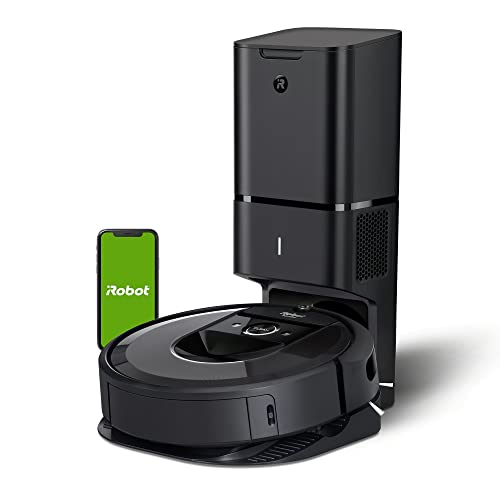
iRobot Roomba i7+ (7550) Robot Vacuum with Automatic Dirt Disposal - Empties Itself for up to 60 Days, Wi-Fi Connected, Smart Mapping, Works with Alexa, Ideal for Pet Hair, Carpets, Hard Floors


Key features
- •Empties on its own - you don't have to think about vacuuming for weeks at a time. Clean Base Automatic Dirt Disposal holds 30 bins of dirt, dust and hair
- •Power-Lifting Suction delivers 10X the air power* for improved pick-up performance
- •Patented iAdapt 3. 0 Navigation with vSLAM technology allows the robot to map its surroundings to clean an entire level of your home
- •Ideal for homes with pets - Premium 3-Stage Cleaning System cleans the dirt and pet hair you see, and the allergens and dust you don't. High-Efficiency Filter captures 99% of mold, pollen, dust mite, dog and cat allergens
- •Dual Multi-Surface Rubber Brushes instantly adjust and flex to stay in constant contact with floors
- •Learns your home, remembers your rooms, and adapts to determine the best way to clean with Imprint Smart Mapping
iRobot Roomba i7+ (7550) Robot Vacuum with Automatic Dirt Disposal - Empties Itself for up to 60 Days, Wi-Fi Connected, Smart Mapping, Works with Alexa, Ideal for Pet Hair, Carpets, Hard Floors
List Price: $872.99$785.69DEALYou Save: $87.30 (10%)
Free shippingFree Returns – 30 daysFree Order CancellationSecure Payment2–3 Days DeliveryGet It October 28, 2026In Stock (1)No marketing spamNo account requiredFulfilment by FedEx / Amazon / UPS / ShipwirePayPal / Card Buyer Protection
Customer Reviews
Reviews sourced from verified Amazon purchasers4.3
out of 5
Based on 10 reviews
5★
70%
4★
30%
3★
0%
2★
0%
1★
0%
Best roomba so far! Do not buy a Roomba if you don't want to learn to repair it!!
Longhorn✓ Verified Purchase•October 18, 2023
I've owned 3 roombas, and my wife's employer has a fleet of 6. The bottom line, owning a robot that cleans the floor means owning tools and the skills to use them. Do NOT buy a roomba if you can't learn to fix it. It WILL break when it consumes a damaging object, and having it serviced when something goes wrong SHOULD cost ~$250 in terms of labor if you prefer not to fix it yourself. This is not a vacuum machine operated by a human. You or your children/pets WILL leave things on the floor that will damage the roomba. If you can't fix it, or don't want big repair bills, you should stick to the human powered vacuum.
This Roomba is the best one so far. Roomba is NOT a vacuum cleaner! This bears repeating!
All roombas can sweep up pet hair and dry dirt from a hard floor.
While the roomba does have a vacuum to suck the dirt in, it is NOT a vacuum cleaner, and never will be. It cannot deep clean a carpet. It CAN sweep the top of the carpet and pick up small objects from the surface of the carpet. If you have carpet, you really need to clean it with a human operated vacuum cleaner. I DO NOT recommend the roomba for carpet cleaning. I also DO NOT recommend carpet. Carpet is cheap, and nothing ever cleans it properly. A $2000 vacuum and a $500 steam cleaner will leave your carpet full of dirt that goes airborne when you walk across it. The only clean carpet is one freshly installed. Seriously.
Did I mention Roomba is NOT a vacuum cleaner?
So as long as you don't own a carpeted floor, and as long as you know you own the job of repairing the roomba when it tries to eat your car keys, I recommend the roomba for you. If you have carpet, or don't want to own the job or repairing the roomba every time it eats a childs toy or a fork, do not buy a roomba.
If you tinker with things, own or are willing to buy tools, and understand the concept of needing to maintain a robot, the roomba is for you!
This is the best roomba ever. It has eyes, and can navigate your house! You can map your house out, divide it into cleaning and stay out zones, and you can give the robot tasks to accomplish. Making tortillas in the kitchen and get flour on the floor? Tell it to clean the kitchen. See that a pet has shredded some paper in the living room, tell your robot to do it's thing. Tell it to clean the cat litter from around the cat box, done in a couple minutes. Kids left a path of sand from the back door to their room, pick the 3 or 4 cleaning zones affected, and tell it to go.
The first roomba was good... Then they had the one with the remote that never worked... They also had the exclusion towers for those early models... All ok, never great. Now I can put exclusion zones on the map of the house, label the cleaning zones, and give my roomba a chores list as needed. You can do a schedule, and you can do on demand. Pretty darned good!
And yes, you will get to fix it when it gets stuck trying to swallow a cat toy, a power cord, or whatever else you leave on the floor you shouldn't. Perhaps the next version will steer clear of damaging objects, wouldn't that be clever? That will be in the next version I'm sure...
Oh, my new roomba learned a new trick.... I had an old roomba charging base tucked away under a china cabinet that I haven't removed yet. Last night the GFCI for the power port of the new base unit was tripped (a problem unrelated to the roomba). When the roomba finished it's clean the kitchen job, it went and parked at the old charging base. I did some testing to explore this feature, and here is what I found:
If the roomba is parked at the base, and looses power, it will complain of having a charging error if you launch a job. To launch a job, the base it is on must have power, even if the roomba is fully charged.
If the base looses power when the roomba is cleaning, upon return the roomba will drive back and forth in front of the base, looking for the parking beam, after three passes, it will go to the alternative base. If both bases loose power during cleaning, a home command will first send it to the vacuum base, and if that has no power it goes to the secondary base, and will pace back and forth in front of the secondary base, and will start mapping the edges of the room as if to make sure it is where it thinks it is... Interesting behavior. Further home commands will not making it go back to the vacuum base, it will keep trying the secondary base. At this point it must park at the secondary base, it will not make any further attempts to go to the primary. On the next cleaning job, it WILL attempt to first seek out the primary base.
This Roomba is the best one so far. Roomba is NOT a vacuum cleaner! This bears repeating!
All roombas can sweep up pet hair and dry dirt from a hard floor.
While the roomba does have a vacuum to suck the dirt in, it is NOT a vacuum cleaner, and never will be. It cannot deep clean a carpet. It CAN sweep the top of the carpet and pick up small objects from the surface of the carpet. If you have carpet, you really need to clean it with a human operated vacuum cleaner. I DO NOT recommend the roomba for carpet cleaning. I also DO NOT recommend carpet. Carpet is cheap, and nothing ever cleans it properly. A $2000 vacuum and a $500 steam cleaner will leave your carpet full of dirt that goes airborne when you walk across it. The only clean carpet is one freshly installed. Seriously.
Did I mention Roomba is NOT a vacuum cleaner?
So as long as you don't own a carpeted floor, and as long as you know you own the job of repairing the roomba when it tries to eat your car keys, I recommend the roomba for you. If you have carpet, or don't want to own the job or repairing the roomba every time it eats a childs toy or a fork, do not buy a roomba.
If you tinker with things, own or are willing to buy tools, and understand the concept of needing to maintain a robot, the roomba is for you!
This is the best roomba ever. It has eyes, and can navigate your house! You can map your house out, divide it into cleaning and stay out zones, and you can give the robot tasks to accomplish. Making tortillas in the kitchen and get flour on the floor? Tell it to clean the kitchen. See that a pet has shredded some paper in the living room, tell your robot to do it's thing. Tell it to clean the cat litter from around the cat box, done in a couple minutes. Kids left a path of sand from the back door to their room, pick the 3 or 4 cleaning zones affected, and tell it to go.
The first roomba was good... Then they had the one with the remote that never worked... They also had the exclusion towers for those early models... All ok, never great. Now I can put exclusion zones on the map of the house, label the cleaning zones, and give my roomba a chores list as needed. You can do a schedule, and you can do on demand. Pretty darned good!
And yes, you will get to fix it when it gets stuck trying to swallow a cat toy, a power cord, or whatever else you leave on the floor you shouldn't. Perhaps the next version will steer clear of damaging objects, wouldn't that be clever? That will be in the next version I'm sure...
Oh, my new roomba learned a new trick.... I had an old roomba charging base tucked away under a china cabinet that I haven't removed yet. Last night the GFCI for the power port of the new base unit was tripped (a problem unrelated to the roomba). When the roomba finished it's clean the kitchen job, it went and parked at the old charging base. I did some testing to explore this feature, and here is what I found:
If the roomba is parked at the base, and looses power, it will complain of having a charging error if you launch a job. To launch a job, the base it is on must have power, even if the roomba is fully charged.
If the base looses power when the roomba is cleaning, upon return the roomba will drive back and forth in front of the base, looking for the parking beam, after three passes, it will go to the alternative base. If both bases loose power during cleaning, a home command will first send it to the vacuum base, and if that has no power it goes to the secondary base, and will pace back and forth in front of the secondary base, and will start mapping the edges of the room as if to make sure it is where it thinks it is... Interesting behavior. Further home commands will not making it go back to the vacuum base, it will keep trying the secondary base. At this point it must park at the secondary base, it will not make any further attempts to go to the primary. On the next cleaning job, it WILL attempt to first seek out the primary base.
The Ultimate Cleaning Companion
Fadi Shamaan✓ Verified Purchase•August 25, 2023
Cleaning has never been my favorite chore, but all that changed when I discovered the iRobot Roomba i7+. This cutting-edge robot vacuum has revolutionized the way I maintain a clean home. With its automatic dirt disposal, Wi-Fi connectivity, smart mapping capabilities, and compatibility with Alexa, it's the ideal solution for tackling pet hair, carpets, and hard floors. In this personal account, I'll share my journey with the iRobot Roomba i7+, highlighting its exceptional features and the profound impact it has had on my cleaning routine.
A Spark of Interest :
It all started when I stumbled upon the iRobot Roomba i7+ while browsing for a reliable and efficient robot vacuum. The product description promised hassle-free cleaning, and the positive customer reviews piqued my curiosity. Intrigued by its features, I decided to give it a shot. Little did I know that this little black machine would become an integral part of my daily life.
Unboxing and Set-up :
Upon receiving my iRobot Roomba i7+, I was impressed by its sleek design and build quality. The package included the robot vacuum, the Clean Base Automatic Dirt Disposal, a virtual wall barrier, and detailed instructions. Setting it up was a breeze"”simply download the iRobot HOME app, connect to the Roomba via Wi-Fi, and follow the prompts. Within minutes, I had my new cleaning companion ready to go.
Cleaning Performance:
Once the Roomba i7+ was set up, it was time to put it to the test. The robot vacuum utilizes Imprint Smart Mapping technology, which allows it to navigate and clean every nook and cranny of my home. With its advanced sensors, it effortlessly avoids obstacles and adjusts to different floor surfaces.
I was particularly impressed by its ability to handle pet hair. As a proud owner of two fluffy dogs, keeping my home free from their shedding was a constant struggle. However, the Roomba i7+ tackled pet hair with ease, leaving my carpets and hard floors immaculate.
Automatic Dirt Disposal
One of the standout features of the Roomba i7+ is its automatic dirt disposal. The Clean Base unit, which is included with the vacuum, acts as a docking station where the Roomba empties its contents after each cleaning session. This eliminates the need for frequent emptying, a task that used to be messy and time-consuming. With the ability to hold dirt for up to 60 days, I no longer have to worry about constantly monitoring the vacuum's bin. It's a true game-changer for those with busy schedules.
Smart Connectivity and Voice Control
Thanks to the Roomba i7+'s Wi-Fi connectivity and compatibility with Alexa, I can control and monitor my cleaning sessions with ease. Using the iRobot HOME app, I can schedule cleanings, customize settings, and receive notifications when the vacuum completes its tasks. Furthermore, the integration with Alexa allows me to start or stop cleanings using simple voice commands. It's incredibly convenient and adds an extra layer of entertainment to my cleaning routine.
Conclusion
The iRobot Roomba i7+ has exceeded my expectations in every aspect. Its exceptional cleaning performance, automatic dirt disposal, smart mapping capabilities, and Wi-Fi connectivity have transformed the way I approach household cleaning. The convenience and efficiency it brings to my daily routine are truly remarkable. I can confidently give it a 5 out of 5-star rating and highly recommend it to anyone seeking a hassle-free and thorough cleaning solution.
Epilogue
With the iRobot Roomba i7+ by my side, I've bid farewell to the days of dragging a heavy vacuum cleaner around the house. Its advanced features and user-friendly interface have made cleaning enjoyable and effortless. It's a true investment that has brought both entertainment and cleanliness to my home.
A Spark of Interest :
It all started when I stumbled upon the iRobot Roomba i7+ while browsing for a reliable and efficient robot vacuum. The product description promised hassle-free cleaning, and the positive customer reviews piqued my curiosity. Intrigued by its features, I decided to give it a shot. Little did I know that this little black machine would become an integral part of my daily life.
Unboxing and Set-up :
Upon receiving my iRobot Roomba i7+, I was impressed by its sleek design and build quality. The package included the robot vacuum, the Clean Base Automatic Dirt Disposal, a virtual wall barrier, and detailed instructions. Setting it up was a breeze"”simply download the iRobot HOME app, connect to the Roomba via Wi-Fi, and follow the prompts. Within minutes, I had my new cleaning companion ready to go.
Cleaning Performance:
Once the Roomba i7+ was set up, it was time to put it to the test. The robot vacuum utilizes Imprint Smart Mapping technology, which allows it to navigate and clean every nook and cranny of my home. With its advanced sensors, it effortlessly avoids obstacles and adjusts to different floor surfaces.
I was particularly impressed by its ability to handle pet hair. As a proud owner of two fluffy dogs, keeping my home free from their shedding was a constant struggle. However, the Roomba i7+ tackled pet hair with ease, leaving my carpets and hard floors immaculate.
Automatic Dirt Disposal
One of the standout features of the Roomba i7+ is its automatic dirt disposal. The Clean Base unit, which is included with the vacuum, acts as a docking station where the Roomba empties its contents after each cleaning session. This eliminates the need for frequent emptying, a task that used to be messy and time-consuming. With the ability to hold dirt for up to 60 days, I no longer have to worry about constantly monitoring the vacuum's bin. It's a true game-changer for those with busy schedules.
Smart Connectivity and Voice Control
Thanks to the Roomba i7+'s Wi-Fi connectivity and compatibility with Alexa, I can control and monitor my cleaning sessions with ease. Using the iRobot HOME app, I can schedule cleanings, customize settings, and receive notifications when the vacuum completes its tasks. Furthermore, the integration with Alexa allows me to start or stop cleanings using simple voice commands. It's incredibly convenient and adds an extra layer of entertainment to my cleaning routine.
Conclusion
The iRobot Roomba i7+ has exceeded my expectations in every aspect. Its exceptional cleaning performance, automatic dirt disposal, smart mapping capabilities, and Wi-Fi connectivity have transformed the way I approach household cleaning. The convenience and efficiency it brings to my daily routine are truly remarkable. I can confidently give it a 5 out of 5-star rating and highly recommend it to anyone seeking a hassle-free and thorough cleaning solution.
Epilogue
With the iRobot Roomba i7+ by my side, I've bid farewell to the days of dragging a heavy vacuum cleaner around the house. Its advanced features and user-friendly interface have made cleaning enjoyable and effortless. It's a true investment that has brought both entertainment and cleanliness to my home.
The best of the best!
The Exacting Consumer✓ Verified Purchase•July 23, 2023
This review will cover the i7 as well as another top contender I tried, the Deebot N8+. If you just want to read about the i7 please skip to that part.
If you've done your homework, watched Vacuum Wars videos on YouTube and compared all available options right now, you may have landed on these 2 as your top contenders. The S9 looks nice but it's way too expensive and the reviews just aren't good enough. Roborock looks promising but their top end model is relatively expensive and doesn't have an auto-empty bin as of the date of this review. There is no "perfect" robot in existence right now, in my view. I'm a 5 year owner of a Roomba 960 that had to be returned 3 times initially and repaired once out of warranty before it reached a stable state for me. I figured it was time for an upgrade. I was not optimistic about the i7 at all due to previous 960 issues and for that reason purchased the Deebot first as an extremely impressive option full of advanced tech. I'll give you my experience with both and why, much to my surprise, I landed on the i7 as the robot I will keep.
First up, the N8 Pro+ which boasts variable suction levels that auto-switch depending on the floor type, low noise levels, laser 3D LiDAR tech for navigation, object avoidance camera, dual rotating brushes, built in mopping capability and a physically thinner footprint so it can get under my kitchen cabinets where my 960 gets stuck, daily. The functionality of the Ecovacs app is all there but my gripes are mainly around the layout, button naming and settings menus. I didn't find it very intuitive at all but all the key features are there: house mapping and virtual keep out zones being my top priorities. I did have some trouble with the initial configuration of the keep-out zones but got there eventually. The robot functions very well in general and is a very good vacuum, all told.
The downsides that I experienced, however, were enough for me to return it. The key cons here are battery life, recharge time, the auto-empty base and getting stuck. Your first step with the N8 is the initial mapping of your floorplan which must be completed fully before you can do anything, I mean anything. It runs the vacuum during this mapping so battery consumption will be high. The i7 by comparison can do mapping runs with the vacuum turned off making it a much more streamlined process. I found the battery life to be much lower than the advertised 110 minutes netting a maximum of 75 minutes. The bigger problem is that it takes HOURS to recharge, so depending on when you start your cleaning run, this thing could quite literally run all day. For example in my situation, 635 square feet cleaned took 110 minutes of total run time with a required charge in the middle. This netted a total of nearly 6 hours to complete! Unacceptable. Also important to note is that the N8 will want to recharge at 15% battery, so the most you ever really get out of this thing is 85%.
The next big problem for me was the design of the auto-empty base. They opted to use a dual port discharge method that sucks from 2 doors in the dust bin simultaneously. If you have pet hair to deal with, like I do, it was unable to suck out any of it, just leaving stranded clumps hanging from each port in the dust bin.
The final nail in the coffin was that despite all the advanced tech in the N8, cameras, lasers, etc, it STILL got stuck under the dining room table/ chairs just like my 960 does. Too many concessions so I sent it back and tried my luck with the i7+.
N8 Pros:
-Competitive price (usually on sale)
-Premium look and feel
-Advanced tech (cameras, lasers...)
-Powerful variable suction
-Systematic cleaning pattern
-Free in-box extras (bags, mop pads)
-Awesome low noise levels
-Lower physical profile so glides under kitchen cabinets
N8 Cons:
-Initial mapping will take a VERY long time and must be fully completed
-Even with Lidar, mapping, sensing etc it still gets stuck
-Battery life is terrible (more like 75 minutes at best) vs 110, charging time is worse (1 cleaning + charge cycle = 5 hours!)
-85% max usable battery is abysmal, Roomba will drain itself to nothing
-Dual port self-empty in the base creates problems, especially for pet hair
With the N8 returned I found the i7 on sale for the same price and pulled the trigger to give iRobot yet another chance. Much less advanced overall tech here, the same "crash into everything" sensor mode as the old Roomba models, no fancy lasers here but the camera does use iAdapt to map out objects. This camera needs light, mind you. Out of the box is a very simple setup just plug in the base, set the robot in it, add the robot to the app. I was prompted with a firmware update right away so let that run and waited until the next day to do the initial mapping run. Being able to just wander around without the vacuum running is such a simple but meaningful feature here. One battery charge and you should have a map of your floorplan, vs 2 runs + 1 charge on my N8. The completed map was excellent and they even attempt to add room dividers so you can partition areas of your house for more granularity. This is really cool and allows you to choose certain areas to clean on certain days or times if you want. No-go zones and room labels are also easily applied here. VERY intuitive app layout, button naming scheme, settings menus. You can tell iRobot put a lot of effort into this. So I did the mapping run then followed with a "vacuum everywhere" run, no virtual barriers yet. Not only was the robot able to navigate my entire floor cleaning everything, it didn't get stuck once, even under the kitchen cabinets or dining room chairs, truly impressive. It did need a charge in the middle but at an hour or so to top up, the cleaning process completes in a much more reasonable time period. The rubber brush rolls are great for hair of all kinds and manage to pass it to the dust bin without tangles. i7 triggers the auto-empty base which is LOUD like a jet taking off but wow is it effective, nothing left in the dust bin after, not a strand of long cat hair. iRobot used a single port suction method for the base which works much better than the dual port design the N8 uses, so no problem with stuck pet hair. For comparison, the i7 cleaned 658 sq ft in 133 mins of cleaning plus a 75 minute charge. Half the total time of the N8. Cool!
As for the downsides, there are a few but minor considering the system actually works well. First is the bump sensor design. I know the i7 first came out 3 years ago and once the robot learns your house it should be more gentle, as they claim, but this just feels like ancient tech at this point. Not only that, the RCON sensor, which is the protruding eye in the middle above the bumper, takes plenty of direct hits as it activates the bumper it sits on. This is the part I needed repaired on my 960 as one day it actually broke off due to years of repeated impact. iRobot should do like the others in this space and move it somewhere else safer! The unit itself is thicker than the N8 so doesn't glide under my cabinets but so far has managed to avoid getting stuck. The single rotating brush isn't as effective as the dual brushes on the N8 and you would need to buy a separate mopping robot, if you care about that. The other thing to keep in mind is that the Roomba can't see well in the dark, it needs light to do its thing.
Overall I'm very pleased with the i7 and intend to keep it. All the areas the N8 falls short work as intended or better on the i7, despite being lower tech. And this is after I was almost positive I wouldn't buy another Roomba!
i7 Pros:
-Competitive price
-Premium look and feel
-Systematic cleaning pattern
-Free in-box extras (1 bag, filter, rotating brush)
-Excellent battery and charging performance
-Excellent auto-empty base
-ZERO issue with long pet hair
-Intuitive and granular control via the app (clean zones, no go zones, defined rooms that can be scheduled)
-Smart Maps works really well
i7 Cons:
-Old school vSLAM bump sensor tech that will mar the more stuff it bumps into
-RCON sensor sits in harms way atop the bumper
-Single rotating brush could be improved
-Room lighting is required, this thing doesn't do well in the dark
-No variable speed motor = higher noise, about the same as my 960
If you've done your homework, watched Vacuum Wars videos on YouTube and compared all available options right now, you may have landed on these 2 as your top contenders. The S9 looks nice but it's way too expensive and the reviews just aren't good enough. Roborock looks promising but their top end model is relatively expensive and doesn't have an auto-empty bin as of the date of this review. There is no "perfect" robot in existence right now, in my view. I'm a 5 year owner of a Roomba 960 that had to be returned 3 times initially and repaired once out of warranty before it reached a stable state for me. I figured it was time for an upgrade. I was not optimistic about the i7 at all due to previous 960 issues and for that reason purchased the Deebot first as an extremely impressive option full of advanced tech. I'll give you my experience with both and why, much to my surprise, I landed on the i7 as the robot I will keep.
First up, the N8 Pro+ which boasts variable suction levels that auto-switch depending on the floor type, low noise levels, laser 3D LiDAR tech for navigation, object avoidance camera, dual rotating brushes, built in mopping capability and a physically thinner footprint so it can get under my kitchen cabinets where my 960 gets stuck, daily. The functionality of the Ecovacs app is all there but my gripes are mainly around the layout, button naming and settings menus. I didn't find it very intuitive at all but all the key features are there: house mapping and virtual keep out zones being my top priorities. I did have some trouble with the initial configuration of the keep-out zones but got there eventually. The robot functions very well in general and is a very good vacuum, all told.
The downsides that I experienced, however, were enough for me to return it. The key cons here are battery life, recharge time, the auto-empty base and getting stuck. Your first step with the N8 is the initial mapping of your floorplan which must be completed fully before you can do anything, I mean anything. It runs the vacuum during this mapping so battery consumption will be high. The i7 by comparison can do mapping runs with the vacuum turned off making it a much more streamlined process. I found the battery life to be much lower than the advertised 110 minutes netting a maximum of 75 minutes. The bigger problem is that it takes HOURS to recharge, so depending on when you start your cleaning run, this thing could quite literally run all day. For example in my situation, 635 square feet cleaned took 110 minutes of total run time with a required charge in the middle. This netted a total of nearly 6 hours to complete! Unacceptable. Also important to note is that the N8 will want to recharge at 15% battery, so the most you ever really get out of this thing is 85%.
The next big problem for me was the design of the auto-empty base. They opted to use a dual port discharge method that sucks from 2 doors in the dust bin simultaneously. If you have pet hair to deal with, like I do, it was unable to suck out any of it, just leaving stranded clumps hanging from each port in the dust bin.
The final nail in the coffin was that despite all the advanced tech in the N8, cameras, lasers, etc, it STILL got stuck under the dining room table/ chairs just like my 960 does. Too many concessions so I sent it back and tried my luck with the i7+.
N8 Pros:
-Competitive price (usually on sale)
-Premium look and feel
-Advanced tech (cameras, lasers...)
-Powerful variable suction
-Systematic cleaning pattern
-Free in-box extras (bags, mop pads)
-Awesome low noise levels
-Lower physical profile so glides under kitchen cabinets
N8 Cons:
-Initial mapping will take a VERY long time and must be fully completed
-Even with Lidar, mapping, sensing etc it still gets stuck
-Battery life is terrible (more like 75 minutes at best) vs 110, charging time is worse (1 cleaning + charge cycle = 5 hours!)
-85% max usable battery is abysmal, Roomba will drain itself to nothing
-Dual port self-empty in the base creates problems, especially for pet hair
With the N8 returned I found the i7 on sale for the same price and pulled the trigger to give iRobot yet another chance. Much less advanced overall tech here, the same "crash into everything" sensor mode as the old Roomba models, no fancy lasers here but the camera does use iAdapt to map out objects. This camera needs light, mind you. Out of the box is a very simple setup just plug in the base, set the robot in it, add the robot to the app. I was prompted with a firmware update right away so let that run and waited until the next day to do the initial mapping run. Being able to just wander around without the vacuum running is such a simple but meaningful feature here. One battery charge and you should have a map of your floorplan, vs 2 runs + 1 charge on my N8. The completed map was excellent and they even attempt to add room dividers so you can partition areas of your house for more granularity. This is really cool and allows you to choose certain areas to clean on certain days or times if you want. No-go zones and room labels are also easily applied here. VERY intuitive app layout, button naming scheme, settings menus. You can tell iRobot put a lot of effort into this. So I did the mapping run then followed with a "vacuum everywhere" run, no virtual barriers yet. Not only was the robot able to navigate my entire floor cleaning everything, it didn't get stuck once, even under the kitchen cabinets or dining room chairs, truly impressive. It did need a charge in the middle but at an hour or so to top up, the cleaning process completes in a much more reasonable time period. The rubber brush rolls are great for hair of all kinds and manage to pass it to the dust bin without tangles. i7 triggers the auto-empty base which is LOUD like a jet taking off but wow is it effective, nothing left in the dust bin after, not a strand of long cat hair. iRobot used a single port suction method for the base which works much better than the dual port design the N8 uses, so no problem with stuck pet hair. For comparison, the i7 cleaned 658 sq ft in 133 mins of cleaning plus a 75 minute charge. Half the total time of the N8. Cool!
As for the downsides, there are a few but minor considering the system actually works well. First is the bump sensor design. I know the i7 first came out 3 years ago and once the robot learns your house it should be more gentle, as they claim, but this just feels like ancient tech at this point. Not only that, the RCON sensor, which is the protruding eye in the middle above the bumper, takes plenty of direct hits as it activates the bumper it sits on. This is the part I needed repaired on my 960 as one day it actually broke off due to years of repeated impact. iRobot should do like the others in this space and move it somewhere else safer! The unit itself is thicker than the N8 so doesn't glide under my cabinets but so far has managed to avoid getting stuck. The single rotating brush isn't as effective as the dual brushes on the N8 and you would need to buy a separate mopping robot, if you care about that. The other thing to keep in mind is that the Roomba can't see well in the dark, it needs light to do its thing.
Overall I'm very pleased with the i7 and intend to keep it. All the areas the N8 falls short work as intended or better on the i7, despite being lower tech. And this is after I was almost positive I wouldn't buy another Roomba!
i7 Pros:
-Competitive price
-Premium look and feel
-Systematic cleaning pattern
-Free in-box extras (1 bag, filter, rotating brush)
-Excellent battery and charging performance
-Excellent auto-empty base
-ZERO issue with long pet hair
-Intuitive and granular control via the app (clean zones, no go zones, defined rooms that can be scheduled)
-Smart Maps works really well
i7 Cons:
-Old school vSLAM bump sensor tech that will mar the more stuff it bumps into
-RCON sensor sits in harms way atop the bumper
-Single rotating brush could be improved
-Room lighting is required, this thing doesn't do well in the dark
-No variable speed motor = higher noise, about the same as my 960
You ARE getting what you pay for. Very well developed product.
Rick Allday✓ Verified Purchase•July 19, 2023
I researched robot vacuums a few years ago and determined they weren't far enough along in development for our needs. I didn't want to spend more time helping the robot correct errors, than we would have spent just vacuuming. The last couple years we knew they were getting closer to a fully developed product. We needed mapping, wifi phone control software updates/notifications/scheduling/good with pet hair (we have two dogs and one is a lab mix that sheds heavy AND light floating hairs)/ability to work itself out of situations and decent suction. The self-emptying was a Bonus. I didn't have to have that until I 'knew what I didn't know.' We finally decided to take the chance. We are really satisfied with the purchase (of 'Rosie').
We read some reviews prior to purchase on many units. We would hear that the i7 is good with pet hair on some reviews and on others that it was not so good. We 'read between the lines' and determined that it was good (prior to purchase). The bad reviews would say that it clumps the hair and pushes it around. This is believable, but we figure those that say it is not good, were using it in areas with build-up that don't get vacuumed very often. We never expected the i7 to be a 'Make-ready' robot for a rental house (just joking, but you get the point). These are maintenance robots not detailers (it does go back and forth on areas that it senses more dust). When we received the unit, we were waiting to see clumps of dog hair. We didn't see any at 1st (was hidden). Then we saw a couple spots under the bed, in one of the bedrooms where we had some clumping. Our thoughts were verified; it was an area that didn't get vacuumed often. We were ok with picking up a few clumps to get the area into a state where it could be cleaned, on a regular basis. Basically, you don't send the robot into an episode of 'Hoarders' and expect it to clear out the clutter. I figure iRobot has lost some sales due to not communicating this situation better to potential purchasers. This can be misunderstood by review readers. If I were CEO, I would get with Marketing and get this communication corrected tomorrow.
It has been stuck/stopped a few times, but we have learned what not to leave on the floor or what to correct; phone charger ends and sagging middle of bottom of console tables. It does a GREAT job of twisting out of standard 110v cords and corners of area rugs. It also bumped a bedroom door closed one day and locked itself in the bedroom. I received a notification on my phone and opened the door. We keep the minor clutter picked up a little better now that Rosie is running around...a plus to us.
I can schedule/send it to go clean a specific room or rooms. at anytime. Very nice. It's not too loud either (I don't have a robot to compare it to, but I can watch TV and am not bothered at all...except for putting my feet up on the coffee table).
It will take 5 or so cleans to map out your house before you can use that feature (it will tell you the % mapped after each clean until it's fully mapped); FYI - It will bounce around to different rooms without fully cleaning a room and then go back to a previous room. I don't have a copy of the algorithm, but I suspect it finds and reverifies some landmarks.
FYI - Also, if you are moving furniture around in a room while it's cleaning, it's probably not going to clean everything (under that item) IF it has already bumped/recorded the location of said item. Best to let it clean once in that room (assuming mapping is already set up) and then move the furniture around on a 2nd pass. Also, don't move a bunch of furniture around during the mapping while the robot is in that room as it can affect the mapping....wait until the mapping process (5+ cleans) is completed. Then you move stuff all around.
The battery life is good. The visual design is exceptional. The suction is good. I think there is one with more suction, but we don't need that, even with our 2 dogs and 2 kids. The notifications that I receive on my phone tell me what 'Rosies' doing (cleaning, charging, self-emptying, stuck, when she will resume cleaning while charging OR when she is finished, etc.).
It's not perfect, but it is a very well developed product (also, it gets wifi updates as they come out, as the company improves it algorithms). You ARE getting what you pay for. We don't have weekly Labrador 'tumbleweeds' any longer now that 'Rosie' is on duty.
We read some reviews prior to purchase on many units. We would hear that the i7 is good with pet hair on some reviews and on others that it was not so good. We 'read between the lines' and determined that it was good (prior to purchase). The bad reviews would say that it clumps the hair and pushes it around. This is believable, but we figure those that say it is not good, were using it in areas with build-up that don't get vacuumed very often. We never expected the i7 to be a 'Make-ready' robot for a rental house (just joking, but you get the point). These are maintenance robots not detailers (it does go back and forth on areas that it senses more dust). When we received the unit, we were waiting to see clumps of dog hair. We didn't see any at 1st (was hidden). Then we saw a couple spots under the bed, in one of the bedrooms where we had some clumping. Our thoughts were verified; it was an area that didn't get vacuumed often. We were ok with picking up a few clumps to get the area into a state where it could be cleaned, on a regular basis. Basically, you don't send the robot into an episode of 'Hoarders' and expect it to clear out the clutter. I figure iRobot has lost some sales due to not communicating this situation better to potential purchasers. This can be misunderstood by review readers. If I were CEO, I would get with Marketing and get this communication corrected tomorrow.
It has been stuck/stopped a few times, but we have learned what not to leave on the floor or what to correct; phone charger ends and sagging middle of bottom of console tables. It does a GREAT job of twisting out of standard 110v cords and corners of area rugs. It also bumped a bedroom door closed one day and locked itself in the bedroom. I received a notification on my phone and opened the door. We keep the minor clutter picked up a little better now that Rosie is running around...a plus to us.
I can schedule/send it to go clean a specific room or rooms. at anytime. Very nice. It's not too loud either (I don't have a robot to compare it to, but I can watch TV and am not bothered at all...except for putting my feet up on the coffee table).
It will take 5 or so cleans to map out your house before you can use that feature (it will tell you the % mapped after each clean until it's fully mapped); FYI - It will bounce around to different rooms without fully cleaning a room and then go back to a previous room. I don't have a copy of the algorithm, but I suspect it finds and reverifies some landmarks.
FYI - Also, if you are moving furniture around in a room while it's cleaning, it's probably not going to clean everything (under that item) IF it has already bumped/recorded the location of said item. Best to let it clean once in that room (assuming mapping is already set up) and then move the furniture around on a 2nd pass. Also, don't move a bunch of furniture around during the mapping while the robot is in that room as it can affect the mapping....wait until the mapping process (5+ cleans) is completed. Then you move stuff all around.
The battery life is good. The visual design is exceptional. The suction is good. I think there is one with more suction, but we don't need that, even with our 2 dogs and 2 kids. The notifications that I receive on my phone tell me what 'Rosies' doing (cleaning, charging, self-emptying, stuck, when she will resume cleaning while charging OR when she is finished, etc.).
It's not perfect, but it is a very well developed product (also, it gets wifi updates as they come out, as the company improves it algorithms). You ARE getting what you pay for. We don't have weekly Labrador 'tumbleweeds' any longer now that 'Rosie' is on duty.
Still Going Strong after 4 years
Karen Trotter✓ Verified Purchase•July 4, 2023
Alright, the first year was a little rough going. I purchased this when it was newly released. I'm pretty sure I had to warranty claim every part of the vacuum and base. We originally had it stationed on our main level. After a year of fighting it and getting replacement parts I took it upstairs to our 2nd level and it has thrived up there!
It runs on a schedule while I'm working from home. Run consistently, although they do seem to be quite long runs with 1-2 battery charge breaks. We have very thick carpets on our 2nd level and this little gal does a great job picking up all the dropped hair elastics from my 3 year old, crumbs and pet hair from our long hair cat. I wouldn't say it deep cleans though. I still vacuum with our upright every month or so but keeps things tidy in between.
I love the app, I love the feature that tells you the life still left in your replacement parts. Gives me confidence that I'm taking good care of her. I love the mapping and being able to set rooms and schedules to clean the different areas.
It does have a tendency to get itself high centered on things. We had a baby bouncer that it would routinely get itself trapped in when we had it up. It also has gotten stuck trying to go over the bottom lip of our baby gate many times. Also, when clearing its waste into the base, it's quite loud but I'm not usually working near it so that isn't a problem.
Almost 4 years old and still going strong (even if we started off on the wrong foot). Definitely worth the now much less expensive price tag!
It runs on a schedule while I'm working from home. Run consistently, although they do seem to be quite long runs with 1-2 battery charge breaks. We have very thick carpets on our 2nd level and this little gal does a great job picking up all the dropped hair elastics from my 3 year old, crumbs and pet hair from our long hair cat. I wouldn't say it deep cleans though. I still vacuum with our upright every month or so but keeps things tidy in between.
I love the app, I love the feature that tells you the life still left in your replacement parts. Gives me confidence that I'm taking good care of her. I love the mapping and being able to set rooms and schedules to clean the different areas.
It does have a tendency to get itself high centered on things. We had a baby bouncer that it would routinely get itself trapped in when we had it up. It also has gotten stuck trying to go over the bottom lip of our baby gate many times. Also, when clearing its waste into the base, it's quite loud but I'm not usually working near it so that isn't a problem.
Almost 4 years old and still going strong (even if we started off on the wrong foot). Definitely worth the now much less expensive price tag!
Page 1 of 2