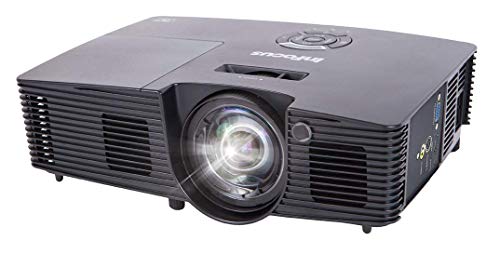
Optoma UHD51ALV True 4K UHD Smart Projector with HDR | Super Bright 3,000 Lumens | HDR10 | Works with Alexa and Google Assistant | Voice Command to Activate Projector | USB Media Streamer


Key features
- •COMPATIBLE WITH ALEXA & GOOGLE ASSISTANT: With Echo devices or Google Home, take control of the UHD51A with voice commands to power on/off, adjust volume, change inputs, and control USB media playback
- •True 4K Ultra HD: experience high-quality home cinema feel with 4K Ultra HD with 8. 3 million distinct addressable on-screen pixels, enabled by the Texas Instruments 4K UHD DLP chipset
- •HD compatible: HDR10 technology with dci-p3 wide color gamut support displays everything in the rec. 2020 colors to match Television and Film quality; also Providing brighter whites, deeper blacks, and greater color depth
- •4K video playback with the integrated USB media player. Operating Temperature-41-104°F (5-40°C), 85% max humidity
- •Ultra-sharp picture: Ultra detail technology ensures enhanced image sharpness with a higher frame rate to deliver a crystal clear picture
- •Enhanced color wheel: an RGBRGB color wheel increases the color Ratio for richer, vivid and cinematic image
BrandOptoma
CategoryVideo Projectors
ColorBlack
Warranty1-Year limited parts and labor warranty on the projector
Optoma UHD51ALV True 4K UHD Smart Projector with HDR | Super Bright 3,000 Lumens | HDR10 | Works with Alexa and Google Assistant | Voice Command to Activate Projector | USB Media Streamer
List Price: $4362.09$3925.88DEALYou Save: $436.21 (10%)
Free shippingFree Returns – 30 daysFree Order CancellationSecure Payment2–3 Days DeliveryGet It October 26, 2026In Stock (2)No marketing spamNo account requiredFulfilment by FedEx / Amazon / UPS / ShipwirePayPal / Card Buyer Protection
Customer Reviews
Reviews sourced from verified Amazon purchasers3.9
out of 5
Based on 10 reviews
5★
40%
4★
60%
3★
0%
2★
0%
1★
0%
Absolutely stunning 3D
Daniel B. Lyle✓ Verified Purchase•July 17, 2023
I have been observing carefully the 4k projector progression for years, hoping to have: 1) reasonable price (below $2,000); an enhancement of the 2K quality of 3D 1080Px2 by regards to its increased pixel projection; and 3) enhancement of the irritating 1/2 decrease in illumination of 3D versus a 2D projection. With the Optoma UHD51ALV 4K unit I received and set up yesterday, I'm delighted to say I've gotten all of that (plus of course 4K flat projection as a viewing option for UHD blu rays). 3D from this unit (projecting and viewing several different 3D discs) was absolutely stunning: (compared to my prior faithful workhorse, BenQ W1070 1080P 3D Home Theater Projector) the 1080P is more detailed, the colors more vibrant, and the picture brighter, up to a normal viewing level (versus the dusky 3D of the Benq that ones eyes would have to adjust down to). My faithul (now retired) BenQ was 2,000 lumens and this unit is 3,000 lumens, giving me a very significant increase in brightness without washing out any colors (as happens if one just tries to brighten up an image on its own). I directly compared 4K to 3D on this unit using the picture "India" that's provided as both 4K and 3D in the same offering. 4K on this unit is spectacular, with amazing crispness and detail in the smallest features. The 2K of the 3D rendering is a bit less crisp and detailed in the small features compared to the 4K, but still superior to what I've previously viewed from 1080P discs. What with the increased (to normal viewing levels) brightness while maintaining vibrant colors, the 3D from this projector is nothing less than stunning. For instance in the India documentary versus the spectacular 4K details, the 3D surrounds you and pulls you into the depths of the picture, as close to looking through a magic window at the real thing as you can get (versus seeing a flat, wonderful rendering of reality in 4K). So my point is that though this is rightly touted as an excellent 4K projector, it's ALSO a fabulous 3D projector for those of us with two working eyeballs that savor such renderings. Also please note that you need not freak out (as I almost did) when initially exploring the settings I found the 3D options missing or grayed and unresponsive. After my long search and laying down nearly $2,000 to buy this thing I had the terrible thought that I'd been sent the wrong model, one that only did 4K not 3D. But, fortunately, I decided to slap in a 3D disc and was delighted when the projector recognized the format and lit up the 3D settings for usage. Whew! Anywho, the only thing that would make this unit better is if it could render (nonexistant) 4K 3D as 8K. Actually, that's not so fantastic as I read 8K TV's are right around the corner, making it quite feasible to view a 4Kx2 3D disc! Hey, you tech geniuses, don't forget us 3D nuts! And thanks to Optoma for not leaving us behind, but giving us an even better experience as the world moves to 4K. Well done!
beautiful picture, read the manual, & be careful unwrapping
MJ✓ Verified Purchase•June 27, 2023
It deserves four out of five stars. The picture is beautiful, (sources have included a 4K Apple TV, laptop & dekstop PC's). The backlit remote is intuitive. The on-screen menu is fine. The built-in speaker is usable in a pinch. I'm amending my review after owning an Optoma UHD51A projector for over four years--long enough to replace not only the remote's battery, also the projector lamp, even having survived a move, and having encountered multiple user issues 🤦 some lessons include: be more patient, check the manual, perhaps getting it focused 100% is an unrealistic goal. This is a reliable 4K projector that I've gotten thousands of hours of use out of, (especially during the pandemic), perhaps used just a fraction of its features, and the image runs circles around my previous projector. Would happily recommend :o)
______original review below______
the picture on the UHD51A is fine, but the overall experience using this projector could best be summed up as "meh". this morning when I went to turn it on there is no picture, and this is doubly-upsetting because while peeling the plastic off of the projector while unpacking, I accidentally removed one of the stickers covering the screws--came off with minimal effort. Little stickers with super-tiny print. Somewhere there is a middle-manager that thought these were a brilliant idea. Now I've mistakenly nixed the warranty on a projector that in under a month, surprise! has no picture. Hope it's user error again.
The packaging could either be described as dodgy, since the sticker was next to the edge of one of the larger sheets of plastic to remove, or downright deceptive. Buyer beware.
______original review below______
the picture on the UHD51A is fine, but the overall experience using this projector could best be summed up as "meh". this morning when I went to turn it on there is no picture, and this is doubly-upsetting because while peeling the plastic off of the projector while unpacking, I accidentally removed one of the stickers covering the screws--came off with minimal effort. Little stickers with super-tiny print. Somewhere there is a middle-manager that thought these were a brilliant idea. Now I've mistakenly nixed the warranty on a projector that in under a month, surprise! has no picture. Hope it's user error again.
The packaging could either be described as dodgy, since the sticker was next to the edge of one of the larger sheets of plastic to remove, or downright deceptive. Buyer beware.
Huge Step Up!!!
Rob✓ Verified Purchase•May 21, 2023
I just upgraded my Mitsubishi HC4000 1080P projector after many years of use. I really enjoyed that projector, but I didn't know what I was missing! I have 110" screen and ceiling mounted at 15' using the HC4000's largest setting to fill the screen. At the same distance the Optima is on it's smallest setting. I have it in a basement with very little ambient light as the HC4000 was very sensitive to it. I DO have about a dozen bright can lights in my finished basement. I can have them on full power and the Optima will shine right through it with an absolutely stunning picture. This thing is a BEAST!
Now for the not so good... Took some fiddling to get the Wifi hooked up, and while the interface is better than the HC4000, it leaves some to be desired. They could have made it a lot simpler. I still haven't got it to work with Alexa. After trouble shooting on the phone, they sent me an update that requires 3 DIFFERENT types of USB cables and 4 steps to complete. Even if I never get Alexa to work with it, I would be completely satisfied with the PJ. Not sure what Alexa can do other than turn it on and off. Not sure spending too much time on that would be worth that functionality. Anyway, it would have gotten 5 stars if that worked out of the box, or the update was smoother.
Now for the not so good... Took some fiddling to get the Wifi hooked up, and while the interface is better than the HC4000, it leaves some to be desired. They could have made it a lot simpler. I still haven't got it to work with Alexa. After trouble shooting on the phone, they sent me an update that requires 3 DIFFERENT types of USB cables and 4 steps to complete. Even if I never get Alexa to work with it, I would be completely satisfied with the PJ. Not sure what Alexa can do other than turn it on and off. Not sure spending too much time on that would be worth that functionality. Anyway, it would have gotten 5 stars if that worked out of the box, or the update was smoother.
If you plan to use 3D a lot I recommend getting one of the brighter versions
CBH✓ Verified Purchase•May 2, 2023
I'm new to projectors so I don't have much to compare it to:
1. Picture quality: Looks amazing to me.
a. for some reason when my computer screen is off the projector goes 4096x2160, and when it's mirroring it goes 3840x2160. when the screen is 4096 it is actually wider! which is really weird! isn't the picture supposed to be 4 times 1080p pixel shifted?
b. I seem to need to adjust the focus a bit on each use. not sure why. it's a little annoying.
c. when viewing from up close bright stuff on dark stuff seems to have a colorful aura...
d. with all the problems when all is said and done when viewing the picture from viewing distance it looks sharp and crisp and I love it. I can definitely tell when I'm using a 1080p file vs a 4k file.
2. 3D: it's ok.
a. it took me 6 hours of support through amazon and optoma to get 3D working. I'm not even sure what I did to make it work.
b. the 3D option seems to be almost always greyed out. I changed everything I could about the resolution in windows and tried a billion different media players. what's constantly working is putting the laptop screen completely off, the projector screen on 4096x2160 through windows, and using powerDVD mediaplayer. for some reason MPC and VLC didn't work for me. then you need to turn on the 3D option in the projector settings and use a DLP link glasses.
c. picture is not bright enough in 3D. you'll need to be watching in a dark room or at night. so If you plan on watching a lot of 3D get the 3000/3600 versions.
2400 is enough for 4k viewing on my 100 inch screen at medium lit room
d. after the headache 3D is quite fun and looks good to me. it would probably be better if I could afford a bigger screen space.
e. I'm using pricey JmGO HGL1 and used Elephans glasses. they're all the same to me, so get the cheapest option u can I think.
4. support is an awful experience for me.
amazon support tried their best, but they have no idea what they're doing regarding projectors it seems
Optoma support takes years to respond or doesn't at all
they don't even have a paper manual because of ecological reasons... which would be ok... but at least do some startup guide with 10 pages or something! As an inexperienced user I had issues making it work.
5. ezcast (the dongle for wireless casting) is awful and useless. everything about it is the worst. I'm not gonna expend on it, just know that if you'll need casting you'll need to buy something better.
6. the picture is slightly tilted by default, and I needed to adjust the shelf/legs to make it straight. amazon support said it's normal.
overall for the price against the competition, I think I made a good buy even with all its caveats
1. Picture quality: Looks amazing to me.
a. for some reason when my computer screen is off the projector goes 4096x2160, and when it's mirroring it goes 3840x2160. when the screen is 4096 it is actually wider! which is really weird! isn't the picture supposed to be 4 times 1080p pixel shifted?
b. I seem to need to adjust the focus a bit on each use. not sure why. it's a little annoying.
c. when viewing from up close bright stuff on dark stuff seems to have a colorful aura...
d. with all the problems when all is said and done when viewing the picture from viewing distance it looks sharp and crisp and I love it. I can definitely tell when I'm using a 1080p file vs a 4k file.
2. 3D: it's ok.
a. it took me 6 hours of support through amazon and optoma to get 3D working. I'm not even sure what I did to make it work.
b. the 3D option seems to be almost always greyed out. I changed everything I could about the resolution in windows and tried a billion different media players. what's constantly working is putting the laptop screen completely off, the projector screen on 4096x2160 through windows, and using powerDVD mediaplayer. for some reason MPC and VLC didn't work for me. then you need to turn on the 3D option in the projector settings and use a DLP link glasses.
c. picture is not bright enough in 3D. you'll need to be watching in a dark room or at night. so If you plan on watching a lot of 3D get the 3000/3600 versions.
2400 is enough for 4k viewing on my 100 inch screen at medium lit room
d. after the headache 3D is quite fun and looks good to me. it would probably be better if I could afford a bigger screen space.
e. I'm using pricey JmGO HGL1 and used Elephans glasses. they're all the same to me, so get the cheapest option u can I think.
4. support is an awful experience for me.
amazon support tried their best, but they have no idea what they're doing regarding projectors it seems
Optoma support takes years to respond or doesn't at all
they don't even have a paper manual because of ecological reasons... which would be ok... but at least do some startup guide with 10 pages or something! As an inexperienced user I had issues making it work.
5. ezcast (the dongle for wireless casting) is awful and useless. everything about it is the worst. I'm not gonna expend on it, just know that if you'll need casting you'll need to buy something better.
6. the picture is slightly tilted by default, and I needed to adjust the shelf/legs to make it straight. amazon support said it's normal.
overall for the price against the competition, I think I made a good buy even with all its caveats
Happy with this projector. Finally, a 4K projector that checks all the boxes for well under $2K.
Colin Dunn✓ Verified Purchase•April 26, 2023
I ordered this projector a few weeks ago and dropped it into my system. I was excited because this was the first projector to come to market that checks all the boxes for under $2,000.
RGBRGB color wheel for accurate color reproduction? Check.
Support for HDMI 2.0 / HDCP 2.2? Check.
Support for viewing 3D Blu-ray content? Check.
Enough brightness to use outside of a bat cave? Check.
So finally, 4K arrived in my home theater. The first thing I observed is that it does have a fairly short throw and only a small degree of lens shift, so you will either have to ceiling-mount or coffee table mount. Focus is manual. No motorized "lens memory" features for fans of 2.35:1 constant image height setups. Shelf mounting at the back of the room is not likely to work in most installations.
This projector uses the 0.47" DLP chip with pixel-shifting. However, pixels do not appear to overlap when viewed up close - you can actually see the "screen door" effect if you put your face right up next to the screen. Unlike in the days of 720p projectors, no screen door effect is visible at normal viewing distances. Seeing the "screen door" up close is desirable - it means pixel-shifting DLP works and can reproduce a true 3840x2160 image, in which every pixel is individually distinguishable. It also means the optics of the lens are good enough to render high-resolution images.
After using a Panasonic PT-3000AU 3LCD projector for the last decade, this projector was a big upgrade. It throws a brighter, more vibrant image on my 120" screen. While no lamp-based projector can fully reproduce HDR content, I can say that 4K HDR content is noticeably clearer with more vibrant colors. The expanded color space of 4K HDR also made for very smooth gradients, with considerably less "banding" artifacts compared to 1080p Blu-ray on my old projector. The UHD51A uses an RGBRGB color wheel, which is best for home theater applications as it renders colors most accurately. Competing models that have higher lumen ratings (high 2000s to mid 3000s) use an RGBW wheel, but that extra brightness is lost when the projector is calibrated for accurate color reproduction. The RGBW wheel gives extra white lumens that can cut through ambient light, but I found the UHD51A's RGBRGB wheel to be bright enough to illuminate a 120" 1.1-gain screen in my living room, which is not totally light-controlled.
HDR is not rendered as well as on an OLED TV, but those are prohibitively expensive if you want a picture size over 65". The visual impact of a 120" picture is considerable. Black levels are not state of the art, but they are good enough. It's comparable to what you would experience if you went to a movie theater with digital projection. Projector users are familiar with these compromises; that aspect has not changed in the last decade.
Like all the 0.47" DLPs on the market, this projector does have a "light border" that extends past the picture area, and even past the black borders on my screen. If this bothers you, paint your screen wall a flat black to reduce this effect. I do wish TI would fix this in the 0.47" DLP light engine. A projector should not project light outside the borders of the image. But again, all 0.47" DLPs have this issue currently, so consider it when setting up your theater.
I didn't set up the Amazon Alexa features so can't comment on those. Also haven't tried 3D yet, but am looking forward to watching a 3D movie on a 120" screen.
This review may seem negative, as I pointed out some caveats and limitations. It's important to take these issues into account, and this projector may not work in every room. I did have to re-arrange my room to get this projector into my system, but it was worth the trouble. No one else offers a 4K + 3D projector for well under $2,000. It has given my theater a considerable boost in picture quality, and I finally get to enjoy 4K content the way it was meant to be seen. If, like me, you want both 4K UHD and 3D, this is the best bargain going currently.
RGBRGB color wheel for accurate color reproduction? Check.
Support for HDMI 2.0 / HDCP 2.2? Check.
Support for viewing 3D Blu-ray content? Check.
Enough brightness to use outside of a bat cave? Check.
So finally, 4K arrived in my home theater. The first thing I observed is that it does have a fairly short throw and only a small degree of lens shift, so you will either have to ceiling-mount or coffee table mount. Focus is manual. No motorized "lens memory" features for fans of 2.35:1 constant image height setups. Shelf mounting at the back of the room is not likely to work in most installations.
This projector uses the 0.47" DLP chip with pixel-shifting. However, pixels do not appear to overlap when viewed up close - you can actually see the "screen door" effect if you put your face right up next to the screen. Unlike in the days of 720p projectors, no screen door effect is visible at normal viewing distances. Seeing the "screen door" up close is desirable - it means pixel-shifting DLP works and can reproduce a true 3840x2160 image, in which every pixel is individually distinguishable. It also means the optics of the lens are good enough to render high-resolution images.
After using a Panasonic PT-3000AU 3LCD projector for the last decade, this projector was a big upgrade. It throws a brighter, more vibrant image on my 120" screen. While no lamp-based projector can fully reproduce HDR content, I can say that 4K HDR content is noticeably clearer with more vibrant colors. The expanded color space of 4K HDR also made for very smooth gradients, with considerably less "banding" artifacts compared to 1080p Blu-ray on my old projector. The UHD51A uses an RGBRGB color wheel, which is best for home theater applications as it renders colors most accurately. Competing models that have higher lumen ratings (high 2000s to mid 3000s) use an RGBW wheel, but that extra brightness is lost when the projector is calibrated for accurate color reproduction. The RGBW wheel gives extra white lumens that can cut through ambient light, but I found the UHD51A's RGBRGB wheel to be bright enough to illuminate a 120" 1.1-gain screen in my living room, which is not totally light-controlled.
HDR is not rendered as well as on an OLED TV, but those are prohibitively expensive if you want a picture size over 65". The visual impact of a 120" picture is considerable. Black levels are not state of the art, but they are good enough. It's comparable to what you would experience if you went to a movie theater with digital projection. Projector users are familiar with these compromises; that aspect has not changed in the last decade.
Like all the 0.47" DLPs on the market, this projector does have a "light border" that extends past the picture area, and even past the black borders on my screen. If this bothers you, paint your screen wall a flat black to reduce this effect. I do wish TI would fix this in the 0.47" DLP light engine. A projector should not project light outside the borders of the image. But again, all 0.47" DLPs have this issue currently, so consider it when setting up your theater.
I didn't set up the Amazon Alexa features so can't comment on those. Also haven't tried 3D yet, but am looking forward to watching a 3D movie on a 120" screen.
This review may seem negative, as I pointed out some caveats and limitations. It's important to take these issues into account, and this projector may not work in every room. I did have to re-arrange my room to get this projector into my system, but it was worth the trouble. No one else offers a 4K + 3D projector for well under $2,000. It has given my theater a considerable boost in picture quality, and I finally get to enjoy 4K content the way it was meant to be seen. If, like me, you want both 4K UHD and 3D, this is the best bargain going currently.
Page 1 of 2