ElecGear Replacement Internal Cooling Fan for PS4 Slim CUH-2xxx – CPU Heatsink Cooler, Arctic MX-2 Thermal Compound Paste, TR8 Torx Security, PH00 Screwdriver Repair Tool Kit for PlayStation 4 Slim


Key features
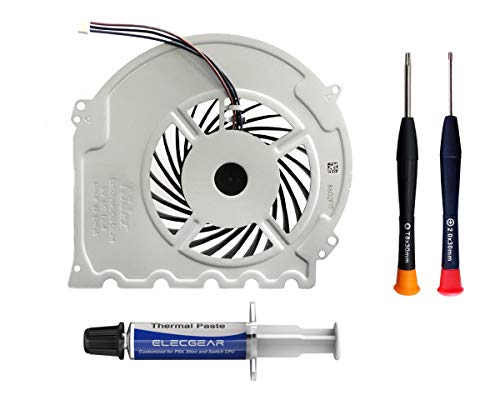
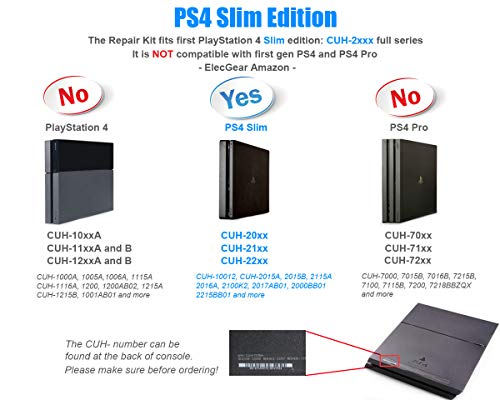
- •PS4 Slim Replacement internal CPU cooling fan - Nidec G85G12MS1AN-56J14 for Sony PlayStation 4 Slim console. Interchangeable with G85G12MS1CN-56J14 and Delta KSB0912HD. Compatible with PS4 Slim edition with model number ✅CUH-20xx, ✅CUH-21xx and ✅CUH-22xx
- •Brand-new, Sony authentic and 100% tested in perfect working condition; 3Pin DC12V PWM power plug (fit both small and big plug); Well wrapped in industrial EPE protective bag and box. Repair tutorial is offered on ElecGear web site
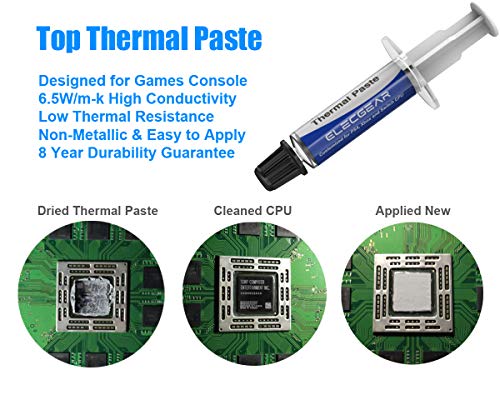
- •Arctic MX-2 thermal compound paste is included to totally solve the noise problem of PS4 SLIM. This is the ideal CPU heatsink grease, tested and selected with high thermal conductivity, low thermal resistance, metal-free, non-bleeding and 8 year durability
- •TR8 Torx Security (T8 tamper proof screwdriver) and Phillips #00 cross screwdriver repair tool kit are included for console teardown and assembly operation
- •Packaging: 1* Nidec G85G12MS1AN-56J14; 1*Arctic MX-2 (4-gram 2019 edition); 1*TR8 Torx Security screwdriver; 1*PH00 screwdriver. (Be noticed: This model is NOT compatible with first generation of ❌PS4 CUH-1xxx or ❌PS4 PRO CUH-7xxx. Please check our shop for other two models.)
ElecGear Replacement Internal Cooling Fan for PS4 Slim CUH-2xxx – CPU Heatsink Cooler, Arctic MX-2 Thermal Compound Paste, TR8 Torx Security, PH00 Screwdriver Repair Tool Kit for PlayStation 4 Slim
List Price: $38.64$34.78DEALYou Save: $3.86 (10%)
Free shippingFree Returns – 30 daysFree Order CancellationSecure Payment2–3 Days DeliveryGet It October 26, 2026In Stock (1)No marketing spamNo account requiredFulfilment by FedEx / Amazon / UPS / ShipwirePayPal / Card Buyer Protection
Customer Reviews
Reviews sourced from verified Amazon purchasers4.6
out of 5
Based on 10 reviews
5★
90%
4★
10%
3★
0%
2★
0%
1★
0%
The Best Upgrade
Scott✓ Verified Purchase•December 18, 2023
My ps4 pro was constantly running hot and I had to have an additional fan blowing over the console. Since cleaning the original thermal paste and reapplying a new thick layer. The new fan runs so quiet I can't even hear the console anymore. It never feels warm to the touch like it used to as well. 5 stars well deserved!
Ps4 pro
Will Marks✓ Verified Purchase•October 27, 2023
Works great and quite
Working great
Mr.todd✓ Verified Purchase•October 14, 2023
Got this new fan quickly and had it installed that night. The tools were exactly what I needed and it runs much quieter than the old. I'm hoping it will last longer than the older one did.
It worked.
MrKemak✓ Verified Purchase•October 7, 2023
Used this on my PS4 Pro Destiny 2 edition that had been running loud with a really annoying whine.
The screwdrivers worked well and the fan is nice and quiet.
When running at full speed it's loud but doesn't have the whine that the stock one had.
And the only reason it ran at full speed was cos I screwed up the thermal paste first time.
With that done correctly it's been quiet.
For others looking to do this:
I watched a couple of teardown videos to see how do it. Mostly it's a lot of unscrewing things, keep track of the screws and where they should go.
Biggest issues I had were getting the case apart and the internal power connector.
For whatever reason the case on mine needed a LOT of force to pry apart. I ended up giving it a couple of sideways taps with rubber mallet and that seemed to free it up.
The thin 4 wire power connector was stuck, possibly even glued in at both ends.
In the teardown videos, I saw the guys just quickly pop it off without issue.
Mine started to disintegrate as I tried to use pliers.
In the end I just left it connected and unscrewed everything I could.
I was able to rotate the main board enough to get the fan out and the new one in and then put on the thermal paste.
Initially I used a thermal pad from another vendor and that didn't work out. Not sure if it was too thick or I didn't tighten the heatsink down enough, but the PS4 went into full speed fan mode when turned on.
I took the pad out, cleaned it all up and then used 5 small blobs of the supplied paste.
That seemed to work and it's been quiet so far.
The screwdrivers worked well and the fan is nice and quiet.
When running at full speed it's loud but doesn't have the whine that the stock one had.
And the only reason it ran at full speed was cos I screwed up the thermal paste first time.
With that done correctly it's been quiet.
For others looking to do this:
I watched a couple of teardown videos to see how do it. Mostly it's a lot of unscrewing things, keep track of the screws and where they should go.
Biggest issues I had were getting the case apart and the internal power connector.
For whatever reason the case on mine needed a LOT of force to pry apart. I ended up giving it a couple of sideways taps with rubber mallet and that seemed to free it up.
The thin 4 wire power connector was stuck, possibly even glued in at both ends.
In the teardown videos, I saw the guys just quickly pop it off without issue.
Mine started to disintegrate as I tried to use pliers.
In the end I just left it connected and unscrewed everything I could.
I was able to rotate the main board enough to get the fan out and the new one in and then put on the thermal paste.
Initially I used a thermal pad from another vendor and that didn't work out. Not sure if it was too thick or I didn't tighten the heatsink down enough, but the PS4 went into full speed fan mode when turned on.
I took the pad out, cleaned it all up and then used 5 small blobs of the supplied paste.
That seemed to work and it's been quiet so far.
Original Nidec replacement.
Manny ✓ Verified Purchase•October 3, 2023
Genuine Nidec fan, not very difficult to replace. Just becareful when pulling out the fan, i pulled too hard and accidentally cut off 2 of the 3 wires that power the fan. Which is why i ordered this one to replace the damaged fan.
Page 1 of 2