Celestron – Smartphone Adapter for Telescope, Binoculars & Spotting Scopes – Capture Images & Video Through Your Optics – Simple, Durable, Metal Body - Compact and Travel-Friendly


Key features
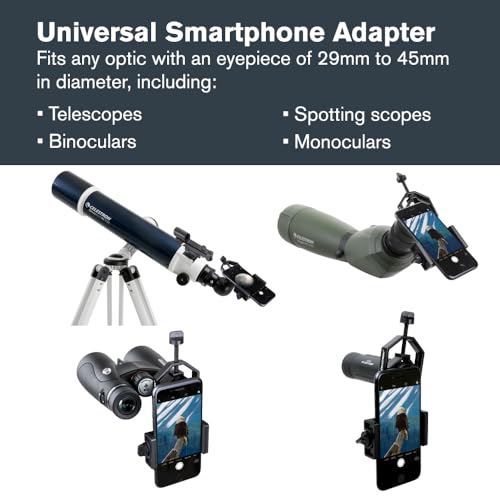
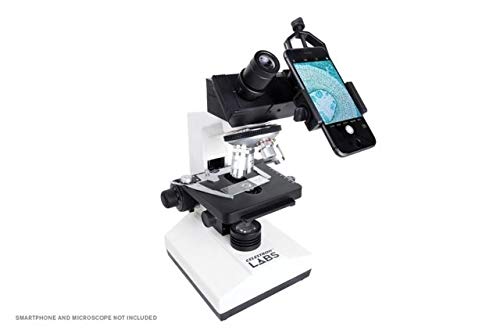
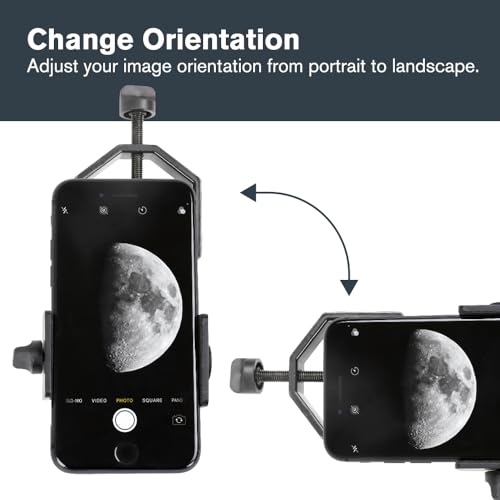
- •This smartphone Adapter connects your smartphone to a telescope, binocular, spotting scope, or microscope, so you can capture images and video through the eyepiece.
- •Works with most smartphone devices.
- •Compatible with Most telescope eyepieces and any eyepiece with an outside diameter measuring from 29mm to 45mm.
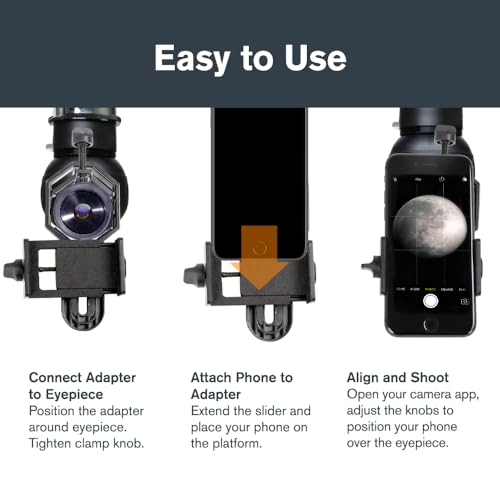
- •Simple to use! Place your phone in the adapter, center your phone's camera over the eyepiece, and use the knobs to secure the Adapter in place.
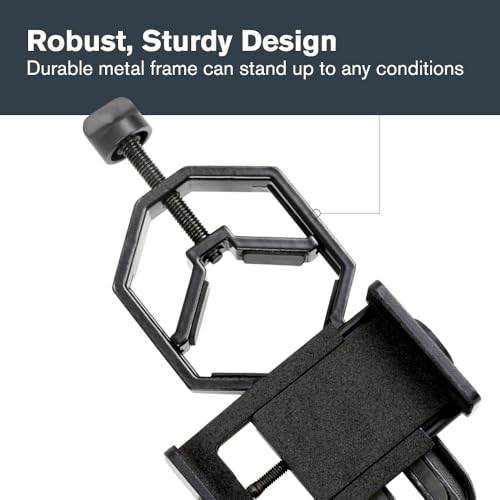
- •Durable, metal bodied adapter stands up to rigorous use in the field and harsh weather conditions.
Celestron – Smartphone Adapter for Telescope, Binoculars & Spotting Scopes – Capture Images & Video Through Your Optics – Simple, Durable, Metal Body - Compact and Travel-Friendly
List Price: $36.58$32.92DEALYou Save: $3.66 (10%)
Free shippingFree Returns – 30 daysFree Order CancellationSecure Payment2–3 Days DeliveryGet It October 26, 2026In Stock (5)No marketing spamNo account requiredFulfilment by FedEx / Amazon / UPS / ShipwirePayPal / Card Buyer Protection
Customer Reviews
Reviews sourced from verified Amazon purchasers4.0
out of 5
Based on 10 reviews
5★
50%
4★
50%
3★
0%
2★
0%
1★
0%
Works but can take some effort
Steve✓ Verified Purchase•March 5, 2024
It took me a little while to get this to work. I finally found that if attach my phone to the adapter, then I remove the lens from the telescope and put it in the adapter and then line up my phone using daylight in order to judge the alignment (don't do this at night), I got much better results. There was still the issue of distance of camera to lens. Sometimes I got a small circle and sometimes large and moving closer to lens did not always give the larger view.
I also ran into an issue with weight. I have an equatorial mount. Once I attached the phone and adapter to the telescope the balance was off. So, I practiced during the day. Lined up phone on adapter, attached to telescope, rebalanced and aimed using a combination of the phone screen and eyepiece. At night, this didn't work quite as well. The moon was pretty easy, but planets were dark and tough to get into view. Once there is wasn't tough to keep them in view, but very frustrating finding Saturn on that view screen. But that isn't really the adapters fault. A cell phone is not exactly the best lowlight camera. And a 20mm lens doesn't give great field of view width.
But I was able to get it done. I got good shots of the moon (though still working on getting more of the moon in view - a larger field of vision lens would help - maybe 25mm or larger). I got Jupiter and its moons, but with some blur as the earth is moving. I got Saturn and if you zoom the image, you can see some rings, but again a slight blur.
I also bought a remote camera device that connects using bluetooth to the phone. This way I am not shaking the telescope every time I press the camera button (I also tried voice control which worked well).
There is a limit to the width of the phone that fits. My Galaxy S7 had no problem and I quick tried an iPhone 10. Both easily fit in. Location of the lens is not an issue as the adapter can swivel to get to the correct location.
Overall, this is not a connect and it works type of device. You have to practice. But it does work and aligning the camera to lens is not difficult using this adapter.
I also ran into an issue with weight. I have an equatorial mount. Once I attached the phone and adapter to the telescope the balance was off. So, I practiced during the day. Lined up phone on adapter, attached to telescope, rebalanced and aimed using a combination of the phone screen and eyepiece. At night, this didn't work quite as well. The moon was pretty easy, but planets were dark and tough to get into view. Once there is wasn't tough to keep them in view, but very frustrating finding Saturn on that view screen. But that isn't really the adapters fault. A cell phone is not exactly the best lowlight camera. And a 20mm lens doesn't give great field of view width.
But I was able to get it done. I got good shots of the moon (though still working on getting more of the moon in view - a larger field of vision lens would help - maybe 25mm or larger). I got Jupiter and its moons, but with some blur as the earth is moving. I got Saturn and if you zoom the image, you can see some rings, but again a slight blur.
I also bought a remote camera device that connects using bluetooth to the phone. This way I am not shaking the telescope every time I press the camera button (I also tried voice control which worked well).
There is a limit to the width of the phone that fits. My Galaxy S7 had no problem and I quick tried an iPhone 10. Both easily fit in. Location of the lens is not an issue as the adapter can swivel to get to the correct location.
Overall, this is not a connect and it works type of device. You have to practice. But it does work and aligning the camera to lens is not difficult using this adapter.
This Looks good.
spike✓ Verified Purchase•March 5, 2024
I haven't tried this yet. It looks like it's a good sturdy tool made of steel.
A Bit Clumsy, but Works Well
JeffNJ✓ Verified Purchase•February 27, 2024
Sturdy and well built. The clamp screws are good quality and easy to turn and access. Can be a bit clumsy to get the smartphone centered on the eyepiece. It requires the phone to be slid up and down to center on the eyepiece, but also twisted left and right. So, this means fiddling with three screws, the phone clamp, the eyepiece clamp, and phone rotational clamp.
Works great, just a bit of wiggle
Amazon Customer✓ Verified Purchase•February 17, 2024
I would recommend this product as it does work and I have had fun testing it out and getting pictures with it. The only true negative I have is while it is clamped on there is a bit more wiggle than I would prefer which can make it hard to get a great picture, but does not make it impossible.
Product was very simple to figure out and get installed so I could begin using it.
Product was very simple to figure out and get installed so I could begin using it.
Está bien, hace el trabajo.
J S✓ Verified Purchase•February 12, 2024
Leà muchas reseñas, de todas las calificaciones, hoy recibà el adaptador y puedo afirmar:
- Funciona para la mayorÃa de móviles, sin importar si la cámara está a la izquierda, al centro o a la derecha. Muchas opiniones decÃan que para cámaras ubicadas al centro no funcionaba, falso, si funciona.
- No es difÃcil de configurar, con anterioridad vi un video de un compatriota colombiano que me dio las pautas principales a tener en cuenta. 1. Verificar cual es la cámara principal del móvil, 2. de dÃa enfocar con el telescopio un punto medianamente lejano, 3- quitar el ocular e instalarlo en el adaptador, 4- poner el móvil en el adaptador y asegurarlo sin afectar botones del móvil. 5- Luego encender la cámara y mover el brazo del adaptador con el móvil instalado hasta cuando en la pantalla del móvil aparezca un circulo perfecto y blanco, en ese punto asegurar el brazo del adaptador con el perno correspondiente. 6- Colocar el conjunto, adaptador y móvil, en el telescopio. Funciona. Mi primera foto, faltó foco, otra recomendación del video es hacer esto de dÃa, lo hice de noche.
- Muchas reseñas negativas hablaban del problema del perno que asegura el móvil al adaptador, se rompÃa a la primera, yo estaba prevenido y lo aseguré con cuidado, no se rompió y estaré pendiente a ver como se desempeña en el futuro.
En resumen me parece un buen producto, no es perfecto, las soluciones más profesionales son considerablemente más costosas y es adecuado como un primer paso hacia la astrofotografÃa.
Desde el hermoso Caribe colombiano feliz noche.
- Funciona para la mayorÃa de móviles, sin importar si la cámara está a la izquierda, al centro o a la derecha. Muchas opiniones decÃan que para cámaras ubicadas al centro no funcionaba, falso, si funciona.
- No es difÃcil de configurar, con anterioridad vi un video de un compatriota colombiano que me dio las pautas principales a tener en cuenta. 1. Verificar cual es la cámara principal del móvil, 2. de dÃa enfocar con el telescopio un punto medianamente lejano, 3- quitar el ocular e instalarlo en el adaptador, 4- poner el móvil en el adaptador y asegurarlo sin afectar botones del móvil. 5- Luego encender la cámara y mover el brazo del adaptador con el móvil instalado hasta cuando en la pantalla del móvil aparezca un circulo perfecto y blanco, en ese punto asegurar el brazo del adaptador con el perno correspondiente. 6- Colocar el conjunto, adaptador y móvil, en el telescopio. Funciona. Mi primera foto, faltó foco, otra recomendación del video es hacer esto de dÃa, lo hice de noche.
- Muchas reseñas negativas hablaban del problema del perno que asegura el móvil al adaptador, se rompÃa a la primera, yo estaba prevenido y lo aseguré con cuidado, no se rompió y estaré pendiente a ver como se desempeña en el futuro.
En resumen me parece un buen producto, no es perfecto, las soluciones más profesionales son considerablemente más costosas y es adecuado como un primer paso hacia la astrofotografÃa.
Desde el hermoso Caribe colombiano feliz noche.
Page 1 of 2


