Koolertron One Handed Macro Mechanical Keyboard, Portable Mini One-Handed Mechanical Gaming Keypad 23 Fully Programmable Keys (RGB Backlit/Blue switches)


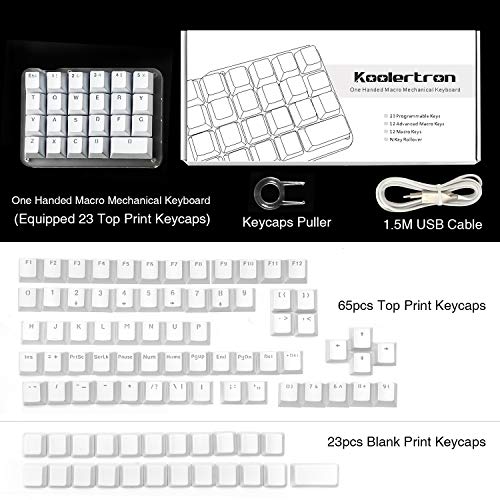

Key features
- •【All 23 Keys Programmable】All keys can be programmable. The custom programmable key functions include regular 127 buttons, web navigation buttons, 19 multimedia shortcuts, keyboard locks, Windows locks, etc. Each button can be set to any of these buttons.
- •【All Macro Keys】There are 16 macro function buttons. Macro functions can be used in series and can support up to 349 key commands, which can meet various complex usage scenarios, Such as: office/wps and other office software shortcuts, CAD/Ae/Pr/Ps shortcuts, various user accounts and passwords, game quick tricks, basic code for programmers. For example, setting a button triggers "ctrl+a 0.5s ctrl+c 0.5s ctrl+v" etc a series of operations
- •【4-Layer Custom Configurations】 Built-in MCU, after keyboard keys be set up, it can be stored in keyboard's MCU, and no need reset the keyboard even replace the computer. Can save 4-layer of configurations to handle multiple usage scenarios. Perfect not only for gamers but also for so many other types of users including designers and video editors
- •【Portable Mini Keypad】Portable Mini keypad,5"x 3.5" x 1.2" ultra-small size, effectively saves desktop space. Detachable USB cable. You can connect the keypad (plug and play) and a 104-key keyboard with the same computer at the same time, they will not interfere with each other.
- •【RGB Backlight Keyboard】RGB backlight can be customized to the player's desired color. The backlight brightness can be adjusted/turned off. Dynamic effects can be summarized into 8, each dynamic light effect can be adjusted to 3 different speeds; In addition, you can adjust 30 levels of brightness, 32 levels of saturation, and 32 different colors (including 32 static monochrome and 32 static color) in the light effect.(NOTE: there is no support for using HUB)
- •Note: Please download the latest version of the keyboard configuration software according to the website: (If you have any problems, please tell us in time)Windows--https://product_manual.s3.us-east-1.amazonaws.com/MYKB.zip . Mac OS--https://product_manual.s3.us-east-1.amazonaws.com/MYKB_For_MacOS.zip .
Koolertron One Handed Macro Mechanical Keyboard, Portable Mini One-Handed Mechanical Gaming Keypad 23 Fully Programmable Keys (RGB Backlit/Blue switches)
List Price: $105.91$95.32DEALYou Save: $10.59 (10%)
Free shippingFree Returns – 30 daysFree Order CancellationSecure Payment2–3 Days DeliveryGet It October 24, 2026In Stock (1)No marketing spamNo account requiredFulfilment by FedEx / Amazon / UPS / ShipwirePayPal / Card Buyer Protection
Customer Reviews
Reviews sourced from verified Amazon purchasers4.1
out of 5
Based on 10 reviews
5★
20%
4★
80%
3★
0%
2★
0%
1★
0%
Great build quality but disappointing implementation.
Futski✓ Verified Purchase•October 7, 2023
Refers to Koolerton 23 Key keyboard (Blue Backlight / Red Switchs)
this is really a mixed review. There's a lot to like here and this might be perfect for some applications. But in my case, there are a lot of down sides too.
Lets start with the things I like
1) Excellent build quality. Feels solid. Worked perfectly out of the box. A+ here.
2) Very high quality USB cable came with it. Another A+
3) There are 4 layers, so in reality you can map up to 96 different keys (23 x 4).
4) Full set of Black keyboard keys with transparent letters, perfect for the backlit keys
5) 23 extra blank white keys.
6) Included keycap puller
7) Actual usable instruction pamphlet included with it. Who does that these days! Very nice touch. Like it.
8) Software worked well (on an up-to-date Win 10), no problems running it and connecting to the Keypad.
9) Running the software on 2 PC is possible. When moving the keypad to the other PC, just connecting to the keypad will download the config from the keypad into the software for changes. No need to transfer config files from one PC to another.
Now for the list of things I didn't like (or could use improvement):
1) The software for programming the keyboard is a little quirky but nothing too difficult to figure out with just a little trial and error.
2) Clicking the "Upload" to keypad button only uploads the section you're working on. ie. changing the keymapping upload will not upload the macros. You need to upload those separately. Just a quirk to learn
3) Each key can be programmed with either a single keystroke or a macro. By single keystroke, I mean one key-press. If you want to do a combination keystroke, like Win+L, that's 2 keystrokes. Tp do that you need to use macros.
4) You can assign a "Macro" to a key press. But you're limited to only 24 macros. For your macros, 12 of them are "Quick Macros" limited to 24 chars max. And 12 are "Custom Macros" which are limited to 42 chars. Remember, pressing Shift, Ctrl, Alt, or Win key modifiers consume one of your precious few characters.
5) Remember, with the 4 layers, you really have 92 programmable keys but only 24 macros. That limits the usefulness of the keyboard as the remaining 69 keys will need to be single keys, same as on your normal keyboard.
6) Given the limited size of each macro (24 or 42 chars) and only having 24 macros available, the usefulness is limited.
7) Macros can contain other imbedded macros, so you could work-around the 24 or 42 char limit, but you'd be using more of your precious few macros.
My intent was to store fairly long strings of frequently repeated keystrokes. This is just to limiting for that.
Things for improvement:
1) Increase the size limit on the macros to at least 100 chars.
2) Increase the number of macros available. 92 sounds like a good number :)
3) One missing feature that would be nice to have in the software is a Macro recorder. Would be nice to have it record my keystrokes as I work instead of making me enter a series of keystrokes manually.
So there you have it. Its a well built solid product. But has a lot of drawbacks when it comes to taking full advantage of an otherwise excellent product.
** Update 1 **
I noticed a weird quirk. If Caps Lock is set ON on your main keyboard, the Caps Lock will also apply to any key or macro on this keypad as well. Kind of defeats the purpose, especially if you have passwords stored on this keypad.
this is really a mixed review. There's a lot to like here and this might be perfect for some applications. But in my case, there are a lot of down sides too.
Lets start with the things I like
1) Excellent build quality. Feels solid. Worked perfectly out of the box. A+ here.
2) Very high quality USB cable came with it. Another A+
3) There are 4 layers, so in reality you can map up to 96 different keys (23 x 4).
4) Full set of Black keyboard keys with transparent letters, perfect for the backlit keys
5) 23 extra blank white keys.
6) Included keycap puller
7) Actual usable instruction pamphlet included with it. Who does that these days! Very nice touch. Like it.
8) Software worked well (on an up-to-date Win 10), no problems running it and connecting to the Keypad.
9) Running the software on 2 PC is possible. When moving the keypad to the other PC, just connecting to the keypad will download the config from the keypad into the software for changes. No need to transfer config files from one PC to another.
Now for the list of things I didn't like (or could use improvement):
1) The software for programming the keyboard is a little quirky but nothing too difficult to figure out with just a little trial and error.
2) Clicking the "Upload" to keypad button only uploads the section you're working on. ie. changing the keymapping upload will not upload the macros. You need to upload those separately. Just a quirk to learn
3) Each key can be programmed with either a single keystroke or a macro. By single keystroke, I mean one key-press. If you want to do a combination keystroke, like Win+L, that's 2 keystrokes. Tp do that you need to use macros.
4) You can assign a "Macro" to a key press. But you're limited to only 24 macros. For your macros, 12 of them are "Quick Macros" limited to 24 chars max. And 12 are "Custom Macros" which are limited to 42 chars. Remember, pressing Shift, Ctrl, Alt, or Win key modifiers consume one of your precious few characters.
5) Remember, with the 4 layers, you really have 92 programmable keys but only 24 macros. That limits the usefulness of the keyboard as the remaining 69 keys will need to be single keys, same as on your normal keyboard.
6) Given the limited size of each macro (24 or 42 chars) and only having 24 macros available, the usefulness is limited.
7) Macros can contain other imbedded macros, so you could work-around the 24 or 42 char limit, but you'd be using more of your precious few macros.
My intent was to store fairly long strings of frequently repeated keystrokes. This is just to limiting for that.
Things for improvement:
1) Increase the size limit on the macros to at least 100 chars.
2) Increase the number of macros available. 92 sounds like a good number :)
3) One missing feature that would be nice to have in the software is a Macro recorder. Would be nice to have it record my keystrokes as I work instead of making me enter a series of keystrokes manually.
So there you have it. Its a well built solid product. But has a lot of drawbacks when it comes to taking full advantage of an otherwise excellent product.
** Update 1 **
I noticed a weird quirk. If Caps Lock is set ON on your main keyboard, the Caps Lock will also apply to any key or macro on this keypad as well. Kind of defeats the purpose, especially if you have passwords stored on this keypad.
My favorite setup gadget! Perfect for productivity or gaming
qbin✓ Verified Purchase•September 26, 2023
As a mechanical keyboard enthusiast, this thing is the perfect sidekick! For regular PC usage I leave it locked on a certain layer to use as a nav cluster, and for gaming I move my keyboard so that I have just the keypad and mouse in front of me to utilize the full space of my mousemat. It's pretty fun being able to whip my mouse around without worrying about crashing into my keyboard! I imagine it would also be super useful to map keyboard shortcuts for photo/video editing.
There are a generous total of 4 fully programmable layers, with every key being addressable per layer. For users of custom keyboards, like 60%s running QMK, it should be completely intuitive to be able to shift up and down layers. One handy feature is the ability to "lock" (toggle) a layer, so it stays active without holding the Fn key. Macros are simple enough to work with, just remember which macro is which because you can't rename them. Also as other reviews have stated, you may have to split keypresses into up and down if the macro involves holding a key down while pressing others.
RGB is SUPER bright. The LEDs themselves are brighter than any of my other keyboards, and it is only further amplified by the acrylic case and white keycaps. Customization is limited, with the only animated modes being breathing, blinking, and a rainbow wave, but you can at least choose what colors to go through. You can also set it to change to a certain color when an Fn layer is locked.
Included in the packaging are what appears to be a full set of white doubleshot keycaps, as well enough extra blank keycaps to cover each key. Honestly, my only complaint at all is with the Outemu Red switches. They're scratchy, have crunchy springs, and the bottom out feels mushy. However this doesn't have to be an issue if it really bothers you, as you can always just desolder and put in new switches. I personally installed holtites for my WASD keys to make them hotswappable, since those are the only keys that I would really care how they feel, and Kailh Box Reds are an infinity% improvement (just note that you'll need switches with the big rectangular LED cutout because the SMD LEDs protrude from the PCB).
I have not had a single issue with the hardware or software; it worked right when first plugged in without having to fiddle with any drivers, every switch works, and every key does exactly what I program it to. Finally, the value for this little keypad is amazing! You get better programmability than the ones from Razer/Logitech at like half the price, and I'd argue that this one has the best form factor as just a slice of a keyboard instead of a literal numpad or some terrible claw shape. If you're in the market for a keypad there's no reason to look elsewhere!
There are a generous total of 4 fully programmable layers, with every key being addressable per layer. For users of custom keyboards, like 60%s running QMK, it should be completely intuitive to be able to shift up and down layers. One handy feature is the ability to "lock" (toggle) a layer, so it stays active without holding the Fn key. Macros are simple enough to work with, just remember which macro is which because you can't rename them. Also as other reviews have stated, you may have to split keypresses into up and down if the macro involves holding a key down while pressing others.
RGB is SUPER bright. The LEDs themselves are brighter than any of my other keyboards, and it is only further amplified by the acrylic case and white keycaps. Customization is limited, with the only animated modes being breathing, blinking, and a rainbow wave, but you can at least choose what colors to go through. You can also set it to change to a certain color when an Fn layer is locked.
Included in the packaging are what appears to be a full set of white doubleshot keycaps, as well enough extra blank keycaps to cover each key. Honestly, my only complaint at all is with the Outemu Red switches. They're scratchy, have crunchy springs, and the bottom out feels mushy. However this doesn't have to be an issue if it really bothers you, as you can always just desolder and put in new switches. I personally installed holtites for my WASD keys to make them hotswappable, since those are the only keys that I would really care how they feel, and Kailh Box Reds are an infinity% improvement (just note that you'll need switches with the big rectangular LED cutout because the SMD LEDs protrude from the PCB).
I have not had a single issue with the hardware or software; it worked right when first plugged in without having to fiddle with any drivers, every switch works, and every key does exactly what I program it to. Finally, the value for this little keypad is amazing! You get better programmability than the ones from Razer/Logitech at like half the price, and I'd argue that this one has the best form factor as just a slice of a keyboard instead of a literal numpad or some terrible claw shape. If you're in the market for a keypad there's no reason to look elsewhere!
Potentially The Best
Amazon Customer✓ Verified Purchase•September 13, 2023
Bought this to replace my Razer Tartarus v2, because honestly I dislike Razer peripherals, but they absolutely own the "Gaming Keypad" market.
The device itself: A+, 5 stars. It is great quality, feels great, looks great, durable, great keys, and the number of keys just feels perfect for my hand. Everything about the device is perfect in my opinion.
The software: This is where this thing loses a star for me. The software is just an executable, that modifies onboard settings for the device, which has it's own perks. Moving between computers is effortless. Plug and play. The downside to this though, is there's hard limitations on the customizability of the device. If you just want a standard layout, where you can remap your keys, do a couple macros possibly, then great, this is for you. HOWEVER, if you're looking for the ability to have a bunch of profiles that you can switch between, so every game can have different keybinds, then this thing is not for you. You can do a workaround so that you can KIND OF have 3 profiles, and switch between them using a key, but it feels real funky. My Razer Tartarus has 10 different profiles for different games, that all have different key mapping, so now only having 3 is doable, but not ideal.
TL:DR; If they ever make software for this device that lets you manage multiple profiles and vastly increase the amount of macros, then this will be the best gaming keypad on the market by a decent margin, but until then it has limitations for anyone that wants to switch between more than 3 layouts.
The device itself: A+, 5 stars. It is great quality, feels great, looks great, durable, great keys, and the number of keys just feels perfect for my hand. Everything about the device is perfect in my opinion.
The software: This is where this thing loses a star for me. The software is just an executable, that modifies onboard settings for the device, which has it's own perks. Moving between computers is effortless. Plug and play. The downside to this though, is there's hard limitations on the customizability of the device. If you just want a standard layout, where you can remap your keys, do a couple macros possibly, then great, this is for you. HOWEVER, if you're looking for the ability to have a bunch of profiles that you can switch between, so every game can have different keybinds, then this thing is not for you. You can do a workaround so that you can KIND OF have 3 profiles, and switch between them using a key, but it feels real funky. My Razer Tartarus has 10 different profiles for different games, that all have different key mapping, so now only having 3 is doable, but not ideal.
TL:DR; If they ever make software for this device that lets you manage multiple profiles and vastly increase the amount of macros, then this will be the best gaming keypad on the market by a decent margin, but until then it has limitations for anyone that wants to switch between more than 3 layouts.
Great for Animation and 3D modeling!
Sydney✓ Verified Purchase•August 15, 2023
The media could not be loaded. I work a lot in Autodesk Maya and this plays very well with it! This keyboard is by far one of the best upgrades to my workspace yet and my wrist has been in less pain/discomfort. No more reaching across the laptop keyboard to hit buttons! I also, use a wrist/elbow wrest so my hand is more level with the keyboard.
Quality wise, the build of the keyboard is really nice. I'm not really into all the nuances of mechanical keyboards, though I'll say it feels nice when pressing the keys down and it sounds nice too. The key cap puller tends to scratch the sides of the key caps when putting it on and taking off, not too noticeably though.
The keycaps themselves could be better. The extra black ones in the bag are not printed very well and sometimes difficult to read. Also I don't really like the angles on the keys because it makes it difficult to swap them around without it looking weird. They also vary in size. (see photos)
The AMAG software has a small learning curve and I recommend watching the video to set yours up. Only thing I've yet to figure out, is how to setup the different layers.
Overall a great keyboard for the lower price and a great upgrade for ergonomics!
Quality wise, the build of the keyboard is really nice. I'm not really into all the nuances of mechanical keyboards, though I'll say it feels nice when pressing the keys down and it sounds nice too. The key cap puller tends to scratch the sides of the key caps when putting it on and taking off, not too noticeably though.
The keycaps themselves could be better. The extra black ones in the bag are not printed very well and sometimes difficult to read. Also I don't really like the angles on the keys because it makes it difficult to swap them around without it looking weird. They also vary in size. (see photos)
The AMAG software has a small learning curve and I recommend watching the video to set yours up. Only thing I've yet to figure out, is how to setup the different layers.
Overall a great keyboard for the lower price and a great upgrade for ergonomics!
Works With Windows Media Center and does a lot more
JK in CA✓ Verified Purchase•August 1, 2023
Believe it or not but I still have a machine that runs Windows 7 because I love to use Windows Media Center as my DVR for cable TV. The one downside to WMC is that it has inconvenient keyboard shortcuts so you can't go zipping around the interface very easily when watching videos. However, with the Koolertron keypad, you can program those awkward shortcuts so they can be executed with a single keystroke. Note that I programmed the keypad using a Windows 10 machine but the keypad still works on a Windows 7 machine, so it is truly portable.
I also use this for PowerDVD when watching Blu-Rays because it too requires multi-key shortcuts to do navigation.
I also use alternate character sets when typing documents. Nothing slows my typing down more than having to hold the Alt key down followed by typing 4 digits on the keyboard numpad to get an "a" with particular accent marker, or an "n" with a tilda. Now that I have the Koolertron, I can program these characters so they can be executed with a single keystroke. What a timesaver!
Just to clear up some confusion about the use of Layers on this keypad: this keypad does have 4 layers, meaning you can technically program 4 x 23 = 92 keys. However, since you need some keys to navigate between layers, you really only have 20 keys per layer. And lastly, one of the layers requires you to press an "FN" key along with another key to execute a command. So I never use that layer because my whole reason for buying this keypad was to avoid multi-key typing. So for me, I have 3 x 20 = 60 keys available for programming which is plenty considering you can only program 24 macros total.
I do wish Koolertron would produce a new version that had more than 24 total macros. I would be willing to pay double for a keypad that had 48 total macros. I get around this current limitation by saving different configurations to .hex files (this is a great feature of this keypad) and loading the one with the macros I need for the task at hand. But it would be nicer not having to keep track of what macro was on what configuration file.
I also use this for PowerDVD when watching Blu-Rays because it too requires multi-key shortcuts to do navigation.
I also use alternate character sets when typing documents. Nothing slows my typing down more than having to hold the Alt key down followed by typing 4 digits on the keyboard numpad to get an "a" with particular accent marker, or an "n" with a tilda. Now that I have the Koolertron, I can program these characters so they can be executed with a single keystroke. What a timesaver!
Just to clear up some confusion about the use of Layers on this keypad: this keypad does have 4 layers, meaning you can technically program 4 x 23 = 92 keys. However, since you need some keys to navigate between layers, you really only have 20 keys per layer. And lastly, one of the layers requires you to press an "FN" key along with another key to execute a command. So I never use that layer because my whole reason for buying this keypad was to avoid multi-key typing. So for me, I have 3 x 20 = 60 keys available for programming which is plenty considering you can only program 24 macros total.
I do wish Koolertron would produce a new version that had more than 24 total macros. I would be willing to pay double for a keypad that had 48 total macros. I get around this current limitation by saving different configurations to .hex files (this is a great feature of this keypad) and loading the one with the macros I need for the task at hand. But it would be nicer not having to keep track of what macro was on what configuration file.
Page 1 of 2

![Koolertron Single-Handed Programmable Mechanical Keyboard with OEM Gateron Red Switch,All 46 Programmable Keys Tools Keypad,8 Macro Keys,PBT Keycap.[SMKD72-B]](https://m.media-amazon.com/images/I/416qZSLwEmL._SL500_.jpg)


