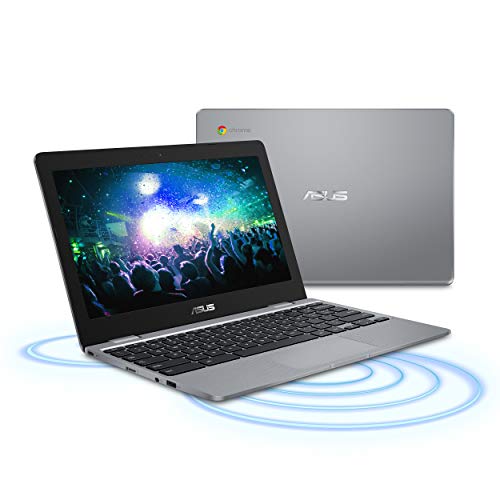
ASUS Chromebook C223 11.6" HD Chromebook Laptop, Intel Dual-Core Celeron N3350 Processor (up to 2.4GHz), 4GB RAM, 32GB eMMC Storage, Premium Design, Grey, C223NA-DH02



Key features
- •Ready for productivity and performance while being on the go, with speedy performance, robust security, and instant-on convenience.
- •Lightweight 2.2 pound body and with thin and premium metallic finish for a sleek appearance.
- •11.6 inch HD 1366x768 anti-glare Display.
- •Powered by the Intel Celeron N3350 Processor (2M Cache, up to 2.4GHz) for fast and snappy performance.
- •4GB LPDDR4 RAM; 32GB eMMC hard drive Storage; No CD or DVD Drive.
- •2x USB 3.1 Type-C (Gen1), 1x USB 3.0, Displayport, HD Webcam, 802.11ac Wi-Fi, Bluetooth 4.0, MicroSD Card Reader
BrandASUS
CategoryTraditional Laptops
Size11.6"
ColorGrey
Warranty1YR International*/1YR ADP with 1-way free shipping/30-Day Zero Bright Dot/2-way FREE shipping for standard warranty repair/24-7 tech support
ASUS Chromebook C223 11.6" HD Chromebook Laptop, Intel Dual-Core Celeron N3350 Processor (up to 2.4GHz), 4GB RAM, 32GB eMMC Storage, Premium Design, Grey, C223NA-DH02
List Price: $279.35$251.42DEALYou Save: $27.93 (10%)
Free shippingFree Returns – 30 daysFree Order CancellationSecure Payment2–3 Days DeliveryGet It October 24, 2026In Stock (13)No marketing spamNo account requiredFulfilment by FedEx / Amazon / UPS / ShipwirePayPal / Card Buyer Protection
Customer Reviews
Reviews sourced from verified Amazon purchasers4.2
out of 5
Based on 10 reviews
5★
60%
4★
40%
3★
0%
2★
0%
1★
0%
Better options are available, but durable...
Cris✓ Verified Purchase•September 29, 2023
Before I begin I must add that I'm a big Chromebook fan boy. I have a Chromebook as my main computer. I bought this and another computer for my siblings as xmas presents and now they think I have favorites. Why? Because the other Chromebook, despite being the same price (if you must know, Acer Chromebook 11) feels and functions better and faster. This ASUS Chromebook looks cool, but the moment you pick it up and feel it buckle under its own weight, you easily realize it's too cheap. I was hoping to give them both a similar device just different colors. Nope. At this price point there are WAAAAY better Chromebooks available. Avoid this one unless you see it at a heavy discount. I would only recommend this specific Chromebook if the price falls to $120.
Update: it's been a year of my sibling using this daily for high school and it still works. I've bought him a better computer and this this red Asus has been relegated to a beater computer I take with me when I don't feel like taking my expensive laptop somewhere (pixelbook).
It gets the job done, I can't deny it that. I still think there are better options (especially now in 2019), but a year of heavy use has proven that in a pinch, this little red computer works fine.
Update: it is now 2021 and this computer is still chugging along. Things I've noted since switching to this as my main after my last, beefier chromebook met end of life updates. This computer, when pushed, overheats fast. Passive cooling makes it impossible to use as a power user while charging. If you are going to push this to have over 10 tabs and music playing like me, a fan will be critical (it won't do much since it has no vents beyond the speakers, but at least the chassis stays cool, which, should in theory, help the inside cool down too).
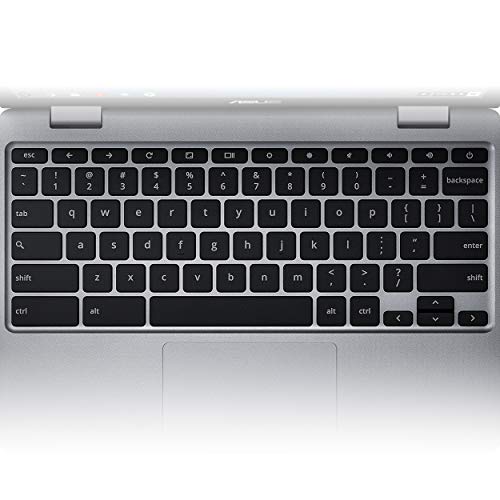
Keyboard really is a dream, comparable to the MacBook air 2020. Screen makes me cry if I don't have the brightness maxed out because of the horrid viewing angles.
The two ubc c ports have really future-proofed this device quite a bit though, I even saw this chromebook from 2016 going into the India market as a new release this year. Crazy!
The processor is just too slow for the average user coming off anything else. I did a bunch of tweaks in the settings and Chrome flags to speed it along, but that was never necessary on my other i5 chromebook (rip). If you can find it under 150, this is a nice travel laptop. You should not, under any circumstances buy this for 200 or more.
Update: it's been a year of my sibling using this daily for high school and it still works. I've bought him a better computer and this this red Asus has been relegated to a beater computer I take with me when I don't feel like taking my expensive laptop somewhere (pixelbook).
It gets the job done, I can't deny it that. I still think there are better options (especially now in 2019), but a year of heavy use has proven that in a pinch, this little red computer works fine.
Update: it is now 2021 and this computer is still chugging along. Things I've noted since switching to this as my main after my last, beefier chromebook met end of life updates. This computer, when pushed, overheats fast. Passive cooling makes it impossible to use as a power user while charging. If you are going to push this to have over 10 tabs and music playing like me, a fan will be critical (it won't do much since it has no vents beyond the speakers, but at least the chassis stays cool, which, should in theory, help the inside cool down too).
Keyboard really is a dream, comparable to the MacBook air 2020. Screen makes me cry if I don't have the brightness maxed out because of the horrid viewing angles.
The two ubc c ports have really future-proofed this device quite a bit though, I even saw this chromebook from 2016 going into the India market as a new release this year. Crazy!
The processor is just too slow for the average user coming off anything else. I did a bunch of tweaks in the settings and Chrome flags to speed it along, but that was never necessary on my other i5 chromebook (rip). If you can find it under 150, this is a nice travel laptop. You should not, under any circumstances buy this for 200 or more.
Good product
Patricia Currency✓ Verified Purchase•August 21, 2023
Works well
An average median Chromebook for average use
Bruce E. Reynolds✓ Verified Purchase•August 5, 2023
I wish I could give this Chromebook a score of 3.5. It's not as bad as a 3, but certainly not good enough to rate a 4. Believe it or not, this Chromebook got an Octane 2.0 score (https://chromium.github.io/octane/) of 10,798, which is really not that bad.
Bear in mind that any Chromebook will definitely need a reliable and consistently strong Wifi connection. Since this Chromebook doesn't have an ethernet port, I would imagine that you could procure an adapter to see how fast a dedicated ethernet connection would get you (available here: https://www.amazon.com/Ethernet-Adapter-uni-Thunderbolt-Compatible/dp/B077KXY71Q/ref=sr_1_1_sspa?keywords=ethernet+to+usb+c+adapter&qid=1553194437&s=gateway&sr=8-1-spons&psc=1), but realistically, you really need to have a reliable Wifi connection to the internet.
This Chromebook does the email (Gmail comes to mind) and general web surfing well. It also can access your Google docs, spreadsheets, and such like on Google Drive. If you have your heart set on using a Chromebook to watch video content, such as Amazon TV, or something like Hulu, it would be better if you got a Chromebook that has a better monitor and higher performance specs.
Some Chromebooks after you log into them after pressing the power button for the first time during the day, and then after when you simply open them, they will turn on. In the case of this particular Chromebook, you have to press on the power button every time to turn it on.
This is not a terrible Chromebook, but it is not a spectacular one, either. It simply meets the basic need to get on the internet to surf, do web shopping and looking at your email.
Bear in mind that any Chromebook will definitely need a reliable and consistently strong Wifi connection. Since this Chromebook doesn't have an ethernet port, I would imagine that you could procure an adapter to see how fast a dedicated ethernet connection would get you (available here: https://www.amazon.com/Ethernet-Adapter-uni-Thunderbolt-Compatible/dp/B077KXY71Q/ref=sr_1_1_sspa?keywords=ethernet+to+usb+c+adapter&qid=1553194437&s=gateway&sr=8-1-spons&psc=1), but realistically, you really need to have a reliable Wifi connection to the internet.
This Chromebook does the email (Gmail comes to mind) and general web surfing well. It also can access your Google docs, spreadsheets, and such like on Google Drive. If you have your heart set on using a Chromebook to watch video content, such as Amazon TV, or something like Hulu, it would be better if you got a Chromebook that has a better monitor and higher performance specs.
Some Chromebooks after you log into them after pressing the power button for the first time during the day, and then after when you simply open them, they will turn on. In the case of this particular Chromebook, you have to press on the power button every time to turn it on.
This is not a terrible Chromebook, but it is not a spectacular one, either. It simply meets the basic need to get on the internet to surf, do web shopping and looking at your email.
Very practical, nothing fancy
Broomfield_CO✓ Verified Purchase•July 10, 2023
I got this as a tablet replacement. I like having one hinged device with a keyboard, rather than a tablet plus keyboard packaged into a cover. And I didn't want to pay for a Microsoft Surface. I purchased a renewed unit so it was very cheap. It does everything I need it to do. I can install apps on it like on an Android tablet, and I run everything off of Google Drive and Google Docs. I switch to my Windows laptop if I need to do any intense editing of documents, then I put them on Drive, and I can view the docs on this device.
Get what you pay for
Pete P.✓ Verified Purchase•July 3, 2023
Solid value. Works well. It's a little laggy when calling up sites but I can stream YouTube videos fine. Well worth the price compared to higher end units.
Page 1 of 2