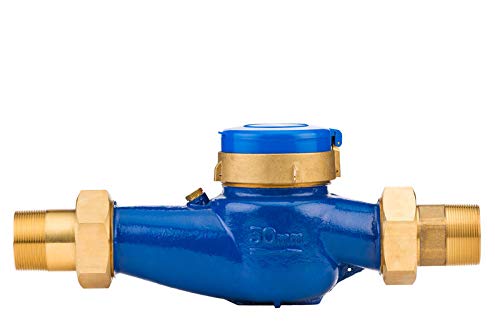
GREDIA G1-1/2" 1.5" Water Flow Sensor Food-Grade Switch Hall Effect Flowmeter Fluid Meter Counter 5-150L/min


Key features
- •Connect to G1-1/2 inch male thread, hall effect
- •Flow range:5-150L/min, Water Pressure: ≤1.75Mpa
- •Working voltage: DC 5-24 V, F=(0.5*Q)±2%, Q=L/Min
- •Material: food grade plastic, all raw materials conform to the ROHS test standard
- •Wide application: It is mainly used in petrochemical industry, residential area flow control, waterworks, farmland and garden irrigation, etc.
GREDIA G1-1/2" 1.5" Water Flow Sensor Food-Grade Switch Hall Effect Flowmeter Fluid Meter Counter 5-150L/min
List Price: $45.38$40.84DEALYou Save: $4.54 (10%)
Free shippingFree Returns – 30 daysFree Order CancellationSecure Payment2–3 Days DeliveryGet It October 24, 2026In Stock (1)No marketing spamNo account requiredFulfilment by FedEx / Amazon / UPS / ShipwirePayPal / Card Buyer Protection
Customer Reviews
Reviews sourced from verified Amazon purchasers4.2
out of 5
Based on 10 reviews
5★
80%
4★
20%
3★
0%
2★
0%
1★
0%
Not perfect but for the price i have no complaints
Amazon Customer✓ Verified Purchase•January 24, 2024
title sums it up for me, i added enough Teflon tape, screwed everything together (no leaks) and started coding.
for this project i used 2 GREDIA G2 2" Water Flow Sensor/Switch Hall Effect Flowmeter Fluid Meter Counter 10-200L/min (model GR-216). my pump is rated for about 80gpm accounting for 90degree elbows and piping i was suspecting about 60gpm all said and done. After physically measuring my flow rate and modifying my initial code i ended with a flow rate of about 57.75gpm so these get a thumps up from me.
here is my initial starting off point with my Rpi3/python code wise, feel free to use it (i monster-iz-ed a couple code snip-its i found online) only thing i don't 100% understand is at the very end of the code i have to multiple gpm by 2 to get close to what i physically measured. only logic i can use is maybe this/these sensors have two pulses per rotation other than that i have no idea, it's avg. rate is at about what i measured (+-1.6%) so it's good enough for what i'm using them for.
## This if for 2 GREDIA G2 2" Water Flow Sensor/Switch Hall Effect Flowmeter Fluid Meter Counter 10-200L/min (model GR-216)
## This code is not 100% accurate but is close enough for measuring coolant flow in a cooling system
## physically measure a flow rate of about 6.44531 gpm; sensor avg. rate is 6.342 gpm a difference of about 1.6%
#!/usr/bin/python3
import RPi.GPIO as GPIO
import time, sys
FLOW_SENSOR = 4
FLOW_SENSOR2 = 17
flowCalibrationFactor = 0.2
# Note: F=(0.2*Q)±2% for this flow sensor, Q=L/Min, and F is pulse freq in 1/s
global oldTime
global count
global count2
oldTime = 0
count = 0
count2 = 0
GPIO.setmode(GPIO.BCM)
GPIO.setup(FLOW_SENSOR, GPIO.IN, pull_up_down = GPIO.PUD_DOWN)
GPIO.setup(FLOW_SENSOR2, GPIO.IN, pull_up_down = GPIO.PUD_DOWN)
def main():
GPIO.add_event_detect(FLOW_SENSOR, GPIO.RISING, callback=countPulse)
GPIO.add_event_detect(FLOW_SENSOR2, GPIO.RISING, callback=countPulse2)
while True:
try:
curgpm = getFlow()
print("GPM: %s" % curgpm )
time.sleep(1)
except KeyboardInterrupt:
print('\ncaught keyboard interrupt!, bye')
GPIO.cleanup()
sys.exit()
def countPulse(channel):
global count
count = count+1
def countPulse2(channel):
global count2
count2 = count2+1
def getFlow():
global count
global count2
global oldTime
start_cnt = count + count2
readcnt = 0
while readcnt time.sleep(0.001)
readcnt += 1
end_cnt = count + count2
pulses = end_cnt - start_cnt
# Note: F=(0.2*Q)±2% for this flow sensor, Q=L/Min, and F is pulse freq in 1/s
gpm = ((1000.0 / (round(time.time() * 1000, 5) - oldTime)) * pulses) / flowCalibrationFactor*0.26417287472922
#gph = ((1000.0 / (round(time.time() * 1000, 5) - oldTime)) * pulses) / flowCalibrationFactor*15.8503
pulses = 0
oldTime = round(time.time() * 1000, 5)
return round(gpm, 3)*2
if __name__ == "__main__":
main()
for this project i used 2 GREDIA G2 2" Water Flow Sensor/Switch Hall Effect Flowmeter Fluid Meter Counter 10-200L/min (model GR-216). my pump is rated for about 80gpm accounting for 90degree elbows and piping i was suspecting about 60gpm all said and done. After physically measuring my flow rate and modifying my initial code i ended with a flow rate of about 57.75gpm so these get a thumps up from me.
here is my initial starting off point with my Rpi3/python code wise, feel free to use it (i monster-iz-ed a couple code snip-its i found online) only thing i don't 100% understand is at the very end of the code i have to multiple gpm by 2 to get close to what i physically measured. only logic i can use is maybe this/these sensors have two pulses per rotation other than that i have no idea, it's avg. rate is at about what i measured (+-1.6%) so it's good enough for what i'm using them for.
## This if for 2 GREDIA G2 2" Water Flow Sensor/Switch Hall Effect Flowmeter Fluid Meter Counter 10-200L/min (model GR-216)
## This code is not 100% accurate but is close enough for measuring coolant flow in a cooling system
## physically measure a flow rate of about 6.44531 gpm; sensor avg. rate is 6.342 gpm a difference of about 1.6%
#!/usr/bin/python3
import RPi.GPIO as GPIO
import time, sys
FLOW_SENSOR = 4
FLOW_SENSOR2 = 17
flowCalibrationFactor = 0.2
# Note: F=(0.2*Q)±2% for this flow sensor, Q=L/Min, and F is pulse freq in 1/s
global oldTime
global count
global count2
oldTime = 0
count = 0
count2 = 0
GPIO.setmode(GPIO.BCM)
GPIO.setup(FLOW_SENSOR, GPIO.IN, pull_up_down = GPIO.PUD_DOWN)
GPIO.setup(FLOW_SENSOR2, GPIO.IN, pull_up_down = GPIO.PUD_DOWN)
def main():
GPIO.add_event_detect(FLOW_SENSOR, GPIO.RISING, callback=countPulse)
GPIO.add_event_detect(FLOW_SENSOR2, GPIO.RISING, callback=countPulse2)
while True:
try:
curgpm = getFlow()
print("GPM: %s" % curgpm )
time.sleep(1)
except KeyboardInterrupt:
print('\ncaught keyboard interrupt!, bye')
GPIO.cleanup()
sys.exit()
def countPulse(channel):
global count
count = count+1
def countPulse2(channel):
global count2
count2 = count2+1
def getFlow():
global count
global count2
global oldTime
start_cnt = count + count2
readcnt = 0
while readcnt time.sleep(0.001)
readcnt += 1
end_cnt = count + count2
pulses = end_cnt - start_cnt
# Note: F=(0.2*Q)±2% for this flow sensor, Q=L/Min, and F is pulse freq in 1/s
gpm = ((1000.0 / (round(time.time() * 1000, 5) - oldTime)) * pulses) / flowCalibrationFactor*0.26417287472922
#gph = ((1000.0 / (round(time.time() * 1000, 5) - oldTime)) * pulses) / flowCalibrationFactor*15.8503
pulses = 0
oldTime = round(time.time() * 1000, 5)
return round(gpm, 3)*2
if __name__ == "__main__":
main()
Works great on my arduino aquaponics setup
Andy Lee✓ Verified Purchase•January 12, 2024
I'm using this sensor to monitor the pump flow rate in my arduino aquaponics setup. I installed it about a month ago and it works great - runs continuously and logs data consistently to ThingSpeak. I used a liberal amount of teflon tape on the threads, and screwed very tightly it into 2" NPT PVC fittings. Not a drop has leaked. If it's helpful to you, see below for some snippets from my code. This code converts units to gallons per hour, and in my system this is typically reporting a flow rate of ~1000 gph with this sensor. I'm no professional programmer by any means, but pieced this together from a few sources online.
//Flow Sensor:
byte flowSensorPin = 6; // flow sensor attached to pin 6 (pin must also be an interrupt ("int") pin)
float flowCalibrationFactor = 0.2; // Note: F=(0.2*Q)±2% for this flow sensor, Q=L/Min, and F is pulse freq in 1/s
volatile byte flowPulseCount=0;
float flowRate=0.0;
unsigned long oldTime=0;
void setup() {
Serial.begin(9600); // Initialize serial output for when it is connected to computer
pinMode(flowSensorPin, INPUT); // declare flow sensor pin
digitalWrite(flowSensorPin, HIGH); // set flow sensor pin
attachInterrupt(digitalPinToInterrupt(flowSensorPin), flowPulseCounter, FALLING); // Configured to trigger on a FALLING state change (transition from HIGH state to LOW state)
}
void loop() {
flowRate=read_flow_rate();
Serial.println("Flow " +String(i)+": "+String(flowRate)); //print flowRate to Serial monitor
delay(1000); //wait 1 sec
}
float read_flow_rate(void){
float flowRateGPH;
if((millis() - oldTime) > 900) // Make sure a reasonable time has passed to count pulses - ideally at least 1sec
{
detachInterrupt(digitalPinToInterrupt(flowSensorPin)); //Disable the interrupt while calculating flow rate
flowRateGPH = ((1000.0 / (millis() - oldTime)) * flowPulseCount) / flowCalibrationFactor*15.8503;
//Scale to frequency (pulses per second) and convert to flow rate 1 LPM = 15.8503 gph
oldTime = millis(); //Reset the reading clock
flowPulseCount = 0; // Reset the pulse counter so we can start incrementing again
attachInterrupt(digitalPinToInterrupt(flowSensorPin), flowPulseCounter, FALLING); // Enable interrupt again
}
return(flowRateGPH); // Return the flow rate for this reading
}
//Flow Sensor:
byte flowSensorPin = 6; // flow sensor attached to pin 6 (pin must also be an interrupt ("int") pin)
float flowCalibrationFactor = 0.2; // Note: F=(0.2*Q)±2% for this flow sensor, Q=L/Min, and F is pulse freq in 1/s
volatile byte flowPulseCount=0;
float flowRate=0.0;
unsigned long oldTime=0;
void setup() {
Serial.begin(9600); // Initialize serial output for when it is connected to computer
pinMode(flowSensorPin, INPUT); // declare flow sensor pin
digitalWrite(flowSensorPin, HIGH); // set flow sensor pin
attachInterrupt(digitalPinToInterrupt(flowSensorPin), flowPulseCounter, FALLING); // Configured to trigger on a FALLING state change (transition from HIGH state to LOW state)
}
void loop() {
flowRate=read_flow_rate();
Serial.println("Flow " +String(i)+": "+String(flowRate)); //print flowRate to Serial monitor
delay(1000); //wait 1 sec
}
float read_flow_rate(void){
float flowRateGPH;
if((millis() - oldTime) > 900) // Make sure a reasonable time has passed to count pulses - ideally at least 1sec
{
detachInterrupt(digitalPinToInterrupt(flowSensorPin)); //Disable the interrupt while calculating flow rate
flowRateGPH = ((1000.0 / (millis() - oldTime)) * flowPulseCount) / flowCalibrationFactor*15.8503;
//Scale to frequency (pulses per second) and convert to flow rate 1 LPM = 15.8503 gph
oldTime = millis(); //Reset the reading clock
flowPulseCount = 0; // Reset the pulse counter so we can start incrementing again
attachInterrupt(digitalPinToInterrupt(flowSensorPin), flowPulseCounter, FALLING); // Enable interrupt again
}
return(flowRateGPH); // Return the flow rate for this reading
}
Accurate & reliable
Tom Leit✓ Verified Purchase•November 25, 2023
This work just the way it's supposed to. Lots of Arduino code available . We are using it to fill a water tank and shut off the valve after so many gallons. it has to be reliable or it will overfill the tank and so far we have had nothing but good results from this sensor.
Great product, but you need to be able to code.
DIY Engineer✓ Verified Purchase•November 19, 2023
The item works well, it does need some calibration, which is easily done in an arduino code. I recommend that you calibrate it with a flow rate very similar or the same as what it will be used for since this will help reduce the error... if you intend to use its full range or multiple flow rates... you could set ranges that have more precision for each range, but the differences will be miniscule anyway... it really depend on "HOW" accurate you need the measurement to be... also consider using 2 in series and compare the variances between them for even more accuracy.... overall really good product...
Works great
Amazon Customer✓ Verified Purchase•November 6, 2023
Actually using these in industrial environment and never failed. In operation over two years now.
Page 1 of 2