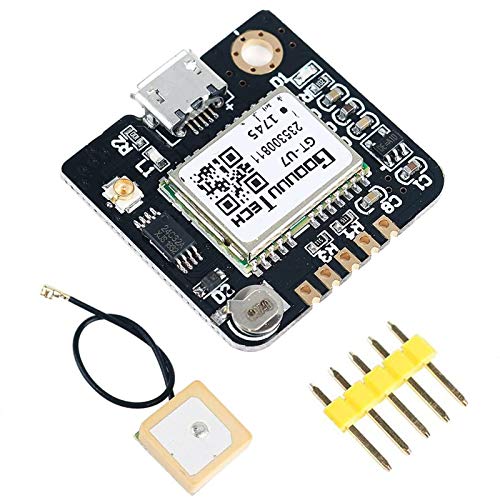
MakerFocus GT-U7 GPS Module Satellite Navigation Positioning GPS Receiver Drone Microcontroller Compatible with NEO-6M 51 Microcontroller STM32 Arduino UNO R3





Key features
- •How to Use This Module: https://www.youtube.com/watch?v=bgOZLgaLa0g. Library: http://arduiniana.org/libraries/tinygpsplus/.
- •GT-U7 main module GPS module using the original UBLOX 7th generation chip, Software is compatible with NEO-6M. GT-U7 module, with high sensitivity, low power consumption, miniaturization, its extremely high tracking sensitivity greatly expanded its positioning of the coverage.
- •With a USB interface, you can directly use the phone data cable on the computer point of view positioning effect; With IPEX antenna interface, the default distribution of active antenna, can be quickly positioned.
- •USB directly connected to the computer, That is, with the host computer-owned serial port function, no need for external serial module, send IPX interface active antenna!
- •We Have a Strong After-sales Service Team: As long as you have any questions about the product, we will resolve your issue immediately if received your email, your satisfactory purchase experience is our greatest hope! How to email us? Plz click "MakerFocus" and click "Ask a question" to email us! Looking forward to your consultation!
MakerFocus GT-U7 GPS Module Satellite Navigation Positioning GPS Receiver Drone Microcontroller Compatible with NEO-6M 51 Microcontroller STM32 Arduino UNO R3
List Price: $25.20$22.68DEALYou Save: $2.52 (10%)
Free shippingFree Returns – 30 daysFree Order CancellationSecure Payment2–3 Days DeliveryGet It October 25, 2026In Stock (1)No marketing spamNo account requiredFulfilment by FedEx / Amazon / UPS / ShipwirePayPal / Card Buyer Protection
Customer Reviews
Reviews sourced from verified Amazon purchasers4.4
out of 5
Based on 10 reviews
5★
70%
4★
30%
3★
0%
2★
0%
1★
0%
Mostly pros. Few cons. Works fine for my application.
igoeco2001✓ Verified Purchase•September 20, 2023
My application is timekeeping, and certainly does not involve flight control.
This module was intriguing given its low price relative to other modules.
Notes:
"¢ MicroUSB connector makes it super quick to check operation against a 9600 baud serial port/terminal.
"¢ Operates on 5V, and I've confirmed on a scope (and by use) that both the TXD and PPS output TTL levels.
"¢ Draws ~35ma @ 5V.
"¢ PPS is a positive-going 100ms pulse and it appears that the positive transitions mark the *next* received sentences, and seconds=00. Note that PPSs only appear when there's an actual fix (eg. $GPRMC Status term = "˜A') The little red LED on the breakout board seems to be wired as inverse-PPS, so solid red until a fix, then pulsing off in tandem with PPS. Useful.
"¢ I confirmed that two otherwise unrelated modules with fixes, do PPS exactly in tandem, as expected.
"¢ Sentences output (at 1s intervals of 9600 baud) are ($GP)RMC, VTG, GGA, GSA, GSV & GLL. I only needed RMC & GGA.
"¢ Position output was spot-on at least when static on my desk. Had no need to evaluate it in motion.
"¢ Sentences seem to work fine with the usual GPS parsing libraries, or if you roll your own.
"¢ The breakout module features what appears to be a small rechargeable coin cell spot-welded to its holder, permitting hot-starts.
"¢ The supplied patch antenna on a short pigtail with a U.FL connector works well. So does a more substantial GPS antenna terminated with a U.FL. Keep in mind U.FL connectors are not intended for repeated mating cycles. ie, they're fragile! Use a magnifying glass when connecting.
What I find questionable:
"¢ Vendors' Amazon description claims to be "using the original UBLOX (sic) 7th generation chip". Obviously, the "GT-U7" module on this breakout board does not claim to be a u-blox product. Is it then using some sort of "original" ublox chip inside it? Reading up on how to spot a fake on ublox's site leads one to believe this is in fact some sort of clone of the u-blox Neo 6 or 7. Startup $GPTXT sentence claims itself as u-blox 7, tho"¦ Questionable if module is in fact configurable via u-center, although u-center has no problem parsing its output. If you are expecting something genuine-ublox, do some research.
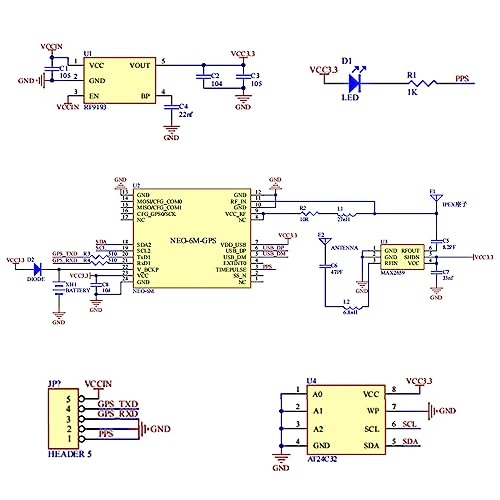
"¢ Questionable how 5V-tolerant RXD, the sole input on this breakout, might be. Since I do not plan on sending it any configuration, I'm leaving it disconnected and using the module in its default mode.
"¢ A schematic of this breakout board would be very useful, in particular to answer the previous question. Can't seem to find one for it. Aargh. Easy enough to reverse-engineer, given motivation to do so.
So, would I trust this product in my 1/8 scale autonomous jet-powered RC A380 model aircraft? Probably not.
But for my timekeeping application, it works fine, thus not subtracting any stars since I'm realistic about its pedigree.
---
This module was intriguing given its low price relative to other modules.
Notes:
"¢ MicroUSB connector makes it super quick to check operation against a 9600 baud serial port/terminal.
"¢ Operates on 5V, and I've confirmed on a scope (and by use) that both the TXD and PPS output TTL levels.
"¢ Draws ~35ma @ 5V.
"¢ PPS is a positive-going 100ms pulse and it appears that the positive transitions mark the *next* received sentences, and seconds=00. Note that PPSs only appear when there's an actual fix (eg. $GPRMC Status term = "˜A') The little red LED on the breakout board seems to be wired as inverse-PPS, so solid red until a fix, then pulsing off in tandem with PPS. Useful.
"¢ I confirmed that two otherwise unrelated modules with fixes, do PPS exactly in tandem, as expected.
"¢ Sentences output (at 1s intervals of 9600 baud) are ($GP)RMC, VTG, GGA, GSA, GSV & GLL. I only needed RMC & GGA.
"¢ Position output was spot-on at least when static on my desk. Had no need to evaluate it in motion.
"¢ Sentences seem to work fine with the usual GPS parsing libraries, or if you roll your own.
"¢ The breakout module features what appears to be a small rechargeable coin cell spot-welded to its holder, permitting hot-starts.
"¢ The supplied patch antenna on a short pigtail with a U.FL connector works well. So does a more substantial GPS antenna terminated with a U.FL. Keep in mind U.FL connectors are not intended for repeated mating cycles. ie, they're fragile! Use a magnifying glass when connecting.
What I find questionable:
"¢ Vendors' Amazon description claims to be "using the original UBLOX (sic) 7th generation chip". Obviously, the "GT-U7" module on this breakout board does not claim to be a u-blox product. Is it then using some sort of "original" ublox chip inside it? Reading up on how to spot a fake on ublox's site leads one to believe this is in fact some sort of clone of the u-blox Neo 6 or 7. Startup $GPTXT sentence claims itself as u-blox 7, tho"¦ Questionable if module is in fact configurable via u-center, although u-center has no problem parsing its output. If you are expecting something genuine-ublox, do some research.
"¢ Questionable how 5V-tolerant RXD, the sole input on this breakout, might be. Since I do not plan on sending it any configuration, I'm leaving it disconnected and using the module in its default mode.
"¢ A schematic of this breakout board would be very useful, in particular to answer the previous question. Can't seem to find one for it. Aargh. Easy enough to reverse-engineer, given motivation to do so.
So, would I trust this product in my 1/8 scale autonomous jet-powered RC A380 model aircraft? Probably not.
But for my timekeeping application, it works fine, thus not subtracting any stars since I'm realistic about its pedigree.
---
For both the ‘black’ and the ‘dark black’ units:
P. Meyer✓ Verified Purchase•September 14, 2023
DARK BLACK MODEL:
This is the puck one with the tiny DuPont connectors. The connectors are not for 2.54 DuPont pins but if you shove hard enough they'll go in and make good contact.
It has a good receiver and low power (20ma). It gets a fix about as quickly as the bare board model but does it in places in my house where none of my other units can (the "˜black' ones which are just the board and antenna).
It is 38400 baud by default, that can be changed via i2c or with the ublox windows app. Ublox has an i2c driver on github but it's too big for a nanos 328p memory.
So I use it at 38400 on the nano's internal uart . You have to set the Serial baud rate to 38400 and then disconnect the wire between the gps and the uart RxD (pin 2) to download programs. You can still print debug statements to the USB port but they're going to have be at 38k. This model emits messages much faster than the once per second of the black model, at least 5x, maybe more.
I have had it in hand for a couple of years but just started using it. During my first day I see it producing $GNRMC messages as opposed to the $GPRMC messages I am used to from the other units in this ad. The GN messages are probably from GLONASS but might just be the way this company handles supporting both GPS and GLONASS. In any case GNRMC messages are formatted the same as GPRMC. There are plenty of other messages but I only care about RMC ones.
It updates 5 times per second but the first of those may not come out until the end of the second. The latency seems to slew slowly from being early to being late. This results in the time being accurate sometimes and 1-second slow later.
BLACK MODEL:
Update: one of my nanos was only putting out 4.2v on the 5v pin and that caused many problems including
very poor reception by this gps. If yours acts up check the voltage it's getting.
Update: For my clocks I finally wrote my own nmea parser that only looks at the RMC messages. TinyGPS hides the actual message type from you, it waits until the age and error flags are all proper before it hands data off to you and it takes time extracting a lot of stuff I don't care about. I have things to get done and TinyGPS was getting in the way.
20ma draw.
First (cold) start under a tin roof at 2000ft above sea level approx 10 min but may not happen at all until satellite view improves.
Warm start 10min later still under tin but against outside wooden wall is 5 seconds. 12 sats in view and 9 tracked.
"˜Tepid' start after being off overnight is about 5-10 seconds in the same conditions to emit time but getting the date takes maybe another 5 seconds.
Sentences with time appear as soon as the first sat is in view. (Nice for use as a clock source).
This is the puck one with the tiny DuPont connectors. The connectors are not for 2.54 DuPont pins but if you shove hard enough they'll go in and make good contact.
It has a good receiver and low power (20ma). It gets a fix about as quickly as the bare board model but does it in places in my house where none of my other units can (the "˜black' ones which are just the board and antenna).
It is 38400 baud by default, that can be changed via i2c or with the ublox windows app. Ublox has an i2c driver on github but it's too big for a nanos 328p memory.
So I use it at 38400 on the nano's internal uart . You have to set the Serial baud rate to 38400 and then disconnect the wire between the gps and the uart RxD (pin 2) to download programs. You can still print debug statements to the USB port but they're going to have be at 38k. This model emits messages much faster than the once per second of the black model, at least 5x, maybe more.
I have had it in hand for a couple of years but just started using it. During my first day I see it producing $GNRMC messages as opposed to the $GPRMC messages I am used to from the other units in this ad. The GN messages are probably from GLONASS but might just be the way this company handles supporting both GPS and GLONASS. In any case GNRMC messages are formatted the same as GPRMC. There are plenty of other messages but I only care about RMC ones.
It updates 5 times per second but the first of those may not come out until the end of the second. The latency seems to slew slowly from being early to being late. This results in the time being accurate sometimes and 1-second slow later.
BLACK MODEL:
Update: one of my nanos was only putting out 4.2v on the 5v pin and that caused many problems including
very poor reception by this gps. If yours acts up check the voltage it's getting.
Update: For my clocks I finally wrote my own nmea parser that only looks at the RMC messages. TinyGPS hides the actual message type from you, it waits until the age and error flags are all proper before it hands data off to you and it takes time extracting a lot of stuff I don't care about. I have things to get done and TinyGPS was getting in the way.
20ma draw.
First (cold) start under a tin roof at 2000ft above sea level approx 10 min but may not happen at all until satellite view improves.
Warm start 10min later still under tin but against outside wooden wall is 5 seconds. 12 sats in view and 9 tracked.
"˜Tepid' start after being off overnight is about 5-10 seconds in the same conditions to emit time but getting the date takes maybe another 5 seconds.
Sentences with time appear as soon as the first sat is in view. (Nice for use as a clock source).
Easy GPS to use for Navigation or testing
Alec Bloss✓ Verified Purchase•September 12, 2023
This chip has pretty good warm and hot starts, your cold start will depend almost entirely on the antenna you use, although it's usually 2-5 minutes under poor conditions. Without SBAS or RTK corrections it's accurate to 2.5-5m, again depending on your antenna and sky conditions. It's a Ublox neo-6m chip (or a clone of it). U-center works to configure it, and so does PyGPSClient. You can read serial data direct from it, and it can output NMEA or RTCM2 sentences (and of course UBX). It can take corrections, however, it must be RTCM2, which really isn't supported by anything that's actually respectable (most networked RTK solutions use RTCM3). Using RTKLib with corrections via NTRIP you can use RTCM3 sources as the processing is done on your computer instead of the GPS module. Here I've gotten 1 meter accuracy. A better antenna would likely improve this significantly, and you can use a U.FL to SMA to TNC adapter to use better more commercially available antennas.
All in all a great little unit for the cost. Just don't expect to get mm level accuracy out of it. You've got to pay to play that game.
All in all a great little unit for the cost. Just don't expect to get mm level accuracy out of it. You've got to pay to play that game.
It's alright.
Tony Tony✓ Verified Purchase•July 30, 2023
Code I used that worked:
/*
SD card read/write
This example shows how to read and write data to and from an SD card file
The circuit:
SD card attached to SPI bus as follows:
** MOSI - pin 11
** MISO - pin 12
** CLK - pin 13
** CS - pin 4 (for MKRZero SD: SDCARD_SS_PIN)
created Nov 2010
by David A. Mellis
modified 9 Apr 2012
by Tom Igoe
This example code is in the public domain.
*/
#include
#include
//chipSelect = 53 for ArduinoMega
//const int chipSelect = 53;
const int chipSelect = 10;
File myFile;
void setup() {
// Open serial communications and wait for port to open:
Serial.begin(9600);
while (!Serial) {
; // wait for serial port to connect. Needed for native USB port only
}
Serial.print("Initializing SD card...");
if (!SD.begin(chipSelect)) {
Serial.println("initialization failed!");
while (1);
}
Serial.println("initialization done.");
// open the file. note that only one file can be open at a time,
// so you have to close this one before opening another.
myFile = SD.open("test.txt", FILE_WRITE);
// if the file opened okay, write to it:
if (myFile) {
Serial.print("Writing to test.txt...");
myFile.println("testing 4, 5, 6.");
myFile.println("sent through Arduino Mega.");
// close the file:
myFile.close();
Serial.println("done.");
} else {
// if the file didn't open, print an error:
Serial.println("error opening test.txt");
}
// re-open the file for reading:
myFile = SD.open("test.txt");
if (myFile) {
Serial.println("test.txt:");
// read from the file until there's nothing else in it:
while (myFile.available()) {
Serial.write(myFile.read());
}
// close the file:
myFile.close();
} else {
// if the file didn't open, print an error:
Serial.println("error opening test.txt");
}
}
void loop() {
// nothing happens after setup
}
Make sure import from GPS++ from their github instead of the libraries on Arduino.
Also takes a while to actually get location data. I had to be outside in low clouds to actually get data and it took a few minutes. Also seems to be getting a pretty accurate altitude, but I'm not sure how accurate that is or why it takes like 10 minutes to start getting altitude even if it gets the longitude and latitude data.
/*
SD card read/write
This example shows how to read and write data to and from an SD card file
The circuit:
SD card attached to SPI bus as follows:
** MOSI - pin 11
** MISO - pin 12
** CLK - pin 13
** CS - pin 4 (for MKRZero SD: SDCARD_SS_PIN)
created Nov 2010
by David A. Mellis
modified 9 Apr 2012
by Tom Igoe
This example code is in the public domain.
*/
#include
#include
//chipSelect = 53 for ArduinoMega
//const int chipSelect = 53;
const int chipSelect = 10;
File myFile;
void setup() {
// Open serial communications and wait for port to open:
Serial.begin(9600);
while (!Serial) {
; // wait for serial port to connect. Needed for native USB port only
}
Serial.print("Initializing SD card...");
if (!SD.begin(chipSelect)) {
Serial.println("initialization failed!");
while (1);
}
Serial.println("initialization done.");
// open the file. note that only one file can be open at a time,
// so you have to close this one before opening another.
myFile = SD.open("test.txt", FILE_WRITE);
// if the file opened okay, write to it:
if (myFile) {
Serial.print("Writing to test.txt...");
myFile.println("testing 4, 5, 6.");
myFile.println("sent through Arduino Mega.");
// close the file:
myFile.close();
Serial.println("done.");
} else {
// if the file didn't open, print an error:
Serial.println("error opening test.txt");
}
// re-open the file for reading:
myFile = SD.open("test.txt");
if (myFile) {
Serial.println("test.txt:");
// read from the file until there's nothing else in it:
while (myFile.available()) {
Serial.write(myFile.read());
}
// close the file:
myFile.close();
} else {
// if the file didn't open, print an error:
Serial.println("error opening test.txt");
}
}
void loop() {
// nothing happens after setup
}
Make sure import from GPS++ from their github instead of the libraries on Arduino.
Also takes a while to actually get location data. I had to be outside in low clouds to actually get data and it took a few minutes. Also seems to be getting a pretty accurate altitude, but I'm not sure how accurate that is or why it takes like 10 minutes to start getting altitude even if it gets the longitude and latitude data.
I'm Impressed
Joel Styer✓ Verified Purchase•July 14, 2023
This little device impressed me. I only needed it to provide an accurate time reference but I did check out the positioning too. Lattitude seemed to be right on the money but longitude was off by about 50 feet (15 meters) in my first test. At my window (inside), it normally sees 6 to 8 satellites. But even in the middle of the house, it always saw at least a few and I had to work hard to get it to lose lock (for testing purposes). And that is when it is mounted inside a waterproof, plastic box. I have a local 3.3V switching regulator in the box as well as an RS484 converter to transmit the data. The sentences transmitted seem to be consistent and accurate. I don't know how good it is for a moving environment but for my purposes it works well.
Page 1 of 2