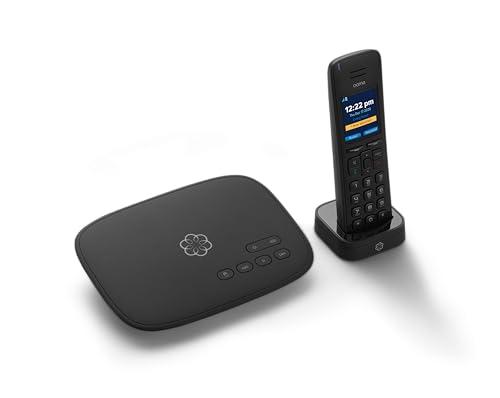
Ooma Telo VoIP Free Internet Home Phone Service and HD3 Handset. Affordable landline replacement. Unlimited nationwide calling. Call on the go with free mobile app. Can block Robocalls.


Key features
- •Crystal - clear nationwide calling for free and low international rates. Pay only monthly applicable taxes and fees
- •# 1 rated home phone service for overall satisfaction and value by a leading consumer research publication
- •Included Ooma HD3 Handset features a 2" color display and full-duplex speakerphone
- •Pure Voice technology delivers superior voice quality for a consistently great calling experience
- •Includes unlimited calling in the U.S., voicemail, caller-ID, call-waiting, 911 calling and text alerts
- •Download the Ooma Telo mobile app and take your Ooma service on-the -go
Ooma Telo VoIP Free Internet Home Phone Service and HD3 Handset. Affordable landline replacement. Unlimited nationwide calling. Call on the go with free mobile app. Can block Robocalls.
List Price: $160.04$144.04DEALYou Save: $16.00 (10%)
Free shippingFree Returns – 30 daysFree Order CancellationSecure Payment2–3 Days DeliveryGet It October 29, 2026In Stock (30)No marketing spamNo account requiredFulfilment by FedEx / Amazon / UPS / ShipwirePayPal / Card Buyer Protection
Customer Reviews
Reviews sourced from verified Amazon purchasers4.3
out of 5
Based on 10 reviews
5★
80%
4★
20%
3★
0%
2★
0%
1★
0%
Working so far...and expect it to pay for itself soon
Cryptapocalypse✓ Verified Purchase•September 8, 2023
After I decided to buy my own cable modem (without telephony) instead of renting one from Comcast, I lost the ability to use VOIP with Comcast, so had to find an alternative. Following the recommendation of a family member, I bought this unit and set it up. So far it has worked very well. The instructions are quite good. It seemed to have a bit of trouble getting an IP address from my router initially, but within 10 minutes after I cycled the unit, the logo turned solid blue on the top and the phone worked fine. I am opting for basic ooma service, so I had to pay $40 to port my landline number from Comcast, but it was worth it to me versus keeping the free number I selected through the ooma website. The website indicates that the transfer will take 3-4 weeks, which is lengthy for something that should be simple by now, but maybe that estimate is way on the cautious side- time will tell.
Some considerations:
-If you want transfer your phone number, don't disconnect your phone service with the current provider until after the transfer occurs. If you cancel phone service with your current provider, you will not be able to transfer your number- it's out of your control and back in the number pool of your current provider.
-ooma won't work with an Ackerman security system, so keep in mind you might have to go with a cell phone-based upgrade to your security system. It's much safer anyway, but it does decrease the monthly savings when switching to ooma. The cell service option will cost $10/month more, but I am still money ahead.
Cost comparison:
+$10.00 for cell phone upgrade to security system
+$ 3.85 for monthly ooma taxes and fees
-$ 7.00, no more monthly comcast modem rental charges
-$ 32.00, no more Comcast phone service
Net savings is about $25 per month; I spent $160 on the ooma and $150 on Netgear modem plus $40 on the port ($350), so I will break even in about 14 months. That's OK with me, and worth it to break away from having to use a substandard Comcast modem while getting an upgrade to our security system at the same time.
Update- as soon as the phone number ported to Ooma, Comcast automatically raised my monthly subscription rate to internet and cable to $200, so I had to call them and go through the process of getting the monthly rate down. Comcast subscribers- be prepared.
AUGUST 25 2014 update- No problems with the phone except when I continually lost my internet connection. Off topic, but we just switched to ATT Uverse service and at least in my locale the internet stability has been much better (no drops whatsoever in more than a week). The final straw was when I was charged $60 for a Comcast service visit when the tech could not find anything wrong with the signal strength, so he informed me he had to indicate that my equipment was to blame. I didn't understand that meant a $60 charge. I know other people have the exact opposite experience, but if you are dissatisfied with your current Comcast service, it's worth a look at ATT Uverse.
OCTOBER 2014 update. Ooma box has worked flawlessly, but discovered that the company automatically signs you up for a higher tier of features that you get free for a month, but then your credit card begins to be charged at a higher rate. Just be aware that you will have to call and stop higher tier service if you don't want those features.
MAY 2015: I haven't had any problems with the unit except very rare internet connection drops. BTW, it took me 6 months to get the $90 Comcast owed me back from them- after three calls and hours on the phone, plus a FAX to their "Consumer Service VP" or whatever their title is, I finally got the check. I have to say that Comcast's very poor customer service reputation is well deserved in my personal experience.
Some considerations:
-If you want transfer your phone number, don't disconnect your phone service with the current provider until after the transfer occurs. If you cancel phone service with your current provider, you will not be able to transfer your number- it's out of your control and back in the number pool of your current provider.
-ooma won't work with an Ackerman security system, so keep in mind you might have to go with a cell phone-based upgrade to your security system. It's much safer anyway, but it does decrease the monthly savings when switching to ooma. The cell service option will cost $10/month more, but I am still money ahead.
Cost comparison:
+$10.00 for cell phone upgrade to security system
+$ 3.85 for monthly ooma taxes and fees
-$ 7.00, no more monthly comcast modem rental charges
-$ 32.00, no more Comcast phone service
Net savings is about $25 per month; I spent $160 on the ooma and $150 on Netgear modem plus $40 on the port ($350), so I will break even in about 14 months. That's OK with me, and worth it to break away from having to use a substandard Comcast modem while getting an upgrade to our security system at the same time.
Update- as soon as the phone number ported to Ooma, Comcast automatically raised my monthly subscription rate to internet and cable to $200, so I had to call them and go through the process of getting the monthly rate down. Comcast subscribers- be prepared.
AUGUST 25 2014 update- No problems with the phone except when I continually lost my internet connection. Off topic, but we just switched to ATT Uverse service and at least in my locale the internet stability has been much better (no drops whatsoever in more than a week). The final straw was when I was charged $60 for a Comcast service visit when the tech could not find anything wrong with the signal strength, so he informed me he had to indicate that my equipment was to blame. I didn't understand that meant a $60 charge. I know other people have the exact opposite experience, but if you are dissatisfied with your current Comcast service, it's worth a look at ATT Uverse.
OCTOBER 2014 update. Ooma box has worked flawlessly, but discovered that the company automatically signs you up for a higher tier of features that you get free for a month, but then your credit card begins to be charged at a higher rate. Just be aware that you will have to call and stop higher tier service if you don't want those features.
MAY 2015: I haven't had any problems with the unit except very rare internet connection drops. BTW, it took me 6 months to get the $90 Comcast owed me back from them- after three calls and hours on the phone, plus a FAX to their "Consumer Service VP" or whatever their title is, I finally got the check. I have to say that Comcast's very poor customer service reputation is well deserved in my personal experience.
Replaced our 10 year old Ooma Telo
Weekday Gamer✓ Verified Purchase•August 25, 2023
Product shipped within hours, thanks to Amazon. Replaced our old Ooma from 2013 that just stopped working. If you have existing Account and Phone#, don't activate the device as instructed in the User's manual. Instead call Ooma support and tell them you are replacing your old device and will be using the same phone#. They were able to activate my new Ooma with my old # and it's been working great so far.
Bye bye AT&T!
Cycling Through Life✓ Verified Purchase•August 24, 2023
After years of regular land line service, we finally made the switch when we had enough of AT&T intermittent service in our area, while charging us $60 per month, half of which are taxes and regulatory fees.
I looked at various services - those through Comcast (our ISP), as well as services from Vonage and Magic Jack. At the end of the day, I selected Ooma based on the reviews listed here. Working for a networking company, I am familiar with the effect of the network on the quality of the home telephone service and connected experience. Many of the readers here seem to run into issues with wireless connectivity. In our case, we didn't have the issue. Before I go into the review, let me just say in general, when you are experiencing issues with your VOIP service, your video streaming, your music streaming - most of the time it is not the service, but your network and how it might be configured.
Our home network setup is a little unique from most of the reviewers here. The instructions assumed that most people have an integrated wireless/router. Our home network consists of a wired router (no wireless), a separate 24 port managed switch with PoE, and 3separate wireless access points, several intelligent power distribution units (basically intelligent power strips). In our case, we connected our Ooma via Ethernet cable instead of a wireless connection. Working for a high end networking company in the smart home/pro AV industry, I always tell our resellers that if they could, a wired connection is preferable to a wireless connection. In addition, we connected our Ooma hardline to the switch, instead of the router (you could connect to either, but in our case we wanted to put it on its own separate VLAN).
Because we connected it hardline instead of wireless, we didn't run into many of the network issues people seem to have. When people have issues, it is typically due to poor wireless signal coverage within the house, wireless interference, improper wireless router placement.
For those people that have a managed switch in their homes like we do, we put the Ooma on its own separate subnetwork or VLAN (to segment different traffic types and keep them within their own subnetwork) and QoS (to prioritize network traffic, with telephony traffic with the highest priority). I setup the Ooma on VLAN2 , with the video/audio streaming on VLAN3. In order to use the Ooma apps to make calls within the house from my smartphone, I also enabled intervlan communication as the wireless portion of my network is on VLAN 1.
Setup was very easy. I activated the service, selected a phone number in my area code. Then connected in the Ooma to the network. In under 5 minutes, I was up and running... Granted, I know networking, and but even then, other than where to connect it to, I didn't draw upon my networking knowledge (my day job). So easy, my wife can do it.
It's been about 3 weeks now, and so far everything is solid. Voice quality is superb and crystal clear, like landline service. With the premier service activated for a free trial, I enabled the service to block telemarketers and robocalls. With that, I noticed the telemarketer call volume drop off significantly.... we still get a couple of robocalls daily (like the current IRS lawsuit scam going on in our area at the moment), but I put those on the call blacklist. One "downside" to VOIP service is that you cannot use it do fax transmissions. You may need to do faxing using internet based fax services like efax.
We also ported our landline number to Ooma, and it took 3 days.. much faster than I had anticipated. We waited the weekend, and told AT&T where to shove it (my wife finally had her revenge when she called to discontinue service).
That said, there are some things I wish Ooma would do
1. Enable the Ooma Telo be powered by PoE (in addition to AC powered). This way, it frees up an electrical outlet and allows you to place the phone in a spot without having to be near an outlet. In addition, it removes the need to have a uninterruptible power supply for the phone, and a separate one for the network devices (unlike the landline phones, which can still operate when house power goes out). Granted, this feature will only be useful to a very small subset of Ooma's customer base.
2. I wish the Ooma had a way to add calls to the personal blacklist from the mobile app. Many times I am at work, and with the call forwarded to my phone, I would like to add it to the personal blacklist from there instead of having to login through the web browser.
But all in all, this is a great product. The instructions were clear and straightforward. Activating the account, porting your phone number over, and just using it was easy and transparent.
I looked at various services - those through Comcast (our ISP), as well as services from Vonage and Magic Jack. At the end of the day, I selected Ooma based on the reviews listed here. Working for a networking company, I am familiar with the effect of the network on the quality of the home telephone service and connected experience. Many of the readers here seem to run into issues with wireless connectivity. In our case, we didn't have the issue. Before I go into the review, let me just say in general, when you are experiencing issues with your VOIP service, your video streaming, your music streaming - most of the time it is not the service, but your network and how it might be configured.
Our home network setup is a little unique from most of the reviewers here. The instructions assumed that most people have an integrated wireless/router. Our home network consists of a wired router (no wireless), a separate 24 port managed switch with PoE, and 3separate wireless access points, several intelligent power distribution units (basically intelligent power strips). In our case, we connected our Ooma via Ethernet cable instead of a wireless connection. Working for a high end networking company in the smart home/pro AV industry, I always tell our resellers that if they could, a wired connection is preferable to a wireless connection. In addition, we connected our Ooma hardline to the switch, instead of the router (you could connect to either, but in our case we wanted to put it on its own separate VLAN).
Because we connected it hardline instead of wireless, we didn't run into many of the network issues people seem to have. When people have issues, it is typically due to poor wireless signal coverage within the house, wireless interference, improper wireless router placement.
For those people that have a managed switch in their homes like we do, we put the Ooma on its own separate subnetwork or VLAN (to segment different traffic types and keep them within their own subnetwork) and QoS (to prioritize network traffic, with telephony traffic with the highest priority). I setup the Ooma on VLAN2 , with the video/audio streaming on VLAN3. In order to use the Ooma apps to make calls within the house from my smartphone, I also enabled intervlan communication as the wireless portion of my network is on VLAN 1.
Setup was very easy. I activated the service, selected a phone number in my area code. Then connected in the Ooma to the network. In under 5 minutes, I was up and running... Granted, I know networking, and but even then, other than where to connect it to, I didn't draw upon my networking knowledge (my day job). So easy, my wife can do it.
It's been about 3 weeks now, and so far everything is solid. Voice quality is superb and crystal clear, like landline service. With the premier service activated for a free trial, I enabled the service to block telemarketers and robocalls. With that, I noticed the telemarketer call volume drop off significantly.... we still get a couple of robocalls daily (like the current IRS lawsuit scam going on in our area at the moment), but I put those on the call blacklist. One "downside" to VOIP service is that you cannot use it do fax transmissions. You may need to do faxing using internet based fax services like efax.
We also ported our landline number to Ooma, and it took 3 days.. much faster than I had anticipated. We waited the weekend, and told AT&T where to shove it (my wife finally had her revenge when she called to discontinue service).
That said, there are some things I wish Ooma would do
1. Enable the Ooma Telo be powered by PoE (in addition to AC powered). This way, it frees up an electrical outlet and allows you to place the phone in a spot without having to be near an outlet. In addition, it removes the need to have a uninterruptible power supply for the phone, and a separate one for the network devices (unlike the landline phones, which can still operate when house power goes out). Granted, this feature will only be useful to a very small subset of Ooma's customer base.
2. I wish the Ooma had a way to add calls to the personal blacklist from the mobile app. Many times I am at work, and with the call forwarded to my phone, I would like to add it to the personal blacklist from there instead of having to login through the web browser.
But all in all, this is a great product. The instructions were clear and straightforward. Activating the account, porting your phone number over, and just using it was easy and transparent.
Great replacement for expensive home phone service
Kathryn✓ Verified Purchase•August 23, 2023
I am one of the few people I know that still have a home phone. AT&T was bound and determined to price us out of home phone service by making our monthly bill ridiculously high. Since we have internet, home phone and U-Verse, our bundle was supposed to save us money. Right. Special promotions would expire every year and you'd have to call to try to get another one. I've had it. So I bought Ooma. I actually had it several years ago and used it for a few years and then AT&T lured us back with a cheap price. Now that "cheap" price is $53/month. Well, the jokes on them. I will be paying $9.95/month and not to them. Ooma is actually pretty easy to install. I had my old unit and tried to reuse it, but it wouldn't work, so I had to buy a new unit. I called Ooma a few times for advice and even though I am calling a foreign country, they helped me every time, spoke good English and I did not spend a lot of time on hold before being connected with someone. Because I have four handsets located in the various rooms, I also have a Linx, which is a Ooma device that allows you to be able to use all of your extra handsets in the house. Thankfully my old one did work, so I didn't have to buy a new one. I was not 100% sure if I still needed to use it, but since I had it, I set it up (and that was really easy). When setting up the Ooma unit for the first time, it did only take about fifteen minutes. I was able to choose a temporary phone number (I paid $39.99 to port my old phone number), so I picked a really easy number and in one week, my old number will be on my account. The calling clarity is really good. When receiving a call, there is a few second delay before you can hear the other caller. You just get used to waiting three seconds before you say hello. Since I had Ooma in the past, I was comfortable going back to it and I'm really happy to save $43/month. Yes I had to buy a new unit, but it pays for itself in savings in two months. You won't regret getting it.
So far great
Louis L.✓ Verified Purchase•August 23, 2023
I had a land-line for years, and really would have liked to keep it but it was getting very expensive and I was getting nothing but marketing calls anyway. I suppose most people live without a landline and of course I use my mobile phone almost exclusively. But I live in a hurricane zone and it's nice to have a form of communication that can be up in the middle of a disaster since landlines are self-powered. But at nearly a hundred bucks a month for basic phone service there comes a time....
I've had Ooma active for 2 weeks now and the most striking thing is the fact that my once-landline telephone number no longer rings 20 times a day with marketing calls. It is surprising if you're used to having a landline how little it is used for what I would call useful purposes. It has become just a telemarketers paradise. So Ooma does a great job of screening all that. A really great added benefit is that it will send a voicemail message to my email account for those calls that are not screened out. So I have an actual record of the call to refer to long after I have deleted the voicemail and I can screen my messages when I am out and about.
The landline people need to embrace computer technology in their service offering so, for those who want to have the security a landline brings, they can also have the convenience that a well-screened telephone service brings.
My last landline bill was for $136 which included what the landline people call high capacity internet. DSL. I was using the DSL as a backup to my broadband internet provider, a least-favorite service in the industry but one which our neighborhood is stuck with. But Ooma at $10 bucks a month for the enhanced service I subscribe to. just is too enticing a cost savings. I liked my landline provider, hate my broadband internet provider, but saving $120 a month is obviously a good thing. Maybe I can replace my internet provider sometime too soon once our neighborhood has an option to do so.
I've had Ooma active for 2 weeks now and the most striking thing is the fact that my once-landline telephone number no longer rings 20 times a day with marketing calls. It is surprising if you're used to having a landline how little it is used for what I would call useful purposes. It has become just a telemarketers paradise. So Ooma does a great job of screening all that. A really great added benefit is that it will send a voicemail message to my email account for those calls that are not screened out. So I have an actual record of the call to refer to long after I have deleted the voicemail and I can screen my messages when I am out and about.
The landline people need to embrace computer technology in their service offering so, for those who want to have the security a landline brings, they can also have the convenience that a well-screened telephone service brings.
My last landline bill was for $136 which included what the landline people call high capacity internet. DSL. I was using the DSL as a backup to my broadband internet provider, a least-favorite service in the industry but one which our neighborhood is stuck with. But Ooma at $10 bucks a month for the enhanced service I subscribe to. just is too enticing a cost savings. I liked my landline provider, hate my broadband internet provider, but saving $120 a month is obviously a good thing. Maybe I can replace my internet provider sometime too soon once our neighborhood has an option to do so.
Page 1 of 2