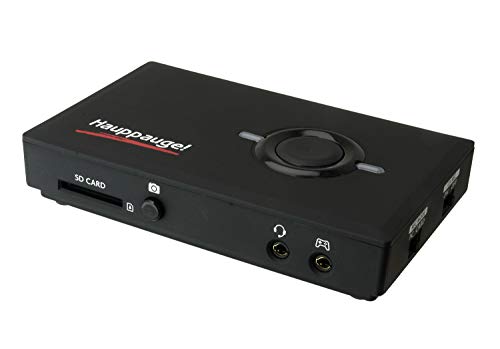
AVerMedia Live Gamer Mini, 1080p60 Capture Card with HDMI Pass-Thru, Plug & Play, for OBS, Xbox Series X/S, PS5, Switch, Win 11/macOS 12 (GC311)


Key features
- •Full HD 1080P video Recording: stream and record all your content in full HD at 60 FPS.
- •Zero-lag pass-through video: enjoy playing uncompressed video straight on the PC monitor with No latency.
- •Plug-and-play functionality: offers convenience, Just plug it to your PC, and it's ready to record and stream.
- •H.264 hardware encoder: with hardware encoding, this device takes load without putting any load on to your CPU.
- •Supports RECentral streaming software: It is a powerful streaming and recording software pack with great functions, such as multi-stream, rich overlays, Chroma key, and more.
BrandAVerMedia
CategoryExternal TV Tuners
Size1080p60 hardware encoder
ColorLive Gamer Mini
WarrantyRegister your product within 90 days of purchase gets 12 months of the warranty extension.
AVerMedia Live Gamer Mini, 1080p60 Capture Card with HDMI Pass-Thru, Plug & Play, for OBS, Xbox Series X/S, PS5, Switch, Win 11/macOS 12 (GC311)
List Price: $105.91$95.32DEALYou Save: $10.59 (10%)
Free shippingFree Returns – 30 daysFree Order CancellationSecure Payment2–3 Days DeliveryGet It October 26, 2026In Stock (4)No marketing spamNo account requiredFulfilment by FedEx / Amazon / UPS / ShipwirePayPal / Card Buyer Protection
Customer Reviews
Reviews sourced from verified Amazon purchasers4.4
out of 5
Based on 10 reviews
5★
70%
4★
30%
3★
0%
2★
0%
1★
0%
AverMedia GC553G2 HDMI 2.1 4k60p capture
Carlos✓ Verified Purchase•January 13, 2024
Second review(update):
So after speaking with AVerMedia extensively, there are a few things to consider if you are a MacOS M1-M2-M3 chip user. First the UVC limitation on MacOS is frustrating as the GC553G2 will not read 4k60. This is not a limitation on AVM this is a sad limitation on MacOS. However, even without the 60 frames at 4k resolution"¦. The quality of this product is FAR ABOVE Elgato or other products out there. I'd say the only "competition" would be the Blackmagic Web Presenter 4K but that's a whopping $600 vs $300. But for AVM to be able to reach such heights with this product is very impressive. I did quite a bit of testing with them myself with my MSM1U(Mac Studio M1 Ultra) and OBS. I do regular podcasts weekly on Facebook and YouTube. And I found 0 issues with this product. AVM and I went back and forth testing various things and everything just works! Thank you AVM you guys have made an exceptional, quality product! Very excited for the tech advancements in the near future! I decided to keep it and use it as it vastly out performs other products in this price point and higher price points.
First review:
Probably one of the saddest days today. After waiting for the possibility of being able to capture 4k60fps on the Apple Mac Studio M1 Ultra, today I checked the website and was very disappointed"¦ Found out this card only captures 4k30"¦. Will be returning as soon as it gets home"¦ very sad day indeed. I'll be buying the Blackmagic Web Presenter 4k. At least that has been proven to capture 4k60 by many users!
So after speaking with AVerMedia extensively, there are a few things to consider if you are a MacOS M1-M2-M3 chip user. First the UVC limitation on MacOS is frustrating as the GC553G2 will not read 4k60. This is not a limitation on AVM this is a sad limitation on MacOS. However, even without the 60 frames at 4k resolution"¦. The quality of this product is FAR ABOVE Elgato or other products out there. I'd say the only "competition" would be the Blackmagic Web Presenter 4K but that's a whopping $600 vs $300. But for AVM to be able to reach such heights with this product is very impressive. I did quite a bit of testing with them myself with my MSM1U(Mac Studio M1 Ultra) and OBS. I do regular podcasts weekly on Facebook and YouTube. And I found 0 issues with this product. AVM and I went back and forth testing various things and everything just works! Thank you AVM you guys have made an exceptional, quality product! Very excited for the tech advancements in the near future! I decided to keep it and use it as it vastly out performs other products in this price point and higher price points.
First review:
Probably one of the saddest days today. After waiting for the possibility of being able to capture 4k60fps on the Apple Mac Studio M1 Ultra, today I checked the website and was very disappointed"¦ Found out this card only captures 4k30"¦. Will be returning as soon as it gets home"¦ very sad day indeed. I'll be buying the Blackmagic Web Presenter 4k. At least that has been proven to capture 4k60 by many users!
Great
reek✓ Verified Purchase•January 13, 2024
Not many complaints here it does what I need it to do which is stream my vids. No lag at all! Easy setup plug and play. It has rgb if ya like that I use it with obs just fine
My only complaint is it must connected to a power source (which is normal)
My only complaint is it must connected to a power source (which is normal)
OBS game station
Peace Keeper✓ Verified Purchase•January 6, 2024
I have some consoles next to my PC, and my buddies like to stream games for friends to show off new games or cool tricks and stuff.
My PS4 can stream natively, but only YT and twitch. I want to stream on discord for friends.
So I got this, messed with it for a while to get the setting just right in OBS.
IF YOU NEED OBS HELP AND SEE THIS:
1. Add New Capture Card to your scene. It's towards the bottom of the list which is why it's hard to find
2. Once added, a pop-up will give you a preview of what the card is capturing. Take this opportunity to adjust brightness and contrast settings if you need to.
3. Leave the setting in the pop-up window default for now. The main changes won't happen here anyways
4. Setup your audio so that the capture card you added is operating as both the Output Source and Monitor. This should get the audio to come through OBS
5. Right-click the stream preview on the right side, I think it's called the Projector. You want to full screen this.
6. Play games
This will allow you to play your console by using the OBS as your TV and telling the PC to give you audio console audio. There should not be any input lag or latency to worry about, as long as you are using a USB 3 port on your PC. I made a mistake one day, and the USB 2.0 introduced noticeable input lag.
My only recommendation: couple this with an HDMI switch that detects the video source and automatically change the input for you. This allows multiple consoles to feed into the 1 capture card without needing to swap around HDMIs. Turns your PC into the ultimate gaming rig.
Of course you can record gameplay too, but I got this for the streaming. I'm not recording badass plays for YouTube and what not.
Get this thing. Best balance I could find between price and features. One of the only devices in this price range that offers 4K60fps passthru. My Consoles don't need the 4K, but that extra wiggle room inpower is what helps reassure me that this thing is more than capable of handling whatever I throw at it today.
My PS4 can stream natively, but only YT and twitch. I want to stream on discord for friends.
So I got this, messed with it for a while to get the setting just right in OBS.
IF YOU NEED OBS HELP AND SEE THIS:
1. Add New Capture Card to your scene. It's towards the bottom of the list which is why it's hard to find
2. Once added, a pop-up will give you a preview of what the card is capturing. Take this opportunity to adjust brightness and contrast settings if you need to.
3. Leave the setting in the pop-up window default for now. The main changes won't happen here anyways
4. Setup your audio so that the capture card you added is operating as both the Output Source and Monitor. This should get the audio to come through OBS
5. Right-click the stream preview on the right side, I think it's called the Projector. You want to full screen this.
6. Play games
This will allow you to play your console by using the OBS as your TV and telling the PC to give you audio console audio. There should not be any input lag or latency to worry about, as long as you are using a USB 3 port on your PC. I made a mistake one day, and the USB 2.0 introduced noticeable input lag.
My only recommendation: couple this with an HDMI switch that detects the video source and automatically change the input for you. This allows multiple consoles to feed into the 1 capture card without needing to swap around HDMIs. Turns your PC into the ultimate gaming rig.
Of course you can record gameplay too, but I got this for the streaming. I'm not recording badass plays for YouTube and what not.
Get this thing. Best balance I could find between price and features. One of the only devices in this price range that offers 4K60fps passthru. My Consoles don't need the 4K, but that extra wiggle room inpower is what helps reassure me that this thing is more than capable of handling whatever I throw at it today.
a bit finicky, but works fine
2dbirdy✓ Verified Purchase•January 1, 2024
The connection can be a little finicky at times, so you have to plug and unplug things a bit at times to get it to properly connect, but it's not so big of a deal, really. Other than that, it's very plug and play, functionally.
I don't recommend keeping it plugged in when it's not in use, because it can get pretty warm. It sometimes doesn't want to function anymore if you leave it on too long. Make sure to unplug it after use.
I don't really care about having perfect quality since I use this quite casually between me and my wife to share our screen with friends and stream occasionally. It looks good enough to me.
I do notice that the video output is different when I have my Nintendo Switch docked, so remember that you might have to change your TV settings on your Nintendo Switch when you have this plugged into it vs. when you don't. The size of the screen is the only thing that seems to be different. Reguarly my Switch needs to be zoomed to 91% on my TV, but with the capture card, the setting is 100%. Your mileage may vary.
Also for anyone wondering, it works just fine both on a PC laptop and a Macbook. My wife uses a PC laptop with it, and I use an adapter to plug the USB into my Macbook, and it still has the plug and play functionality.
I don't recommend keeping it plugged in when it's not in use, because it can get pretty warm. It sometimes doesn't want to function anymore if you leave it on too long. Make sure to unplug it after use.
I don't really care about having perfect quality since I use this quite casually between me and my wife to share our screen with friends and stream occasionally. It looks good enough to me.
I do notice that the video output is different when I have my Nintendo Switch docked, so remember that you might have to change your TV settings on your Nintendo Switch when you have this plugged into it vs. when you don't. The size of the screen is the only thing that seems to be different. Reguarly my Switch needs to be zoomed to 91% on my TV, but with the capture card, the setting is 100%. Your mileage may vary.
Also for anyone wondering, it works just fine both on a PC laptop and a Macbook. My wife uses a PC laptop with it, and I use an adapter to plug the USB into my Macbook, and it still has the plug and play functionality.
Perfectly Servicable
July Neon✓ Verified Purchase•November 5, 2023
It's more than good enough for anyone wanting to stream switch/xbox/steam deck/whatever else uses HDMI. A point of advice, some things have some sort of HDCP protection thing (Roku, Steam Deck, etc), and that can be turned off if you dig through avermedia's software...which is less than stellar. Occasionally I'll find it'll freak out/lock up on me, but usually unplugging it and waiting a few minutes will solve whatever issue it's having. Best advice i can give is don't bother trying to stream with avermedia's software, stick to using it in something like OBS/xsplit, or discord's new capture card feature.
Page 1 of 2