DURGOD Gaming Mechanical Keyboard with Cherry MX Silent Red Switches - 104 Key - Double Shot PBT - NKRO - USB Type C - for Gamer/Typist(White,ANSI/US)



Key features
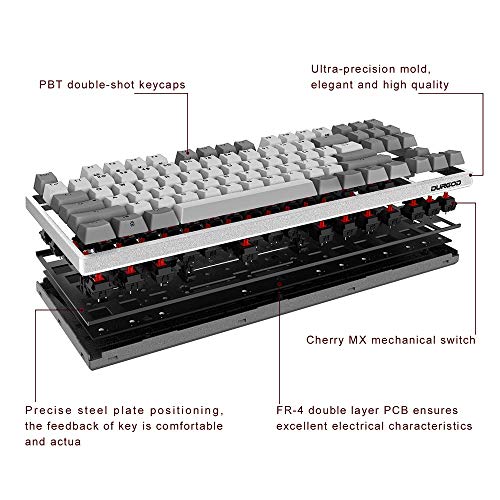
- •104 Keys Double Shot PBT Keycaps ; Ansi US International Layout ; Cherry MX Switches
- •Durgod K310 Features a Sturdy case with adjustable feets so you can prop the keyboard up at an angle to relieve your wrists. (2 positions)
- •Supports DURGOD Zeus Engine software : ( Upgrade your keyboard firmware on the go and set up complex macros or rebind keys as you wish)
- •Two Different Cables : Type C To Type C USB Cable-3.3FT (1M) and Type-C to type-A USB cable 5.9FT/ (1.8M) ; Logo Sticker and keypuller included.
- •Compatibility with Mac and Windows: Compatible with Windows 10, Win 8, Win 7, Win Vista, Windows XP and Mac OS (Might need to remap some key through the software) ; The keyboard is adapted for all environment, Home & Office use.
- •Keyboard weight: approx 1.06KG (2.33 LB)
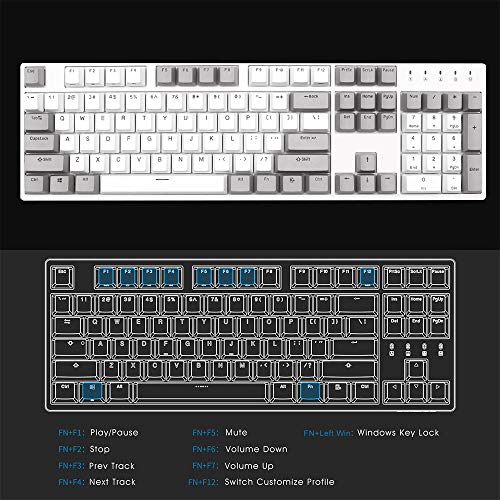
- •All the keys except FN Key are programmable.
- •Independant macro editor
- •Independent profile editor.
- •Windows key lock function programming.
DURGOD Gaming Mechanical Keyboard with Cherry MX Silent Red Switches - 104 Key - Double Shot PBT - NKRO - USB Type C - for Gamer/Typist(White,ANSI/US)
List Price: $202.25$182.03DEALYou Save: $20.22 (10%)
Free shippingFree Returns – 30 daysFree Order CancellationSecure Payment2–3 Days DeliveryGet It October 25, 2026In Stock (1)No marketing spamNo account requiredFulfilment by FedEx / Amazon / UPS / ShipwirePayPal / Card Buyer Protection
Customer Reviews
Reviews sourced from verified Amazon purchasers4.3
out of 5
Based on 10 reviews
5★
50%
4★
50%
3★
0%
2★
0%
1★
0%
Need help picking another ...
BG-Frank✓ Verified Purchase•September 25, 2023
I own two Durgod keyboards already, and want to purchase a third, but the specs are misleading or at least somewhat incomplete. So can anyone help me out? I've sent messages to both Durgod and HK Gaming, but have received no responses whatever from them.
This one: a new full-size "Durgod Taurus K310 Corona Mechanical Gaming Keyboard - 104 Keys - Double Shot PBT - NKRO - USB Type C (Cherry Brown, White Backlit)" [ASIN: B07YQSZMXW] can store its key mappings and macros **within the keyboard itself**, so that I can move it from machine to machine without needing to have the Durgod Zeus Engine (DZE) running. Although it must be programmed with the DZE on a Windows machine, I can use it on Linux and all of my customizations are available with no Durgod software needed.
My ten-month-old ten-key-less "Durgod Taurus K320 TKL Mechanical Gaming Keyboard - 87 Keys - Double Shot PBT - NKRO - USB Type C (Cherry Brown, White)" [ASIN: B07B8DS585] does NOT store its key mappings and macros in the keyboard, and those are only available on a Windows machine with the DZE running so, although it's a great keyboard and works *as a keyboard* on Linux, none of the customizations are available. (Durgod does not have a Linux version of the DZE and Wine has no support for HID connections).
I want to purchase another ten-key-less version but one that retains its key mappings and macros in the keyboard. Is it safe to assume that the "Durgod Taurus K320 TKL Mechanical Gaming Keyboard - 87 Keys - Double Shot PBT - NKRO - USB Type C (Cherry Brown, Corona (White Backlit))" [ASIN: B07VXR9RY7] does this? It seems like it's identical to the full-size version I have, but the Durgod product descriptions make no mention of whether or not any specific keyboard model stores its mapping on the computer or within the keyboard so it's hard to tell.
Otherwise, both the keyboards are built like tanks, and are great to type on though!
This one: a new full-size "Durgod Taurus K310 Corona Mechanical Gaming Keyboard - 104 Keys - Double Shot PBT - NKRO - USB Type C (Cherry Brown, White Backlit)" [ASIN: B07YQSZMXW] can store its key mappings and macros **within the keyboard itself**, so that I can move it from machine to machine without needing to have the Durgod Zeus Engine (DZE) running. Although it must be programmed with the DZE on a Windows machine, I can use it on Linux and all of my customizations are available with no Durgod software needed.
My ten-month-old ten-key-less "Durgod Taurus K320 TKL Mechanical Gaming Keyboard - 87 Keys - Double Shot PBT - NKRO - USB Type C (Cherry Brown, White)" [ASIN: B07B8DS585] does NOT store its key mappings and macros in the keyboard, and those are only available on a Windows machine with the DZE running so, although it's a great keyboard and works *as a keyboard* on Linux, none of the customizations are available. (Durgod does not have a Linux version of the DZE and Wine has no support for HID connections).
I want to purchase another ten-key-less version but one that retains its key mappings and macros in the keyboard. Is it safe to assume that the "Durgod Taurus K320 TKL Mechanical Gaming Keyboard - 87 Keys - Double Shot PBT - NKRO - USB Type C (Cherry Brown, Corona (White Backlit))" [ASIN: B07VXR9RY7] does this? It seems like it's identical to the full-size version I have, but the Durgod product descriptions make no mention of whether or not any specific keyboard model stores its mapping on the computer or within the keyboard so it's hard to tell.
Otherwise, both the keyboards are built like tanks, and are great to type on though!
Well priced, you get a great experience and a very premium feeling keyboard.
Ray Phillips✓ Verified Purchase•September 4, 2023
UPDATE:
I've had this keyboard for about a year and a half. I'm still very happy with it! If something happened to it, I would gladly buy another. One thing of note: the updater for the software is flakey. Many times, new versions will say that they don't pass an integrity check. I just go to their website and download the latest version when this happens. But I figured it may be a deal breaker for some.
Original Review:
When covid hit, I left my "good" keyboard at the office. I've been making due with a Razor mechanical keyboard with their in house switches. I've always been a fan of Cherry MX Blue switches, so I decided enough was enough and started hunting. I came across the Durgod K310 while looking for inexpensive mechanical keyboards with Cherry MX Blues. It looked promising, so I went for it.
Overall, I really like it! It's built like a tank and the blue switches are a dream to type on. I'm a software developer, so I type for 8+ hours a day. The software took a little bit to find online. It's called Zeus for anyone looking. Just Google "Durgod Zeus".
I like the customizability of the keys. I turned the "context menu" key into a right windows key and my scroll lock became a macro key for a common key combination I do while working. I do kinda wish it has a few macro keys, but that's on me for not expecting that I'd want them.
My one complaint is with the backlit keycaps and even this is being nit picky. The backlit portion does not do a good job of evenly distributing the light across the text. You get a "hot spot" of bright light in the middle that fades off fast so the edges of text is not well lit (see my pictures). But I replaced the keycaps anyway and the new keycaps don't have this issue.
All in all, the k310 is a heck of a lot of value for the money. I wouldn't hesitate to buy another one or recommend one to a family member or friend. It's a very good keyboard for the price.
I've had this keyboard for about a year and a half. I'm still very happy with it! If something happened to it, I would gladly buy another. One thing of note: the updater for the software is flakey. Many times, new versions will say that they don't pass an integrity check. I just go to their website and download the latest version when this happens. But I figured it may be a deal breaker for some.
Original Review:
When covid hit, I left my "good" keyboard at the office. I've been making due with a Razor mechanical keyboard with their in house switches. I've always been a fan of Cherry MX Blue switches, so I decided enough was enough and started hunting. I came across the Durgod K310 while looking for inexpensive mechanical keyboards with Cherry MX Blues. It looked promising, so I went for it.
Overall, I really like it! It's built like a tank and the blue switches are a dream to type on. I'm a software developer, so I type for 8+ hours a day. The software took a little bit to find online. It's called Zeus for anyone looking. Just Google "Durgod Zeus".
I like the customizability of the keys. I turned the "context menu" key into a right windows key and my scroll lock became a macro key for a common key combination I do while working. I do kinda wish it has a few macro keys, but that's on me for not expecting that I'd want them.
My one complaint is with the backlit keycaps and even this is being nit picky. The backlit portion does not do a good job of evenly distributing the light across the text. You get a "hot spot" of bright light in the middle that fades off fast so the edges of text is not well lit (see my pictures). But I replaced the keycaps anyway and the new keycaps don't have this issue.
All in all, the k310 is a heck of a lot of value for the money. I wouldn't hesitate to buy another one or recommend one to a family member or friend. It's a very good keyboard for the price.
Great quality
Zachary P.✓ Verified Purchase•August 23, 2023
EDIT:
Dropping my review of the keyboard from 5 stars to 4 because the software for it is garbage. I downloaded and installed the "Zeus Engine" which is their proprietary customization software and immediately it was clear that this wasn't where the budget for the keyboard went. When I initially booted it up, it said that the keyboard had a firmware/software update available, which I then proceeded to install. It requested that I make sure the keyboard stay plugged in while the update ran, which I did. Once completed the keyboard stopped functioning entirely and I had to go and grab my old keyboard to use the computer. After messing with it for awhile, I found that basically, the Zeus software itself was what was preventing the keyboard from working. While all this was going on I noticed that the software would prompt for UAC Administrator permissions for every single button I clicked within the software, which struck me as odd, like it was launching a different program for each menu button or something. Additionally, the English translation in the software is poor at best, but it's hard to fault them for this as this is a very common issue with Chinese made software and tech people aren't necessarily skilled in multiple languages. I uninstalled it and the keyboard works just like before. I still highly recommend the keyboard, as the quality really is excellent, but I would avoid the software like the plague.
ORIGINAL REVIEW:
The keyboard feels great to type on and has a subtle and professional look to it. I was initially concerned about the fact that it's a Chinese brand (especially since it was between this and the DasKeyboard Model S) but I'm entirely pleased with the feel, sound, look, and quality of the board. I haven't used it for gaming at all, but it feels great to type on at the office and isn't too loud for the work environment. (I have the MX brown variant)
Definitely a great keyboard, especially if you like the feel of mechanical, but want something that doesn't look or feel "Gamer-y"
Dropping my review of the keyboard from 5 stars to 4 because the software for it is garbage. I downloaded and installed the "Zeus Engine" which is their proprietary customization software and immediately it was clear that this wasn't where the budget for the keyboard went. When I initially booted it up, it said that the keyboard had a firmware/software update available, which I then proceeded to install. It requested that I make sure the keyboard stay plugged in while the update ran, which I did. Once completed the keyboard stopped functioning entirely and I had to go and grab my old keyboard to use the computer. After messing with it for awhile, I found that basically, the Zeus software itself was what was preventing the keyboard from working. While all this was going on I noticed that the software would prompt for UAC Administrator permissions for every single button I clicked within the software, which struck me as odd, like it was launching a different program for each menu button or something. Additionally, the English translation in the software is poor at best, but it's hard to fault them for this as this is a very common issue with Chinese made software and tech people aren't necessarily skilled in multiple languages. I uninstalled it and the keyboard works just like before. I still highly recommend the keyboard, as the quality really is excellent, but I would avoid the software like the plague.
ORIGINAL REVIEW:
The keyboard feels great to type on and has a subtle and professional look to it. I was initially concerned about the fact that it's a Chinese brand (especially since it was between this and the DasKeyboard Model S) but I'm entirely pleased with the feel, sound, look, and quality of the board. I haven't used it for gaming at all, but it feels great to type on at the office and isn't too loud for the work environment. (I have the MX brown variant)
Definitely a great keyboard, especially if you like the feel of mechanical, but want something that doesn't look or feel "Gamer-y"
Compact but unknown software
David M✓ Verified Purchase•July 29, 2023
Seems well built although two key caps popped off I had to click back on. Just press each key down firmly when you first get the keyboard. Can't try the software (Durgod Zeus Engine) because the Chinese website isn't safe (not https) and the software fails to download. A bit on the pricey side for what it is.
almost perfection in a keyboard. WELL worth it!
JP✓ Verified Purchase•July 25, 2023
so first, lets get the bad out of the way....
1) the switches. some people may love cherry mx switches... but i personally dont. there is too much wobble in the stem, which is just a side effect of the design.
2) the software leaves a lot to be desired. it is GOOD... it does what it says it can do (macros, key remapping, speed, etc) but it has little annoyances that they are still working out the bugs on (it states pretty clearly that its beta software in the app). it has to stay open and running for anything to work 100% as far as macros or key remapping. but, its just annoyances... it all works.
thats pretty much it for the bad. the good:
1) this board is SOLID. i disassembled mine (yes, i know i voided warranty - but more on that later) and the steel plate the switches are mounted to is THICK and turned up on the edges for even more rigidity.
2) the gunmetal color and white are both nice touches. they look good.
3) the keycaps are pretty impressive. they are pbt doubleshot and have a soft almost velveety feel to them. they are definitely quality caps. every legend is perfect... alignment is perfect... just an amazing set of keycaps.
4) the insides are almost as nice as the outside. there was a lot of care put into this board, and its obvious from the internals.
5) smart placement on the indicator lights. ive had lots of boards that throw the indicators just a few mm above the num lock row. if you are sitting over the board, you can see them.... but lean back in your seat a little, and they are impossible to see. not this board! they are smartly placed inline with the top row, so they are visible from any angle, and are noticeable but not bright so they arent distracting. really smart layout.
5) detachable usb-c cable. and get this... they groove the usb-c area to allow you to plug the thing in without even looking (if you use their cable that is). but, the grooves arent in the way, so any cable will work just fine. thats a smart idea and nice touch. the little things really make an impact.
6) they include BOTH a usb-c to usb-c cable, and a usb-c to usb-a cable, so no matter what... as long as you have an open usb port, you can use it. boards that cost twice this much barely include 1 of the options.
7) the stabilizers - WOW. when i opened this board up to start working, i expected to find cheap stabilizers. i was surprised to find pre-modded (clipped) cherry stabilizers that were well lubed. this makes ALL the difference when typing. as a result, there is ZERO rattle on this board. just nice solid clicks.
i was given one of these boards, and loved it so much (which is rare, because as i said - i hate cherry switches) that i bought a second one. when i did, i decided to open up the one that was given to me, and desolder every switch in there. i replaced them with Novelkeys + Kailh Box Heavy Burnt Orange switches, and as soon as i finished (which was no quick task) the difference was night and day. this is my new favorite board... i absolutely love it now. the heavy orange switches give this thing a solid thunk when typing, and just enough resistance and tactility that its absolutely perfection. (DURGOD: IF YOU READ THIS - PLEASE CONSIDER KAILH BOX SWITCHES IN THE FUTURE!)
This is an amazing board, at an amazing price. if you like cherry switches, this keyboard is a no brainer - it is perfection. but even if you dont... its absolutely worth the time consider buying this as to use as a kit and replace the switches with something you like. the switches are all plate mounted, and easy to do with a few hours and $40-80 worth of switches. (warning: not recommended for someone new to soldering or building your own keyboard)
the end result on this board is something i would have gladly paid hundreds for. but i did it for less than $150, and a few hours time. well worth it.
1) the switches. some people may love cherry mx switches... but i personally dont. there is too much wobble in the stem, which is just a side effect of the design.
2) the software leaves a lot to be desired. it is GOOD... it does what it says it can do (macros, key remapping, speed, etc) but it has little annoyances that they are still working out the bugs on (it states pretty clearly that its beta software in the app). it has to stay open and running for anything to work 100% as far as macros or key remapping. but, its just annoyances... it all works.
thats pretty much it for the bad. the good:
1) this board is SOLID. i disassembled mine (yes, i know i voided warranty - but more on that later) and the steel plate the switches are mounted to is THICK and turned up on the edges for even more rigidity.
2) the gunmetal color and white are both nice touches. they look good.
3) the keycaps are pretty impressive. they are pbt doubleshot and have a soft almost velveety feel to them. they are definitely quality caps. every legend is perfect... alignment is perfect... just an amazing set of keycaps.
4) the insides are almost as nice as the outside. there was a lot of care put into this board, and its obvious from the internals.
5) smart placement on the indicator lights. ive had lots of boards that throw the indicators just a few mm above the num lock row. if you are sitting over the board, you can see them.... but lean back in your seat a little, and they are impossible to see. not this board! they are smartly placed inline with the top row, so they are visible from any angle, and are noticeable but not bright so they arent distracting. really smart layout.
5) detachable usb-c cable. and get this... they groove the usb-c area to allow you to plug the thing in without even looking (if you use their cable that is). but, the grooves arent in the way, so any cable will work just fine. thats a smart idea and nice touch. the little things really make an impact.
6) they include BOTH a usb-c to usb-c cable, and a usb-c to usb-a cable, so no matter what... as long as you have an open usb port, you can use it. boards that cost twice this much barely include 1 of the options.
7) the stabilizers - WOW. when i opened this board up to start working, i expected to find cheap stabilizers. i was surprised to find pre-modded (clipped) cherry stabilizers that were well lubed. this makes ALL the difference when typing. as a result, there is ZERO rattle on this board. just nice solid clicks.
i was given one of these boards, and loved it so much (which is rare, because as i said - i hate cherry switches) that i bought a second one. when i did, i decided to open up the one that was given to me, and desolder every switch in there. i replaced them with Novelkeys + Kailh Box Heavy Burnt Orange switches, and as soon as i finished (which was no quick task) the difference was night and day. this is my new favorite board... i absolutely love it now. the heavy orange switches give this thing a solid thunk when typing, and just enough resistance and tactility that its absolutely perfection. (DURGOD: IF YOU READ THIS - PLEASE CONSIDER KAILH BOX SWITCHES IN THE FUTURE!)
This is an amazing board, at an amazing price. if you like cherry switches, this keyboard is a no brainer - it is perfection. but even if you dont... its absolutely worth the time consider buying this as to use as a kit and replace the switches with something you like. the switches are all plate mounted, and easy to do with a few hours and $40-80 worth of switches. (warning: not recommended for someone new to soldering or building your own keyboard)
the end result on this board is something i would have gladly paid hundreds for. but i did it for less than $150, and a few hours time. well worth it.
Page 1 of 2

![Koolertron Single-Handed Programmable Mechanical Keyboard with OEM Gateron Red Switch,All 46 Programmable Keys Tools Keypad,8 Macro Keys,PBT Keycap.[SMKD72-B]](https://m.media-amazon.com/images/I/416qZSLwEmL._SL500_.jpg)


