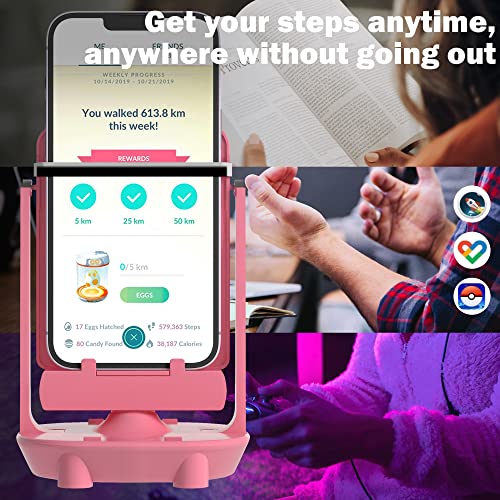
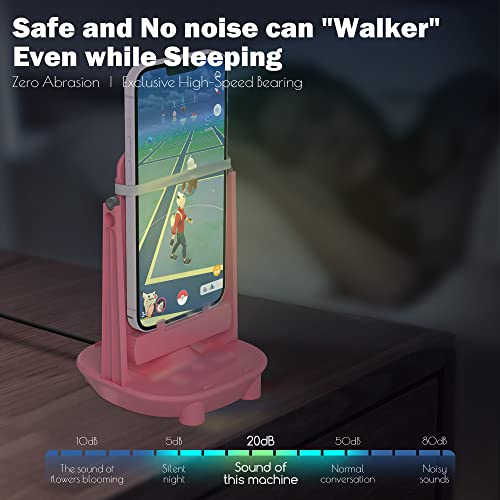
Orzero Steps Counter Compatible for Pokemon Go Walker Phone Swing Accessories Cellphone Pedometer (USB Cable) (Easy Installation) (Mute Version) Egg hatcher Rocker Quick Steps Earning Device - Pink





Key features
- •[Specially Designed]:Suitable for Pedometers, various Smart Phones (Under 7.2 inch) and Smart Watchs.
- •[High Quality Material]: The smooth plastic material will not scratch your smart phones. And since we have improved with the metal wheel on both sides. It will not makes noise. The device can hold 2 phones on the support plate with the rubber band at the same time to help you and your family to earn steps together quietly.
- •[Basic function]: The phone device can be shaked automatically and you will earn 7200 steps per hour easily! (Test Model: Mobile Phone)
- •[Applications]: You will earn steps quickly in apps such as Pokemon GO (Adventure Sync), Walkr, Google Fit, hatch your pokemon faster without going out!
- •[Warm Reminder]: Since each smartphone has different settings and sensor locations, if the device does not count the steps, please place the phone upside down on the device or contact us to find out a best solution.
Orzero Steps Counter Compatible for Pokemon Go Walker Phone Swing Accessories Cellphone Pedometer (USB Cable) (Easy Installation) (Mute Version) Egg hatcher Rocker Quick Steps Earning Device - Pink
List Price: $32.96$29.66DEALYou Save: $3.30 (10%)
Free shippingFree Returns – 30 daysFree Order CancellationSecure Payment2–3 Days DeliveryGet It October 25, 2026In Stock (1)No marketing spamNo account requiredFulfilment by FedEx / Amazon / UPS / ShipwirePayPal / Card Buyer Protection
Customer Reviews
Reviews sourced from verified Amazon purchasers4.2
out of 5
Based on 10 reviews
5★
80%
4★
20%
3★
0%
2★
0%
1★
0%
Phone rocker
Bubblie✓ Verified Purchase•August 23, 2023
The media could not be loaded. I bought this to get some steps in for a couple of the location based games I play. With the pandemic limiting my outings, I'm barely getting in 1/10 of my usual walking, if that.
This thing is not made of the highest quality materials. One of the 4 little ledge pieces on the rocker was broken right out of the box. Not a huge deal since I don't plan on using this as a phone stand, I have much better quality phone stands for that purpose. There are also uneven edges on the pieces, not sure if they contributed to the difficulty in assembling it, the two stand pieces took a while to pop in.
Once assembled, it works pretty smoothly and does open your eggs and portmanteaus. It's best to open the game map and interact with the game occasionally to ensure the steps are counted and a new egg or portmanteau is set once the previous one is done.
I've had two large phones with cases on it and had no issues with the functionality of this rocker. Worked with one or two phones with no noticeable difference in effectiveness. For reference, I have an iPhoneXS Max. The video attached shows a smaller iPhone 8 on it so I could film its movement, but it can hold my bigger phone with no problem.
It did make a slight sound every time it passed over the magnet, almost like the pendulum on an old grandfather clock. I normally tune it out, but it annoy some people. I've had to shut it off for conversations with people who can't stand either it's movement or sound.
Pretty good in terms of doing what it claims. Fairly easy to assemble and use. Took off a star for the minor quality issue right out of the box.
This thing is not made of the highest quality materials. One of the 4 little ledge pieces on the rocker was broken right out of the box. Not a huge deal since I don't plan on using this as a phone stand, I have much better quality phone stands for that purpose. There are also uneven edges on the pieces, not sure if they contributed to the difficulty in assembling it, the two stand pieces took a while to pop in.
Once assembled, it works pretty smoothly and does open your eggs and portmanteaus. It's best to open the game map and interact with the game occasionally to ensure the steps are counted and a new egg or portmanteau is set once the previous one is done.
I've had two large phones with cases on it and had no issues with the functionality of this rocker. Worked with one or two phones with no noticeable difference in effectiveness. For reference, I have an iPhoneXS Max. The video attached shows a smaller iPhone 8 on it so I could film its movement, but it can hold my bigger phone with no problem.
It did make a slight sound every time it passed over the magnet, almost like the pendulum on an old grandfather clock. I normally tune it out, but it annoy some people. I've had to shut it off for conversations with people who can't stand either it's movement or sound.
Pretty good in terms of doing what it claims. Fairly easy to assemble and use. Took off a star for the minor quality issue right out of the box.
decent
Natasha McPheron✓ Verified Purchase•August 14, 2023
i wish it didnt fall apart so easily but it gets the job done so thats all that really matters
Touchy, but works really well!
Olivia Fox✓ Verified Purchase•August 9, 2023
Took me a few tries to get it to work with pokemon go. I use a Samsung s10
If it doesn't work for you (which it didn't for me, it took me awhile to figure it out) these steps are what made it work.
1. Download your fitness app. for me, it Google Fitness. Sync the app so it tracks your steps and movement. If you do this, it'll track steps, even when walking around the room or on a treadmill.
2. Sync pogo to the fitness app. this'll make it count your steps sooo much better. Makes egg hatching and candies easier to obtain.
3. Turn on adventure sync. (turn it on and off if it was on before syncing to the fitness app)
4. restart pogo
5. set the phone on the swing (either right side up or upside down, one will track more steps then the other.) My phone does better upside down.
6. Make sure the fitness app is tracking your steps. it will put it towards pokemon go. It may not track correctly if pokemon go is open. It tracks best when its closed on my device.
If you did all of these correctly and its synced right, it works really well! I get 3 stars on my buddy pokemon within an hour.
If it doesn't work for you (which it didn't for me, it took me awhile to figure it out) these steps are what made it work.
1. Download your fitness app. for me, it Google Fitness. Sync the app so it tracks your steps and movement. If you do this, it'll track steps, even when walking around the room or on a treadmill.
2. Sync pogo to the fitness app. this'll make it count your steps sooo much better. Makes egg hatching and candies easier to obtain.
3. Turn on adventure sync. (turn it on and off if it was on before syncing to the fitness app)
4. restart pogo
5. set the phone on the swing (either right side up or upside down, one will track more steps then the other.) My phone does better upside down.
6. Make sure the fitness app is tracking your steps. it will put it towards pokemon go. It may not track correctly if pokemon go is open. It tracks best when its closed on my device.
If you did all of these correctly and its synced right, it works really well! I get 3 stars on my buddy pokemon within an hour.
Cute colour
Maii D.✓ Verified Purchase•August 1, 2023
Second time purchase, just in case I bought another cable as the first purchase the cable was not working.
Make sure to take the phone out of any casing in order to fit within the rubber band.
6000+ steps on android
Make sure to take the phone out of any casing in order to fit within the rubber band.
6000+ steps on android
Buy it! Worth the price!
Snow Queen✓ Verified Purchase•June 30, 2023
It's not the greatest material. Kinda flimsy. But it's super easy to assemble, and if you take the time to read the reviews (like this one), and learn how to use it, it is worth the $20! Some reviewer's have experienced noise, other's haven't. Mine I guess depends on its mood, as it does and does not make noise. It isn't really annoying when it does make noise, just a click noise that's pretty easy to ignore.
I have an iPhone. I don't give up easily on products, I try to figure out how to use them before sending them back. So, I figured it out! Keep reading!
If you have Adventure Sync enabled AND your iOS Health app set up installed and set up correctly, this will work. The iOS Health app is what will track your steps almost as if you are on a treadmill, so this app is an absolute MUST!
It goes without saying that Adventure Sync needs to be enabled. Even if you know it is, uncheck the box and check it again, just to refresh the account. It will not break to do it again.
In the iOS Health app, tap on your user icon (upper right corner) and under privacy tap on apps. Make sure under your apps that Pokémon Go is listed. If it isn't, add it either here or in settings under PoGo- give your Health app permission to access it, and then come back to the Health app. Once back in the Health app tap on the PoGo app. As you start scrolling down, begin enabling the actions you would like the Health app to be reported to the PoGo app. I have all but the two options for "˜wheelchair' enabled, because not only do I not use a wheelchair, but it also sends no useable data to PoGo anyway.
That's it!
After doing these steps. I close all apps (PoGo MUST be closed for this to work!), lock the screen and put the phone in the swing set.
First night I had all 9 friendship eggs in incubators, went to bed and the next morning they all had hatched!
I'm sorry I don't have the instructions for Google phones, but I imagine you would also play around with the settings of your phone's health app, and make sure the two apps are talking to each other.
I hope this helps!
Happy "walking", friends. And may the shinies be with you!
I have an iPhone. I don't give up easily on products, I try to figure out how to use them before sending them back. So, I figured it out! Keep reading!
If you have Adventure Sync enabled AND your iOS Health app set up installed and set up correctly, this will work. The iOS Health app is what will track your steps almost as if you are on a treadmill, so this app is an absolute MUST!
It goes without saying that Adventure Sync needs to be enabled. Even if you know it is, uncheck the box and check it again, just to refresh the account. It will not break to do it again.
In the iOS Health app, tap on your user icon (upper right corner) and under privacy tap on apps. Make sure under your apps that Pokémon Go is listed. If it isn't, add it either here or in settings under PoGo- give your Health app permission to access it, and then come back to the Health app. Once back in the Health app tap on the PoGo app. As you start scrolling down, begin enabling the actions you would like the Health app to be reported to the PoGo app. I have all but the two options for "˜wheelchair' enabled, because not only do I not use a wheelchair, but it also sends no useable data to PoGo anyway.
That's it!
After doing these steps. I close all apps (PoGo MUST be closed for this to work!), lock the screen and put the phone in the swing set.
First night I had all 9 friendship eggs in incubators, went to bed and the next morning they all had hatched!
I'm sorry I don't have the instructions for Google phones, but I imagine you would also play around with the settings of your phone's health app, and make sure the two apps are talking to each other.
I hope this helps!
Happy "walking", friends. And may the shinies be with you!
Page 1 of 2


![Mr.Shield [3-Pack] Screen Protector For NEW ANBERNIC WIN600 Premium Clear Screen Protector (PET Material)](https://m.media-amazon.com/images/I/41fJvp9pAYL._SL500_.jpg)