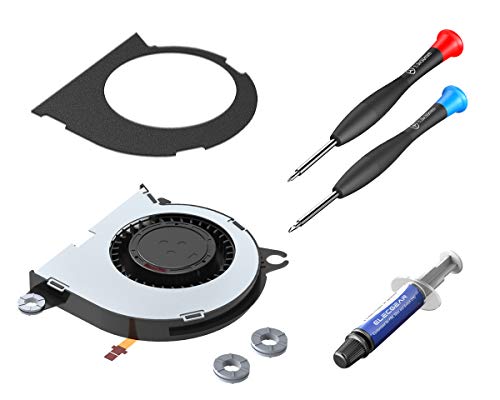
ElecGear Replacement Internal Cooling Fan compatible with Nintendo Switch - CPU Heatsink Cooler, Thermal Compound Paste, Y00 Triwing and PH00 Phillips Screwdriver, Spudger, Wipes Repair Tool Kit


Key features
- •[Switch CPU Fan] – The replacement cooling fan is compatible with Nintendo Switch video games console. Fits Switch ✅HAC-001 and the battery improved model ✅HAC-001(-01). Not compatible with Switch Lite ❌HDH-001 or ❌2021 OLED. Brand-new and tested in perfect working condition. Well wrapped in ESD protective bag and all the necessary repair tools included. Please study what we have done on improving the fan system below
- •[ElecGear vs. Nintendo] – 🔴Newly designed cooling fan at max 8800RPM (100% Duty) which is 10% faster than Nintendo original. 🟠Each piece of fans is tested at fine dynamic balance that is why you might see the red balancing mud on the rotor. 🟡Refined 3x shockproof O-ring feet. 🟢Additional noise absorbing EVA sheet covers the entire metal plate and makes sure 2dB decrease of noise level. We deliberately leave you with the pasting operation for DIY fun
- •[Thermal Paste and Tool Kit] – Specially customized thermal compound is the ideal CPU heatsink grease with high thermal conductivity (6.5w/m-k), low thermal resistance, metal-free, non-bleeding and easy to apply. Y-tipped Y00 tri-wing, PH000 Phillips screwdriver and plastic opening tool for easy teardown and assembly. The disposable pre-moistened wipes makes quick and easy removal of the old thermal paste
- •[What's in Package] – 1x Replacement Internal CPU Cooling fan; 1x Thermal Paste Tube; 1x EVA sheet; 3x Silicone O-ring Pads; 1x Y00 Tri-wing Screwdriver; 1x PH000 Cross Screwdriver; 1x Plastic Opening Pry Tool; 1x Wet and Dry Wipes. Installation demonstration offered on ElecGear tech support site
ElecGear Replacement Internal Cooling Fan compatible with Nintendo Switch - CPU Heatsink Cooler, Thermal Compound Paste, Y00 Triwing and PH00 Phillips Screwdriver, Spudger, Wipes Repair Tool Kit
List Price: $38.76$34.88DEALYou Save: $3.88 (10%)
Free shippingFree Returns – 30 daysFree Order CancellationSecure Payment2–3 Days DeliveryGet It October 25, 2026In Stock (1)No marketing spamNo account requiredFulfilment by FedEx / Amazon / UPS / ShipwirePayPal / Card Buyer Protection
Customer Reviews
Reviews sourced from verified Amazon purchasers4.5
out of 5
Based on 10 reviews
5★
70%
4★
30%
3★
0%
2★
0%
1★
0%
Great Replacement
Jordan✓ Verified Purchase•November 1, 2023
I had pre-order switch and years of use has started to take its toll on one components. The factory fan bearings were going out and it would lock up. The process to replace the fan isn't simple, lots of small connectors to change but there is no soldering. This replacement fan fit just as it needed to, and the tools included everything necessary to swap out.
Perfect!
ghepting✓ Verified Purchase•October 30, 2023
Swapped my failed fan out in my original switch from 2017 last night. This kit was perfect. Everything you need is in the box and the tools are quality, too. Very happy customer who is back to gaming after 1 hour.
Great replacement
Steven hawkins✓ Verified Purchase•October 13, 2023
The fan had went out on a friend's switch so I ordered this for them and got it switched out pretty quickly. The over all installation process was very simple and the fan itself worked great.
Works like a dream
Champ Reyna✓ Verified Purchase•September 7, 2023
My switch's old fan was on its last legs and I really don't know what happened to it; I would play mainstream titles like Splatoon 2 or Pokémon Sword and the fan sounded like a demon screeching, begging to be released from my switch. My switch would get concerningly hot, to the point I was afraid my switch would start melting if I played too long. Finally, I had enough and looked up how to replace the fan. The videos I found seemed straightforward with the main concern being that it is easy to strip screws, regardless of your tool quality. The fan got here relatively quickly, even though I live pretty far south, and the kit came with a tri-wing and a Phillips screwdriver, thermal paste, a sticker(I'm assuming to help direct air? I didn't use it), a single dry and wet wipe, a thermal paste spreader spatula, and the fan itself. I don't think the kit came with written instructions or a pry tool(I did use a pry tool, and I can't remember where I got it, but it's not necessary, it just made it easier since I don't have long nails; the spatula that came in the kit could be a pry tool but it's not the one I used, as the kit's looked more like the spatulas in thermal paste kits used for computers) but I prefer video instructions either way so I looked up a how-to. The kit gives you everything you need, and the thermal paste is more than enough to coat the top and bottom of the heat pipe if you decide to replace your paste while you're changing the fan (highly recommended, as the paste is semi-crumbly once it's re-exposed;highly recommend extra rubbing alcohol and cotton swabs if you do change the paste, but I didn't use the wet or dry wipe at all so results may vary on cleanup). The fan fit nice and snug, and the fan I received came with its own rubber shock absorbers so you don't have to transplant the old ones to the new fan, unlike some of the fan kits I've seen on some how-to videos. After sealing the switch back up, I ended up over-tightening the screw at the top of the switch's chassis, causing it to strip the threading, even after hearing several warnings from others, so DO BE CAREFUL when tightening the screws. I turned my switch back on (make sure your switch is OFF COMPLETELY, NOT just on sleep, throughout the entire repair) and the fan ran so quiet, I thought it wasn't working until I was playing Pokémon Arceus a half-hour later and held my cheek next to the switch's exhaust and felt the hot air gently coming out. It cools my switch perfectly and runs with no whirring or screeching. If you get this kit, make sure that your new fan has the little rubber pads where the screws go, as some sellers might have different variations of the fan provided in the kit, even if you buy from the same person. If it doesn't have them, you'll have to move the old ones to the new one; it's not hard, just something to keep in mind or else you WILL decrease the life of the fan and/or make the fan louder than it should be.
Whine when switch gets hot
SwiftKitten✓ Verified Purchase•August 25, 2023
if you have your switch on for a few hours ( like playing in docked mode for a long time for a new game release)
eventually the fan will go to the highest setting and mine has a really annoying whine when it goes to the max.
most of the time it doesn't do that. and it is completely silent on every other setting but im marking it down to three for when it does because that's a really annoying whine i cant play with ti for more than 10 min or it drives me crazy , that being said, when it does make the whine the switch is quite hot to the touch and its expelling some pretty hot air. soo i mean its working for sure.
if i let it cool for for like 20 min i can go whine free for a few more hours whine free.
probably shouldn't be playing that long a sitting.. but regardless it shouldn't be making that noise in the first place. but at least its a good indication i should take a break >.>
other notes:
the tools that come with it work wonderfully although i would make sure u have IPA and a cloth to wipe off the old thermal paste, it is missing that.
MAKE SURE you double check you picked up the right screwdriver for each screw, else you can strip the screws on your switch, the screws the switch comes with are really bad, i ended up stripping 1 and had to drill it out ( which was scary AF to do to a functioning switch) luckily for me i have had practice doing that.
but that's the fault of Nintendo not these tools, these tools are great.
just that whine is annoying me.. even when its off i can hear it now XD
if it wasn't for the whine i would have given it 5 stars.
again the thing i feel i should stress the most is to take great care not to strip the terrible screws on the switch
Review edit 8/25 post costumer service:
so i was sent a replacement until for free. unfortunately for me this unit also had a similar whine..
apparently the frequency whine is out of the range of hearing for most humans, and only happens when docked and only when operating at max.. i am just unlucky enough to be in that 10% of people who have hearing in this frequency range. and i mostly play docked on graphic intensive games the switch can barely handle like "xenoblade".
i would rate customer service 9/10, and i would certainly buy from them again. they provided very detailed explanations and were very polite and even explained the testing product testing the did on this particular issue. the vast majority of people will not encounter this whine and in the rare cases they do most wont even be able to hear it. i am just one of those unlucky few i guess.
raising review from 3 to 4 because customer service.
eventually the fan will go to the highest setting and mine has a really annoying whine when it goes to the max.
most of the time it doesn't do that. and it is completely silent on every other setting but im marking it down to three for when it does because that's a really annoying whine i cant play with ti for more than 10 min or it drives me crazy , that being said, when it does make the whine the switch is quite hot to the touch and its expelling some pretty hot air. soo i mean its working for sure.
if i let it cool for for like 20 min i can go whine free for a few more hours whine free.
probably shouldn't be playing that long a sitting.. but regardless it shouldn't be making that noise in the first place. but at least its a good indication i should take a break >.>
other notes:
the tools that come with it work wonderfully although i would make sure u have IPA and a cloth to wipe off the old thermal paste, it is missing that.
MAKE SURE you double check you picked up the right screwdriver for each screw, else you can strip the screws on your switch, the screws the switch comes with are really bad, i ended up stripping 1 and had to drill it out ( which was scary AF to do to a functioning switch) luckily for me i have had practice doing that.
but that's the fault of Nintendo not these tools, these tools are great.
just that whine is annoying me.. even when its off i can hear it now XD
if it wasn't for the whine i would have given it 5 stars.
again the thing i feel i should stress the most is to take great care not to strip the terrible screws on the switch
Review edit 8/25 post costumer service:
so i was sent a replacement until for free. unfortunately for me this unit also had a similar whine..
apparently the frequency whine is out of the range of hearing for most humans, and only happens when docked and only when operating at max.. i am just unlucky enough to be in that 10% of people who have hearing in this frequency range. and i mostly play docked on graphic intensive games the switch can barely handle like "xenoblade".
i would rate customer service 9/10, and i would certainly buy from them again. they provided very detailed explanations and were very polite and even explained the testing product testing the did on this particular issue. the vast majority of people will not encounter this whine and in the rare cases they do most wont even be able to hear it. i am just one of those unlucky few i guess.
raising review from 3 to 4 because customer service.
Page 1 of 2