Honeycomb Alpha Flight Controls Yoke & Switch Panel
Key features
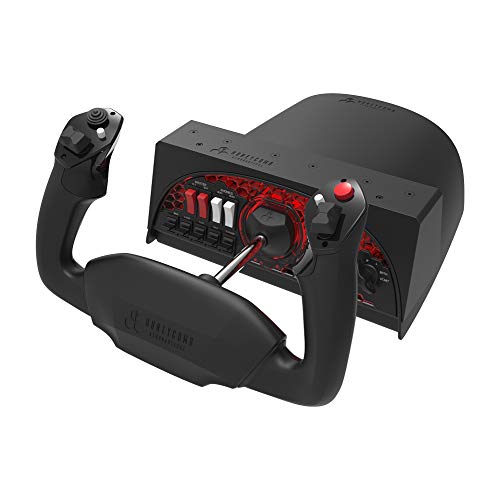
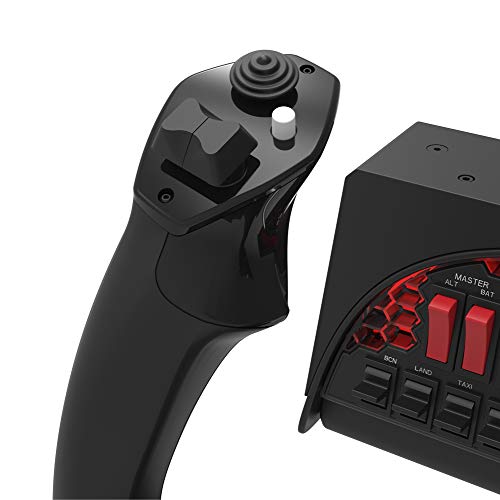
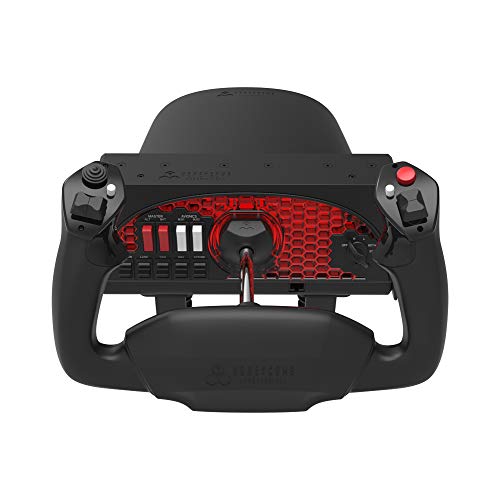
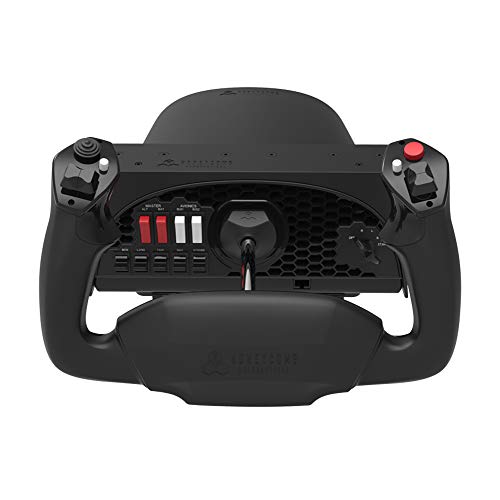
- •Left handle features one 8-WAY HAT SWITCH, two Vertical 2-way rocker switches, a button and a push to Talk Button
- •Right handle features two Horizontal 2-Way ROCKER SWITCHES, one large & one small button
- •SOLID STEEL yoke shaft with 180° YOKE ROTATION
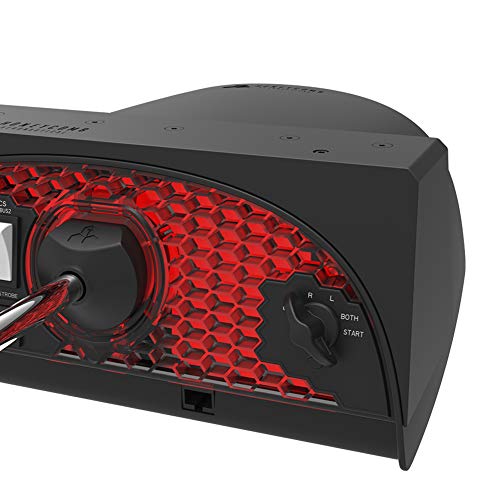
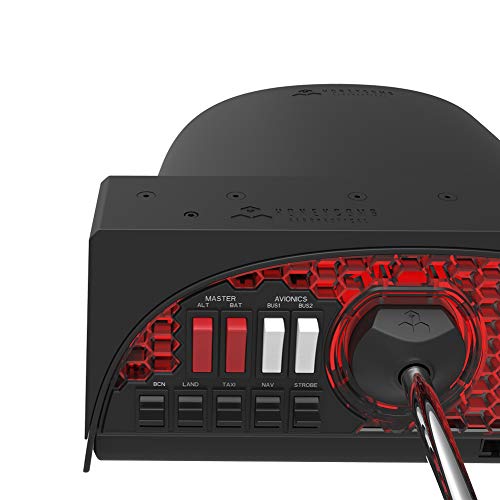
- •5-POSITION IGNITION SWITCH and MASTER, AVIONICS, ALTERNATOR and LIGHT switch panel
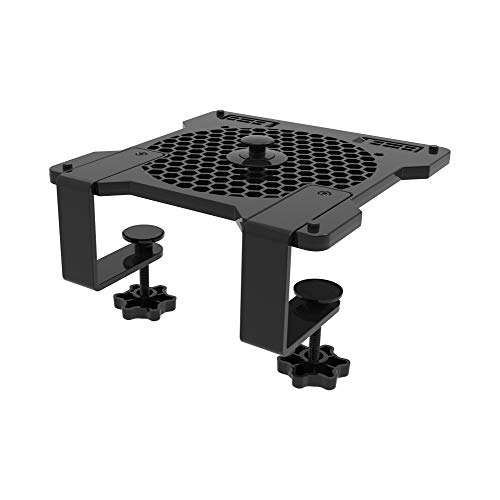
- •DUAL MOUNTING Solution allows for full use with or without clamps. Two heavy duty clamps made of steel attach and secure the yoke. For thicker tabletops, a large 3M Micro-Suction Pad that produces 40lbs of tensile strength can be used for a clamp free solution.
CategoryIndustrial Electrical
Honeycomb Alpha Flight Controls Yoke & Switch Panel
List Price: $363.74$327.37DEALYou Save: $36.37 (10%)
Free shippingFree Returns – 30 daysFree Order CancellationSecure Payment2–3 Days DeliveryGet It October 25, 2026In Stock (1)No marketing spamNo account requiredFulfilment by FedEx / Amazon / UPS / ShipwirePayPal / Card Buyer Protection
Customer Reviews
Reviews sourced from verified Amazon purchasers0.0
out of 5
Based on 10 reviews
5★
70%
4★
30%
3★
0%
2★
0%
1★
0%
I use the screw-down mount - stick mount is great but not good enough
Taylor W Strack✓ Verified Purchase•December 19, 2023
The higher stick forces are documented by others. I won't comment about the realism of such stick forces but the result of using the stick mount is that it gives way in the flare when you need full deflections. Otherwise the stick mount is more than sufficient. I recommend this product as is!
Updated Review
pccoder✓ Verified Purchase•December 15, 2023
Quality wise, it looks really strong. Nice, heavy and great feel. There is great rotation on the horizontal axes. The soft rubberish feel of the yoke is a nice touch.
I have a desk which doesn't allow for the use of the clamps. I am using the provided sticky pad and I'm shocked how well it holds to the desk surface. I was apprehensive that it would hold but it does very well. It's easy to forget that no clamps are even there.
The switches are awkward to reach as they're directly behind the yoke. This is especially true since I use a Logitech throttle and it is located (clamped) directly to the right of the yoke. It's a tight fit of putting my arm through there. Luckily enough the only thing over there is the starter switch so it's not a deal breaker. The switches on the left are equally uncomfortable to reach but a small price to pay for their usefulness.
The footprint on the desk is no better nor worse than my Logitech yoke, aside from not needing clamps. The red glowing light behind the yoke serves no real practical purpose and should just be considered a novelty. It's not going to produce enough light to serve any purpose even in a pitch black room. If you need to see those keys on your keyboard you might need to just get a lit keyboard.
My yoke had a malfunctioning metal rod and I brought this to the attention of the manufacturer and they replaced the unit very quickly. Good customer service!
I think this is going to be a really nice yoke, definitely nicer than my Logitech and for the price it's a great purchase.
I have a desk which doesn't allow for the use of the clamps. I am using the provided sticky pad and I'm shocked how well it holds to the desk surface. I was apprehensive that it would hold but it does very well. It's easy to forget that no clamps are even there.
The switches are awkward to reach as they're directly behind the yoke. This is especially true since I use a Logitech throttle and it is located (clamped) directly to the right of the yoke. It's a tight fit of putting my arm through there. Luckily enough the only thing over there is the starter switch so it's not a deal breaker. The switches on the left are equally uncomfortable to reach but a small price to pay for their usefulness.
The footprint on the desk is no better nor worse than my Logitech yoke, aside from not needing clamps. The red glowing light behind the yoke serves no real practical purpose and should just be considered a novelty. It's not going to produce enough light to serve any purpose even in a pitch black room. If you need to see those keys on your keyboard you might need to just get a lit keyboard.
My yoke had a malfunctioning metal rod and I brought this to the attention of the manufacturer and they replaced the unit very quickly. Good customer service!
I think this is going to be a really nice yoke, definitely nicer than my Logitech and for the price it's a great purchase.
Plug and play, works great with MS Flight Sim 2020
RJ8989✓ Verified Purchase•November 23, 2023
Pros: The quality is quite good. The range of motion is a full 90 degrees to the right and left, which keeps the input at a 1:1 ratio in the simulator. Push and pull back are smooth and stiff like a real yoke. Very realistic. The switches for the lights match the correct order for the Cessna.
Con: the starter switch does not spring back from start to both (for the magnetos) like it does in a real Cessna. You have to manually turn it to "Both" or a voltage alarm will sound if left in "start" for too long. Not a big deal at all.
Con: the starter switch does not spring back from start to both (for the magnetos) like it does in a real Cessna. You have to manually turn it to "Both" or a voltage alarm will sound if left in "start" for too long. Not a big deal at all.
High Quality Yoke
E. A. Jacques✓ Verified Purchase•November 15, 2023
I purchased this to replace my older, yet fully functional, Logitech (a.k.a. Saitek) yoke. The quality of this yoke is a lot higher than that of the Logitech - no question. The operation is much smoother with virtually no detente throughout the range of movements. It just feels more like what I image a real yoke to feel like - sturdy and solid. The yoke handles have a real nice professional feel not plastic feeling like the Logitech, although the Logitech was fine. The mounting system is very solid as well.
The switch panel is a nice feature too. They are laid out to be pretty much an exact replica of a Cessna 172 switch panel and are even labeled as such, so if that is your plane of choice you will appreciate the switches - which are solid and well made. I would have liked an option to get a yoke without the switch panel or maybe an option to have them sans labels. I actually find it more realistic to reach out and operate the switches with my mouse since they are not right underneath the yoke in the actual plane. But it's a matter of preference. And now that I have moved on from the Cessna to a Beach Craft King Air the switches seem out of place. I might end up using them for some functions, but to be honest accessing them for anything other than the start up procedure is awkward as they are right under the yoke handle.
There is no question this is a high end yoke. That said, the Logitech yoke and others like it, work just fine. I wanted the best of the best and had the money so for me it there are no regrets. If you are on a tight budget and already have a functional yoke, I would say stick with what you have. If you have some extra cash laying around or are buying this yoke for someone who would really appreciate having one of the best yokes made, this is the one to get.
For me, the more important place to spend you flight sim budget is on a good set of rudder pedals. Regardless, I can definitely recommend this yoke for the flight simmers out there who want quality and realism and can afford it.
The switch panel is a nice feature too. They are laid out to be pretty much an exact replica of a Cessna 172 switch panel and are even labeled as such, so if that is your plane of choice you will appreciate the switches - which are solid and well made. I would have liked an option to get a yoke without the switch panel or maybe an option to have them sans labels. I actually find it more realistic to reach out and operate the switches with my mouse since they are not right underneath the yoke in the actual plane. But it's a matter of preference. And now that I have moved on from the Cessna to a Beach Craft King Air the switches seem out of place. I might end up using them for some functions, but to be honest accessing them for anything other than the start up procedure is awkward as they are right under the yoke handle.
There is no question this is a high end yoke. That said, the Logitech yoke and others like it, work just fine. I wanted the best of the best and had the money so for me it there are no regrets. If you are on a tight budget and already have a functional yoke, I would say stick with what you have. If you have some extra cash laying around or are buying this yoke for someone who would really appreciate having one of the best yokes made, this is the one to get.
For me, the more important place to spend you flight sim budget is on a good set of rudder pedals. Regardless, I can definitely recommend this yoke for the flight simmers out there who want quality and realism and can afford it.
If You Can Get One In 2020, You're Lucky!
J. Whiteside✓ Verified Purchase•November 1, 2023
Many years ago, when I was into flight simulators, I used a CH Products yoke. I was never really happy with that yoke, it had a number of issues. As I pursued my PPL in my younger days, the difference between the "real thing" and the CH yoke just became greater and greater. Eventually, due to cost and competing interests, I had to put both flying and simulators behind me.
When MS Flight Simulator 2020 was announced, I knew I'd be getting back into the simulator world. I was a VFR pilot, of course I was going to fly the first flight simulator truly capable of providing a VFR experience. I was fortunate to see the release coming and purchased this yoke to compliment the experience. As the release got closer and closer, stock of these yokes dwindled and unfortunately, now, they're practically unavailable at any cost. But, I still want to detail my experience.
I am quite satisfied with this yoke. While it's still absent of the feel of the "real thing", this more closely replicates a real yoke than anything else in the same grade and cost. I love that there is a full 90 degrees of rotation in the yoke's travel, it's much easier to anticipate what your virtual plane will do. (Both the CH and Logitech yokes do 45 degrees and scale your input to actual roll.) Pitch controls aren't quite as faithful as the roll controls, but they are still quite good at offering resistance in both directions.
There are sufficient buttons found on the unit to provide a decent experience with your major virtual plane controls. I have remapped several of the keys to my liking and it was quite easy to develop the muscle memory for them. I do like the power, engine and beacon controls being available on the unit. These definitely offer a more realistic way to engage these functions. These nice little touches make "cold start" or "more realistic" experiences much more enjoyable than remembering a dozen or more keystrokes.
Honeycomb made some great decisions with this yoke. I love the removable USB-C connection, it's much nicer to leave my cabling in place when I remove the yoke. The yoke mounting is substantial, well built and super easy to apply to my desk, I don't find it inconvenient at all to convert my desk for a virtual flight experience and then back to a regular desk. Shipping packaging was also well thought out and I love that they included a box that is great for long-term storage if needed. The yoke is just plain attractive and the adjustable red LED backlighting is a nice touch.
Value-wise, I think this is a far better yoke than other (also expensive) yokes that make too many compromises. I know it seems a bit crazy to spend this much on a peripheral, but it was worth every penny in my opinion. If you're interested in exploring flight or are a pilot that wants to relive the good old days through a modern virtual experience, this peripheral is where that experience begins. If you've ever paid real money for a real plane, you know the cost of this yoke is less than a couple hours wet. The Honeycomb yoke is as good as it gets in the "cheap yoke" world, you can spend a lot more!
As for a note on the seller I purchased from, MG Pilot Shop, it's appropriate to recognize them. I was very satisfied with their quick shipping, they processed my order within two hours and shipped it the same day. I received the product very quickly as well. It was one of the best 3rd party seller experience's I've had on Amazon.
I am super looking forward to the Bravo throttle quadrant release and hope I can get one soon. Keep it up, Honeycomb! I'd love to see rudder controls from them as well!
When MS Flight Simulator 2020 was announced, I knew I'd be getting back into the simulator world. I was a VFR pilot, of course I was going to fly the first flight simulator truly capable of providing a VFR experience. I was fortunate to see the release coming and purchased this yoke to compliment the experience. As the release got closer and closer, stock of these yokes dwindled and unfortunately, now, they're practically unavailable at any cost. But, I still want to detail my experience.
I am quite satisfied with this yoke. While it's still absent of the feel of the "real thing", this more closely replicates a real yoke than anything else in the same grade and cost. I love that there is a full 90 degrees of rotation in the yoke's travel, it's much easier to anticipate what your virtual plane will do. (Both the CH and Logitech yokes do 45 degrees and scale your input to actual roll.) Pitch controls aren't quite as faithful as the roll controls, but they are still quite good at offering resistance in both directions.
There are sufficient buttons found on the unit to provide a decent experience with your major virtual plane controls. I have remapped several of the keys to my liking and it was quite easy to develop the muscle memory for them. I do like the power, engine and beacon controls being available on the unit. These definitely offer a more realistic way to engage these functions. These nice little touches make "cold start" or "more realistic" experiences much more enjoyable than remembering a dozen or more keystrokes.
Honeycomb made some great decisions with this yoke. I love the removable USB-C connection, it's much nicer to leave my cabling in place when I remove the yoke. The yoke mounting is substantial, well built and super easy to apply to my desk, I don't find it inconvenient at all to convert my desk for a virtual flight experience and then back to a regular desk. Shipping packaging was also well thought out and I love that they included a box that is great for long-term storage if needed. The yoke is just plain attractive and the adjustable red LED backlighting is a nice touch.
Value-wise, I think this is a far better yoke than other (also expensive) yokes that make too many compromises. I know it seems a bit crazy to spend this much on a peripheral, but it was worth every penny in my opinion. If you're interested in exploring flight or are a pilot that wants to relive the good old days through a modern virtual experience, this peripheral is where that experience begins. If you've ever paid real money for a real plane, you know the cost of this yoke is less than a couple hours wet. The Honeycomb yoke is as good as it gets in the "cheap yoke" world, you can spend a lot more!
As for a note on the seller I purchased from, MG Pilot Shop, it's appropriate to recognize them. I was very satisfied with their quick shipping, they processed my order within two hours and shipped it the same day. I received the product very quickly as well. It was one of the best 3rd party seller experience's I've had on Amazon.
I am super looking forward to the Bravo throttle quadrant release and hope I can get one soon. Keep it up, Honeycomb! I'd love to see rudder controls from them as well!
Page 1 of 2

![Adafruit Round Force-Sensitive Resistor (FSR) [ADA166]](https://m.media-amazon.com/images/I/510Ur+WOu9L._SL500_.jpg)


