2 Port Dual Monitor KVM Switch HDMI 4K@30Hz, 2 USB 2.0 Hub, Supported Wireless Keyboard & Mouse and Hotkey Switch, No Power Adapter with 4 HDMI Cables
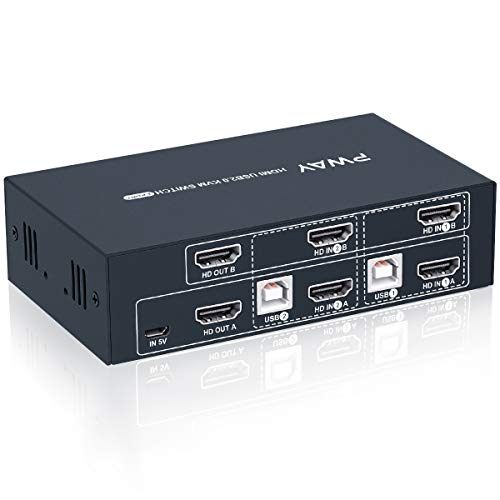


Key features
- •【2 PORT HDMI KVM DUAL MONITOR】This kit help you use one set of keyboard and mouse to control 2 computers and share 2 monitor, you can switch anytime. It requires every computer support 2 screen or above display functions.
- •【UHD 4K@30Hz】 Support 4K x 2K@30Hz/3D/1080P resolution, make the image display more exquisite and realistic. You can enjoy the most luxurious video with this HDMI KVM dual monitor Switch. It also support HDCP 1.2 protocol.
- •【HOTKEY SWITCH】You can choose hotkey switch (Press scroll lock+ scroll lock+1/2), You also can switch the two signal sources by the panel buttons, the status light tells you which port is active.Special Note: Hotkey switching is not supported when the keyboard and mouse use the USB 2.0 port.
- •【POWERED BY USB】It means powered by USB cables, no need external power adapter, just connect you switcher devices to enjoy, it make you work and life easier and simpler. We also equip you with 1 Micro USB power cord for high power device.
- •【PLEASE NOTE】Please note that in the premise that the supports 2 or multi-screen display, the extended mode can output two different screens, and the copy mode can output two identical screens; if the computer only supports single-screen display, this Dual Monitor KVM only one output port works(show one monitor). If you have any questions about the product, please contact us
BrandSteetek
CategoryKVM Switches
2 Port Dual Monitor KVM Switch HDMI 4K@30Hz, 2 USB 2.0 Hub, Supported Wireless Keyboard & Mouse and Hotkey Switch, No Power Adapter with 4 HDMI Cables
List Price: $105.91$95.32DEALYou Save: $10.59 (10%)
Free shippingFree Returns – 30 daysFree Order CancellationSecure Payment2–3 Days DeliveryGet It October 26, 2026In Stock (1)No marketing spamNo account requiredFulfilment by FedEx / Amazon / UPS / ShipwirePayPal / Card Buyer Protection
Customer Reviews
Reviews sourced from verified Amazon purchasers3.8
out of 5
Based on 10 reviews
5★
40%
4★
60%
3★
0%
2★
0%
1★
0%
Works great 95% of the time
Nathan✓ Verified Purchase•October 26, 2023
This products works great 95% of the time. I have 2 monitors, a keyboard, a mouse, and a headset all switching between my desktop PC and work laptop. It works like a charm... until it doesn't. Every few months or so, it will just start intermittently disconnecting my peripherals. When this happens, I need to do a full reset on the switch. You would think this would just be unplugging the power cable, but noooooo... power is also supplied by the USB connectors apparently, which are so stubborn to pull out, that I end up having to unplug all 10 cables just to reset the switch. Which is a bitch, especially if you don't have good cable management. With that said, this box gets the job done most of the time, and I'm fine putting up with oddities every now and then.
it works, but with some quirks
Michel✓ Verified Purchase•October 20, 2023
I've had this set up and have been using it to switch between my work and personal machines for a little over a month now, and the good news is that it works. but, not without it's quirks.
first, it's HDMI only, so if either of your computers use DP or any other input, be prepared to buy adapters, and and make sure they're the good ones. The cheapish DP-HDMI adapters I bought from amazon didn't work, but the less cheap ones I got from a national big box retailer worked just fine. it comes with all the other cables you'll need to connect things (4x HDMI and 2x USB-A) so it has that going for it, which is nice.
Another quirk I could see potentially see being a bit bigger of an issue for some (and I can't be 100% sure the issue isn't with my work machine, but...) one of the displays turns green when switching from my main system to work system, and can only resolved with a reboot. which means it's not quite as simple as pressing the KVM button when switching back and forth throughout the day. it's not a big deal for me because I only have to switch between my compys twice a day. I use only my work machine during work hours, so shutting it down when not in use and booting fresh every morning seems to get around this oddity.
another thing to be aware of is that adding this device to your set-up takes things up several notches in difficulty when it comes to cable management. if you're like me, and strive for nice, clean cable management then you're going to have a bit of a bad time getting this out of rats nest status. can be done, but takes time and a grip of strategically placed zip ties.
lastly, if you use a keyboard/mouse with RGB, you'll have to use the USB ports on the switch, not the K/M ports. that means the hotkey switch doesn't work. again, not a big deal for me considering the way I use the switch, but something to be aware of.
otherwise, this is a great device if you can deal with the quirks and cable management issues, especially considering the alternatives cost twice as much. oh, and customer support from the seller got off to a great start by sending over some info before the device had even arrived to help get it set up correctly. so, good on you, Steetek.
first, it's HDMI only, so if either of your computers use DP or any other input, be prepared to buy adapters, and and make sure they're the good ones. The cheapish DP-HDMI adapters I bought from amazon didn't work, but the less cheap ones I got from a national big box retailer worked just fine. it comes with all the other cables you'll need to connect things (4x HDMI and 2x USB-A) so it has that going for it, which is nice.
Another quirk I could see potentially see being a bit bigger of an issue for some (and I can't be 100% sure the issue isn't with my work machine, but...) one of the displays turns green when switching from my main system to work system, and can only resolved with a reboot. which means it's not quite as simple as pressing the KVM button when switching back and forth throughout the day. it's not a big deal for me because I only have to switch between my compys twice a day. I use only my work machine during work hours, so shutting it down when not in use and booting fresh every morning seems to get around this oddity.
another thing to be aware of is that adding this device to your set-up takes things up several notches in difficulty when it comes to cable management. if you're like me, and strive for nice, clean cable management then you're going to have a bit of a bad time getting this out of rats nest status. can be done, but takes time and a grip of strategically placed zip ties.
lastly, if you use a keyboard/mouse with RGB, you'll have to use the USB ports on the switch, not the K/M ports. that means the hotkey switch doesn't work. again, not a big deal for me considering the way I use the switch, but something to be aware of.
otherwise, this is a great device if you can deal with the quirks and cable management issues, especially considering the alternatives cost twice as much. oh, and customer support from the seller got off to a great start by sending over some info before the device had even arrived to help get it set up correctly. so, good on you, Steetek.
As another reviewer said, almost perfect
MIke✓ Verified Purchase•September 27, 2023
This is my third KVM and I'm not buying any more! First one was a single monitor two PC KVM that stopped working when I switched from a HDMI to a mini-DP card on my desktop, even though the laptop is through a powered dock -- so I thought the HDMI on that dock would have supplied power, but no... replaced it with a StarTech one that worked great, but to the dismay of Windows on both my desktop and laptop, it disconnected the monitor every switch. That was workable but I started wanting to use two displays with the desktop and laptop.
So enter this KVM. Perhaps the problem is my setup, but the StarTech KVM was fine with it -- desktop has a quad output mini-DP card and I use mini-DP to HDMI cables with it, and laptop is connected to a dual head dock, one HDMI and one DVI to HDMI. Displays are all HDMI and everything's 1920x1080. Switching between computers happens instantly for the keyboard and mouse but the displays take a number of seconds to switch, sometimes not coming up at all until I open Windows graphics settings. The weird thing is I don't even click detect or identify, just the act of opening graphics settings seems to reset the displays and then all is well! I just work around this with a second wireless mouse for quick adjustments on the desktop when I'm working on the laptop, and for what I'm doing it's actually easier than switching back and forth anyway.
I would have liked having the USB A KVM socket on the back with everything else instead of having a cable around the front, and speaking of the USB on the back, who uses USB B anymore? However, positives are a nice metal box, all HDMI and USB cables included, LEDs that are the perfect brightness (not obnoxiously bright and not uselessly dim), and no reaching for the A/B switch! It works fine with my Microsoft Desktop 900 wireless keyboard and mouse with no dropped or repeated keystrokes.
So enter this KVM. Perhaps the problem is my setup, but the StarTech KVM was fine with it -- desktop has a quad output mini-DP card and I use mini-DP to HDMI cables with it, and laptop is connected to a dual head dock, one HDMI and one DVI to HDMI. Displays are all HDMI and everything's 1920x1080. Switching between computers happens instantly for the keyboard and mouse but the displays take a number of seconds to switch, sometimes not coming up at all until I open Windows graphics settings. The weird thing is I don't even click detect or identify, just the act of opening graphics settings seems to reset the displays and then all is well! I just work around this with a second wireless mouse for quick adjustments on the desktop when I'm working on the laptop, and for what I'm doing it's actually easier than switching back and forth anyway.
I would have liked having the USB A KVM socket on the back with everything else instead of having a cable around the front, and speaking of the USB on the back, who uses USB B anymore? However, positives are a nice metal box, all HDMI and USB cables included, LEDs that are the perfect brightness (not obnoxiously bright and not uselessly dim), and no reaching for the A/B switch! It works fine with my Microsoft Desktop 900 wireless keyboard and mouse with no dropped or repeated keystrokes.
Great Customer Service!
Elias✓ Verified Purchase•September 14, 2023
I bought this item as I needed to use my existing dual monitor home pc setup for a remote office setup for my work laptop too. The first unit i bought did have an issue outputting to the second monitor upon 1st use. I contacted them and quickly received a replacement. The replacement unit worked very well for about 32 days, then fell victim to the same issue the 1st unit had. I contacted them and they offered a quick solution while letting me know the have updated the internal components which should resolve my issue. They did this after the 30 days Amazon return window had closed so i was grateful to begin with. They were very "on-top" of the return and quick to reply to any communication. The new unit has worked great right out of the box. They have contacted me a few times since I received the last unit to see if I am happy with my replacement. That is awesome (who actually does this?!?) I told them I would wait until i've had a chance to use it awhile and let them know as well as right up a review for them on Amazon. So far so good!!
Highly recommend the product as well as the company.
Highly recommend the product as well as the company.
Not impressed - freezes entirely intermittently: Updated: replacement unit working (added stars)
J E✓ Verified Purchase•September 9, 2023
Original Review:
(The attached picture does not show the KVM hooked up - because by the time I wrote this I got sick of dealing with the cables - it's just to show what it looks like). I am using the KVM with a work laptop (HP Elitebook) and a high end gaming desktop (RTX2080 GPU/AMD Ryzen 2700x CPU). Long story short - the KVM freezes up entirely, intermittently (switch button stops working, keyboard and mouse no longer work) so you have to unplug all the cables, shut your computers off, hook everything back up, power your PC's back on, and sometimes it might start working normally again. Other times, I've had to try that process like 6 times in a row before it starts working again. When this happens the resolution on my Dell 27" 2560 x 1440 gaming monitor drops down and everything is on the screen gets huge. Also, there is no reset button that I can find on the KVM, so this thing is causing me major productivity impact. It take a long time to fumble with cables every time this thing locks up on me. I did the IM support with Amazon and they are sending me a new one. We'll see if it helps (doubtful right now). Everything is definitely hooked up correctly, because it works fine most of the time - this problem is intermittent, but it's extremely disruptive. I thought maybe I'm using the wrong USB power adapter (it does not come with one, you have to provide one - and I'm using a 5v one which is what it calls for so it's not that either. The same power adapter works fine on other devices. It charges my Bluetooth headphones/smart watch etc. just fine and 5v is what the KMV calls for. Also, the mouse input for the KVM for my laptop has not worked right with it ever. I had to plug in a dedicated mouse to the laptop and use two mice to get by. The same exact mouse through the KVM works just fine on my desktop though. Two major strikes against this for me. Not impressed.
Updated Review:
I contacted Amazon chat support and although I was past the return period, the agent listened to my issue (I bought the KVM along with a dual monitor arm, and 63" desk to improve my working environment over what I had - however the 63" desk didn't come for weeks (despite being a Prime item), so I waited until I had it before I assembled everything. This waiting put me past the return period for the KVM, but the rep listened to me and after I explained the issue, sent a replacement unit. The replacement unit is working so far - with one minor work around required. I still had the issue of the keyboard and mouse working fine for the desktop, but only one worked for the laptop. I found a workaround which was to plug one of the keyboard/mouse USB cables into the K/M port on the front of the KVM, and the other into one of the USB2.0 ports also on the front of the KVM. This solved the weird issue of the K/M only both working on the desktop. I am satisficed as I don't have a critical need to share the other USB2.0 between the laptop and desktop.
I added two stars because the Amazon rep was willing to help me, and also because the seller sjsmtek reached out to me email to say they'd make it right.
This review went from negative to positive due to good customer service and ultimately, a good resolution. I would have bumped up to 5 stars if the weird K/M issue wasn't still present, so I figure 4 is fair.
(The attached picture does not show the KVM hooked up - because by the time I wrote this I got sick of dealing with the cables - it's just to show what it looks like). I am using the KVM with a work laptop (HP Elitebook) and a high end gaming desktop (RTX2080 GPU/AMD Ryzen 2700x CPU). Long story short - the KVM freezes up entirely, intermittently (switch button stops working, keyboard and mouse no longer work) so you have to unplug all the cables, shut your computers off, hook everything back up, power your PC's back on, and sometimes it might start working normally again. Other times, I've had to try that process like 6 times in a row before it starts working again. When this happens the resolution on my Dell 27" 2560 x 1440 gaming monitor drops down and everything is on the screen gets huge. Also, there is no reset button that I can find on the KVM, so this thing is causing me major productivity impact. It take a long time to fumble with cables every time this thing locks up on me. I did the IM support with Amazon and they are sending me a new one. We'll see if it helps (doubtful right now). Everything is definitely hooked up correctly, because it works fine most of the time - this problem is intermittent, but it's extremely disruptive. I thought maybe I'm using the wrong USB power adapter (it does not come with one, you have to provide one - and I'm using a 5v one which is what it calls for so it's not that either. The same power adapter works fine on other devices. It charges my Bluetooth headphones/smart watch etc. just fine and 5v is what the KMV calls for. Also, the mouse input for the KVM for my laptop has not worked right with it ever. I had to plug in a dedicated mouse to the laptop and use two mice to get by. The same exact mouse through the KVM works just fine on my desktop though. Two major strikes against this for me. Not impressed.
Updated Review:
I contacted Amazon chat support and although I was past the return period, the agent listened to my issue (I bought the KVM along with a dual monitor arm, and 63" desk to improve my working environment over what I had - however the 63" desk didn't come for weeks (despite being a Prime item), so I waited until I had it before I assembled everything. This waiting put me past the return period for the KVM, but the rep listened to me and after I explained the issue, sent a replacement unit. The replacement unit is working so far - with one minor work around required. I still had the issue of the keyboard and mouse working fine for the desktop, but only one worked for the laptop. I found a workaround which was to plug one of the keyboard/mouse USB cables into the K/M port on the front of the KVM, and the other into one of the USB2.0 ports also on the front of the KVM. This solved the weird issue of the K/M only both working on the desktop. I am satisficed as I don't have a critical need to share the other USB2.0 between the laptop and desktop.
I added two stars because the Amazon rep was willing to help me, and also because the seller sjsmtek reached out to me email to say they'd make it right.
This review went from negative to positive due to good customer service and ultimately, a good resolution. I would have bumped up to 5 stars if the weird K/M issue wasn't still present, so I figure 4 is fair.
Page 1 of 2


