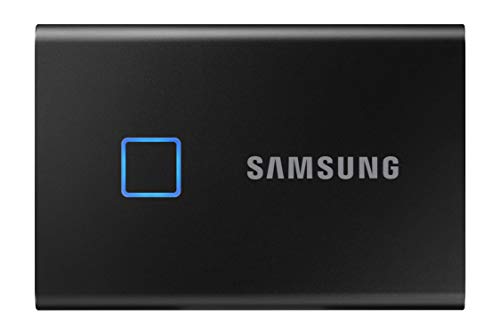
SAMSUNG T7 Touch Portable SSD 500GB - Up to 1050MB/s - USB 3.2 External Solid State Drive, Black (MU-PC500K/WW)


Key features
- •FINGERPRINT SECURITY: SSD with fingerprint and password security
- •BLAZING FAST STORAGE: Reads up to 1,050 MB/s / Writes up to 1 000 MB/s. Transfers files nearly 9.5x faster than hard drives
- •LED STATUS INDICATOR: The T7 Touch features an LED square that illuminates to keep you informed of what your SSD is doing at a glance
- •BUILT STRONG: Shock-resistant and withstands drops from 6ft
SAMSUNG T7 Touch Portable SSD 500GB - Up to 1050MB/s - USB 3.2 External Solid State Drive, Black (MU-PC500K/WW)
List Price: $216.80$195.12DEALYou Save: $21.68 (10%)
Free shippingFree Returns – 30 daysFree Order CancellationSecure Payment2–3 Days DeliveryGet It October 26, 2026In Stock (1)No marketing spamNo account requiredFulfilment by FedEx / Amazon / UPS / ShipwirePayPal / Card Buyer Protection
Customer Reviews
Reviews sourced from verified Amazon purchasers4.7
out of 5
Based on 10 reviews
5★
70%
4★
30%
3★
0%
2★
0%
1★
0%
Pricy but worth it due to the fingerprint reader security feature. This is the second I’ve bought.
GY✓ Verified Purchase•August 9, 2023
I use this for back ups. My constant fear is someone will break in and steal computer hardware and especially my whole business file back up. I sometimes travel with the SSD to do work on the road. A pass word on an SSD is fine but the finger print ready is extremely confident. It accepts up to 5 finger prints. I have two of us that can be read by the finger scanner. (BTW I keep several back ups in different locations)
Fits in my Wallet
Connor Ramsey✓ Verified Purchase•July 29, 2023
I was looking for an encrypted, portable storage device that I could connect to both my PC and phone, that also has high storage capacity. The Samsung T7 Touch is a high performance encrypted SSD that offers better value than encrypted USB drives. For around 20 dollars more than a 256GB flash drive with a fingerprint scanner, the T7 offers 4x the storage and 3x the transfer speed.
You can also use a password to access the drive, but the password can only be entered through a PC app. The password is also limited to 16 characters, and you can't reset it without entering the current password. So if you forgot the password, there's no way to change it. You also can't turn off encryption or remove saved fingerprints without knowing the password. It makes no sense that I can't change the password using the biometric scanner! I hope that Samsung is able to address this issue.
Keeping that in mind, though, I recommend the Samsung T7 as a portable SSD with relatively high security.
You can also use a password to access the drive, but the password can only be entered through a PC app. The password is also limited to 16 characters, and you can't reset it without entering the current password. So if you forgot the password, there's no way to change it. You also can't turn off encryption or remove saved fingerprints without knowing the password. It makes no sense that I can't change the password using the biometric scanner! I hope that Samsung is able to address this issue.
Keeping that in mind, though, I recommend the Samsung T7 as a portable SSD with relatively high security.
BEST PORTABLE SSD
Joey Purrazzo✓ Verified Purchase•July 27, 2023
Really great external solid state drive from Samsung. My flex alpha only has 256gb so I needed something extra for all my back ups and to put the Halo Master Chief Collection on :) haha . Honestly was not sure how the fingerprint sensor was going to be based on other reviews but it is flawless. My trick is registering the same finger about 3 times, (I do this on my note 10+ as well and notice it helps tremendously with unlocking speeds), so immediately after unlocking my laptop by fingerprint, I place my finger on the SSD and in a fraction of a second we are in!
Feels very secure knowing somebody cant just grab it and copy my pictures and everything.
Works with just a password, or none at all. Should add you only need to place your finger once, even if you do a quick restart for your pc you will not need to unlock the drive again. Really like that part.
I am using the type A usb to type C, because my C port is used by my docking station, and still get read and write speeds around 450-500 mbps using CrystalDiskMark, but you can get them even faster using type c to type c. Just thought I would add these are the max speeds for the older model and most other ssds so I am very happy with this still.
One issue I have found using the SSD (all external drives not just the t7), is that when using it as storage for new apps, Like Halo 3 for me, I have trouble running applications that are saved to the external drive. Basically, if I am using ableton for a while or watching videos, etc., then go to play halo 3 it does not open. After a ton of searching I figured out that you need to go back to settings > storage settings > change where new content is saved > then change apps back to your C drive and hit apply. Change it back from C drive to SSD and hit apply. Problem solved. Not sure what causes this but it was really a pain and took forever to figure out such a simple solution.
No issues with overheating that I have noticed whatsoever, I am very big on that one.
I really could not believe how slim and lightweight this little guy is. Super impressive considering it still has that extremely solid and well built feeling. Love the fact it is not made out of plastic. I think this thing will last a very long time.
Honest review of 5 stars but if this thing gives me any trouble I'll be sure to update.
Feels very secure knowing somebody cant just grab it and copy my pictures and everything.
Works with just a password, or none at all. Should add you only need to place your finger once, even if you do a quick restart for your pc you will not need to unlock the drive again. Really like that part.
I am using the type A usb to type C, because my C port is used by my docking station, and still get read and write speeds around 450-500 mbps using CrystalDiskMark, but you can get them even faster using type c to type c. Just thought I would add these are the max speeds for the older model and most other ssds so I am very happy with this still.
One issue I have found using the SSD (all external drives not just the t7), is that when using it as storage for new apps, Like Halo 3 for me, I have trouble running applications that are saved to the external drive. Basically, if I am using ableton for a while or watching videos, etc., then go to play halo 3 it does not open. After a ton of searching I figured out that you need to go back to settings > storage settings > change where new content is saved > then change apps back to your C drive and hit apply. Change it back from C drive to SSD and hit apply. Problem solved. Not sure what causes this but it was really a pain and took forever to figure out such a simple solution.
No issues with overheating that I have noticed whatsoever, I am very big on that one.
I really could not believe how slim and lightweight this little guy is. Super impressive considering it still has that extremely solid and well built feeling. Love the fact it is not made out of plastic. I think this thing will last a very long time.
Honest review of 5 stars but if this thing gives me any trouble I'll be sure to update.
Works far better than I expected.
°Andrew°✓ Verified Purchase•June 2, 2023
I need to do alot of file transfers of locally stored data and had purchased a Samsung 970 Evo Plus M.2 SSD and installed in into a Sabrent M.2 NVMe external enclosure. This solution was wonderful because it was complete overkill but guaranteed that the SSD wouldn't be a bottleneck. The only issue I had was it's not inherently secure. I could use software encryption but that would slow down the transfer dramatically, especially since many of these transfers are from old systems that don't have much processing power, over to new systems. When I heard Samsung was going to release the T7 Touch I was very excited but obviously skeptical. How fast would it actually be, would the fingerprint sensor work on any device without needing to install software, how accurate is the fingerprint sensor, how fast does it find a match and unlock, etc...
I'm happy to confirm that the fingerprint reader is indeed fast, accurate and allows for multiple fingerprints to be enrolled. (Can add friends, family, coworkers, etc.) I currently have four fingers registered so I can easily unlock it when it's plugged-in on either side of me. The reader can... well read... from any orientation so you don't have to line it up straight. The SSD can be backwards and register you just fine. Also it only takes about a 1.5 to 2.0 seconds to unlock. Lastly and most importantly, everything is saved onboard and no software is needed, *After the initial setup*, to access the data. You can plug it into any device that is capable of reading it and unlock it without any headaches.
It's not disclosed if this SSD uses TLC or QLC Flash Nand and it doesn't offer a TBW limit with it's warranty, only that it has a 3yr warranty which is 2yrs less than their typical 5yrs offered on most of their TLC SSDs. So I have no idea how long it will actually last with my specific workload but If I can actually get a solid 3-years out of it then I will be impressed.
Lastly, this thing is very thin and very light... something my Sabrent enclosure was not lol. I loved the solid block of aluminum but it was quite-cumbersome in the pocket sometimes, especially when kneeling or needing to lay-down to access something that's hard to reach.
All-in-all I've been very pleased this past month with my purchase and have since 'secure-erased' the 970 Evo Plus and added it as a secondary SSD to the one I'm already using in my desktop.
I'm happy to confirm that the fingerprint reader is indeed fast, accurate and allows for multiple fingerprints to be enrolled. (Can add friends, family, coworkers, etc.) I currently have four fingers registered so I can easily unlock it when it's plugged-in on either side of me. The reader can... well read... from any orientation so you don't have to line it up straight. The SSD can be backwards and register you just fine. Also it only takes about a 1.5 to 2.0 seconds to unlock. Lastly and most importantly, everything is saved onboard and no software is needed, *After the initial setup*, to access the data. You can plug it into any device that is capable of reading it and unlock it without any headaches.
It's not disclosed if this SSD uses TLC or QLC Flash Nand and it doesn't offer a TBW limit with it's warranty, only that it has a 3yr warranty which is 2yrs less than their typical 5yrs offered on most of their TLC SSDs. So I have no idea how long it will actually last with my specific workload but If I can actually get a solid 3-years out of it then I will be impressed.
Lastly, this thing is very thin and very light... something my Sabrent enclosure was not lol. I loved the solid block of aluminum but it was quite-cumbersome in the pocket sometimes, especially when kneeling or needing to lay-down to access something that's hard to reach.
All-in-all I've been very pleased this past month with my purchase and have since 'secure-erased' the 970 Evo Plus and added it as a secondary SSD to the one I'm already using in my desktop.
Seems Great But…
Kinghuman✓ Verified Purchase•May 25, 2023
I plugged it in to my computes and NOTHING. I thought it was DOA"¦. It was the cables.
The cables provided are junk. They just didn't work at all. I tried using a cable I had from another drive I had and VIOLA! It worked. As for the function of the drive; It seems fast and I like the security feature. The compact size is great. I've loaded a ton of video footage on it and I'm surprised at how fast the drive is. I linked to the drive as a file source as I was editing videos and it worked well. I've done this with other drives in the past and they're very laggy and can crash. I have yet to log any serious time with this but so far so good. Only one minor incident"¦ it disappeared from my computer directory once. Had to unplug it and plug it in again to get it back. Works fine between my windows desktop and my ipad. Just what I need. Hope it holds up, we'll see.
The cables provided are junk. They just didn't work at all. I tried using a cable I had from another drive I had and VIOLA! It worked. As for the function of the drive; It seems fast and I like the security feature. The compact size is great. I've loaded a ton of video footage on it and I'm surprised at how fast the drive is. I linked to the drive as a file source as I was editing videos and it worked well. I've done this with other drives in the past and they're very laggy and can crash. I have yet to log any serious time with this but so far so good. Only one minor incident"¦ it disappeared from my computer directory once. Had to unplug it and plug it in again to get it back. Works fine between my windows desktop and my ipad. Just what I need. Hope it holds up, we'll see.
Page 1 of 2