LIOTOIN Caregiver Pager Wireless Call Button Alert Button Call Bell Emergency Button for Home/Elderly/Patients Panic Button Nurse Alert Call System 3Call Button 3Receivers (600+ft Operating Range)



Key features
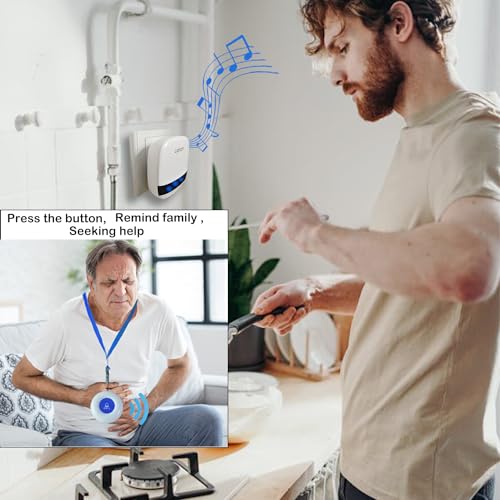
- •Three call buttons and three pagers, One of which is touch screen button, Which is convenient for patients with relatively small strength to use. You can call for help by gently touching. Simply press any call button to alert the caregiver via the wireless receiver.
- •Using adaptive high-frequency technology, More anti-interference than the ordinary doorbell over 600ft/180m in the open area, Strong penetration and signal stability, Can penetrate a few walls.
- •Transmitter/Push Call Button is easy carry. It can be put in pocket. Or hang on neck as pendant. Neck strap included. Fixed in Bedside/Washing Room. The fixed bracket and double sticker are included
- •Pager/Chime Unit has 36 ring tones for your choice.5 Level adjustable volume from 0db to 110db,Silent mode with LED flash is available.Easy use ( Plug and Play) plug the receiver into an electrical outlet
- •Transmitter/Push Call Button is waterproof. Acceptable for meal/soup Splash. And allow to be installed in the washing room.3 months money back promise and 1 year quality Service. Any quality problem of the item,Please contact our customer service team directly.
Brandliotoin
CategoryPagers
Size3 Transmitter + 3 Plug-in Receiver
Colorwhite
Warranty1 year manufacturer
LIOTOIN Caregiver Pager Wireless Call Button Alert Button Call Bell Emergency Button for Home/Elderly/Patients Panic Button Nurse Alert Call System 3Call Button 3Receivers (600+ft Operating Range)
List Price: $75.49$67.94DEALYou Save: $7.55 (10%)
Free shippingFree Returns – 30 daysFree Order CancellationSecure Payment2–3 Days DeliveryGet It October 25, 2026In Stock (5)No marketing spamNo account requiredFulfilment by FedEx / Amazon / UPS / ShipwirePayPal / Card Buyer Protection
Customer Reviews
Reviews sourced from verified Amazon purchasers4.6
out of 5
Based on 10 reviews
5★
60%
4★
40%
3★
0%
2★
0%
1★
0%
Work just fine.
Gordon Fleckenstein✓ Verified Purchase•September 8, 2023
Alert system for wife and I in house.
Very good out of the box. Changing ringtones is difficult
Brian Ziegler✓ Verified Purchase•August 22, 2023
The system has very good range and worked well out of the box. But the default ringtone was too close to my door bell. It took awhile to figure out how to change it. The factory directions are short and imprecise. This is what I have learned.
BACKGROUND INFORMATION
The "receivers" are the devices with the AC plugs and speaker. The "transmitters" come in two flavors:
1. The round call buttons
2. The oval shaped device with the black plastic band across the bottom. The button is in the middle of the black band.
The "smarts" are in the receivers. A receiver assigns a ringtone to a transmitter as part of the pairing procedure. You can pair multiple transmitters to a receiver in a single procedure.
The receivers are independent devices. They do not cooperate with each other. If you have three receivers you will have to do the pairing procedure three times.
RINGTONE SELECTION AND PAIRING
Plug in an extension cord and place the socket end by a comfortable chair or sofa. Get ALL your transmitters and receivers and place them within easy reach.
Plug a receiver into the extension cord. Allow 10 seconds for the receiver to power up. Click the "Volume Button" repeatedly until it is at the lowest audible setting. This will save wear and tear on your ears. Press and HOLD the "Ringtone Button" for 20 seconds to reset the receiver to default settings and remove all existing pairings between the receiver and transmitters. Release the "Ringtone Button".
Click the "Ringtone Button" repeatedly and select your favorite ringtone.
Press and HOLD the "Volume Button" for at least 5 seconds with one hand, then with your other hand click a transmitter's button to pair the two units and assign the previously selected ring tone to the transmitter. You will hear the receiver play the previously selected ring tone. This is your confirmation that the two units paired successfully.
Continue to hold the "Volume Button".
Pickup the next unpaired transmitter and click its button. You will again hear the previously selected ring tone. This is your confirmation that the two units paired successfully. Repeat with the next unpaired transmitter while continuing to hold the "Volume Button" on the receiver. You can release the "Volume Button" after you have paired the last transmitter.
Repeat the "Ringtone Selection And Pairing" process with each receiver.
BACKGROUND INFORMATION
The "receivers" are the devices with the AC plugs and speaker. The "transmitters" come in two flavors:
1. The round call buttons
2. The oval shaped device with the black plastic band across the bottom. The button is in the middle of the black band.
The "smarts" are in the receivers. A receiver assigns a ringtone to a transmitter as part of the pairing procedure. You can pair multiple transmitters to a receiver in a single procedure.
The receivers are independent devices. They do not cooperate with each other. If you have three receivers you will have to do the pairing procedure three times.
RINGTONE SELECTION AND PAIRING
Plug in an extension cord and place the socket end by a comfortable chair or sofa. Get ALL your transmitters and receivers and place them within easy reach.
Plug a receiver into the extension cord. Allow 10 seconds for the receiver to power up. Click the "Volume Button" repeatedly until it is at the lowest audible setting. This will save wear and tear on your ears. Press and HOLD the "Ringtone Button" for 20 seconds to reset the receiver to default settings and remove all existing pairings between the receiver and transmitters. Release the "Ringtone Button".
Click the "Ringtone Button" repeatedly and select your favorite ringtone.
Press and HOLD the "Volume Button" for at least 5 seconds with one hand, then with your other hand click a transmitter's button to pair the two units and assign the previously selected ring tone to the transmitter. You will hear the receiver play the previously selected ring tone. This is your confirmation that the two units paired successfully.
Continue to hold the "Volume Button".
Pickup the next unpaired transmitter and click its button. You will again hear the previously selected ring tone. This is your confirmation that the two units paired successfully. Repeat with the next unpaired transmitter while continuing to hold the "Volume Button" on the receiver. You can release the "Volume Button" after you have paired the last transmitter.
Repeat the "Ringtone Selection And Pairing" process with each receiver.
Much needed!
Darlene E. Quichocho✓ Verified Purchase•July 17, 2023
Now using this for my husband who's on a breathing ventilator. Since he cannot talk, this item works perfect.
I had hoped that there would be a portable transmitter.
I had hoped that there would be a portable transmitter.
Exactly what we needed
shannon✓ Verified Purchase•July 11, 2023
Caregiver for mother in separate house on same property. So buttons are in her home and receivers in mine. Range is great. Only complaint is the buttons are sensitive, so they get accidentally pushed often.
Helping
Jesse South✓ Verified Purchase•July 3, 2023
Product work very well
Page 1 of 2


