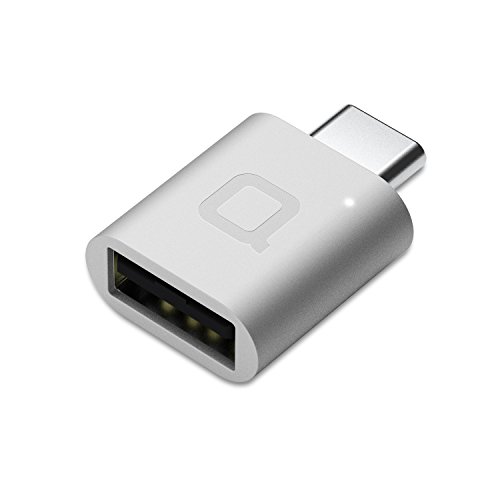
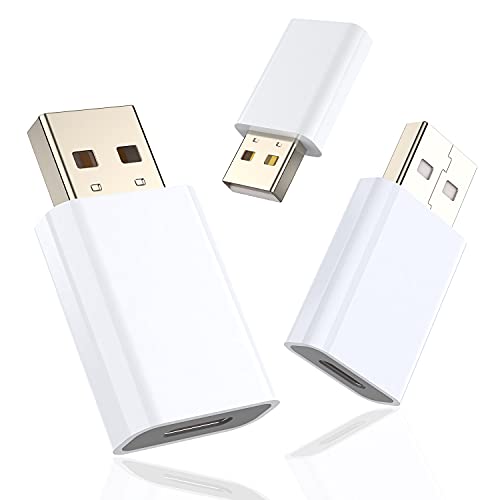
XAOSUN [10Gbps] USB C Female to USB Male Adapter (2-Pack), 3.1 USB A to C Adapter, One-Sided SuperSpeed Data Sync & 100W Fast Charging for iPhone 15 Plus Pro Max, Laptop, Charger, Quest Link, etc.
![XAOSUN [10Gbps] USB C Female to USB Male Adapter (2-Pack), 3.1 USB A to C Adapter, One-Sided SuperSpeed Data Sync & 100W Fast Charging for iPhone 15 Plus Pro Max, Laptop, Charger, Quest Link, etc.](https://m.media-amazon.com/images/I/31FBZqYGy0L._SL500_.jpg)
![XAOSUN [10Gbps] USB C Female to USB Male Adapter (2-Pack), 3.1 USB A to C Adapter, One-Sided SuperSpeed Data Sync & 100W Fast Charging for iPhone 15 Plus Pro Max, Laptop, Charger, Quest Link, etc.](https://m.media-amazon.com/images/I/51xnYdLIldL._SL500_.jpg)
![XAOSUN [10Gbps] USB C Female to USB Male Adapter (2-Pack), 3.1 USB A to C Adapter, One-Sided SuperSpeed Data Sync & 100W Fast Charging for iPhone 15 Plus Pro Max, Laptop, Charger, Quest Link, etc.](https://m.media-amazon.com/images/I/418b0vTZZyL._SL500_.jpg)
![XAOSUN [10Gbps] USB C Female to USB Male Adapter (2-Pack), 3.1 USB A to C Adapter, One-Sided SuperSpeed Data Sync & 100W Fast Charging for iPhone 15 Plus Pro Max, Laptop, Charger, Quest Link, etc.](https://m.media-amazon.com/images/I/51O8ccWouNL._SL500_.jpg)
![XAOSUN [10Gbps] USB C Female to USB Male Adapter (2-Pack), 3.1 USB A to C Adapter, One-Sided SuperSpeed Data Sync & 100W Fast Charging for iPhone 15 Plus Pro Max, Laptop, Charger, Quest Link, etc.](https://m.media-amazon.com/images/I/51Bb9Rs8GYL._SL500_.jpg)
![XAOSUN [10Gbps] USB C Female to USB Male Adapter (2-Pack), 3.1 USB A to C Adapter, One-Sided SuperSpeed Data Sync & 100W Fast Charging for iPhone 15 Plus Pro Max, Laptop, Charger, Quest Link, etc.](https://m.media-amazon.com/images/I/41VR2+9wNLL._SL500_.jpg)
![XAOSUN [10Gbps] USB C Female to USB Male Adapter (2-Pack), 3.1 USB A to C Adapter, One-Sided SuperSpeed Data Sync & 100W Fast Charging for iPhone 15 Plus Pro Max, Laptop, Charger, Quest Link, etc.](https://m.media-amazon.com/images/I/51ymrfuRPJL._SL500_.jpg)
Key features
- •🚀 High-Speed Transmission - Using USB 3.1 Gen 2 technology, this USB to USB C Adapter supports up to 10Gbps data transmission. The transmission speed of this usb c adapter is twice that of USB 3.0 and more than 20 times that of USB 2.0. This means it only takes a few seconds to transfer 4K HD movies, bringing you an unparalleled speed experience.
- •⚡️ Fast Charging - Built-in dual 56kΩ Pull-up resistors and supports fast-charging up to 100W 20V 5A. Other brands on the market only support 1-3A charging. it charges devices faster & more efficiently. (Note: Due to the incompatibility of charging protocols, this adapter doesn't fit your 12 Magsafe Charger or charge MacBook.)
- •💎 Superior Workmanship - Tired of USB C to A Adapter falling apart during plugging and unplugging? The usb c adapter uses an integral forming of aviation-grade aluminum alloy shell material, which can withstand more than 20,000 frequent plug-ins and unplugs. The top matte texture brings you safety, comfortable and enjoyable experience!
- •👍 Easy to Use - Please note that this USB-C to USB Adapter only supports single-sided 10Gbps high-speed transmission (while other brands only provide 1/2 transmission speed). The Type-C female port allows you to switch between USB 3.1 speed and USB 2.0 speed with a simple flip of the Type C plug. Now you can enjoy unparalleled transmission quality from your devices!
- •✔️ Travel-Ready Portability - Take these lightweight USB-C to USB-A Adapter with you anywhere you go! It is 20% smaller than other competing adapter, allowing you to store securely in backpack, purse, pocket, briefcase, desk drawer or anywhere else you desire.
XAOSUN [10Gbps] USB C Female to USB Male Adapter (2-Pack), 3.1 USB A to C Adapter, One-Sided SuperSpeed Data Sync & 100W Fast Charging for iPhone 15 Plus Pro Max, Laptop, Charger, Quest Link, etc.
List Price: $13.54$12.19DEALYou Save: $1.35 (10%)
Free shippingFree Returns – 30 daysFree Order CancellationSecure Payment2–3 Days DeliveryGet It October 26, 2026In Stock (1)No marketing spamNo account requiredFulfilment by FedEx / Amazon / UPS / ShipwirePayPal / Card Buyer Protection
Customer Reviews
Reviews sourced from verified Amazon purchasers4.5
out of 5
Based on 20 reviews
5★
60%
4★
40%
3★
0%
2★
0%
1★
0%
New Macbook Pro? These might be what you need now
Bradley J. Turner✓ Verified Purchase•September 4, 2023
I have a newer Macbook Pro. All of the ports are now USB C sized. Most of my older accessories have USB A ports. These kept my older accessories working for another 5 years. (It's Apple. They'll make this new computer extinct in 5 years)
These devices work well and are very convenient for adapting older devices to USB-C
C. Gill✓ Verified Purchase•September 1, 2023
These adapters have so far worked quite well at adapting USB-A sockets to interface with USB-C cables. I don't have any devices currently available with a USB-A port that operates at 10 Gbps, so I can't confirm the claim of 10 Gbps speeds.
On that topic, I think it's important to note that the (really tiny) print on the back of the device reads exactly as follows:
Reversible USB-C connector
Data transfer rate:
one side: up to 10 Gbps
the other side: 480 Mbps
Perhaps I've misunderstood the labeling, but since this device is all about data throughput, I don't know how in practice you'd get anything more than 480 Mbps at either end, even if the internals can handle it that bit rate. However, I'd appreciate anyone who can explain how that could work.
Lastly, I'd recommend that these devices be kept plugged in to something, since otherwise they can be easy to misplace.
I hope this helps.
On that topic, I think it's important to note that the (really tiny) print on the back of the device reads exactly as follows:
Reversible USB-C connector
Data transfer rate:
one side: up to 10 Gbps
the other side: 480 Mbps
Perhaps I've misunderstood the labeling, but since this device is all about data throughput, I don't know how in practice you'd get anything more than 480 Mbps at either end, even if the internals can handle it that bit rate. However, I'd appreciate anyone who can explain how that could work.
Lastly, I'd recommend that these devices be kept plugged in to something, since otherwise they can be easy to misplace.
I hope this helps.
Multiple product review for USB-C hard drive expansion
aTypicalEngineer808✓ Verified Purchase•August 23, 2023
Title: Multiple product review for USB-C hard drive expansion
Summary: I purchased two different hard disk drive (HDD) enclosures, for use with both a 2.5" solid state drives (SSDs), and 3.5" HDDs, so that I could swap between drives. Primary use was to transfer data between computers, and backup as a secondary purpose.
Details: Main desktop computer is a Dell XPS 8920. System drive is a 250GB SSD. Two other HDDs for data, 1.0TB and 6.0TB. External USB connections are: USB-C 3.1 (rear), USB-A 3.1 (rear), USB-A 3.0 (front). The highest transfer speeds are via the USB-C 3.1 connection, and the USB-A 3.0 ports on the front are not far behind. The SSD via USB-C was faster than the HDD via the internal SATA bus (expected).
Test Method: The test program I use is ATTO Disk Benchmark (freeware). I tried a few different ones, and settled on this one because the result picture was relatively easy to compare to other results. I created a 50GB partition on the SSD, and used the same for all tests and configurations. When evaluating results, I mainly looked at the transfer speeds for files size 1 MB or larger.
Observations:
1) There was some variation in the transfer speed between the various adapters. Both the Orico and the Nekteck were the fastest with 505 MB/s Write, and 540 MB/s Read. 3rd place was the VCZHS Tech Sata to USB adapter with 420 MB/s Write, and 440 MB/s Read.
2) When changing from USB-C to USB-A 3.0, the orientation of USB-C connector somes times made a difference. The difference is staggering, you'll loose 90% of the speed. Once I established an orientation for the USB-A connector, I tested and then marked (with a permanent sharpie) the faster orientation.
3) Heat soak, with the plastic enclosures could be a problem, even in an air conditioned office. One of the reasons I bought the ICY DOCK adapter was to put the 2.5" SSD or HDD in it, and that effective functions as a heat sink. Both the Nekteck and Orico CLEAR PLASTIC carriers had very tiny (or none) vent holes, so air flow will be minimal. For the Nekteck, I left the top cover off so that some heat could escape.
4) Other than the XAOSUN USB-A adapters, the other adapters and cables all functioned correctly, and did not reduce transfer speed.
Conclusion:
Invest the time if you purchase these products to verify (using a freeware program) that the transfer speeds are functioning correctly.
Reviewed Items (by Category):
Hard Drive(s):
1) Samsung SSD 860 EVO 250GB 2.5 Inch SATA III Internal SSD (MZ-76E250B/AM)
https://smile.amazon.com/gp/product/B07864WMK8
Pros: Fast and reliable / Cons: None
Enclosure(s):
2A) Nekteck Transparent Plastic Case SATA to USB C Hard Disk Enclosure HDD/SSD Adapter Case with USB Type C to C Gen 2 Cable Tool Free Hard Drive Enclosure
https://smile.amazon.com/gp/product/B07169C4BG/
Pros: Fast transfer speed; USB-C connection / Cons: Heat build-up, case has no vents (used without the top cover installed); drive a little difficult to remove (needs to be lifted up, and pulled away from SATA connector at the same time.
2B) ORICO Hard Drive Docking Station, USB3.1 Gen2 10Gbps to SATA 2.5/3.5 inch SSD HDD Docking Station Laptop External Hard Drive Enclosure, Support 12TB
https://smile.amazon.com/gp/product/B07SY7ZMNX/
Pros: Fast transfer speed; USB-C connection; bright blue LED indicate activity / Cons: Tiny vent holes on bottom, no vents on top (heat rises), drive heat may be a issue.
Adapter(s):
3A) VCZHS Tech SATA to USB 3.1 Cable Adapter USB 3.1 Type C SATA Cables Converter for 2.5" SATA Drives External Hard Drive Cable SATA to USB C Adapter
https://smile.amazon.com/gp/product/B077P6ZT4P/
Pros: Decent speed (but not the fastest of the three tested) / Cons: USB-C connector needs to be oriented correctly when connecting to a USB-A adapter (like the XAOSUN).
3B) ICY DOCK 2.5" to 3.5" SSD/HDD Mounting Adapter Comparable to Adaptadrive Mac SAS/SATA Hard Drive Tray Kit (MB482SP-3B)
https://smile.amazon.com/gp/product/B00OBYP2UY/
Pros: Good fit & finish (edges not sharp); pass through SATA connector did not slow down transfer speed / Cons: Priced a little on the high end for drive carriers/adapters.
3C) USB C to USB 3.0 Adapter [2 Pack] - XAOSUN 3.1 USB C Female to USB Male Adapter - Support One-Sided 10Gbps Data Sync & Fast Charging
https://smile.amazon.com/gp/product/B083XW2XBH/
Pros: Good fit & finish / Cons: USB-C connector needs to be oriented correctly when connecting to a USB-A adapter (there are Q&A questions about this).
3D) 90 Degree USB C Type C Male to Female Adapter, AFUNTA Right & Left and Upward & Downward Angled 90 Degree USB-C USB 3.1 Type-C Male to Female Extension
https://smile.amazon.com/gp/product/B078YRKTKM/
Pros: Good fit & finish; works in both orientations; does not slow down transfer speed / Cons: None.
Cable(s):
4) DockCase - USB C to USB C Cable (0.72ft), 3.1 Gen 2
https://smile.amazon.com/gp/product/B07V9PXXKD/
Pros: Good fit & finish; full transfer speed / Cons: 0.72 foot is a little too short for SSD/HDD use, probably okay for phone charging.
Summary: I purchased two different hard disk drive (HDD) enclosures, for use with both a 2.5" solid state drives (SSDs), and 3.5" HDDs, so that I could swap between drives. Primary use was to transfer data between computers, and backup as a secondary purpose.
Details: Main desktop computer is a Dell XPS 8920. System drive is a 250GB SSD. Two other HDDs for data, 1.0TB and 6.0TB. External USB connections are: USB-C 3.1 (rear), USB-A 3.1 (rear), USB-A 3.0 (front). The highest transfer speeds are via the USB-C 3.1 connection, and the USB-A 3.0 ports on the front are not far behind. The SSD via USB-C was faster than the HDD via the internal SATA bus (expected).
Test Method: The test program I use is ATTO Disk Benchmark (freeware). I tried a few different ones, and settled on this one because the result picture was relatively easy to compare to other results. I created a 50GB partition on the SSD, and used the same for all tests and configurations. When evaluating results, I mainly looked at the transfer speeds for files size 1 MB or larger.
Observations:
1) There was some variation in the transfer speed between the various adapters. Both the Orico and the Nekteck were the fastest with 505 MB/s Write, and 540 MB/s Read. 3rd place was the VCZHS Tech Sata to USB adapter with 420 MB/s Write, and 440 MB/s Read.
2) When changing from USB-C to USB-A 3.0, the orientation of USB-C connector somes times made a difference. The difference is staggering, you'll loose 90% of the speed. Once I established an orientation for the USB-A connector, I tested and then marked (with a permanent sharpie) the faster orientation.
3) Heat soak, with the plastic enclosures could be a problem, even in an air conditioned office. One of the reasons I bought the ICY DOCK adapter was to put the 2.5" SSD or HDD in it, and that effective functions as a heat sink. Both the Nekteck and Orico CLEAR PLASTIC carriers had very tiny (or none) vent holes, so air flow will be minimal. For the Nekteck, I left the top cover off so that some heat could escape.
4) Other than the XAOSUN USB-A adapters, the other adapters and cables all functioned correctly, and did not reduce transfer speed.
Conclusion:
Invest the time if you purchase these products to verify (using a freeware program) that the transfer speeds are functioning correctly.
Reviewed Items (by Category):
Hard Drive(s):
1) Samsung SSD 860 EVO 250GB 2.5 Inch SATA III Internal SSD (MZ-76E250B/AM)
https://smile.amazon.com/gp/product/B07864WMK8
Pros: Fast and reliable / Cons: None
Enclosure(s):
2A) Nekteck Transparent Plastic Case SATA to USB C Hard Disk Enclosure HDD/SSD Adapter Case with USB Type C to C Gen 2 Cable Tool Free Hard Drive Enclosure
https://smile.amazon.com/gp/product/B07169C4BG/
Pros: Fast transfer speed; USB-C connection / Cons: Heat build-up, case has no vents (used without the top cover installed); drive a little difficult to remove (needs to be lifted up, and pulled away from SATA connector at the same time.
2B) ORICO Hard Drive Docking Station, USB3.1 Gen2 10Gbps to SATA 2.5/3.5 inch SSD HDD Docking Station Laptop External Hard Drive Enclosure, Support 12TB
https://smile.amazon.com/gp/product/B07SY7ZMNX/
Pros: Fast transfer speed; USB-C connection; bright blue LED indicate activity / Cons: Tiny vent holes on bottom, no vents on top (heat rises), drive heat may be a issue.
Adapter(s):
3A) VCZHS Tech SATA to USB 3.1 Cable Adapter USB 3.1 Type C SATA Cables Converter for 2.5" SATA Drives External Hard Drive Cable SATA to USB C Adapter
https://smile.amazon.com/gp/product/B077P6ZT4P/
Pros: Decent speed (but not the fastest of the three tested) / Cons: USB-C connector needs to be oriented correctly when connecting to a USB-A adapter (like the XAOSUN).
3B) ICY DOCK 2.5" to 3.5" SSD/HDD Mounting Adapter Comparable to Adaptadrive Mac SAS/SATA Hard Drive Tray Kit (MB482SP-3B)
https://smile.amazon.com/gp/product/B00OBYP2UY/
Pros: Good fit & finish (edges not sharp); pass through SATA connector did not slow down transfer speed / Cons: Priced a little on the high end for drive carriers/adapters.
3C) USB C to USB 3.0 Adapter [2 Pack] - XAOSUN 3.1 USB C Female to USB Male Adapter - Support One-Sided 10Gbps Data Sync & Fast Charging
https://smile.amazon.com/gp/product/B083XW2XBH/
Pros: Good fit & finish / Cons: USB-C connector needs to be oriented correctly when connecting to a USB-A adapter (there are Q&A questions about this).
3D) 90 Degree USB C Type C Male to Female Adapter, AFUNTA Right & Left and Upward & Downward Angled 90 Degree USB-C USB 3.1 Type-C Male to Female Extension
https://smile.amazon.com/gp/product/B078YRKTKM/
Pros: Good fit & finish; works in both orientations; does not slow down transfer speed / Cons: None.
Cable(s):
4) DockCase - USB C to USB C Cable (0.72ft), 3.1 Gen 2
https://smile.amazon.com/gp/product/B07V9PXXKD/
Pros: Good fit & finish; full transfer speed / Cons: 0.72 foot is a little too short for SSD/HDD use, probably okay for phone charging.
Works okay, but USB-C end is not completely reversible as it should be
Richrev✓ Verified Purchase•August 23, 2023
Please make special note of this part of the item's description: "The Type-C female port allows you to switch between USB 3.1 speed and USB 2.0 speed with a simple flip of the Type C plug".
I re-read the listing after buying and testing since i was not seeing the expected speeds. Then I noticed this little note and just flipped my USB-C drive around where it plugs into this adapter, and my transfer speeds went up! I have never seen or used another product like this, as USB-C is supposed to be completely reversible, but they have somehow limited the data transfer rate when connected in one orientation versus the other. VERY ODD!!
I tried to get a picture of this little extra info as shown on the back of the adapter, but it is printed in the smallest text ever so it was hard to get a clear one. It reads "Data Transfer rate: One side: Up to 10 Gbps; The other side: 480Mbps" which confirms the strange way these were built. So if its not going as fast as you expect, just flip around your USB-C device.
I re-read the listing after buying and testing since i was not seeing the expected speeds. Then I noticed this little note and just flipped my USB-C drive around where it plugs into this adapter, and my transfer speeds went up! I have never seen or used another product like this, as USB-C is supposed to be completely reversible, but they have somehow limited the data transfer rate when connected in one orientation versus the other. VERY ODD!!
I tried to get a picture of this little extra info as shown on the back of the adapter, but it is printed in the smallest text ever so it was hard to get a clear one. It reads "Data Transfer rate: One side: Up to 10 Gbps; The other side: 480Mbps" which confirms the strange way these were built. So if its not going as fast as you expect, just flip around your USB-C device.
Good Product - Fair Price
My Product Review✓ Verified Purchase•August 23, 2023
Both adapters are working as hoped for and seem to be of good quality and durability.
Note...for those needing to use the adaptor(s) for data transfer and power at the same time (i.e. use with a portable scanner or printer). I checked both of these using a normal/regular USB 3 to USB Micro B cable connected to my portable scanner and they worked fine and powered the scanner through the USB 3 port connection on my laptop where the adapters were used.
Very pleased with both adapters and would buy again in the future if/when needed!
Note...for those needing to use the adaptor(s) for data transfer and power at the same time (i.e. use with a portable scanner or printer). I checked both of these using a normal/regular USB 3 to USB Micro B cable connected to my portable scanner and they worked fine and powered the scanner through the USB 3 port connection on my laptop where the adapters were used.
Very pleased with both adapters and would buy again in the future if/when needed!
Page 1 of 4