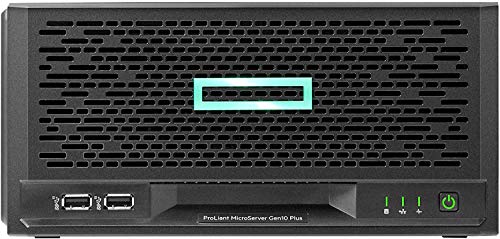
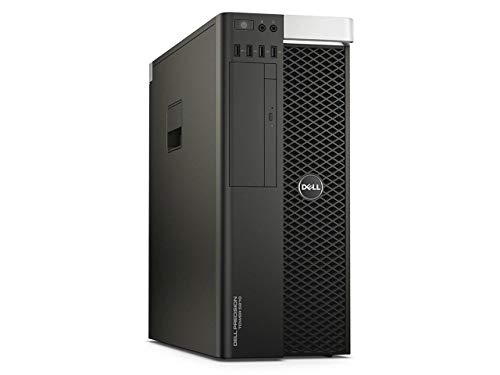
HPE ProLiant MicroServer Gen10 Plus Server with one Intel Xeon E-2224 Processor, 16 GB Memory, and 4 Large Form Factor (LFF) Non-hot Plug Drive Bays


Key features
- •HPE ProLiant MicroServer Gen10 Plus Ultra Micro Tower Server - 1 x Xeon E-2224 - 16 GB RAM HDD SSD - Serial ATA/600 Controller - 1 Processor Support - 32 GB RAM Support - Gigabit Ethernet - 4 x LFF Bay(s) - No - 1 x 180 W
HPE ProLiant MicroServer Gen10 Plus Server with one Intel Xeon E-2224 Processor, 16 GB Memory, and 4 Large Form Factor (LFF) Non-hot Plug Drive Bays
List Price: $1890.05$1701.05DEALYou Save: $189.00 (10%)
Free shippingFree Returns – 30 daysFree Order CancellationSecure Payment2–3 Days DeliveryGet It October 25, 2026In Stock (2)No marketing spamNo account requiredFulfilment by FedEx / Amazon / UPS / ShipwirePayPal / Card Buyer Protection
Customer Reviews
Reviews sourced from verified Amazon purchasers4.5
out of 5
Based on 10 reviews
5★
80%
4★
20%
3★
0%
2★
0%
1★
0%
Great little server
Tyson Lamoureux✓ Verified Purchase•December 18, 2023
Thing is super small (about the size of a toaster), quiet, has low heat output and has some power behind it, perfect for a home server. Max the ram out at 32G, buy the iLO PCI card and throw some large disks in it and you're set.
Be aware support for these servers ends on June 2024 and you should update the firmware for the motherboard and iLO before then. HP's support page is barely usable and they demand you create an account and type in the serial numbers of every one of your products (iLO too) before they will give you firmware / security updates for any devices. Even then, actually performing the update is awful, their website barely functions, the update process requires their brand of specialized tools to work and is a massive time sink. Having run Dell servers for years, I didn't expect the level of support (or lack thereof) to be such a contrast with this manufacturer. Good hardware, awful teeth pulling experience to update anything unless you already run a bunch of HP equipment and have offline archives of all the content that gets taken down and moved around constantly.
Be aware support for these servers ends on June 2024 and you should update the firmware for the motherboard and iLO before then. HP's support page is barely usable and they demand you create an account and type in the serial numbers of every one of your products (iLO too) before they will give you firmware / security updates for any devices. Even then, actually performing the update is awful, their website barely functions, the update process requires their brand of specialized tools to work and is a massive time sink. Having run Dell servers for years, I didn't expect the level of support (or lack thereof) to be such a contrast with this manufacturer. Good hardware, awful teeth pulling experience to update anything unless you already run a bunch of HP equipment and have offline archives of all the content that gets taken down and moved around constantly.
The shape is very beautiful
shy✓ Verified Purchase•November 19, 2023
Advantages: Compared with the previous gen10 and gen8, the volume is reduced by half, the design is very avant-garde, and the materials and craftsmanship are very commendable. The playability is very high. With ilo5, you can remotely access gen10 plus from anywhere in the world at home. Compared with the previous generation, the fan is also quieter. It has four gigabit rj45 network ports, which is very suitable for soft routing. Installation is also very simple. It also supports non-ecc memory, which can be mixed with the built-in ecc memory. The built-in function also reserves a USB port, which can be used to install virtual machine systems, such as esxi. Two usb3.1 gen2 10GB speeds are also reserved in the front.
Disadvantages: Be careful when installing ilo5 and pulling out the motherboard. The power button and hard drive data cable are easily damaged. There is no m2 interface for 2020 products. There is only one pcie, 10G, m2, and the graphics card can only choose three.
Disadvantages: Be careful when installing ilo5 and pulling out the motherboard. The power button and hard drive data cable are easily damaged. There is no m2 interface for 2020 products. There is only one pcie, 10G, m2, and the graphics card can only choose three.
Great NAS solution but not without drawbacks
Raymond Ngai✓ Verified Purchase•November 2, 2023
It's a very neat alternative to Synology/ QNAP or even DIY NAS given the price and footprint. Ideal for UnRAID or TrueNAS
- Compact and good looking
- Upgradable CPU and RAM (Need to consider the power budget though)
- 1 PCIE slot
- 4 x GbE port (+1 management port with iLO enablement kit)
- iLO (enablement kit sold separately)
- internal USB port
- quiet and power efficient operation (UPS measured 12W idle with E2224, 24GB RAM with drives spin down)
Cons
Pros:
- E-2224 option is not powerful enough for VMs
- The HPE firmware won't allow to use the iGPU even with G series Xeon or i3
- No M.2 slot
- Meaning that you can either choose M.2 SSD adapters or a GPU on the only PCIE slot
- HPE quietly removed the PCIE bifurcation support from later BIOS
- If you want to use more than 1 M.2 SSD you need those costly adapters with PCIE downstream chip, or some QNAP M.2 + 2.5/ 10GbE adapters
- 4 SATA ports only unlike the gen8 where there was an extra for optical bay
- PSU is an external 180W laptop power brick, which is quite tight for high core count Xeon with 4 hard drives
The screencap is one of my Gen10 plus upgraded to E-2236, 32GB RAM and QNAP QM2-2P10G1TB running UnRAID, it's a shame I cannot use it for Plex transcoding
- Compact and good looking
- Upgradable CPU and RAM (Need to consider the power budget though)
- 1 PCIE slot
- 4 x GbE port (+1 management port with iLO enablement kit)
- iLO (enablement kit sold separately)
- internal USB port
- quiet and power efficient operation (UPS measured 12W idle with E2224, 24GB RAM with drives spin down)
Cons
Pros:
- E-2224 option is not powerful enough for VMs
- The HPE firmware won't allow to use the iGPU even with G series Xeon or i3
- No M.2 slot
- Meaning that you can either choose M.2 SSD adapters or a GPU on the only PCIE slot
- HPE quietly removed the PCIE bifurcation support from later BIOS
- If you want to use more than 1 M.2 SSD you need those costly adapters with PCIE downstream chip, or some QNAP M.2 + 2.5/ 10GbE adapters
- 4 SATA ports only unlike the gen8 where there was an extra for optical bay
- PSU is an external 180W laptop power brick, which is quite tight for high core count Xeon with 4 hard drives
The screencap is one of my Gen10 plus upgraded to E-2236, 32GB RAM and QNAP QM2-2P10G1TB running UnRAID, it's a shame I cannot use it for Plex transcoding
Great little server
Lance✓ Verified Purchase•October 5, 2023
This server is a great small footprint server. It had to have the firmware all updated to be able to take Microsoft Server 2022. Once this was done, it worked great. We also purchased the ILO Enablement kit - highly recommended. IT allows you to remotely manage the server. All in all, this is a great little machine.
Game and Media servers for the family is a win.
OneXBigTom✓ Verified Purchase•September 5, 2023
I have to say setting this up was a tad bit time consuming. I use this server for our in home server, and Dedicated game hosting server. To give you an example of what this can do, this server is hosting 6 dedicated Ark Survival servers, 1 dedicated Space Engineers server, and 1 dedicated Valheim server. as well as hosting in home media server for photos, videos, music, etc. This is a great at home server box. Windows 10 pro is installed and I use the remote desktop feature to gain access to the server from my main PC. I had upgraded to 32 gig mem, ilo card, sound card and 1 4 tb SSD drive, 3 old school 4tb hard drives. Purchased on August 14, 2021 and it has been running for the most part 24/7 with zero issues.
CPU temp most of the time is around 45 to 50 degrees, CPU clock speed is around 4200 MHz
Only thing I wish I was able to do was add more ram other then the 32 GB ram limit.
All in all great in home server. I do recommend the next gen up for the 64 GB ram limit if you are some one like me that uses a lot of ram for the application that I use.
CPU temp most of the time is around 45 to 50 degrees, CPU clock speed is around 4200 MHz
Only thing I wish I was able to do was add more ram other then the 32 GB ram limit.
All in all great in home server. I do recommend the next gen up for the 64 GB ram limit if you are some one like me that uses a lot of ram for the application that I use.
Page 1 of 2