NIIMBOT Label Maker Machine D11 Label Printer Portable Wireless Connection Multiple Templates Available for Phone Easy to Use Office Home Organization USB Rechargeable




Key features
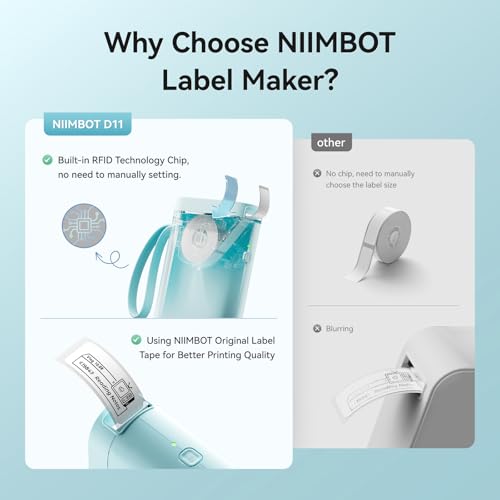
- •【2020 New Version】After the technical updating, we combine the label maker with the smart device, which is more convenient and powerful. The weight and volume are only half of the traditional version. From now on, we bid farewell to the heavy, power-consuming, and money waste old version.
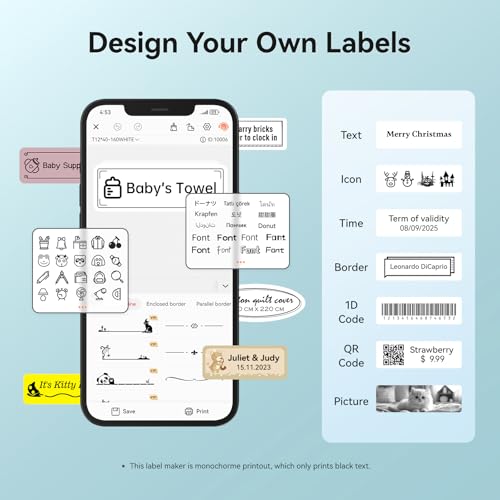
- •【Powerful Functions】It can be connected via Bluetooth and supports printing various texts, numbers, graphics, symbols, logos, barcodes, QR codes,etc. And intelligent recognition of voices and pictures.
- •【Built-in 1200 mAh rechargeable battery】 It can print continuously for 4 hours, and it can be used for 3 months on a single charge, which saves the trouble of long-term battery purchasing and replacement, and it's also very environmentally-friendly.
- •【Design Your Own Labels】The APP NIIMBOT contains various texts, graphic symbols and business icons,and our label paper has varieties of colors and styles to choose from, You can make your own product labels and QR code labels.
- •【Reliable Warranty and Service】Purchasing from our NIIMBOT flagship store,can enjoy the Amazon return policy and an extra 2 years warranty.What's more,once become our valued customer,you can enjoy a lifetime prime customer service,we will provide our best technech support and answer all the questions
NIIMBOT Label Maker Machine D11 Label Printer Portable Wireless Connection Multiple Templates Available for Phone Easy to Use Office Home Organization USB Rechargeable
List Price: $52.36$47.12DEALYou Save: $5.24 (10%)
Free shippingFree Returns – 30 daysFree Order CancellationSecure Payment2–3 Days DeliveryGet It October 25, 2026In Stock (1)No marketing spamNo account requiredFulfilment by FedEx / Amazon / UPS / ShipwirePayPal / Card Buyer Protection
Customer Reviews
Reviews sourced from verified Amazon purchasers4.4
out of 5
Based on 10 reviews
5★
60%
4★
40%
3★
0%
2★
0%
1★
0%
This is great!
Mary Roh✓ Verified Purchase•August 9, 2023
I am loving how fast this arrived and then how easy it is to use!
Simple, easy to use label maker
Abbey✓ Verified Purchase•August 5, 2023
This is a fun, easy to use tool that can add value and joy to your life.
Ease of use: Excellent
Printing ability: Excellent. Labels print quickly.
Size: Excellent. Size of an iPhone 8, only thicker.
Refills: Easy to purchase on Amazon (search for "label maker tape"; one roll is approx. $12 and you can even buy clear ones* or a roll with cute animal backgrounds**.)
Ink toner: Don't need to buy any. This label maker uses thermal printing. You only have to buy refill tape rolls. This only prints black and white. No color.
Charging: Easy. Charges using an included USB cable. Holds a charge for a long time. Turns off by itself. It sings a little song when you turn it on and when it turns off (no joke, it really does).
App: Not perfect. It was easy to download the app onto my phone and to have the app connect to the label maker using Bluetooth. I did not have to register and create an account to use the app. But, without registering for an account, you cannot save labels. If you close the app or let a lot of time lapse, your label will be deleted and you have to retype the label.
When I was really annoyed by having to repeatedly type the same label, I tried to create an account even though I read reviews that highlighted potential privacy concerns. But, registration requires a verification code and Nimbot would email me the verification code after 10 minutes and by then, my registration would have timed out. I am unable to create an account even if I wanted to.
Using the App: Good, not excellent. The instruction guide that comes with the label maker is vague so you have to play around with the app on your own. The app opens up and is able to automatically detect the type of label maker tape that is loaded (e.g., size, shape) which is great. You then double click on the label in the app to start typing. The text box is usually bigger than the label, so I always have to adjust the sizing and location of the text box. It gets annoying. I wish that by default, the text box would appear centered and sized to fit the label.
Usefulness: Very useful. I created labels for all of my hanging file folders. I find folders more quickly. I can read the labels a lot faster when the font is typed out compared to handwritten labels. I also bought the label maker to trivia night and had fun printing out labels with our team's name (A Long Hard Day at the Dildo Factory) to put on our answer sheets.
Conclusion: Overall, I am very happy with this label maker and have found it to be extremely useful. I highly recommend this label maker for someone who wants a simple, easy to use, and inexpensive label maker.
*https://www.amazon.com/Address-Waterproof-Sticker-Supplies-NIIMBOT/dp/B0956SCWTV/ref=sr_1_6?crid=3KM7Z6F04WM96&keywords=niimbot%2Blabels&qid=1656791005&sprefix=nimbot%2Blabel%2Caps%2C75&sr=8-6&th=1
**https://www.amazon.com/Address-Waterproof-Sticker-Supplies-NIIMBOT/dp/B0956NG1FD/ref=sr_1_6?crid=3KM7Z6F04WM96&keywords=niimbot%2Blabels&qid=1656791005&sprefix=nimbot%2Blabel%2Caps%2C75&sr=8-6&th=1
How to add emojis: Open app, open a template, double tap on the text box as if you are going to start typing. Don't type and press OK. A menu will appear. Press "Element" on the top row, left hand side. A menu will appear. Swipe left to see more options. Press "Material" and you will see a menu of emojis. To type text, press "Element" again. Swipe left and press on "Text". A text box will appear. Press twice on the text box and you will be able to edit the text box.
Ease of use: Excellent
Printing ability: Excellent. Labels print quickly.
Size: Excellent. Size of an iPhone 8, only thicker.
Refills: Easy to purchase on Amazon (search for "label maker tape"; one roll is approx. $12 and you can even buy clear ones* or a roll with cute animal backgrounds**.)
Ink toner: Don't need to buy any. This label maker uses thermal printing. You only have to buy refill tape rolls. This only prints black and white. No color.
Charging: Easy. Charges using an included USB cable. Holds a charge for a long time. Turns off by itself. It sings a little song when you turn it on and when it turns off (no joke, it really does).
App: Not perfect. It was easy to download the app onto my phone and to have the app connect to the label maker using Bluetooth. I did not have to register and create an account to use the app. But, without registering for an account, you cannot save labels. If you close the app or let a lot of time lapse, your label will be deleted and you have to retype the label.
When I was really annoyed by having to repeatedly type the same label, I tried to create an account even though I read reviews that highlighted potential privacy concerns. But, registration requires a verification code and Nimbot would email me the verification code after 10 minutes and by then, my registration would have timed out. I am unable to create an account even if I wanted to.
Using the App: Good, not excellent. The instruction guide that comes with the label maker is vague so you have to play around with the app on your own. The app opens up and is able to automatically detect the type of label maker tape that is loaded (e.g., size, shape) which is great. You then double click on the label in the app to start typing. The text box is usually bigger than the label, so I always have to adjust the sizing and location of the text box. It gets annoying. I wish that by default, the text box would appear centered and sized to fit the label.
Usefulness: Very useful. I created labels for all of my hanging file folders. I find folders more quickly. I can read the labels a lot faster when the font is typed out compared to handwritten labels. I also bought the label maker to trivia night and had fun printing out labels with our team's name (A Long Hard Day at the Dildo Factory) to put on our answer sheets.
Conclusion: Overall, I am very happy with this label maker and have found it to be extremely useful. I highly recommend this label maker for someone who wants a simple, easy to use, and inexpensive label maker.
*https://www.amazon.com/Address-Waterproof-Sticker-Supplies-NIIMBOT/dp/B0956SCWTV/ref=sr_1_6?crid=3KM7Z6F04WM96&keywords=niimbot%2Blabels&qid=1656791005&sprefix=nimbot%2Blabel%2Caps%2C75&sr=8-6&th=1
**https://www.amazon.com/Address-Waterproof-Sticker-Supplies-NIIMBOT/dp/B0956NG1FD/ref=sr_1_6?crid=3KM7Z6F04WM96&keywords=niimbot%2Blabels&qid=1656791005&sprefix=nimbot%2Blabel%2Caps%2C75&sr=8-6&th=1
How to add emojis: Open app, open a template, double tap on the text box as if you are going to start typing. Don't type and press OK. A menu will appear. Press "Element" on the top row, left hand side. A menu will appear. Swipe left to see more options. Press "Material" and you will see a menu of emojis. To type text, press "Element" again. Swipe left and press on "Text". A text box will appear. Press twice on the text box and you will be able to edit the text box.
Setup confusing
Robert alfaro✓ Verified Purchase•August 2, 2023
I liked the smallness, but dislike how it stands. Easily topples over if not careful
I bought this to label my camping tins I'm building for outdoors fire kits.
Meigo Fitzpatrick✓ Verified Purchase•July 26, 2023
I bought this to label my camping tins I'm building for outdoors fire kits. So far I've installed the software on my phone and used it to access the printer via bluetooth and print labels for a lot of other stuff. cables for radio gear, monitors, power supplies, kids toys...the printer is just a cool little thermal printer powered by USB rechargeable battery). I don't remember the exact price I paid for it, but I think I've used it enough to make it worth buying. quality of prints is labels you can read, so it works fine for what it makes. I don't even have anything to complain about for this product (And usually I find something I don't like and let people know why in these reviews). Worth picking up, and I'd recommend a friend buy it if they were looking for a cheap label printer. Thanks for reading my review, and have a good one!
Great little Printer
Doron Schleifer✓ Verified Purchase•July 6, 2023
Worked right out of the box. Make sure you have tape the correct orientation. Otherwise works pretty good with app, which you need to download.
Note: Haven't had it long enough to see tape usage, so bought extra roll just in case.
Will update as needed.
Note: Haven't had it long enough to see tape usage, so bought extra roll just in case.
Will update as needed.
Page 1 of 2