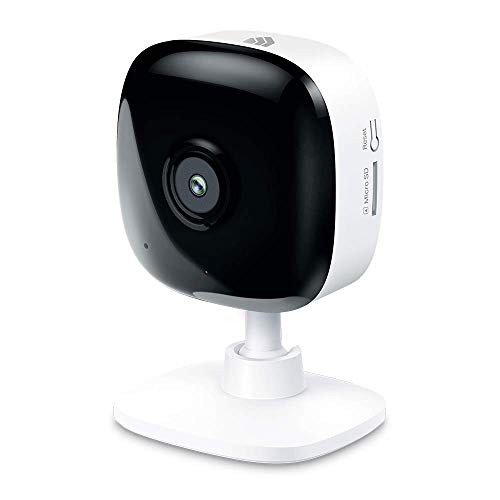
Kasa Smart Security Camera for Baby monitor, 1080p HD Indoor-Camera for Home Security with Motion Detection, Two-Way Audio, Night Vision, Cloud & SD Card Storage, Works with Alexa & Google Home (EC60)


Key features
- •Live Steam from Anywhere: Sharp and clear 1080p Full HD provides high quality video right in the palm of your hand with 130-degree wide angle field of view. See, hear and speak to your family using 2-way audio through the Kasa app while live streaming with this wifi camera.
- •Motion/Sound Detection in Real-Time. Day or Night: Get alerts on your smart phone whenever motion or sound is detected even at night with the night vision (30 ft. away in the dark). Customize up to 4 activity zones around areas which are important to make most use of cameras for home security as a baby monitor, pet camera or nanny cam.
- •Enjoy a Smarter Home with Smart Actions: Set your lights to turn on when your camera detects motion with Kasa Smart Actions. Smart Actions allows you to create interactions between your Kasa camera and other Kasa devices to make your life simpler.
- •Secure Your Videos Locally or with AWS Cloud: As an indoor security camera, EC60 continuously records and stores footage or video clips on a local MicroSD card up to 64 GB (MicroSD card not included). Premium cloud storage options are available with industry-standard 128-bit AES end-to-end encryption on AWS.
- •Voice Control: For additional ease of use, pair the Kasa wireless camera with Alexa echo or Google assistant. Use a simple voice command to ask Alexa or Google Assistant to view your live camera feed on compatible Alexa or Google devices.
- •Digital zoom: 8.0 multiplier_x
Kasa Smart Security Camera for Baby monitor, 1080p HD Indoor-Camera for Home Security with Motion Detection, Two-Way Audio, Night Vision, Cloud & SD Card Storage, Works with Alexa & Google Home (EC60)
List Price: $40.14$36.13DEALYou Save: $4.01 (10%)
Free shippingFree Returns – 30 daysFree Order CancellationSecure Payment2–3 Days DeliveryGet It October 26, 2026In Stock (1)No marketing spamNo account requiredFulfilment by FedEx / Amazon / UPS / ShipwirePayPal / Card Buyer Protection
Customer Reviews
Reviews sourced from verified Amazon purchasers4.4
out of 5
Based on 10 reviews
5★
40%
4★
60%
3★
0%
2★
0%
1★
0%
Easy, offline, and reliable - works through windows!
Samir K✓ Verified Purchase•September 24, 2023
I needed a security camera with quick access to live-view, local recording, and motion detection...and this camera has all that and more!
QUALITY:
My camera is in a 3rd floor window pointed downwards through glass, and I can still see small chipmunks and squirrels through it. You can disable the LED indicator and night vision using the app, which eliminates all reflection when pointing it through a window...and even without night vision, it can still see better/clearer in the dark than me!
STORAGE:
Local recording is supported on Micro SD card. You can choose 24/7 recording which loops (deletes the oldest video while it records real-time). Recordings are easy to view in the app, as you're given a long timeline to scrub forward and backwards on...this can be resized to easily go back days at a time. If you view the Micro SD on a PC, the files are also timestamped making it easy to find video from a certain date/time.
PHONE APP
I have the Kasa companion app on iPhone. It's VERY clean and responsive, and offers widgets and notifications. This allows QUICK access to live-view and motion sensing events. There is no hassle tapping through menus - live view and motion events are 1 click away after opening the app.
Overall: This camera has been a quick and reliable method of home security and given me peace of mind while home and away. I plan on buying more Kasa products (cameras, lights, smart outlets) and adding them to my Kasa app for easy control of my home!
QUALITY:
My camera is in a 3rd floor window pointed downwards through glass, and I can still see small chipmunks and squirrels through it. You can disable the LED indicator and night vision using the app, which eliminates all reflection when pointing it through a window...and even without night vision, it can still see better/clearer in the dark than me!
STORAGE:
Local recording is supported on Micro SD card. You can choose 24/7 recording which loops (deletes the oldest video while it records real-time). Recordings are easy to view in the app, as you're given a long timeline to scrub forward and backwards on...this can be resized to easily go back days at a time. If you view the Micro SD on a PC, the files are also timestamped making it easy to find video from a certain date/time.
PHONE APP
I have the Kasa companion app on iPhone. It's VERY clean and responsive, and offers widgets and notifications. This allows QUICK access to live-view and motion sensing events. There is no hassle tapping through menus - live view and motion events are 1 click away after opening the app.
Overall: This camera has been a quick and reliable method of home security and given me peace of mind while home and away. I plan on buying more Kasa products (cameras, lights, smart outlets) and adding them to my Kasa app for easy control of my home!
Starlight Feature Works
A_diva✓ Verified Purchase•July 12, 2023
I bought this to compare with EZVIZ C1C . Now these are not apples to apples because EZVIZ C1C camera is in 1080 HD and is not available in ]in 2K yet but they are close.
Picture Quality
This is 2K , C1C is 1080. The variance in picture quality is noticeable but not enough that I'd choose to pay significantly more for a product with 2K. Fortunately since it's holidays both are marked down to an extremely affordable price and so it's not a bad idea to take advantage of the better picture quality.3
.
Aesthetic
Hands down EZVIZ looks better. The base and stand connecting piece is metal on EZVIZ whereas on Kasa/ T-P it's a cheap plastic . This also affects the movement. You get more motion on the EZVIZ which means better viewing/positioning. For some odd reason Kasa/T-P has a gray cord "¦ for absolutely no reason - the unit is white and black , huge turn off for those who want a seamless transition to hide cords. The gray for some reason even makes the cord look bigger than the EZVIZ but I put them side by side and to my disbelief they are about the same width. I also have gray walls in my main room but this gray cord on a white and black product just looks odd and makes the cord stand out.
Sound
Both record sound well. Mics are in the front so remember to take off plastic cover of lens or your mic won't record incoming sound (I made this mistake initially). Outbound sound (you talking from your phone through the camera) is from a speaker in back on both.
Wall Mount
EZVIZ mount is better. EZVIZ camera can mount to things that attract magnets like the refrigerator by just putting it against the refrigerator. If mounting to the wall, EZVIZ can stick and mount. It comes with a 3M type sticker for attaching wall mount to wall and then the magnetic metal base of camera attaches to the wall. You can literally put this up in the EZVIZ up in less than 5 minutes. The EZVIZ has the option to mount the wall mount with a screw as well for a stronger mount . Kasa has screw only option. Going back to aesthetics a little. If wall mounting downward from ceiling, the Kasa looks better because it has a shorter stem/neck that connects to the base making it closer to the ceiling and not oddly sticking out of the ceiling. If mounting vertically on a wall, the EZVIZ looks better . If sitting on table both easily sit but the square look of the Kasa/TP just looks odd and stands out in an unattractive way. However both are incredibly small so you can disguise them or remove attention from them by putting other things on your table.
Extra Features
Kasa has the detection of people. While some EZVIZ cameras have this feature, the one I'm comparing that is closest to this product from EZVIZ does not. The starlight feature isn't great on the Kasa but it does work. I expected it to work when it's dark and was disappointed, to see in the complete dark it functions like any other infrared camera. However when there is dim lighting, the Starlight feature does show the video in color . I had it side by side on my mantle next to the EZVIZ camera and as it approached evening and I only had one lamp in the room on. There was a noticeable difference. With that said, the Starlight Feature works. I could see my daughter in color on the Kasa but not on the EZVIZ. When it's completely dark, there's no difference between the two camera's display. Both have the option for zone targeted recording but I don't think this feature works well in either camera from my testing.
Connection:
Both connect fairly easily if you are used to electronics and general technology of recent years. For someone not keen on technology, the EZVIZ connects easier and is recommended for seniors in my opinion. They simply scan a QR code with EZVIZ , it picks up their Wi-Fi signal automatically and they are all set! Not so simple with Kasa. For Kasa it prompted me to go change my phones Wi-Fi to join their network before it could pick up the network in my house and then allowed the connection the connection to begin. These extra steps might be frustrating for an older person if they don't have help setting it up.
Apps
The Kasa app seems like it's a better view if you are comfortable with technology. It looks like the integration of smart home might be easier. I can't say for sure that it's easier because I don't have smart plugs and smart lights but the look of the app presents it in a more appealing way than the EZVIZ. However , the basic simplicity of the EZVIZ may be better for someone not as comfortable with technology. For example on the Kasa spot, I found that the place to view recordings on my SD is not the same viewing place for online recordings. I subscribed online and placed an SD in the Kasa camera and so it was confusing to find the videos in different places. initially but I figured that out in a few minutes. However, I think this can be confusing for someone not tech savvy or who lacks patience to play with the app. I'm testing these to buy for my parents also and I think the Kasa camera app might just be a bit too much for someone over 60 who isn't proactively staying up to date with technology. One downside of the Kasa app is that you can't give your family access to the cameras. The only workaround is to give everyone the same log in. With EZVIZ, you can send family members an invite to see your cameras from their phone. I like sharing the cameras with my entire family, we can leverage the 2 way talking features and , it makes us feel safer. Its like having an extra set of eyes on your house if there's ever a break in. I've had this feature on my Arlo account too. I think this is a miss for Kasa based on what I've read the workaround is to just give everyone the same log on. I think the problem with this workaround is you may have family members accidentally disabling cameras or intentionally disabling them to avoid notifications whereas you may want the notifications.
24/7 recording
Both offer 24/7 recording to SD of 256 with no subscription
Subscription
Subscription is optional with pricing about the same if you only have one camera but when you start considering cameras all over your house on cloud, then that's where the difference counts. 1 camera on Kasa $2.99/mo vs. $3.99/mo on
EZVIZ. 4 cameras on EZVIZ $10.99/mo vs. 10 cameras on Kasa $9.99/mo. As you can see, if you are planning to do cloud for backup, with multiple cameras, you get better value with Kasa.
Recording in general
You must have either a subscription or an SD installed for events to be stored in both. However in the EZVIZ it will create the event alert and still image on your app even if you don't have a subscription or an SD , you just won't be able to play back the video. This means with the EZVIZ you at least know there was an event even if you have no SD and no subscription. However knowing doesn't tell you more than that and so you will have to get an SD or subscription for both to work properly
Overall, it depends on what's important to you. I'm typically drawn to aesthetics which leans me more in favor of EZVIZ but because the Kasa is priced only $10 more with the holidays it makes sense to take advantage of the 2K color. I'll add some EZVIZ in the bedrooms however. There's another TP link model branded under Tapo that is $5 less without Starlight sensor, seems like a good option too!
Overall both cameras are great for the price. It really depends on what is important to you. I'm actually considering doing a mix of both cameras. I don't mind having multiple apps and already had one old 360 EZVIZ camera that I love and use to use downstairs inside my home. Based on my research Kasa and EZVIZ can integrate both on an NVR and so this is no issue to me to mix cameras.
For reference, I also have Arlo cameras outside. The reason I started looking at other camera options is because my Arlo wire free camera batteries are no longer working. I can only turn the camera on when plugged into the wall and so this changes how I can use them outside or means a lot of workarounds. After trying to find aftermarket batteries and longer plugged wires since Arlo is not selling the 1st generation parts anymore, I started looking into hardwired cameras for outside. I also want to add some cameras for my parents. I figured I'd test the cheaper inside cameras for EZVIZ and Kasa to get a feel of their products more before investing into a new system outside and installing any in my parents home. I liked both so much that I decided to add more cameras inside of my own house since they are so affordable.
Picture Quality
This is 2K , C1C is 1080. The variance in picture quality is noticeable but not enough that I'd choose to pay significantly more for a product with 2K. Fortunately since it's holidays both are marked down to an extremely affordable price and so it's not a bad idea to take advantage of the better picture quality.3
.
Aesthetic
Hands down EZVIZ looks better. The base and stand connecting piece is metal on EZVIZ whereas on Kasa/ T-P it's a cheap plastic . This also affects the movement. You get more motion on the EZVIZ which means better viewing/positioning. For some odd reason Kasa/T-P has a gray cord "¦ for absolutely no reason - the unit is white and black , huge turn off for those who want a seamless transition to hide cords. The gray for some reason even makes the cord look bigger than the EZVIZ but I put them side by side and to my disbelief they are about the same width. I also have gray walls in my main room but this gray cord on a white and black product just looks odd and makes the cord stand out.
Sound
Both record sound well. Mics are in the front so remember to take off plastic cover of lens or your mic won't record incoming sound (I made this mistake initially). Outbound sound (you talking from your phone through the camera) is from a speaker in back on both.
Wall Mount
EZVIZ mount is better. EZVIZ camera can mount to things that attract magnets like the refrigerator by just putting it against the refrigerator. If mounting to the wall, EZVIZ can stick and mount. It comes with a 3M type sticker for attaching wall mount to wall and then the magnetic metal base of camera attaches to the wall. You can literally put this up in the EZVIZ up in less than 5 minutes. The EZVIZ has the option to mount the wall mount with a screw as well for a stronger mount . Kasa has screw only option. Going back to aesthetics a little. If wall mounting downward from ceiling, the Kasa looks better because it has a shorter stem/neck that connects to the base making it closer to the ceiling and not oddly sticking out of the ceiling. If mounting vertically on a wall, the EZVIZ looks better . If sitting on table both easily sit but the square look of the Kasa/TP just looks odd and stands out in an unattractive way. However both are incredibly small so you can disguise them or remove attention from them by putting other things on your table.
Extra Features
Kasa has the detection of people. While some EZVIZ cameras have this feature, the one I'm comparing that is closest to this product from EZVIZ does not. The starlight feature isn't great on the Kasa but it does work. I expected it to work when it's dark and was disappointed, to see in the complete dark it functions like any other infrared camera. However when there is dim lighting, the Starlight feature does show the video in color . I had it side by side on my mantle next to the EZVIZ camera and as it approached evening and I only had one lamp in the room on. There was a noticeable difference. With that said, the Starlight Feature works. I could see my daughter in color on the Kasa but not on the EZVIZ. When it's completely dark, there's no difference between the two camera's display. Both have the option for zone targeted recording but I don't think this feature works well in either camera from my testing.
Connection:
Both connect fairly easily if you are used to electronics and general technology of recent years. For someone not keen on technology, the EZVIZ connects easier and is recommended for seniors in my opinion. They simply scan a QR code with EZVIZ , it picks up their Wi-Fi signal automatically and they are all set! Not so simple with Kasa. For Kasa it prompted me to go change my phones Wi-Fi to join their network before it could pick up the network in my house and then allowed the connection the connection to begin. These extra steps might be frustrating for an older person if they don't have help setting it up.
Apps
The Kasa app seems like it's a better view if you are comfortable with technology. It looks like the integration of smart home might be easier. I can't say for sure that it's easier because I don't have smart plugs and smart lights but the look of the app presents it in a more appealing way than the EZVIZ. However , the basic simplicity of the EZVIZ may be better for someone not as comfortable with technology. For example on the Kasa spot, I found that the place to view recordings on my SD is not the same viewing place for online recordings. I subscribed online and placed an SD in the Kasa camera and so it was confusing to find the videos in different places. initially but I figured that out in a few minutes. However, I think this can be confusing for someone not tech savvy or who lacks patience to play with the app. I'm testing these to buy for my parents also and I think the Kasa camera app might just be a bit too much for someone over 60 who isn't proactively staying up to date with technology. One downside of the Kasa app is that you can't give your family access to the cameras. The only workaround is to give everyone the same log in. With EZVIZ, you can send family members an invite to see your cameras from their phone. I like sharing the cameras with my entire family, we can leverage the 2 way talking features and , it makes us feel safer. Its like having an extra set of eyes on your house if there's ever a break in. I've had this feature on my Arlo account too. I think this is a miss for Kasa based on what I've read the workaround is to just give everyone the same log on. I think the problem with this workaround is you may have family members accidentally disabling cameras or intentionally disabling them to avoid notifications whereas you may want the notifications.
24/7 recording
Both offer 24/7 recording to SD of 256 with no subscription
Subscription
Subscription is optional with pricing about the same if you only have one camera but when you start considering cameras all over your house on cloud, then that's where the difference counts. 1 camera on Kasa $2.99/mo vs. $3.99/mo on
EZVIZ. 4 cameras on EZVIZ $10.99/mo vs. 10 cameras on Kasa $9.99/mo. As you can see, if you are planning to do cloud for backup, with multiple cameras, you get better value with Kasa.
Recording in general
You must have either a subscription or an SD installed for events to be stored in both. However in the EZVIZ it will create the event alert and still image on your app even if you don't have a subscription or an SD , you just won't be able to play back the video. This means with the EZVIZ you at least know there was an event even if you have no SD and no subscription. However knowing doesn't tell you more than that and so you will have to get an SD or subscription for both to work properly
Overall, it depends on what's important to you. I'm typically drawn to aesthetics which leans me more in favor of EZVIZ but because the Kasa is priced only $10 more with the holidays it makes sense to take advantage of the 2K color. I'll add some EZVIZ in the bedrooms however. There's another TP link model branded under Tapo that is $5 less without Starlight sensor, seems like a good option too!
Overall both cameras are great for the price. It really depends on what is important to you. I'm actually considering doing a mix of both cameras. I don't mind having multiple apps and already had one old 360 EZVIZ camera that I love and use to use downstairs inside my home. Based on my research Kasa and EZVIZ can integrate both on an NVR and so this is no issue to me to mix cameras.
For reference, I also have Arlo cameras outside. The reason I started looking at other camera options is because my Arlo wire free camera batteries are no longer working. I can only turn the camera on when plugged into the wall and so this changes how I can use them outside or means a lot of workarounds. After trying to find aftermarket batteries and longer plugged wires since Arlo is not selling the 1st generation parts anymore, I started looking into hardwired cameras for outside. I also want to add some cameras for my parents. I figured I'd test the cheaper inside cameras for EZVIZ and Kasa to get a feel of their products more before investing into a new system outside and installing any in my parents home. I liked both so much that I decided to add more cameras inside of my own house since they are so affordable.
Easy to use but false detects humans
anonymous user✓ Verified Purchase•June 27, 2023
This camera was super easy to install, you just plug it in and download the app and it starts working. I installed an SD card to record videos, which is super easy, and I like that you can record videos whenever there's an activity. However the only thing this camera bothers me is that it always falsely detects humans. I point the camera at the tree outside, but it will falsely think the tree is a human and sends me tens of notifications every hour. The false positive rate is super high. However it can detects real human too, so there is no false negative. If you are okay with being bombed with notifications to be safe this camera is pretty good value.
They work WELL!!!
Vicki corriveau✓ Verified Purchase•June 25, 2023
I use mine indoors the canears do work very well I mean they caught a shadow on my wall from a car very faint and it set it off no lies I'm daylight mins you!!!!
Perfect extra baby monitor
B. Balestrieri✓ Verified Purchase•June 23, 2023
We bought this because we needed another baby monitor that wouldn't break the bank! This thing has been worth every penny! It's quick and easy to install with the Kasa App. It has great sound quality, and picture, as well as motion detection. It connects well to Wi-fi, and sends alerts directly to your phone.
I wish there was a different and more consistent alert when it detects the baby crying vs. just detecting movement. If I'm outside, or know I'm outside of earshot from the baby, I will just leave the app open on my phone to make sure I don't miss the alert. Again, this camera is an excellent option as an affordable monitor. Way better than expected! We also frequently travel with this, and it's easy to set up from location to location!
We don't pay for it to record, but that's an option through the app.
I wish there was a different and more consistent alert when it detects the baby crying vs. just detecting movement. If I'm outside, or know I'm outside of earshot from the baby, I will just leave the app open on my phone to make sure I don't miss the alert. Again, this camera is an excellent option as an affordable monitor. Way better than expected! We also frequently travel with this, and it's easy to set up from location to location!
We don't pay for it to record, but that's an option through the app.
Page 1 of 2