Stylus Pen for iPad, NTHJOYS 2 in 1 Rechargeable Digital Pen Fine Point Stylist Capacitive Stylus Pen Smart Pencil for iPhone/iPad Pro/Mini/Air/Samsung and Other Touch Screens




Key features
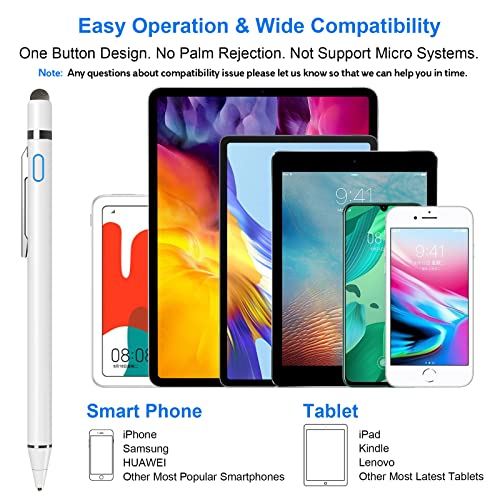
- •🖋️ 2-In-1 Practical Active Stylus Pen -- Designed with an elegant white body. A magnetic closure cap with a fiber mesh tip on the top, which can protect the USB port from damage and dirty. Enjoy your capabilities on your electronic device effortlessly. Convenient pen clip design that allows you to carry and place it anywhere, and prevent your stylus from falling off the table. With a more economic price, get almost similar functions for Apple Pencil.
- •📱 Stylus for Touch Screen Devices -- One stylus pen compatible with most your digital products, works as Apple Pen. Easy to use on iPad/Pro/Mini/Air, iPhone XS/XS MAX/XR/X/8/8 plus/7/7 plus/6S/6 plus, Samsung, Huawei and Android cellphones, or other most popular tablets. ➤ Note: Not support Micro System, Chromebook Devices, and without palm rejection function.
- •✍️ Sensitive & Precise Fine Point Stylus -- With 1.5mm ultra-fine tip design gives you more accuracy and control against tablets and cellphones screen. Make writing, drawing, and noting easier as a real pen. Help you create various artistic effects. Keep your tablet or phone screen free of finger smudges by using this stylus instead.
- •🔋 Long-Lasting Battery Life -- No Need Bluetooth Connection or APP Required. Turn on this active digital pen on the top button (Blue light on), and it automatically turns off after idle for every 30 minutes to protect battery life. About 30 hours of continuous working and 1 year standby time with 80-100 minutes per charge. The pen built-in the Micro USB port, you can charge by Micro USB cable (Included) via AC adapter, power bank, or computer (5V/0.1A)
- •🎁 Excellent Gift for Anyone -- The stylus pen combined with the ergonomic construction and fashion design make it top-notch in both highly sensitive and precise. Everything you need all in one, NTHJOYS professional universal stylus is a perfect gift for anyone. ❤ 30 Days 100% Money-Back + 12-Month Quality Assurance + NTHJOYS Professional Customer Service Team will handle any issues and help you within 24 hours.
Stylus Pen for iPad, NTHJOYS 2 in 1 Rechargeable Digital Pen Fine Point Stylist Capacitive Stylus Pen Smart Pencil for iPhone/iPad Pro/Mini/Air/Samsung and Other Touch Screens
List Price: $36.63$32.97DEALYou Save: $3.66 (10%)
Free shippingFree Returns – 30 daysFree Order CancellationSecure Payment2–3 Days DeliveryGet It October 28, 2026In Stock (1)No marketing spamNo account requiredFulfilment by FedEx / Amazon / UPS / ShipwirePayPal / Card Buyer Protection
Customer Reviews
Reviews sourced from verified Amazon purchasers4.3
out of 5
Based on 10 reviews
5★
50%
4★
50%
3★
0%
2★
0%
1★
0%
Reliable quality!
Barbara Frazier✓ Verified Purchase•September 4, 2023
This pen works great on my iPhone 12 screen. Very handy to use even without the battery. Slim and easy to keep in pocket or purse or in pen holder of phone or iPad case.
I'm sure it's a great stylus.
Jeffrey Dumonceaux✓ Verified Purchase•September 3, 2023
I didn't read the specs. Not compatible w/ my android. Works great as just a regular stylus.
Works fairly well for the fast and impatient .
Michael Kaighn✓ Verified Purchase•August 23, 2023
Made a few minor tweaks after it slipped from my hands too many times and fell tip down on my back concrete stoop. And it wasn't serious damage but keep in mind the brass like tip is fragile . And on this one versus a grey Colored replacement I thought I needed the adjuster I couldn't really figure out proper replacement I didn't expect it all to just"¦ slip off. The gray one don't come off at all. You can see the nicks in the tip in the picture but the soft aluminum alloy allowed for a little misshaping to help snap it back together so all is well now . And the band I added to the charge port cap was because I lost two backs on the same steps. Luckily I know myself and bough a replacement pack when I ordered this. I just have a little of a hard time holding small objects with carple tunnel issues but I applied a little high heat automotive grade wire harness tape for grip in a sword style pattern "¦. Does me good now . I didn't even need the replacement but I kept it as a backup. With my hands , and as much as I like it more than likely I'll break it , and I'll buy 20 more lol. Not a bad product . However I have to note, bony fear of return if you dropped it tip down , it will in fact still function just make sure your screen has a solid enough protector , the tip damaged mine but it's thick few scratches I could handle if not the actual screen. That being said tho , it's even a soft yet hard enough material that I was actually able to use Jean material ( my pants) and gradually buff it back to roundness over a short time (very short ) it's like I didn't even drop it now . So I'm adding that mine seems to be pretty resilient even against me. The tablet I used it for"¦. Not as durable against me . But this still works to use the AutoDesk sketchbook on my iPhone XR still. Even with a smoke out screen protector that's thicker the the length of the tip , it still reached threw it to function 100%
Seems to work pretty well
Richard S. Beam✓ Verified Purchase•July 13, 2023
Seems to work pretty well and MUCH less expensive that the Apple Pencil, if one is not doing fancy work!
Works fairly well for art, if you work it right. Love this thing!
E. Sprak✓ Verified Purchase•July 12, 2023
The media could not be loaded. The beauty of this stylus is that I can see where the point is, unlike the standard passive (blunt nub) styluses.
I was a bit hesitant to buy because of a video someone made showing that they couldn't draw straight diagonal lines on an iPad. Well, you can, if you know how the tablet works in native Apple apps. (note I only have tried on apple screens: iPad mini 2, iPad gen 6, and iPhone SE).
With a powered stylus, the iPad screen tries to do a micro-snap-to-grid function. The slower you go on a diagonal, the more the iPad tries to hunt back and forth snapping to an internal grid. If you look close, you can see the line zig-zagging back and forth as you go. So you need to "stroke" quickly to get a straighter line and if you want an absolutely straight line, you need to pause at the end before lifting the stylus and it will "snap straight". (see video)
The same with a circle, very hard to draw an accurate circle "freehand" on a tablet although I can draw nearly perfect circles with pen on paper. But if you pause at the end of your circle on an iPad/iPhone, it will "snap it" to the nearest elliptical shape.
In the video, I have demonstrated how this works on an Apple device in the native Notes app. The snap-to-grid effect may not be present if you use an actual drawing app like Adobe. I also use a Sensu drawing brush sometimes, but without the Professional Drawing Apps, it doesn't work any better than the old school rubber nub stylus.
Side Note: The passive "nub" stylus on the other end of this stylus has a nice mesh rather than just vinyl like a cheap stylus.This mesh nub glides very smoothly over the glass.
In short - it doesn't do what an Apple pencil would do, but it's only a fifth of the price and makes it a lot more fun to draw with a tablet than a finger or generic nub stylus.
I was a bit hesitant to buy because of a video someone made showing that they couldn't draw straight diagonal lines on an iPad. Well, you can, if you know how the tablet works in native Apple apps. (note I only have tried on apple screens: iPad mini 2, iPad gen 6, and iPhone SE).
With a powered stylus, the iPad screen tries to do a micro-snap-to-grid function. The slower you go on a diagonal, the more the iPad tries to hunt back and forth snapping to an internal grid. If you look close, you can see the line zig-zagging back and forth as you go. So you need to "stroke" quickly to get a straighter line and if you want an absolutely straight line, you need to pause at the end before lifting the stylus and it will "snap straight". (see video)
The same with a circle, very hard to draw an accurate circle "freehand" on a tablet although I can draw nearly perfect circles with pen on paper. But if you pause at the end of your circle on an iPad/iPhone, it will "snap it" to the nearest elliptical shape.
In the video, I have demonstrated how this works on an Apple device in the native Notes app. The snap-to-grid effect may not be present if you use an actual drawing app like Adobe. I also use a Sensu drawing brush sometimes, but without the Professional Drawing Apps, it doesn't work any better than the old school rubber nub stylus.
Side Note: The passive "nub" stylus on the other end of this stylus has a nice mesh rather than just vinyl like a cheap stylus.This mesh nub glides very smoothly over the glass.
In short - it doesn't do what an Apple pencil would do, but it's only a fifth of the price and makes it a lot more fun to draw with a tablet than a finger or generic nub stylus.
Page 1 of 2


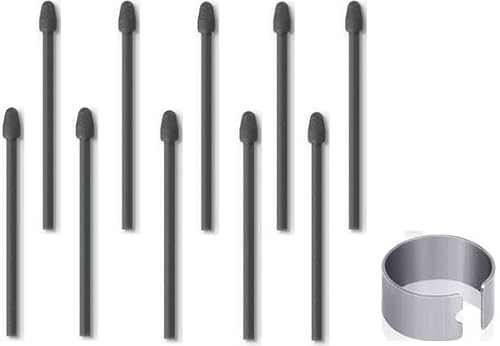


![HXHN Soft Pen Tips/Nibs [Pen Tip 0.7mm] for Samsung Galaxy Note 10/20 /S21/S22 Ultra/ S23 Ultra/Tab S6/ S6 Lite /S7/S7 FE/S7 Plus/ S8/ S8 Plus/ S8 Ultra/Book Pro 360 (2 PCS)](https://m.media-amazon.com/images/I/31st0AmRj7L._SL500_.jpg)