Luminar AI Photo Editing Software – Skylum Software Photo Editor - You Bring the Creative Vision - Powerful AI Brings it to Life - Get the Graphic Design Software for Mac and Windows 10 Pro - 2 seats


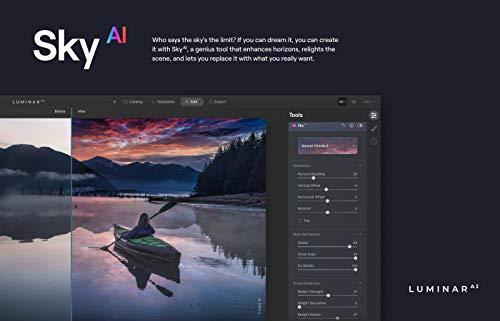


Key features
- •Get breathtaking photos in the blink of an eye. With powerful AI, you just discovered one of the most advanced photo software downloads available anywhere
- •Powerful AI does the hard work for you. The photo editor software for Mac includes SkyAI, FaceAI, SkinAI, BodyAI, AtmosphereAI, and more to detect and enhance pretty much anything in your photo
- •Skip the tutorials. We've kept the user interface of the photo editing software for Windows 10 simple. All photo enhancing software should be this easy to use
- •Find your creative vision. With templates galore, you can find your signature look and create the perfect style for your photos. You haven't seen lightroom photo editing software quite like this
- •Built by Skylum. You can count on photo organizer software that's both professional grade and easy to use
BrandSkylum
CategoryPhotography
Luminar AI Photo Editing Software – Skylum Software Photo Editor - You Bring the Creative Vision - Powerful AI Brings it to Life - Get the Graphic Design Software for Mac and Windows 10 Pro - 2 seats
List Price: $144.05$129.65DEALYou Save: $14.40 (10%)
Free shippingFree Returns – 30 daysFree Order CancellationSecure Payment2–3 Days DeliveryGet It October 26, 2026In Stock (2)No marketing spamNo account requiredFulfilment by FedEx / Amazon / UPS / ShipwirePayPal / Card Buyer Protection
Customer Reviews
Reviews sourced from verified Amazon purchasers2.7
out of 5
Based on 5 reviews
5★
80%
4★
20%
3★
0%
2★
0%
1★
0%
works well, but freezes up part of the time
Amazon Customer✓ Verified Purchase•February 17, 2024
just ok
Simple and amazing
Mustafa✓ Verified Purchase•December 10, 2023
I love how smooth is and simple to use even I use photoshop long time but this software very good to have for workflow and make sure you got good ram I have 32GB of ram and feels sometimes little slow to render but overall I am happy with my purchase
Put passion and flare into your shots
D. R. M.✓ Verified Purchase•December 2, 2023
Before AI I had (and still have) Luminar 3. Love them both. They allow me to put passion and flare into my images that perhaps were not as vivid as I wanted them to be. Fairly easy to use. Highly recommended.
Great alternative to Photoshop
Rick✓ Verified Purchase•December 1, 2023
I am really impressed with the user interface of Luminar 4 and Luminar AI. The ease of use is really impressive. The results are better than Photoshop CS 5.5. Stopped using PS because I refuse to pay monthly subscriptions on photo or graphics art software. Luminar is much easier to use the PS. It will be easy to make the move out of PS and move my photo editing to Luminar.
Ease of use can't be beat
Paul Brians✓ Verified Purchase•October 13, 2023
The first thing to know is that Luminar keeps updating its software. As of 5/14/2023 it's at 1.5.5. They do really try to keep improving it. It's known mainly for its tricky editing tools like sky replacement, but I've found I like it as my mainstay photo editor, adjusting exposure, color, detail etc. really easily. You have to dig around a bit to find all the options, but they provide online videos that go into every aspect of it. If you find you have a batch of shots that all need the same adjustments you can save them as templates and apply the whole set with one click. Very cool.
I apply the Enhance slider to almost every photo. It does several things, but most noticeably increases the dynamic range: bright and darks. A semi-hidden drop-down menu under color lets you adjust individual colors for hue and saturation. The Vibrance tool also enhances most of my shot. The Details tool is also very impressive if you don't overuse it.
Three things I don't like:
1) it's slow. Slow to load photos, slow to process them, slow to export them. If you're doing a massive batch of photos and you're in a hurry, this is not for you. It tries to save all your processed images in a catalog, and many users have reported that when the catalog gets too full the software slows way down or hangs up entirely. I empty the catalog from time to time. But you save a lot of time not searching for and applying the equivalent tools in Photoshop or Lightroom. Everything is grouped together on the right of the screen.
2) The select tool is not precise, unlike Microsoft's Quick Selection Tool. Working on specific areas is hard.
3) The perspective tool is just bad. It often tilts a horizon the wrong way or doesn't work at all. The horizontal tool is something entirely different"”and grotesque.
Note that almost all the negative reviews are from people who couldn't manage to get it to install. Luminar is good at helping people through problems like this if you contact them.
I apply the Enhance slider to almost every photo. It does several things, but most noticeably increases the dynamic range: bright and darks. A semi-hidden drop-down menu under color lets you adjust individual colors for hue and saturation. The Vibrance tool also enhances most of my shot. The Details tool is also very impressive if you don't overuse it.
Three things I don't like:
1) it's slow. Slow to load photos, slow to process them, slow to export them. If you're doing a massive batch of photos and you're in a hurry, this is not for you. It tries to save all your processed images in a catalog, and many users have reported that when the catalog gets too full the software slows way down or hangs up entirely. I empty the catalog from time to time. But you save a lot of time not searching for and applying the equivalent tools in Photoshop or Lightroom. Everything is grouped together on the right of the screen.
2) The select tool is not precise, unlike Microsoft's Quick Selection Tool. Working on specific areas is hard.
3) The perspective tool is just bad. It often tilts a horizon the wrong way or doesn't work at all. The horizontal tool is something entirely different"”and grotesque.
Note that almost all the negative reviews are from people who couldn't manage to get it to install. Luminar is good at helping people through problems like this if you contact them.
![Photostory Deluxe | Version 2020 [PC Download]](https://m.media-amazon.com/images/I/51VMKLLLMLL._SL500_.jpg)

![MAGIX Photostory easy (Version 2) [Download]](https://m.media-amazon.com/images/I/51b+dvMLazL._SL500_.jpg)

![MAGIX Photo Premium [Download]](https://m.media-amazon.com/images/I/71vcr4zxvfL._SL500_.jpg)


![Cyberlink PhotoDirector 11 Ultra [Mac Download]](https://m.media-amazon.com/images/I/51j7DYCPYkL._SL500_.jpg)