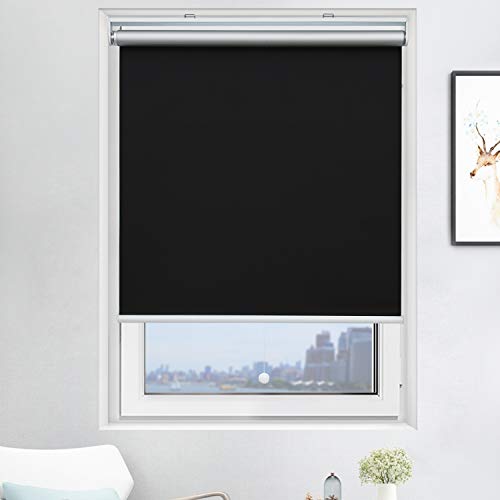
ZSHINE Motorized Blackout Window Blinds Customize Width (23-95 Inches) Remote Control Wireless and Rechargeable Roller Shades Blinds for Windows, Home, Office, Hotel, Club, Restaurant(82010S)…


Key features
- •Material:Polyester, 100% full blackout, water-proof and easily washable, suitable for multiple applications like bedrooms, offices and toilets.
- •REMOTE CONTROL: We offer 2-channel/6-channel remote controller, It can control 2/6 blinds/shades independently or control 999 blinds/shades together.If you have Broadlink RM Pro+ or Smart TUYA key at home, you can control our shades and set timer through all models of Alexa and Google Home.
- •MADE-TO-ORDER: Motorized Blackout Window Shades is customized, please find the "Customize Now" button on the top right of the page. Follow its guidance to customize your order.
- •SHIPPING & DELIVERY: Usually dispatched in 5-7 work days after order confirmation. All the mounting accessories, instructions are included in the package. The remote is already set up before shipped out. You can also email us to get the video or PDF version instructions.
- •SERVICE: We offer 2-year warranty on motors and controls. Any motor or controller failure in the first 2 years is covered by our warranty policy(free replacement). If there's damage on the fabric or components, please take photos, send claim to us within 30 days.
Brandzshine
CategoryRoller Shades
Size118" x 95"
ColorLight Grey
WarrantyWe offer 2-year warranty on motors and controls.
ZSHINE Motorized Blackout Window Blinds Customize Width (23-95 Inches) Remote Control Wireless and Rechargeable Roller Shades Blinds for Windows, Home, Office, Hotel, Club, Restaurant(82010S)…
List Price: $181.88$163.69DEALYou Save: $18.19 (10%)
Free shippingFree Returns – 30 daysFree Order CancellationSecure Payment2–3 Days DeliveryGet It October 26, 2026In Stock (1)No marketing spamNo account requiredFulfilment by FedEx / Amazon / UPS / ShipwirePayPal / Card Buyer Protection
Customer Reviews
Reviews sourced from verified Amazon purchasers4.4
out of 5
Based on 10 reviews
5★
70%
4★
30%
3★
0%
2★
0%
1★
0%
Customer Service
Lake life✓ Verified Purchase•September 7, 2023
I am writing this review in regard to customer service for the roller blind that arrived damaged. So far, I have found it somewhat difficult to find a contact number for Zshine that works. The phone number listed gives a voice automated response that states, "sorry that this person cannot accept calls at this time." I attempted to go through the Amazon return section and it states that this item cannot be returned due to health concerns. I'm assuming that is because the item is manufactured in China and is considered a health concern. I have also sent an email through the chat session with the company so we will see how quickly I receive a response. I will adjust my rating with the timing of the process.
Day 3: Zshine responded with emails (1 each day). Their responses have not resolved the issue and when I respond through email, I don't hear back until the next day. I continue to attempt to call, but get the same automated response. All I am trying to get is two brackets to hang the roller shade without the valance and be refunded for the damaged valance that arrived.
July 7: Follow Up on Zshine Customer Service
I will admit, Zshine continued to reach out on a regular basis to resolve my issue. It took a little time to receive the brackets I needed, but with the 4th of July holiday it is understandable. Zshine customer service has been very good. I miss the days of speaking to someone on the phone, but regardless, they have a satisfied customer. I am just beginning a house remodel and will be buying additional roller shades from Zshine now that I know I will get good customer service, along with a quality shade.
Day 3: Zshine responded with emails (1 each day). Their responses have not resolved the issue and when I respond through email, I don't hear back until the next day. I continue to attempt to call, but get the same automated response. All I am trying to get is two brackets to hang the roller shade without the valance and be refunded for the damaged valance that arrived.
July 7: Follow Up on Zshine Customer Service
I will admit, Zshine continued to reach out on a regular basis to resolve my issue. It took a little time to receive the brackets I needed, but with the 4th of July holiday it is understandable. Zshine customer service has been very good. I miss the days of speaking to someone on the phone, but regardless, they have a satisfied customer. I am just beginning a house remodel and will be buying additional roller shades from Zshine now that I know I will get good customer service, along with a quality shade.
INSTRUCTIONS TO PROGRAM REMOTE CONTROL
CBaker✓ Verified Purchase•August 6, 2023
INSTRUCTIONS TO PROGRAM REMOTE CONTROL
The remote control will control several shades. The key is that the shades need to be programmed all on a single channel in order to work together.
I have 3 shades and programmed my remote so that channel 1 would control the first shade, channel 2 the second shade and channel 3 the third shade. Then I programmed channel 4 to operate all 3 shades at the same time. Here is how to do it:
(Before you do anything you have to put a 2032 button battery in the remote. It doesn't come with one.)
First pick a channel for your first blind. (Channel 1 would be the best option)
Poke the program button on the shade until the LED light comes on and the shade moves up and down
Poke the "Set" button in the battery compartment (the one to the left of the battery) one time to link the channel and the shade together
Hold the program button on the shade again until the shade moves up and down and the LED light goes off. Now this shade can operate by itself when you choose channel 1 on the remote.
Next choose channel two on the remote and follow the same instructions as above for the second shade. Then again for the third shade. Now when you choose that particular channel on your remote it will operate that individual shade.
To link all three shades so that they operate together do the following:
Choose channel 4 (or whatever channel is available) and then poke the program button on the first shade until it moves up and down.
Poke the "Set" button in the battery compartment once, then hold the program button on the window shade until it moves up and down a couple of times and the red LED light goes off.
Do the same thing for each shade still using only channel 4 (or whatever channel you chose to operate all the blinds simultaneously) Once you program all three shades to operate on channel 4 you need to go back to each shade's independent channel and get them all to the same level. Then go back to channel 4 and when you press the up and down button all three will operate together.
SETTING THE AUTO STOP POINTS:
Choose the channel for whichever shade you want to set the stop on. Hold the down button and the "Set" button at the same time until the LED on the shade blinks and then release the buttons. Next lower the shade using the down button until it is where you want the "Auto Stop" to be. While in this programming mode you can use the 25% button and the 75% buttons to micro move the shade up or down so it is in the exact position you want it to be. Now poke the "Set" button on the back of the remote.
Follow the same procedure to set the "Auto Stop" for the UP position.
Now when you go back to channel 4 (after you have positioned each shade to the same height) it should operate all three shades together.
The remote control will control several shades. The key is that the shades need to be programmed all on a single channel in order to work together.
I have 3 shades and programmed my remote so that channel 1 would control the first shade, channel 2 the second shade and channel 3 the third shade. Then I programmed channel 4 to operate all 3 shades at the same time. Here is how to do it:
(Before you do anything you have to put a 2032 button battery in the remote. It doesn't come with one.)
First pick a channel for your first blind. (Channel 1 would be the best option)
Poke the program button on the shade until the LED light comes on and the shade moves up and down
Poke the "Set" button in the battery compartment (the one to the left of the battery) one time to link the channel and the shade together
Hold the program button on the shade again until the shade moves up and down and the LED light goes off. Now this shade can operate by itself when you choose channel 1 on the remote.
Next choose channel two on the remote and follow the same instructions as above for the second shade. Then again for the third shade. Now when you choose that particular channel on your remote it will operate that individual shade.
To link all three shades so that they operate together do the following:
Choose channel 4 (or whatever channel is available) and then poke the program button on the first shade until it moves up and down.
Poke the "Set" button in the battery compartment once, then hold the program button on the window shade until it moves up and down a couple of times and the red LED light goes off.
Do the same thing for each shade still using only channel 4 (or whatever channel you chose to operate all the blinds simultaneously) Once you program all three shades to operate on channel 4 you need to go back to each shade's independent channel and get them all to the same level. Then go back to channel 4 and when you press the up and down button all three will operate together.
SETTING THE AUTO STOP POINTS:
Choose the channel for whichever shade you want to set the stop on. Hold the down button and the "Set" button at the same time until the LED on the shade blinks and then release the buttons. Next lower the shade using the down button until it is where you want the "Auto Stop" to be. While in this programming mode you can use the 25% button and the 75% buttons to micro move the shade up or down so it is in the exact position you want it to be. Now poke the "Set" button on the back of the remote.
Follow the same procedure to set the "Auto Stop" for the UP position.
Now when you go back to channel 4 (after you have positioned each shade to the same height) it should operate all three shades together.
LED light blinking not stopping
RxDFC✓ Verified Purchase•July 31, 2023
This may be helpful to others, so posting since I did not get an answer from the company: I've had the blind and working fine for over a year however the LED light started blinking repeatedly (one long followed by two short), so runs the battery down in a few days. The blind has been fully charged and works properly with the remote. I messaged the company to assist with problem solving. They asked for the order number, then a couple days later asked for a video. I sent both. It's been two weeks now without a further response. MY SOLUTION: I let the shade drain all the way (no LED light) which took several days. I then re-charged and it is working fine now.
Works excellent and good quality!
Eric W.✓ Verified Purchase•July 5, 2023
Perfectly fit, blocks all the sunlight. Customer service responds quick and easy. They shipped quick. I purchased twice, first for my living room, then I ordered for my son's room.
Tuya app control, google assistant and remote, all could work together.
I like it alot!. Next, I will order later for my skylight window.
Tuya app control, google assistant and remote, all could work together.
I like it alot!. Next, I will order later for my skylight window.
Pretty great support
Wade✓ Verified Purchase•June 29, 2023
Only 4 stars because I only just got them installed and am still working on programing the 6-channel remotes to move the shades separately and together.
What happened was I installed the one, plugged in the charger, got the LED light and it did what it was supposed to do with the remote. Install the second one. Same deal, all good. Install the third one. Plugged it in, no LED. Worked the remote programming still no red light.
I then emailed ZShine support at 7:44PM. They emailed back at 8:07PM, 23 minutes later, asking for a video of what I was trying to do and what was or wasn't happening. I did and sent it to them at 8:51PM. By 9:11PM they had downloaded and analyzed the video and replied to me that a difficult-to-see on-off slider switch looked to be in the off position, for me to check that, and put it in the 'on' position if it was indeed off. I did so and it worked.
OK, so, I feel like a dope for not noticing that switch, but there was nothing in the instructions about it that I could find. The point is, I have never had this kind of support from anyone and I was blown away. Simple problem, yes. But they found the problem quickly and got right back to me with a solution.
What happened was I installed the one, plugged in the charger, got the LED light and it did what it was supposed to do with the remote. Install the second one. Same deal, all good. Install the third one. Plugged it in, no LED. Worked the remote programming still no red light.
I then emailed ZShine support at 7:44PM. They emailed back at 8:07PM, 23 minutes later, asking for a video of what I was trying to do and what was or wasn't happening. I did and sent it to them at 8:51PM. By 9:11PM they had downloaded and analyzed the video and replied to me that a difficult-to-see on-off slider switch looked to be in the off position, for me to check that, and put it in the 'on' position if it was indeed off. I did so and it worked.
OK, so, I feel like a dope for not noticing that switch, but there was nothing in the instructions about it that I could find. The point is, I have never had this kind of support from anyone and I was blown away. Simple problem, yes. But they found the problem quickly and got right back to me with a solution.
Page 1 of 2