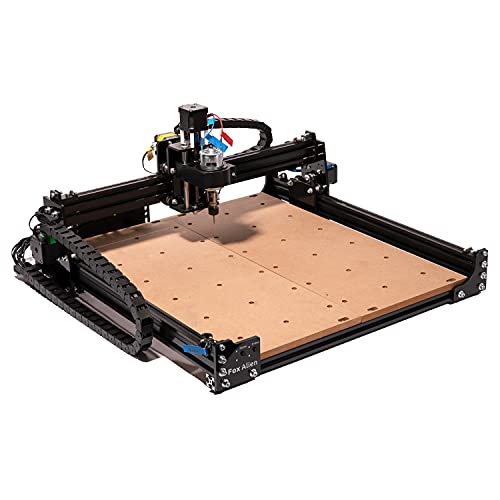
FoxAlien Masuter 4040 CNC Router Machine, 3-Axis Engraving Milling Machine 15.75x14.96” Working Area for Carving Cutting Wood Acrylic MDF Nylon


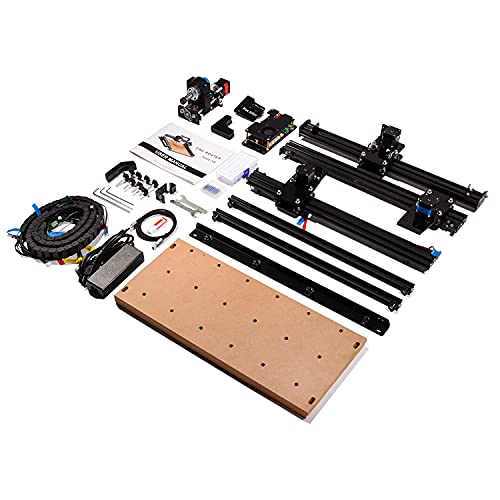
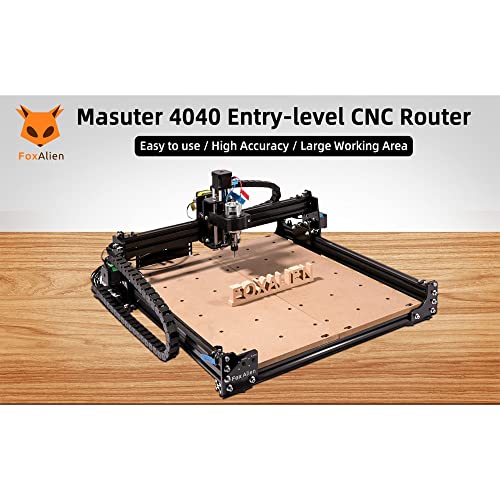
Key features
- •Masuter 4040 is a cost-effective CNC router with large working area of 400 x 380 x 55mm (15.75" x 14.96" x 2.16"). It uses a 60W spindle and NEMA17 stepper motors. Max moving speed is 2000mm/min and spindle speed range is 0~10000.
- •The control board is equipped with an upgraded 32-bit chip which works more efficient and stable. It also supports add-ons such as offline controller, 300W spindle and power modules. (Add-ons sold separately)
- •HOME function and Emergency-Stop button are integrated on the machine. The machine will go to home with simply press the button.
- •Masuter 4040 is capable to engrave, cut and drill many kinds of material such as wood, MDF, acrylic, foam, resin, nylon, PCB, and aluminum etc.
- •Main parts are pre-assembled. It takes about 20-30mins to fully assembly. The machine is compatible with Grbl software. It supports Windows XP/7/10, Linux and Mac OS.
FoxAlien Masuter 4040 CNC Router Machine, 3-Axis Engraving Milling Machine 15.75x14.96” Working Area for Carving Cutting Wood Acrylic MDF Nylon
List Price: $580.55$522.50DEALYou Save: $58.05 (10%)
Free shippingFree Returns – 30 daysFree Order CancellationSecure Payment2–3 Days DeliveryGet It October 24, 2026In Stock (1)No marketing spamNo account requiredFulfilment by FedEx / Amazon / UPS / ShipwirePayPal / Card Buyer Protection
Customer Reviews
Reviews sourced from verified Amazon purchasers3.9
out of 5
Based on 10 reviews
5★
30%
4★
70%
3★
0%
2★
0%
1★
0%
Great starter CNC machine
Dave F.✓ Verified Purchase•July 19, 2023
Great product, a little tricky to setup - but worked great for a year. Had an issue with control board and they sent a replacement right away - great support from Albbe Ye!
Tighten Everything LAST, Prepare To Spend Time Learning!
Dizzy!✓ Verified Purchase•July 13, 2023
The media could not be loaded. Right off the bat, I'm really happy with how well-packed this was. I can't tell you how many things I've ordered that have parts just jingling around inside, but this was packed REALLY well and every part was really securely protected.
Assembly was (more or less) a breeze - you legitimately only need the tools they included, all-in-all assembly took me about 90 minutes from cutting the box open to starting my first test cut, but that's partially because I tightened things too soon and had trouble lining stuff up until I loosened it again (also I forgot to use washers, so I went back and put them in just for posterity's sake), and also I kept stopping to take pictures and video clips because I was so impressed haha. If you DIDN'T make my silly mistakes (and also didn't keep stopping for pictures), it'd take literally half the time or less.
The LONGEST part of the process for me was wiring. The company labeled every single wire and it's super easy to get them all plugged in, just, there's a bunch. You have to check the diagram in the manual and plug each cable into the right slot, double-triple check that ALL the cables are plugged in (both ends) otherwise it literally just won't work right (and REALLY make sure it's all right, because you don't want to have a failing safety mechanism or be sending your X-axis coordinates to the Z-axis). That part took me probably 15 minutes by itself just because I kept double-checking it over and over.
Then you plug the machine into your computer, plug the USB stick in as well, install the machine's drivers onto your computer, and copy the controller program over onto your computer (I put mine in a folder on the desktop so it's easy to find). You don't "install" the program, you just launch it, so it can easily be deleted at any time - on purpose OR by accident. They also give you like four test projects to carve, I like the MAZE one because you can adjust the depth for the cut by only changing one number (if you know anything about CNC carving this way, you're aware of how many number sets there can be and how tedious it would be for a noob like me to change every instance of the Z-axis to a different value manually).
All that said, BE AWARE - I got into CNC because I thought it looked interesting, and it IS, but it's NOT straightforward. If you want to cut a pre-made file from the internet, the easiest possible thing to cut, you'll still need to do a calibration every time you cut a new project and you'll still have to understand the basics of adjusting aspects of your cut using the editor (which may or may not involve a little math). It's not as simple as just drag-and-drop usage, it's not like a Cricut or something, it's still pretty rough technology compared to the easy-to-use stuff dummies like me usually prefer.
But it IS interesting and it's very satisfying to figure it out and make it do what you want it to. I'm sure at some point in the future there will be an option where you can just put a black-and-white picture or vector in and tell it "plot your cutting path to carve this at a 1mm depth", but for now it's up to YOU to plot that, with MATH!
In any case, I got this so that I could carve BIG projects (well, big FLAT projects) without taking up a lot of space in my little house, and the most important things to me were PRICE, SIZE, and the ability to swap out the cutter for a LASER - and this machine absolutely fills all three of those needs. It's plenty big in terms of the cutting area but the footprint is still small - it's like the size of one of those paper cutters you probably used in elementary school, it weighs about that much too, you totally can just pick it up and move it if you want. It's super inexpensive compared other units, it's actually cheaper than most of the other CNCs I've found that were the same size, so I'm satisfied that I could start learning CNC without breaking the bank. And it IS laser compatible - I haven't ordered mine yet, but I'm doing that ASAP for sure, I really want to make a big woodblock laser print for my girlfriend's office, she's a big fan of Hobo font so I'll probably do a sign that's her name spelled in that font or something, with plant-looking decoration around the outside of it.
I think it's gonna be fun, I'm excited about this!
Assembly was (more or less) a breeze - you legitimately only need the tools they included, all-in-all assembly took me about 90 minutes from cutting the box open to starting my first test cut, but that's partially because I tightened things too soon and had trouble lining stuff up until I loosened it again (also I forgot to use washers, so I went back and put them in just for posterity's sake), and also I kept stopping to take pictures and video clips because I was so impressed haha. If you DIDN'T make my silly mistakes (and also didn't keep stopping for pictures), it'd take literally half the time or less.
The LONGEST part of the process for me was wiring. The company labeled every single wire and it's super easy to get them all plugged in, just, there's a bunch. You have to check the diagram in the manual and plug each cable into the right slot, double-triple check that ALL the cables are plugged in (both ends) otherwise it literally just won't work right (and REALLY make sure it's all right, because you don't want to have a failing safety mechanism or be sending your X-axis coordinates to the Z-axis). That part took me probably 15 minutes by itself just because I kept double-checking it over and over.
Then you plug the machine into your computer, plug the USB stick in as well, install the machine's drivers onto your computer, and copy the controller program over onto your computer (I put mine in a folder on the desktop so it's easy to find). You don't "install" the program, you just launch it, so it can easily be deleted at any time - on purpose OR by accident. They also give you like four test projects to carve, I like the MAZE one because you can adjust the depth for the cut by only changing one number (if you know anything about CNC carving this way, you're aware of how many number sets there can be and how tedious it would be for a noob like me to change every instance of the Z-axis to a different value manually).
All that said, BE AWARE - I got into CNC because I thought it looked interesting, and it IS, but it's NOT straightforward. If you want to cut a pre-made file from the internet, the easiest possible thing to cut, you'll still need to do a calibration every time you cut a new project and you'll still have to understand the basics of adjusting aspects of your cut using the editor (which may or may not involve a little math). It's not as simple as just drag-and-drop usage, it's not like a Cricut or something, it's still pretty rough technology compared to the easy-to-use stuff dummies like me usually prefer.
But it IS interesting and it's very satisfying to figure it out and make it do what you want it to. I'm sure at some point in the future there will be an option where you can just put a black-and-white picture or vector in and tell it "plot your cutting path to carve this at a 1mm depth", but for now it's up to YOU to plot that, with MATH!
In any case, I got this so that I could carve BIG projects (well, big FLAT projects) without taking up a lot of space in my little house, and the most important things to me were PRICE, SIZE, and the ability to swap out the cutter for a LASER - and this machine absolutely fills all three of those needs. It's plenty big in terms of the cutting area but the footprint is still small - it's like the size of one of those paper cutters you probably used in elementary school, it weighs about that much too, you totally can just pick it up and move it if you want. It's super inexpensive compared other units, it's actually cheaper than most of the other CNCs I've found that were the same size, so I'm satisfied that I could start learning CNC without breaking the bank. And it IS laser compatible - I haven't ordered mine yet, but I'm doing that ASAP for sure, I really want to make a big woodblock laser print for my girlfriend's office, she's a big fan of Hobo font so I'll probably do a sign that's her name spelled in that font or something, with plant-looking decoration around the outside of it.
I think it's gonna be fun, I'm excited about this!
Good customer service
chickpea✓ Verified Purchase•June 24, 2023
This is a great machine. I initially was looking around for a basic 3018 just to do some engraving. They are cheaper and more compact. I'm super glad I went with the 4040 because it is easy to learn on an way more upgradable than any 3018. I'm already taking advantage of the increased cutting area. I had a small problem with mine but customer service was great and they sent me a replacement part right away.
The only down side is that the 60w spindle just isn't going to cut it. To be sure it will get you through all of your introductory learning. But the 60w spindle compare to the 300w is the only reason you can get into a cnc this big for this price.
I love this machine and will have it in my shop for a long time to come.
The only down side is that the 60w spindle just isn't going to cut it. To be sure it will get you through all of your introductory learning. But the 60w spindle compare to the 300w is the only reason you can get into a cnc this big for this price.
I love this machine and will have it in my shop for a long time to come.
Great customer service!
scott wang✓ Verified Purchase•June 14, 2023
Good machine, outstanding support.
Great machine for beginners
Jeff✓ Verified Purchase•June 9, 2023
Machine works just as it should. I pushed it a little hard a couple times and the belts slip but not the machines falt. I come from a machining background so it was easy for me to get into. Just know going into purchasing you will need to find a program to draw up parts you want to cut. Wish it had bigging spindle in the beginning but I upgraded to a 1/4" router for thr spindle. Awsome machine for home hobbies.
Page 1 of 2
![RIEDHOFF X-Axis Power Milling Machine, [450 LB Torque ] Power Feed Table Mill,110V, 0-200PRM Adjustable Rotate Speed for Bridgeport and Similar Knee Type Milling Machines](https://m.media-amazon.com/images/I/41UHXMx+9XL._SL500_.jpg)