Wireless Keyboard and Mouse Combo,Rainbow Backlit Gaming keyboard with Memory Foam Keyboard Wrist Rest,Rechargeable 3800 mAh Battery,Metal Panel,Mechanical Feel,Ergonomic,Gaming Mouse for PC Gamers



Key features
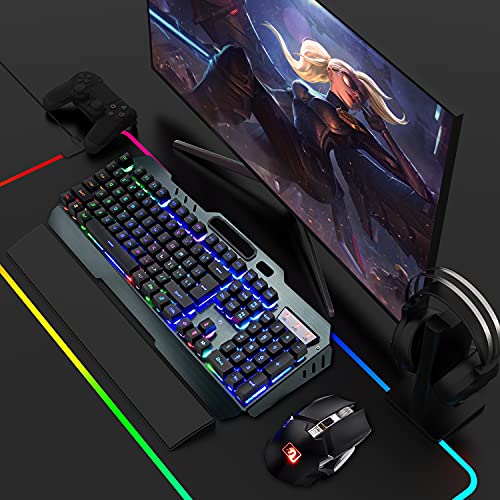
- •3 in 1 gaming combo-The value gift box includes a 104 keys wireless gaming keyboard,a wireless gaming mouse and a 16.9inch keyboard wrist rest;
- •2.4G Wireless keyboard and mosue -2.4G wireless technology enables the keyboard to achieve long-range wireless control.Plug & Play,keyboard and mouse share an Intelligent Nano Receiver,convenient and fast.
- •Rechargeable Keyboard and Mouse -The gaming keyboard is made of aluminum alloy brushed panel,which is sturdy and durable.It can be waterproof,and the keyboard builts-in 3000mAh battery.The mouse builts-in 800mAh battery,eliminates the trouble of frequently changing batteries. No operation automatically sleeps within 5 minutes, any key wakes up.
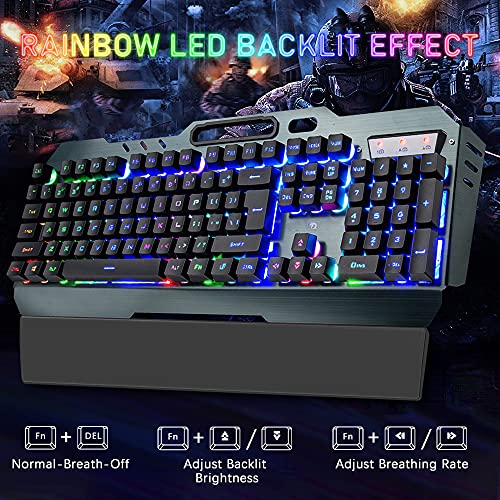
- •Rainbow Gaming Keyboard and Mouse -The mechanical feel keyboard with colorful backlit effect is an excellent visual experience in night operation, pressing FN+DEL to switc three backlight states (normally bright-breath-off), The keyboard can adjust backlight brightness and breathing frequency.
- •Anti-Slip Wrist Rest for Keyboard -The keyboard wrist rest is made of soft and comfortable memory foam,and the breathable material will not cause pressure on the skin under long-term use.The ergonomic design reduces the pressure on the wrist and prevents wrist injuries.
Wireless Keyboard and Mouse Combo,Rainbow Backlit Gaming keyboard with Memory Foam Keyboard Wrist Rest,Rechargeable 3800 mAh Battery,Metal Panel,Mechanical Feel,Ergonomic,Gaming Mouse for PC Gamers
List Price: $99.86$89.87DEALYou Save: $9.99 (10%)
Free shippingFree Returns – 30 daysFree Order CancellationSecure Payment2–3 Days DeliveryGet It October 26, 2026In Stock (1)No marketing spamNo account requiredFulfilment by FedEx / Amazon / UPS / ShipwirePayPal / Card Buyer Protection
Customer Reviews
Reviews sourced from verified Amazon purchasers4.1
out of 5
Based on 10 reviews
5★
30%
4★
70%
3★
0%
2★
0%
1★
0%
Sturdy and great for work use!
Q✓ Verified Purchase•September 11, 2023
Just to first clarify I'm giving this 4 stars for the purpose I am using it for which is not for gaming (hence the minus 1 star since I cannot provide a review for gaming purposes!)
I was looking for a wireless keyboard to be able to use anywhere in my house that would connect to my work laptop. Most of all I wanted a mechanical type keyboard feel because I enjoy the loud tapping sound and feel of keyboard keys (totally a sensory high for me!). But most keyboards I found that provided that were really expensive and I didn't want to spend so much since I'm not a PC gamer and that I would only use it mostly for work. So the price was a definite plus.
Another plus is the included mouse which is very comfortable and glides really easy. The buttons can be easily pressed. I like the overall quality and size of the mouse. I'm short and have small hands so I'm not sure how the feel would be for larger sized hands.
A bonus plus I wasn't really expecting was the metal frame of the keyboard. It's super sturdy and is a tough foundation for the keys to rest on. I also like how the keys are exposed which for me makes it easier to clean since the stems and switches are not covered. I like how the keys seem to "float" above it's base!
The colors are pretty and gives a nice cosmetic effect.
But the one set back that doesn't really bother me is that the hole for the phone is too small for phones with cases and pop sockets (like mine), but I can still rest it on top and it leans on my raised laptop.
The battery life lasts really long. Since I bought this (about a month ago), I haven't needed to plug in the keyboard or the mouse to recharge.
Really this was an excellent find on Amazon. If you're looking for the purposes I described above, you won't go wrong with this one.
I was looking for a wireless keyboard to be able to use anywhere in my house that would connect to my work laptop. Most of all I wanted a mechanical type keyboard feel because I enjoy the loud tapping sound and feel of keyboard keys (totally a sensory high for me!). But most keyboards I found that provided that were really expensive and I didn't want to spend so much since I'm not a PC gamer and that I would only use it mostly for work. So the price was a definite plus.
Another plus is the included mouse which is very comfortable and glides really easy. The buttons can be easily pressed. I like the overall quality and size of the mouse. I'm short and have small hands so I'm not sure how the feel would be for larger sized hands.
A bonus plus I wasn't really expecting was the metal frame of the keyboard. It's super sturdy and is a tough foundation for the keys to rest on. I also like how the keys are exposed which for me makes it easier to clean since the stems and switches are not covered. I like how the keys seem to "float" above it's base!
The colors are pretty and gives a nice cosmetic effect.
But the one set back that doesn't really bother me is that the hole for the phone is too small for phones with cases and pop sockets (like mine), but I can still rest it on top and it leans on my raised laptop.
The battery life lasts really long. Since I bought this (about a month ago), I haven't needed to plug in the keyboard or the mouse to recharge.
Really this was an excellent find on Amazon. If you're looking for the purposes I described above, you won't go wrong with this one.
Adjustments
Michael A. Gill-Branion✓ Verified Purchase•August 31, 2023
My comments are meant for PC Users only. I'm not commenting in regards to APPLE desktops or laptops.
My personal computer is a LIAN LI LANCOOL One Tower, Intel X299 Core i9 Configurator, Windows 10 OS, 64GB Ram, 3060 (12GB Versatile Ram) Vid Card, 10TB HDD, 4TB External SSD. I'm stating my specs because my conditions for using this keyboard may be different from yours.
This keyboard has one outstanding CRUX. Both the "mouse" and the "keyboard" use the same (1) "Nano Wireless Receiver-Adapter" that fits into the USB port of your Desktop or Laptop.
This causes a connectivity issue you will have to make adjustments for... Namely, the USB port located on your Desktop or Laptop "MUST" be within sensor range of the keyboard and mouse at the same time when you boot up or reboot your computer.
Why? If these conditions are not met it will appear as if your keyboard is not charged even if it is plugged into a USB socket charging station. Your mouse will NOT work. Both "mouse" and "keyboard" MUST sync to the "Nano Wireless Receiver-Adapter" in your computer's USB port.
ELEVATION seems to affect connectivity. My desktop was underneath my desk and the first few times I booted up my computer the mouse and keyboard worked. But, then the keyboard and mouse had trouble finding the receiver so I moved my desktop up on top of my desk. Now there are no more problems.
Also, if you are using a desktop with a USB port on top of it in the front, then put the receiver there because when I placed the receiver in the back USB port of my desktop the mouse and keyboard had trouble syncing to it from there too.
I know it seems like a lot of trouble for a keyboard, BUT the keyboard's buttons are huge (nice touch), it does save power with an auto-sleep mode (I keep mine plugged into a charging station regardless) and
when it is on the keys are easily readable.
The BEST feature is the LED - RGB synchronicity allowing your keyboard lights to scintillate in sync with your desktop and other RGB lights inside or outside of your desktop.
It's an AWESOME light show when your RGB Monitor, RGB speakers, RGB Mic, RGB components inside your pc glass tower, RGB keyboard, and RGB mouse all continuously change colors at the same time in a rhythm!!
I hope this helps.
My personal computer is a LIAN LI LANCOOL One Tower, Intel X299 Core i9 Configurator, Windows 10 OS, 64GB Ram, 3060 (12GB Versatile Ram) Vid Card, 10TB HDD, 4TB External SSD. I'm stating my specs because my conditions for using this keyboard may be different from yours.
This keyboard has one outstanding CRUX. Both the "mouse" and the "keyboard" use the same (1) "Nano Wireless Receiver-Adapter" that fits into the USB port of your Desktop or Laptop.
This causes a connectivity issue you will have to make adjustments for... Namely, the USB port located on your Desktop or Laptop "MUST" be within sensor range of the keyboard and mouse at the same time when you boot up or reboot your computer.
Why? If these conditions are not met it will appear as if your keyboard is not charged even if it is plugged into a USB socket charging station. Your mouse will NOT work. Both "mouse" and "keyboard" MUST sync to the "Nano Wireless Receiver-Adapter" in your computer's USB port.
ELEVATION seems to affect connectivity. My desktop was underneath my desk and the first few times I booted up my computer the mouse and keyboard worked. But, then the keyboard and mouse had trouble finding the receiver so I moved my desktop up on top of my desk. Now there are no more problems.
Also, if you are using a desktop with a USB port on top of it in the front, then put the receiver there because when I placed the receiver in the back USB port of my desktop the mouse and keyboard had trouble syncing to it from there too.
I know it seems like a lot of trouble for a keyboard, BUT the keyboard's buttons are huge (nice touch), it does save power with an auto-sleep mode (I keep mine plugged into a charging station regardless) and
when it is on the keys are easily readable.
The BEST feature is the LED - RGB synchronicity allowing your keyboard lights to scintillate in sync with your desktop and other RGB lights inside or outside of your desktop.
It's an AWESOME light show when your RGB Monitor, RGB speakers, RGB Mic, RGB components inside your pc glass tower, RGB keyboard, and RGB mouse all continuously change colors at the same time in a rhythm!!
I hope this helps.
Very colorful
Agentral✓ Verified Purchase•August 20, 2023
The setup and connection was pretty easy for both. Like having an on and off switch on both for when the 3-year-old sits at the desk. All of us like the color changes on both the keyboard and the mouse. Would be nice to have an indicator when the charge was getting low on either. They just become slower and less responsive, that's the only way we know it needs to be charged. The keyboard has loud keys and the mouse is very quiet. Neither are very ergonomical, but not horribly uncomfortable either. The mouse is smooth without any grips to keep it in your hand without gripping it firmly. It's more flashy and functional than comfort. The mouse will go in sleep mode after some time of being idle and to wake it up you have to click a button, not just move it around like most.
Great Keyboard - LOUSY instructions
LBD✓ Verified Purchase•August 19, 2023
I wore the letters off of my last keyboard, so I decided to invest in a gaming keyboard. I'm under the assumption that they're made to really last (let's hope!). And let's face it, these beasts are GORGEOUS. But if you're getting the impression that I'm not a gamer, you'd be right. I'm a middle-aged housewife with a thing for backlit neon rainbows, so I thought... why not? Why should the 20-something guys have all the fun?
The Good:
Pretty. Oh so... so very... So very very very pretty! The photo doesn't do it justice, but that's the best my camera could do with the shifting colors.
The feel of the keyboard is surprisingly responsive. I expected the keys to be thuddy rather than springy. They are, sort of, but instead of being a bother I actually find that I like the old fashioned "solid" feel of it. This set does not feel like a flimsy piece of plastic that's designed to break in 3 months.
Speed: I type between 80-100 WPM, depending on how cold my office is. I was worried that a keyboard designed for video games wouldn't be able to keep up with me, but it turns out that speed is no issue with this beast.
Neutral
It's heavy. To get that nice "solid feel" they made the keyboard of metal rather than plastic. The weight is listed, but I didn't pay any attention to it until it arrived. It's not so much that it breaks my wrist or strains my keyboard shelf, but it's certainly hefty enough that it might be featured in one of my upcoming novels (Death by Rainbow, anyone?) I'm assuming it's this heavy to keep it anchored during rapidfire game play.
The bad:
NOISY! In fact, the space key is driving me nuts. Every time I hit it, it lets off a sort of random clunk/squeak that's really obnoxious. Otherwise the keys give off a noise you'd expect from a mechanical keyboard. It's not suitable if you're using this in a shared bedroom or any other location where silence is golden. In fact, you might want to invest in noise-cancelling headphones.
The instructions are instructions in name only. I'm guessing they are contractually obligated to provide them, but that contract doesn't specify that they need to make sense. It took me quite a while to figure out how to charge the keyboard - reading the instructions just made it take longer. I thought I knew what they wanted, but when I checked with the information provided it seemed to indicate something else! It was only by ignoring the booklet completely that I was able to get it plugged in correctly.
When I finally located the receiver I thought it was really clever. They buried it in the base of the mouse so it won't get lost. But not knowing that in advance and having gibberish for instructions, I spent quite a while looking for it under the assumption that I somehow dropped it during unboxing.
If you're using this primarily for typing the "enter" key will take some getting used to. The shape is inverted from what I'm used to. Typically "enter" is double-wide on the middle row. Sometimes the key will extend up to the top row in a backwards "L" shape. On this keyboard it's just the opposite - the "L" shape is inverted so that the narrow part is level with the middle row (location of the "home" keys"). Instead of the double-wide "enter" there's an extra "slash" key (or "backslash", if you prefer). All morning I've been hitting \\\ every time I want to hit "enter" instead. I'm already getting used to it, but it's still a bit unexpected.
My gripes with this keyboard, overall, are pretty petty. If I can get the "clunk / squeak" spacebar under control the rest of it really isn't worth mentioning. Overall it's a dazzling addition to my office and a pleasant surprise for the money. Just... don't read the instructions. Just... don't.
So I came here, hoping to find some answers. Should you decide to purchase this combo bookmark THIS listing. The instructions here are detailed and make sense, and this is the only place I found them.
The Good:
Pretty. Oh so... so very... So very very very pretty! The photo doesn't do it justice, but that's the best my camera could do with the shifting colors.
The feel of the keyboard is surprisingly responsive. I expected the keys to be thuddy rather than springy. They are, sort of, but instead of being a bother I actually find that I like the old fashioned "solid" feel of it. This set does not feel like a flimsy piece of plastic that's designed to break in 3 months.
Speed: I type between 80-100 WPM, depending on how cold my office is. I was worried that a keyboard designed for video games wouldn't be able to keep up with me, but it turns out that speed is no issue with this beast.
Neutral
It's heavy. To get that nice "solid feel" they made the keyboard of metal rather than plastic. The weight is listed, but I didn't pay any attention to it until it arrived. It's not so much that it breaks my wrist or strains my keyboard shelf, but it's certainly hefty enough that it might be featured in one of my upcoming novels (Death by Rainbow, anyone?) I'm assuming it's this heavy to keep it anchored during rapidfire game play.
The bad:
NOISY! In fact, the space key is driving me nuts. Every time I hit it, it lets off a sort of random clunk/squeak that's really obnoxious. Otherwise the keys give off a noise you'd expect from a mechanical keyboard. It's not suitable if you're using this in a shared bedroom or any other location where silence is golden. In fact, you might want to invest in noise-cancelling headphones.
The instructions are instructions in name only. I'm guessing they are contractually obligated to provide them, but that contract doesn't specify that they need to make sense. It took me quite a while to figure out how to charge the keyboard - reading the instructions just made it take longer. I thought I knew what they wanted, but when I checked with the information provided it seemed to indicate something else! It was only by ignoring the booklet completely that I was able to get it plugged in correctly.
When I finally located the receiver I thought it was really clever. They buried it in the base of the mouse so it won't get lost. But not knowing that in advance and having gibberish for instructions, I spent quite a while looking for it under the assumption that I somehow dropped it during unboxing.
If you're using this primarily for typing the "enter" key will take some getting used to. The shape is inverted from what I'm used to. Typically "enter" is double-wide on the middle row. Sometimes the key will extend up to the top row in a backwards "L" shape. On this keyboard it's just the opposite - the "L" shape is inverted so that the narrow part is level with the middle row (location of the "home" keys"). Instead of the double-wide "enter" there's an extra "slash" key (or "backslash", if you prefer). All morning I've been hitting \\\ every time I want to hit "enter" instead. I'm already getting used to it, but it's still a bit unexpected.
My gripes with this keyboard, overall, are pretty petty. If I can get the "clunk / squeak" spacebar under control the rest of it really isn't worth mentioning. Overall it's a dazzling addition to my office and a pleasant surprise for the money. Just... don't read the instructions. Just... don't.
So I came here, hoping to find some answers. Should you decide to purchase this combo bookmark THIS listing. The instructions here are detailed and make sense, and this is the only place I found them.
Not your topical gamer
Alex✓ Verified Purchase•August 18, 2023
I love this keyboard, I use it for day trading and trading can get a bit boring as you wait for setups. But with this keyboard it adds and element of color to your doing and brings a different excitement to the day. I love how the mouse when moved lights up as in saying we are ready. The size makes it easy also to use the number pad with speed.
Page 1 of 2

![Koolertron Single-Handed Programmable Mechanical Keyboard with OEM Gateron Red Switch,All 46 Programmable Keys Tools Keypad,8 Macro Keys,PBT Keycap.[SMKD72-B]](https://m.media-amazon.com/images/I/416qZSLwEmL._SL500_.jpg)


