HP Smart -Tank 7602 Wireless Cartridge-free all in one printer, up to 2 years of ink included, mobile print, scan, copy, fax, auto doc feeder, featuring an app-like magic touch panel (28B98A)




Key features
- •BEST FOR SMALL BUSINESSES – Print a variety of color documents in high volumes
- •KEY FEATURES – Print, copy, scan and fax, plus automatic 2-sided printing, 35-page automatic document feeder, borderless prints, mobile and wireless printing. Print up to 15 ppm black and 9 ppm color.
- •MAGIC TOUCH PANEL – Easily complete everyday print, scan and copy tasks at the printer with app-like, intuitive navigation
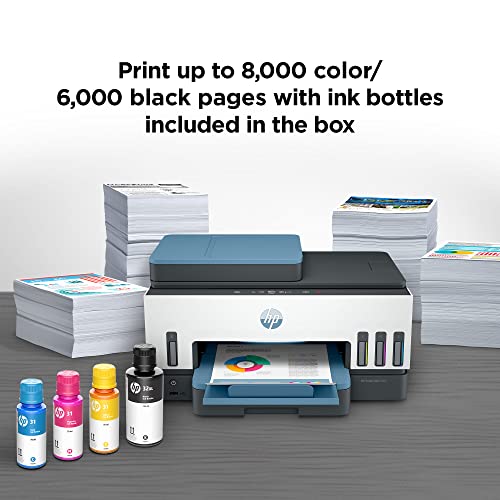
- •FULLY LOADED WITH SAVINGS – Perfect for low-cost, high-volume printing—up to 2 years of Original HP Ink Bottles included; get up to 8,000 color pages or 6,000 black pages right out of the box
- •EXCEPTIONAL HP QUALITY – Consistently delivers outstanding color graphics, photos and crisp text for all your prints
BrandHP
CategoryHome & Office
SizeStandard
ColorBlue
WarrantyOne year limited hardware warranty from the date of purchase; user replaceable parts have separate warranty periods.
HP Smart -Tank 7602 Wireless Cartridge-free all in one printer, up to 2 years of ink included, mobile print, scan, copy, fax, auto doc feeder, featuring an app-like magic touch panel (28B98A)
List Price: $654.74$589.27DEALYou Save: $65.47 (10%)
Free shippingFree Returns – 30 daysFree Order CancellationSecure Payment2–3 Days DeliveryGet It October 29, 2026In Stock (21)No marketing spamNo account requiredFulfilment by FedEx / Amazon / UPS / ShipwirePayPal / Card Buyer Protection
Customer Reviews
Reviews sourced from verified Amazon purchasers4.2
out of 5
Based on 10 reviews
5★
80%
4★
20%
3★
0%
2★
0%
1★
0%
Amazing All-in-One
Jesnes✓ Verified Purchase•February 23, 2024
This is an amazing printer. It includes everything you need, print (including double sided printing), copy, fax, and scan. You are also able to print a variety of sizes using different paper sizes and types. The print quality is amazing. All prints have been very clear and isn't pixelated. I tested out documented prints and photo prints and both were great, no complaints here. The print speed was good, its not laser print fast but its fast enough. The connection is great, since I connected it to my wifi, I haven't lost any connection, which is amazing. I cannot stress how annoying it is to reconnect a printer. I love the fact that it comes with up to 2 years of ink. Makes it an even more affordable printer. I also enjoy the ease of use and convenience of the HP Smart app. You can see how much ink you have left, if you need to refill the ink, you can print wirelessly from your phone and scan documents to be saved to your device as well. The connection from the HP Smart app is smooth. I can easily connect from my phone, laptop and iPad. This printer fulfills all of my household needs and I highly recommend it for anyone who is in need of an all-in-one.
Easy set up, easy to use, quality printing
Reesie80RN✓ Verified Purchase•February 5, 2024
The HP Smart Tank 7602 printer is an amazing printer so far. It has capability to fax, scan, copy, and print from other devices. I am starting school soon and also frequently print for work from home, so I chose this printer over others based on the quality that I have come to trust from HP and the fact that the manufacturer claims it holds enough ink to last for years. On arrival it was packged very securely and even with a dented box no parts were damaged. The setup was simple. There was a choice to setup using the HP smart app or manual. I chose the app and it made setup a breeze. It connected and installed the drivers for me and connected the printer to my wifi. Then it walked me through the setup process using pictures and simple instructions to fill and start using my new printer. I was initially concerned about filling the tanks. I just installed new carpet and was imagining permanent ink stains, but their system is virtually spill proof and I would have trusted my 10 year old to do it. It's that fool proof. Once up and running the print quality is far superior to my old printer. Pictures even not on photo paper are crisp and text is bold and clean. I am impressed with the speed of printing without sacrificing the quality of the print job. Three full color pages printed in less than 30 seconds. I really like the feature of being able to feed multiple pages on top to make copies, a feature I have only had the luxury of having on commercial copy machines in the office. My only complaint is the noise, which really isn't that awful. It's louder than I would like, but not a deal breaker that would cause me to return it, and it is still quieter than my old printer. I can't wait to continue using this printer!
Great choice for your home or office!!
tim✓ Verified Purchase•January 21, 2024
If you have a small business or just a home with kids who need constant pictures and pages printed, the HP Smart Tank 7602 is a great choice! I was blown away by how easy it was to set up! First I prepared the printer for setup by removing the cardboard inserts and then plugged it in. I chose to use the guided setup through the HP Smart app. It was simple to download and create an account! Using the screen on the printer, it walked me through how to connect the printer to my network, and it showed animations for how to fill the ink tanks, install the printheads, load paper, and align the printheads. I followed each step with no problems! At that point I tried my first print! I printed from my phone and didn't have to set anything up to do it - it found the printer right away, and there was only a couple second delay before it started printing! My only complaint for this printer is regarding the scan-to-email function. The printer gives directions on where to go to set up an email account, but the instructions on the hp site are dismal. I fumbled my way through it and got it working thankfully, but that has been the only issue so far! I won't be using the fax function but it is nice to know that it's possible. It has 7 different status light colors for things like processing & printing, updating, or if it needs attention. Another cool feature is the ID Card Copy - it can copy both sides of a card onto the same page! Overall, it prints quickly, quietly and clearly! I'm most excited to not have to deal with ink cartridges anymore, and thrilled that the ink goes a long ways. It fits a ton of paper, and it's been very reliable on every print job. It's the perfect partner to our home and business!!
HP Dummy Proof Printer
Bill Prader✓ Verified Purchase•January 16, 2024
The HP Smart Tank 7602 is amazing! It has made life as a homeschool family so much easier. My wife can print the kid's schoolwork in color. The images are so clear and crisp, and the colors are very vivid. My wife, who is somewhat technologically challenged (bless her heart), even managed to figure out how to print a math worksheet from her phone without me even knowing she was doing it! She asked no questions! She also printed double sided and didn't have to flip the pages manually, which saves a lot of paper, both from printing double-sided, and from her not turning it the wrong way and having to try again. The kids are disappointed that they don't get as much scrap paper from poor print jobs, but I'm sure they'll find something else to cut up or draw on. From my estimate, it looks like the advertised ink usage is pretty accurate. We have printed quite a bit, and the levels have not moved much.
It's nice being able to scan things we want to save and have them stored digitally instead of having thick binders full of old schoolwork. The scanner is easy to use and does a great job scanning both color and black and white.
During unboxing, I was pleasantly surprised to find that the printer was in a bag that had handles. This made it very easy to pull from the box without having to do the Styrofoam shimmy while holding the box just right with my feet. Setting up the printer was very straightforward. After installing the HP Smart app on my phone, I followed the instructions step by step. It took about 10 minutes to set everything up. This includes installing the app, removing the tape and packaging from the printer, filling the ink tanks, installing the print heads, and connecting to Wi-Fi.
If you need to set up the "scan to email" and "scan to network folder" features, these steps will need to be completed using the printer's Embedded Web Server. To access this, you can find the IP address of your printer using the HP Smart App, tapping on the printer, then tapping on Printer Information in the Advanced section. Enter the IP address in your web browser, and you should be looking at your printer's built in web server. Once there, follow the menus to set these features up.
Overall, I found the printer easy to setup, the user interface easy to navigate, and the print quality excellent. I strongly recommend this printer to anyone who needs a multi-function printer for both home and small office use.
It's nice being able to scan things we want to save and have them stored digitally instead of having thick binders full of old schoolwork. The scanner is easy to use and does a great job scanning both color and black and white.
During unboxing, I was pleasantly surprised to find that the printer was in a bag that had handles. This made it very easy to pull from the box without having to do the Styrofoam shimmy while holding the box just right with my feet. Setting up the printer was very straightforward. After installing the HP Smart app on my phone, I followed the instructions step by step. It took about 10 minutes to set everything up. This includes installing the app, removing the tape and packaging from the printer, filling the ink tanks, installing the print heads, and connecting to Wi-Fi.
If you need to set up the "scan to email" and "scan to network folder" features, these steps will need to be completed using the printer's Embedded Web Server. To access this, you can find the IP address of your printer using the HP Smart App, tapping on the printer, then tapping on Printer Information in the Advanced section. Enter the IP address in your web browser, and you should be looking at your printer's built in web server. Once there, follow the menus to set these features up.
Overall, I found the printer easy to setup, the user interface easy to navigate, and the print quality excellent. I strongly recommend this printer to anyone who needs a multi-function printer for both home and small office use.
Fast and Furios Setup Ever
WiJoY78✓ Verified Purchase•December 29, 2023
For a long time, I have been using different brands. I decided to go back and try HP again. After the printer arrived, I started to open and set up. The printer's design is simple, sleek, and eye-catching. It is a mid-size printer. I liked the color combination on it. Installing and setting it up was very easy and amazingly fast. I was surprised about it. After downloading the installation guide, it shows how to do everything. The magic screen is magical. The touch screen is smooth and responsive. Filling the ink tanks is pretty easy and quick. No mess around. Printing speed is satisfying. If you choose Best quality instead of Auto, the photo print quality is good. But it would be better. Starting up the noise level is a bit annoying"”like 10-year-old models. I don't know why they don't find a solution for this. The printing noise level is reasonable. The printer must be on a sturdy surface because while printing, the printer shakes the table if it is not sturdy. Since this is new and has just started to be used, I am unsure how long the inks will last. They claim the inks should last for two years. Wifi printing is fast. From phone to printer, there is no gap to wait to print. Lastly, there is no on/off switch for the light, which is annoying. I have to turn the printer off completely to turn off the light. It would be nice to have an on/off feature for that. Generally speaking, this printer is satisfying. It is good enough for small businesses, home, and school purposes.
Page 1 of 2


