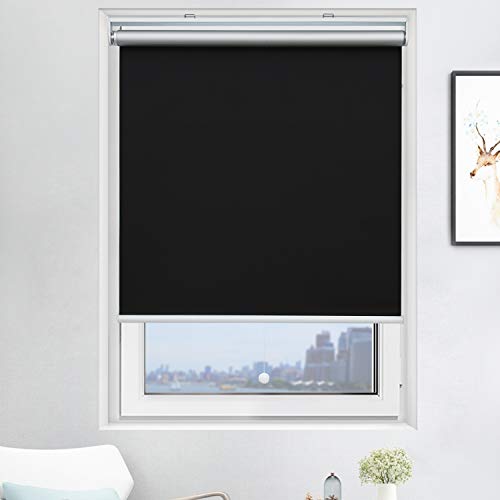
ZSHINE Motorized Blackout Window Blinds Customize Width (23-95 Inches) Remote Control Wireless and Rechargeable Roller Shades Blinds for Windows, Home, Office, Hotel, Club, Restaurant (82010w)


Key features
- •Material: Polyester, 100% full blackout, water-proof and easily washable, suitable for multiple applications like bedrooms, offices and toilets.
- •Remote control: We offer 2-channel/6-channel remote controller, It can control 2/6 blinds/shades independently or control 999 blinds/shades together.If you have Broadlink RM4 Pro or Smart TUYA key at home, you can control our shades and set timer through all models of Alexa and Google Home.
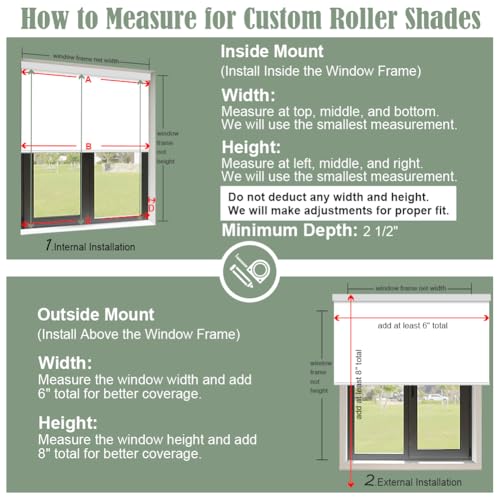
- •Made to order: Motorized Blackout Window Shades is customized, please find the "Customize Now" button on the top right of the page. Follow its guidance to customize your order.
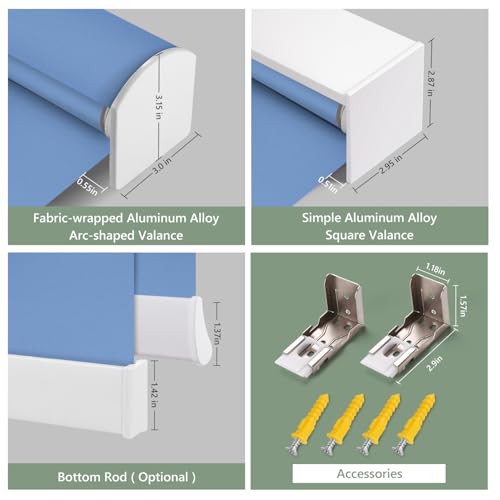
- •Package: Customer self-installs, all the mounting kits, instructions are included in the package. The remote basic program is a factory set before ship. You can also ask for the video or PDF version instructions.
Brandzshine
CategoryRoller Shades
Size95"W x 118"H
ColorDark Blue
WarrantyWe offer 2-year warranty on motors and controls.
ZSHINE Motorized Blackout Window Blinds Customize Width (23-95 Inches) Remote Control Wireless and Rechargeable Roller Shades Blinds for Windows, Home, Office, Hotel, Club, Restaurant (82010w)
List Price: $181.88$163.69DEALYou Save: $18.19 (10%)
Free shippingFree Returns – 30 daysFree Order CancellationSecure Payment2–3 Days DeliveryGet It October 25, 2026In Stock (20)No marketing spamNo account requiredFulfilment by FedEx / Amazon / UPS / ShipwirePayPal / Card Buyer Protection
Customer Reviews
Reviews sourced from verified Amazon purchasers4.4
out of 5
Based on 10 reviews
5★
80%
4★
20%
3★
0%
2★
0%
1★
0%
UPDATE: Issued Resolved - Very Happy
G2✓ Verified Purchase•December 9, 2023
UPDATE: The manufacturer was very responsive and helped resolve this matter (any delay in this update was on my part due to travelling). They promptly sent the necessary replacement part which I was able to install and the unit works as advertised. I also want to add that the customization and fit was perfect, and really looks good. I am very happy with the product and service.
Original review:
This is a customized order. Power Cord severed from unit when received. Am attempting to work with manufacture to correct. Will advise on how responsive manufacture is.
Mine was customized at 95" wide. When received I installed with the 5 mounting brackets. Unit was perfect size and all things considered the installation went smoothly. Unit snaps into place. When I went to plug in the power cord to the connector end attached to the unit, it came off in my hand ... it apparently had been severed. This was not part of the installation process, not sure how this happened unless it got cut on the edge of the unit(?). Hopefully there is an acceptable solution to this. A repair or replacement would be acceptable. In every other aspect the unit appears to be just what we wanted.
One star may be unfair until resolution is reached. Not dissatisfied with the unit itself. Service is what is questionable.
Original review:
This is a customized order. Power Cord severed from unit when received. Am attempting to work with manufacture to correct. Will advise on how responsive manufacture is.
Mine was customized at 95" wide. When received I installed with the 5 mounting brackets. Unit was perfect size and all things considered the installation went smoothly. Unit snaps into place. When I went to plug in the power cord to the connector end attached to the unit, it came off in my hand ... it apparently had been severed. This was not part of the installation process, not sure how this happened unless it got cut on the edge of the unit(?). Hopefully there is an acceptable solution to this. A repair or replacement would be acceptable. In every other aspect the unit appears to be just what we wanted.
One star may be unfair until resolution is reached. Not dissatisfied with the unit itself. Service is what is questionable.
Exactly what I wanted!
gcman✓ Verified Purchase•December 5, 2023
Love the blind, totally blacks out the morning sunlight to sleep in late. My only drawback with it is I can't seem to get the remote to learn the stop and start points, otherwise, fantastic.
I really like the shades
Jake Anderson✓ Verified Purchase•November 26, 2023
The media could not be loaded. I got a quote from a local blind company. Was over $3000.00. These were 10% of the cost and works great. Can control one or both at. The same time. Comes with charger but do not have to charge often. Can charge in place. Would buy again.
Great functionality and value
dougn✓ Verified Purchase•November 8, 2023
I shopped quite a bit before ordering these but decide to order two even though there were a number of negative comments on the programming of the remote. Either the instructions are much better or the prior reviewers had very limited experience. I any event, they arrived in 1/2 the time they quoted, fit perfectly, and work great. I couldn't be happier. It took me less than 10 minutes to install each shade and about 15-20 minutes to set the top-stop and bottom-stop of both controls. I ordered the 6 channel remove with one shade and none for the second. They included a second 2 channel remote. Each was already paired to one of the blinds. It took 3 minutes pair a separate channel to each of the blinds so they operate together.
I purchased the Broadlink RM4 pro remote hub separately and was able to teach it the shades' remote in less than 10 minutes. Now I just say "Alexa run Master Blinds Close" and "Alexa run Master Blinds Open".
A bonus is that I was also able to setup the broadlink hub to control the master bedroom fireplace.
I am getting ready to order 2 more of these shades now for the other 2 master bedroom windows.
I purchased the Broadlink RM4 pro remote hub separately and was able to teach it the shades' remote in less than 10 minutes. Now I just say "Alexa run Master Blinds Close" and "Alexa run Master Blinds Open".
A bonus is that I was also able to setup the broadlink hub to control the master bedroom fireplace.
I am getting ready to order 2 more of these shades now for the other 2 master bedroom windows.
INSTRUCTIONS TO PROGRAM REMOTE CONTROL
CBaker✓ Verified Purchase•October 23, 2023
INSTRUCTIONS TO PROGRAM REMOTE CONTROL
The remote control will control several shades. The key is that the shades need to be programmed all on a single channel in order to work together.
I have 3 shades and programmed my remote so that channel 1 would control the first shade, channel 2 the second shade and channel 3 the third shade. Then I programmed channel 4 to operate all 3 shades at the same time. Here is how to do it:
(Before you do anything you have to put a 2032 button battery in the remote. It doesn't come with one.)
First pick a channel for your first blind. (Channel 1 would be the best option)
Poke the program button on the shade until the LED light comes on and the shade moves up and down
Poke the "Set" button in the battery compartment (the one to the left of the battery) one time to link the channel and the shade together
Hold the program button on the shade again until the shade moves up and down and the LED light goes off. Now this shade can operate by itself when you choose channel 1 on the remote.
Next choose channel two on the remote and follow the same instructions as above for the second shade. Then again for the third shade. Now when you choose that particular channel on your remote it will operate that individual shade.
To link all three shades so that they operate together do the following:
Choose channel 4 (or whatever channel is available) and then poke the program button on the first shade until it moves up and down.
Poke the "Set" button in the battery compartment once, then hold the program button on the window shade until it moves up and down a couple of times and the red LED light goes off.
Do the same thing for each shade still using only channel 4 (or whatever channel you chose to operate all the blinds simultaneously) Once you program all three shades to operate on channel 4 you need to go back to each shade's independent channel and get them all to the same level. Then go back to channel 4 and when you press the up and down button all three will operate together.
SETTING THE AUTO STOP POINTS:
Choose the channel for whichever shade you want to set the stop on. Hold the down button and the "Set" button at the same time until the LED on the shade blinks and then release the buttons. Next lower the shade using the down button until it is where you want the "Auto Stop" to be. While in this programming mode you can use the 25% button and the 75% buttons to micro move the shade up or down so it is in the exact position you want it to be. Now poke the "Set" button on the back of the remote.
Follow the same procedure to set the "Auto Stop" for the UP position.
Now when you go back to channel 4 (after you have positioned each shade to the same height) it should operate all three shades together.
The remote control will control several shades. The key is that the shades need to be programmed all on a single channel in order to work together.
I have 3 shades and programmed my remote so that channel 1 would control the first shade, channel 2 the second shade and channel 3 the third shade. Then I programmed channel 4 to operate all 3 shades at the same time. Here is how to do it:
(Before you do anything you have to put a 2032 button battery in the remote. It doesn't come with one.)
First pick a channel for your first blind. (Channel 1 would be the best option)
Poke the program button on the shade until the LED light comes on and the shade moves up and down
Poke the "Set" button in the battery compartment (the one to the left of the battery) one time to link the channel and the shade together
Hold the program button on the shade again until the shade moves up and down and the LED light goes off. Now this shade can operate by itself when you choose channel 1 on the remote.
Next choose channel two on the remote and follow the same instructions as above for the second shade. Then again for the third shade. Now when you choose that particular channel on your remote it will operate that individual shade.
To link all three shades so that they operate together do the following:
Choose channel 4 (or whatever channel is available) and then poke the program button on the first shade until it moves up and down.
Poke the "Set" button in the battery compartment once, then hold the program button on the window shade until it moves up and down a couple of times and the red LED light goes off.
Do the same thing for each shade still using only channel 4 (or whatever channel you chose to operate all the blinds simultaneously) Once you program all three shades to operate on channel 4 you need to go back to each shade's independent channel and get them all to the same level. Then go back to channel 4 and when you press the up and down button all three will operate together.
SETTING THE AUTO STOP POINTS:
Choose the channel for whichever shade you want to set the stop on. Hold the down button and the "Set" button at the same time until the LED on the shade blinks and then release the buttons. Next lower the shade using the down button until it is where you want the "Auto Stop" to be. While in this programming mode you can use the 25% button and the 75% buttons to micro move the shade up or down so it is in the exact position you want it to be. Now poke the "Set" button on the back of the remote.
Follow the same procedure to set the "Auto Stop" for the UP position.
Now when you go back to channel 4 (after you have positioned each shade to the same height) it should operate all three shades together.
Page 1 of 2