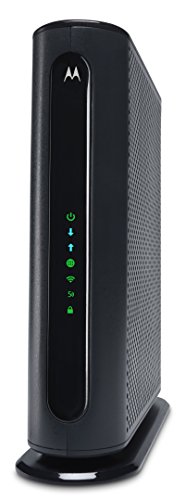
ARRIS Surfboard, S33 DOCSIS 3.1 Modem (2.5 Gbps Max Internet Speeds) & W31 AX11000 WiFi 6 Mesh Ready Router Bundle (WiFi speeds up to 11 Gbps), Alexa Support, Mesh with Your Cable Internet


Key features
- •A Trusted Name in Home Connectivity: Designed to bring you superior connectivity, increase your network capability, provide faster streaming/downloading throughout your home; Mesh Wi-Fi uses cutting edge technology delivering the fastest speeds
- •Save Money: Own your modem and save. Reduce your cable bill up to $168 dollars per year in cable modem rental fees (Savings vary by cable service provider); Certified for use with most U.S. cable internet service providers
- •Compatibility: The SURFboard S33 is compatible with major US cable internet providers including Cox (Gigablast), Spectrum (Internet Gig), Xfinity (Blast!/Extreme Pro) and others; It's approved for cable internet speed plans up to 2.5-Gbps
- •The SURFboard mAX AX11000 Difference: Are you ready to upgrade your home network? The AX11000 Router is mesh-compatible and optimized for virtual reality, online gaming, and 4K video; Bursting with premium components & technology
- •Tri-Band System is Expandable: You can connect additional W131 or W31 SURFboard mesh devices to turn your router into a Wi-Fi 6 AX11000 mesh system (up to 3 routers); Deliver speeds for: audio & video conferencing, HD/4K video streaming & online gaming
ARRIS Surfboard, S33 DOCSIS 3.1 Modem (2.5 Gbps Max Internet Speeds) & W31 AX11000 WiFi 6 Mesh Ready Router Bundle (WiFi speeds up to 11 Gbps), Alexa Support, Mesh with Your Cable Internet
List Price: $477.81$430.03DEALYou Save: $47.78 (10%)
Free shippingFree Returns – 30 daysFree Order CancellationSecure Payment2–3 Days DeliveryGet It October 24, 2026In Stock (1)No marketing spamNo account requiredFulfilment by FedEx / Amazon / UPS / ShipwirePayPal / Card Buyer Protection
Customer Reviews
Reviews sourced from verified Amazon purchasers4.4
out of 5
Based on 10 reviews
5★
70%
4★
30%
3★
0%
2★
0%
1★
0%
Easy setup!
SimplySuzie✓ Verified Purchase•November 2, 2023
We've been needing to upgrade our old 11 year old Arris SB6183 that is only DOCSIS 3.0 and have been waiting for a deal for this Arris S33. Got a great deal on Prime Day and am so glad we finally upgraded!
The Arris S33 is small like the SB6183 but modernly sleek and so very easy to set up. We have Xfinity and the setup couldn't be easier - you just use the Xfinity app to set it up (unlike the old days when you had to call). It takes about 8-11 minutes for Xfinity to configure. We did have a hiccup with the Xfinity app, but just give it a few minutes. As long as the light on the Arris S33 turns blue, you're good to go --- the Xfinity app still said we were not online, though we were and this cleared up on the app within 3 minutes or so. Our connection speeds are much faster now and we are extremely pleased and hope this modem lasts for several years to come!
The Arris S33 is small like the SB6183 but modernly sleek and so very easy to set up. We have Xfinity and the setup couldn't be easier - you just use the Xfinity app to set it up (unlike the old days when you had to call). It takes about 8-11 minutes for Xfinity to configure. We did have a hiccup with the Xfinity app, but just give it a few minutes. As long as the light on the Arris S33 turns blue, you're good to go --- the Xfinity app still said we were not online, though we were and this cleared up on the app within 3 minutes or so. Our connection speeds are much faster now and we are extremely pleased and hope this modem lasts for several years to come!
A good modem with possible limitations
Public name (required)✓ Verified Purchase•September 25, 2023
*The modem delivers high speeds for a good price point. It does as advertised.
*It is very compact and much smaller than I would have imagined.
*The setup was easy. No issues. The app is not the greatest. It feels laggy most of the time, no matter the phones signal.
*My main concern was the connectivity access to the internet when using "both" the 2.5 gb port & the 1 gb port at the same time. For me it was a deal breaker. I want my main work station to have a direct ethernet connection to my modem while extending the internet via a wifi router throughout my home. I currently have Xfinity and after some research I would need another IP address to gain access to both ports.
My solution for me was to find a modem with a built in router. I hope more people are aware of that issue. As I am not sure other internet providers are similar to Xfinity? Yet it's information that should be shared.
Lastly I cannot rate the fault of the modem if it's a service provider issue (feature). If it's an industry standard than Arris needs to advertise on their product you cannot receive service via both ports simultaneously.
*It is very compact and much smaller than I would have imagined.
*The setup was easy. No issues. The app is not the greatest. It feels laggy most of the time, no matter the phones signal.
*My main concern was the connectivity access to the internet when using "both" the 2.5 gb port & the 1 gb port at the same time. For me it was a deal breaker. I want my main work station to have a direct ethernet connection to my modem while extending the internet via a wifi router throughout my home. I currently have Xfinity and after some research I would need another IP address to gain access to both ports.
My solution for me was to find a modem with a built in router. I hope more people are aware of that issue. As I am not sure other internet providers are similar to Xfinity? Yet it's information that should be shared.
Lastly I cannot rate the fault of the modem if it's a service provider issue (feature). If it's an industry standard than Arris needs to advertise on their product you cannot receive service via both ports simultaneously.
The Arris S33 is cute but powerful.
Davis Family✓ Verified Purchase•September 2, 2023
After taking the last two weeks to learn more about internet and wifi protocols, the theme that is consistent with all of this is there are lots of variables to consider on what modem to use. There are also many variables that impact a true internet speed.
First, your internet speed has both down and up channels to your ISP. You might be getting 200mps but if your up is very low (5mps) then it's going to impact how responsive is your download. Also, if you want the best and most consistent signal then get the best coax and ethernet cables. Personally, I use Blue Jeans Cable. They are made in the USA and they make their own stuff. It's the best that I know of. Don't buy cheap cables. For example, you can easily find ethernet cables that have "extra" shielding, but the reality is too much shielding negatively impacts the signal. It's a marketing trick.
Bad cables will definitely impact your speed - and get the right Cat level for your ethernet... especially if you are running it a long distance like 100' or more.
I used the Arris SB8200 for about a week and a half. I returned it because the unit requires both ports to be aggregated to attain faster speeds. The S33 has a 2.5gb port alongside the 1gb port. So for those of you who are getting about 1gb now and want the option to increase your speeds later, this unit will work. With the SB8200 I was getting about 700mps down. After I installed the S33 it's now 900-1,000mps down with zero changes to my Comcast internet plan. The SB8200 had about 7-8ms latency. It's now at 4ms.
It can be helpful to know that generally speaking, the more expensive modems have better hardware, more ram, more flash memory. The S33 has 1gb of ram, 256mb of flash memory.
Without distracting the conversation, if you want a very good wifi home setup, get a high quality modem like the S33, and a separate high-quality tri-band router with minimum internet 6.
Sure, there are more expensive options like the Nighthawk but the add'l cost isn't worth it. If your internet plan is close to 1gb download, then I recommend you have a modem like this S33 where you can easily jump up to 2.5gb as an option. And as I said, my download increased simply by swapping out the SB8200 for the S33 because of the 2.5gb port.
From my understanding, having a modem with the ability to through-put 2+gb or more will not cap the internet speed like a 1gb modem will do (as my case showed). My only concern when I got this S33 was having only one indicator light. After the first day of use, I was content with having only one indicator light. The reason is I've had modems with lights for connection, down, up, etc. But when something goes wrong and the lights are fully lit up, I didn't have a clue what was going on. So the reality is most people look at the lights on their modem every now and then. So when the S33 blue light came on, it indicated it was connected but again, I tested to verify this was true. Unlike the other tech hardware in my office, I want less lights on the things that are meant to work in the background.
Get the best cables. Get a high quality modem and high quality router. Be sure you plug them into a brand-name high quality surge protector like Tripp Lite.
First, your internet speed has both down and up channels to your ISP. You might be getting 200mps but if your up is very low (5mps) then it's going to impact how responsive is your download. Also, if you want the best and most consistent signal then get the best coax and ethernet cables. Personally, I use Blue Jeans Cable. They are made in the USA and they make their own stuff. It's the best that I know of. Don't buy cheap cables. For example, you can easily find ethernet cables that have "extra" shielding, but the reality is too much shielding negatively impacts the signal. It's a marketing trick.
Bad cables will definitely impact your speed - and get the right Cat level for your ethernet... especially if you are running it a long distance like 100' or more.
I used the Arris SB8200 for about a week and a half. I returned it because the unit requires both ports to be aggregated to attain faster speeds. The S33 has a 2.5gb port alongside the 1gb port. So for those of you who are getting about 1gb now and want the option to increase your speeds later, this unit will work. With the SB8200 I was getting about 700mps down. After I installed the S33 it's now 900-1,000mps down with zero changes to my Comcast internet plan. The SB8200 had about 7-8ms latency. It's now at 4ms.
It can be helpful to know that generally speaking, the more expensive modems have better hardware, more ram, more flash memory. The S33 has 1gb of ram, 256mb of flash memory.
Without distracting the conversation, if you want a very good wifi home setup, get a high quality modem like the S33, and a separate high-quality tri-band router with minimum internet 6.
Sure, there are more expensive options like the Nighthawk but the add'l cost isn't worth it. If your internet plan is close to 1gb download, then I recommend you have a modem like this S33 where you can easily jump up to 2.5gb as an option. And as I said, my download increased simply by swapping out the SB8200 for the S33 because of the 2.5gb port.
From my understanding, having a modem with the ability to through-put 2+gb or more will not cap the internet speed like a 1gb modem will do (as my case showed). My only concern when I got this S33 was having only one indicator light. After the first day of use, I was content with having only one indicator light. The reason is I've had modems with lights for connection, down, up, etc. But when something goes wrong and the lights are fully lit up, I didn't have a clue what was going on. So the reality is most people look at the lights on their modem every now and then. So when the S33 blue light came on, it indicated it was connected but again, I tested to verify this was true. Unlike the other tech hardware in my office, I want less lights on the things that are meant to work in the background.
Get the best cables. Get a high quality modem and high quality router. Be sure you plug them into a brand-name high quality surge protector like Tripp Lite.
Bought it when I had cable issues but then this happened...
Fishwich✓ Verified Purchase•August 24, 2023
My Bxxxxxxxxe cable signal went from great to wretched after a hurricane last fall.
Tech support told me it was my older Arris SB6183 which was no longer supported. I bought the Arris Surfboard S33 as an upgrade.
It did not solve the cable signal issues but 2 months, 4 tech visits and a couple boom trucks later it was determined to be a line issue on the street. Because of course it was.
Long story short. Didn't need it but kept it anyway. Works great. All is well.
Tech support told me it was my older Arris SB6183 which was no longer supported. I bought the Arris Surfboard S33 as an upgrade.
It did not solve the cable signal issues but 2 months, 4 tech visits and a couple boom trucks later it was determined to be a line issue on the street. Because of course it was.
Long story short. Didn't need it but kept it anyway. Works great. All is well.
Almost did the install myself but alas
Learned user✓ Verified Purchase•August 14, 2023
My ISP required that I download their app and then sign in via my SMART phone. This has a user interface which is on your connected device, my PC, immediately. Thank goodness. Everyone should update their ethernet or wireless modem for security reasons. I am delighted with the pocket-book size and I bet it uses less electricity than my former ethernet modem.
Page 1 of 2