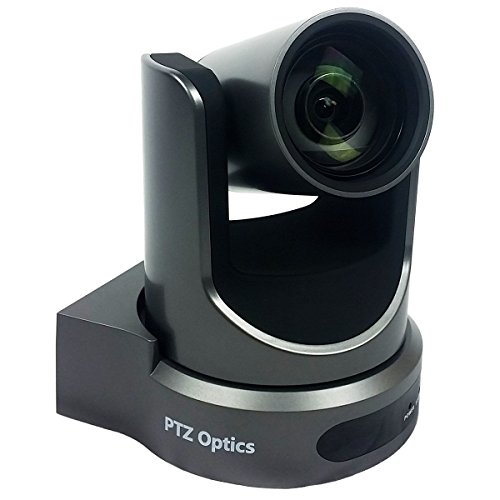
REOLINK PTZ Security Camera System 4K, IP PoE 360 Camera with Dual-Lens, Auto 6X Hybrid Zoomed Tracking, 355 Pan & 90 Tilt, Outdoor Surveillance, AI Detection, TrackMix PoE



Key features
- •DUAL VIEW ON ONE SCREEN: See exactly what's happening around your home with dual view on one screen. The 8mm telephoto lens captures close-up details, while the 2.8mm wide-angle lens brings a panoramic view.
- •AUTO TRACKING & 6X HYBRID ZOOM: The wide-angle PT lens tracks the target; while the telephoto lens zooms in to focus on details. The close-up view delivers 2MP or 4K views automatically. You can choose three different tracking modes to better suit your needs.
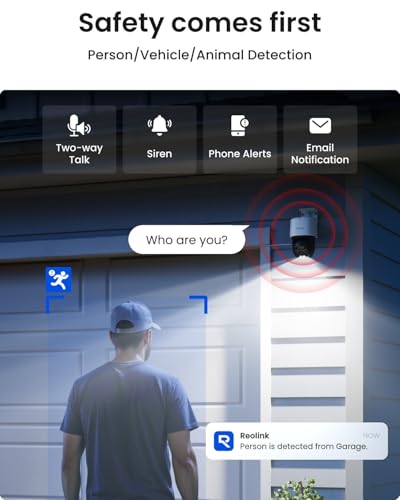
- •SMART DETECTION & PLAYBACK: The camera can detect and closely follow the movements of people, vehicles and pets. Besides, you can replay the saved videos, filter them by detection modes and control the timeline to quickly locate what you want to see. No subscription fee is needed.
- •INSTANT ALERTS: Once any suspicious motions are detected, spotlights and sirens will be triggered, and push/email notifications will be sent to your device. Feel safe all the time.
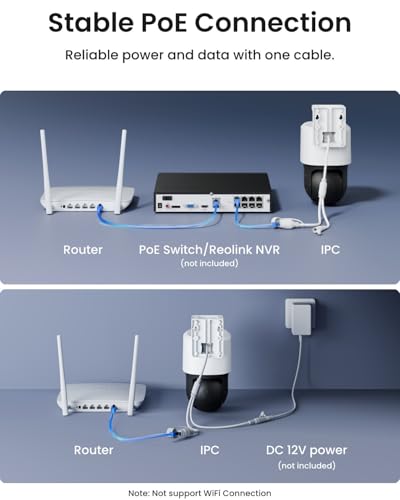
- •RELIABLE CONNECTION WITH PoE: Thanks to the PoE technology, this security camera can load 4K HD images in unparalleled stability. You can install the camera quickly and nicely with only one network cable.
REOLINK PTZ Security Camera System 4K, IP PoE 360 Camera with Dual-Lens, Auto 6X Hybrid Zoomed Tracking, 355 Pan & 90 Tilt, Outdoor Surveillance, AI Detection, TrackMix PoE
List Price: $276.44$248.80DEALYou Save: $27.64 (10%)
Free shippingFree Returns – 30 daysFree Order CancellationSecure Payment2–3 Days DeliveryGet It October 27, 2026In Stock (5)No marketing spamNo account requiredFulfilment by FedEx / Amazon / UPS / ShipwirePayPal / Card Buyer Protection
Customer Reviews
Reviews sourced from verified Amazon purchasers4.3
out of 5
Based on 10 reviews
5★
60%
4★
40%
3★
0%
2★
0%
1★
0%
Maximum Security
Amanda✓ Verified Purchase•August 4, 2023
I bought this camera because I have found myself taking an increased amount of vacations and unfortunately can't always find a house sitter. I wanted to ensure I was able to monitor my home wherever I may be so I put together my own system that met the requirements I wanted. I installed this camera on the ion the soffit at the corner of the front of my home and was pleasantly surprised with how clear the video was and what it could pick up. The two cameras work well together to give a full view of the property. It easily picks up cars, people and animals, whatever you may have it set to pick up and it gives a clear picture that can easily identify anyone in the area for about 2-3 houses in any direction. I like the camera can be set to digitally track without moving to alert individuals they are being tracked until it absolutely must move. The only problem is the camera can lose the object its tracking if something bigger comes along, even if it is specifically set to track a particular object. For example even when set to track people, a car coming down the street can break its focus and it will not relock onto the person even if they are still in the area. Also it would be nice if tracking was automatically on but you have to go into the app and turn it on and set specific monitor points. I also would like to see it be default set to perform scans, but those are minor things. The camera itself performs amazing. The spotlight is bright, the alarm is loud enough to deter anyone and keep them moving, and the two way speaker is loud and clear. Overall this is the best camera I have seen for patrolling the entire front of my property (it is a 3000 sq. ft. home). I have it wired as a PoE to an NVR and I couldn't be happier. This is feature rich with great video. You won't regret this purchase if you are serious about security.
Updated!! Ill be returning mine - total fail in blue iris
Amazon Customer✓ Verified Purchase•July 2, 2023
*Updated and decided to keep.
You need to update to bi5 latest and then the cam will operate as expected. Change your frame interval to 1, change the fps to 15, if you notice any wonky behavior and you have the cam more than 100 feet from your typical injector, upgrade to a single port 60 watt Poe++ from TP-Link.
I have a 24 port injector that outputs around 25 watts to each port and it was unable to adequately power the cam. As soon as it would try to track, power would cut.
Do your setup as follows: blue iris PC plugged into data switch, all cams plugged into data switch from Poe injector (these two devices can be combined, I just found better performance having a managed switch and separate Poe injector), data switch as one feed from your router.
There's things about these REOLINKs cams that is a bit annoying, the track mix is wildly heavy, if you want it to auto track you can't have it patrol because it won't stop patrolling, auto track, and then return to patrol after the event.
Oh and lastly it's so silly that they don't mention the zoomed profile if using blue iris.
So I like having both streams running as separate cams. So when you setup this cam in blue iris setup the main stream and sub stream 1, if you do it properly and put in the ip and use inspect you will be able to select the streams from the drop down, then setup another camera in the same exact fashion but name it like "zoomed" or something and then drop down the streams again, but this time when it auto populates I'm the text field, change 01 to 02 and you will have another cam window on the zoomed track.
If any of the above is confusing ask a question on the product page and I'll try to reply.
Their support is helpful in reaching out and trying, but eventually you end up in an infinite loop as you get passed around from rep to rep. It's definitely an offshore (prob Chinese) company. You can't beat the price but with the time difference it makes trouble shooting a bear. Hope the above helps, it took me a couple days toying with it to get to here. Most of the forums just say "Reolink and blue iris don't work together", I think now we can prove them wrong.
You cannot specify the iframe rate on these cams to match in blue iris, so theres constant drop of frames. If you want to use the adequately in blue iris, find another camera. Total POS from a blue iris standpoint. Just get amcrest.
You need to update to bi5 latest and then the cam will operate as expected. Change your frame interval to 1, change the fps to 15, if you notice any wonky behavior and you have the cam more than 100 feet from your typical injector, upgrade to a single port 60 watt Poe++ from TP-Link.
I have a 24 port injector that outputs around 25 watts to each port and it was unable to adequately power the cam. As soon as it would try to track, power would cut.
Do your setup as follows: blue iris PC plugged into data switch, all cams plugged into data switch from Poe injector (these two devices can be combined, I just found better performance having a managed switch and separate Poe injector), data switch as one feed from your router.
There's things about these REOLINKs cams that is a bit annoying, the track mix is wildly heavy, if you want it to auto track you can't have it patrol because it won't stop patrolling, auto track, and then return to patrol after the event.
Oh and lastly it's so silly that they don't mention the zoomed profile if using blue iris.
So I like having both streams running as separate cams. So when you setup this cam in blue iris setup the main stream and sub stream 1, if you do it properly and put in the ip and use inspect you will be able to select the streams from the drop down, then setup another camera in the same exact fashion but name it like "zoomed" or something and then drop down the streams again, but this time when it auto populates I'm the text field, change 01 to 02 and you will have another cam window on the zoomed track.
If any of the above is confusing ask a question on the product page and I'll try to reply.
Their support is helpful in reaching out and trying, but eventually you end up in an infinite loop as you get passed around from rep to rep. It's definitely an offshore (prob Chinese) company. You can't beat the price but with the time difference it makes trouble shooting a bear. Hope the above helps, it took me a couple days toying with it to get to here. Most of the forums just say "Reolink and blue iris don't work together", I think now we can prove them wrong.
You cannot specify the iframe rate on these cams to match in blue iris, so theres constant drop of frames. If you want to use the adequately in blue iris, find another camera. Total POS from a blue iris standpoint. Just get amcrest.
Pretty surprised!
Alan✓ Verified Purchase•May 9, 2023
Camera seems to work as advertised. Tracks folks walking across the front of my house pretty well. I live on a busy street so we'll see how well it holds up. Bought whole Reolink system after being incredibly disappointed in the Zosi equivalent. Just like any system the software takes some getting used to, but once you do, you can set it up with ease. Features of this camera are very good. 2 way audio is far better than the zosi cameras, but zosi has reolink beat on the night vision. The App is where reolink really shines over Zosi, it actually works! Zosi's app couldn't go 2 weeks functioning. I've reached out to customer service about firmware upgrades (on other parts of the system) and they have been responsive. Reolink seems to be the way to go!
Good camera, wish the frame rate could be higher
Kindle Customer✓ Verified Purchase•May 9, 2023
The camera is well built. The set up is fairly straight forward as well using the Reolink APP. The picture quality is daily good. I used a browser on Windows to set up the FTP. Went without a problem. Had some trouble setting up NVIF. Turned out NVIF (and RTSP) is disabled by default. Had to be enabled first through Setup. The video quality is very good compared to the older cameras I had. The main issue with the camera is the slow frame rate of 25 FPS. For a security cam, the frame rate needs to be quite high, like over 100 FPS since the subject, a person, pet, or a vehicle, is mostly moving. They will not stop for you to take a nice picture. So the captured images mostly turn out blurry. I wish the camera had the option to trade resolution for frame rate like, 1080P at 100 FPS, or 720P at 200 FPS. It would be mush better to capture a clear 1080P image at 2 mega pixels than a blurry 8 mega pixels at 4K. Because of this issue, I consider this camera still as a transitional solution until I can get a camera with FPS greater than 120 frames per second.
Cheap good quality PTZ PoE Camera
Ryan✓ Verified Purchase•May 6, 2023
This camera like most Reolink devices I've seen has a good quality image at night. The camera is easy to configure and works great with Frigate.
A feature I would love but is missing is a "Patrol" feature where it will sweep between multiple points. This would be great tied to the AI detection.
A feature I would love but is missing is a "Patrol" feature where it will sweep between multiple points. This would be great tied to the AI detection.
Page 1 of 2