Mirabox Wireless HDMI Transmitter and Receiver Extender 1x4-200m(656Ft) 5.8GHz 1080P@60Hz Audio Video Extender Kit with IR and HDMI Loop-Out for TV,DSLR Camera,Projector,DVR,Laptop,PS5,Switch


Key features
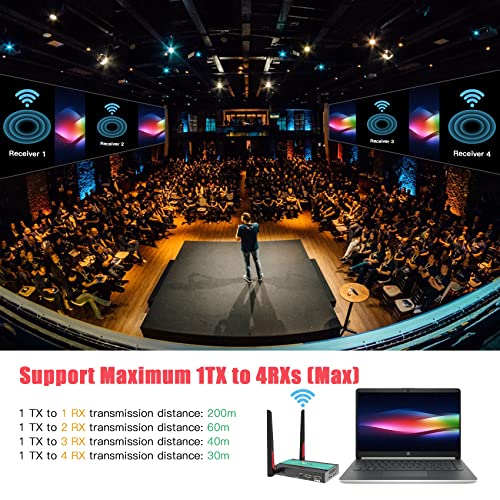
- •【This is 1TX+1RX Set】【Support 1TX to 4RXs(Max)】This wireless hdmi trasnmitter and receiver can support 1TX to 4RXs(Max) for multiple screens,add more RXs as you need(like: buy 1x2, 1x3, 1x4 receivers for 2 tvs,3 tvs, 4 tvs).Buy more RXs from this ASIN:B0B586LDTW .Noted:With the increase of RX, the wireless transmission distance will become shorter.Theoretically,line of sight distance: 1 TX to 1 RX: 200m(656ft); 1 TX to 2 RX: 60m(196ft); 1 TX to 3 RX: 40m(130ft); 1 TX to 4 RX: 30m(98ft).
- •【200m(656Ft) Line Of Sight Transmission】This wireless HDMI extender wirelessly sends HDMI A/V signals up to 656 feet(200m) through line-of-sight environments; works with most HDMI-equipped devices, including TV, DSLR camera,Projector, PS4,PS5, switch, hd digital video camera, blu-ray players, set-top boxes, AV receivers, cable/satellite boxes, laptop and computer pc systems.
- •【5.8GHz Dual Antennas,Strong and Stable Signal】Wireless hdmi extender 5.8GHz dual antenna for strong signal broadcast and long distance transmission.Thanks to the 5.8GHz dual antennas,the delay of this device is very low,only 0.12s,which is very suitable for conference presentations,home theather and live broadcast transmission needs. NOTE: Do NOT install multiple kits in the same location as this may cause signal interference, we recommend install 5 kits in the same location at most.
- •【1080P@60HZ Full HD Transmission and No Delay HDMI Loop-out】This wireless hd video transmitter and receiver kit supports vivid, high-definition videos up 1080p @60Hz. Compatible with HDMI 1.3 (High-bandwidth Digital Content Protection) and Loop-out 1080P full HD signal to the local monitor. Resolution supported: 1080p@50Hz / 1080p@60Hz / 1080p@24Hz /1080p@25Hz /1080p@30Hz / 720p@50Hz / 720p@60Hz / 576i@50Hz / 480p@60Hz
- •【Built in IR Remote Control】This wireless hdmi transmitter and receiver built-in IR signal extension feature allows you to control the playback device remotely. Imagine you have a DVD player in your media room and a TV in your living room, while you are in the living room, you can still use your DVD remote to control the DVD player with IR CONTROL EXTENSION function.
- •【Package Content】Wireless HDMI Transmitter x 1,Wireless HDMI Receiver x 1,5.8GHz Antennas x 4,12V1A DC Power Adapter x 2,IR extension cable TX x 1,IR extension cable RX x 1,User Manual x1
BrandMirabox
ColorHSV8113 1080P Wireless HDMI Extender TX RX
WarrantyOnly replace without repair within 12 months, lifetime warranty
Mirabox Wireless HDMI Transmitter and Receiver Extender 1x4-200m(656Ft) 5.8GHz 1080P@60Hz Audio Video Extender Kit with IR and HDMI Loop-Out for TV,DSLR Camera,Projector,DVR,Laptop,PS5,Switch
List Price: $209.51$188.56DEALYou Save: $20.95 (10%)
Free shippingFree Returns – 30 daysFree Order CancellationSecure Payment2–3 Days DeliveryGet It June 24, 2026In Stock (2)No marketing spamNo account requiredFulfilment by FedEx / Amazon / UPS / ShipwirePayPal / Card Buyer Protection
Customer Reviews
Reviews sourced from verified Amazon purchasers4.2
out of 5
Based on 10 reviews
5★
40%
4★
60%
3★
0%
2★
0%
1★
0%
Doesn't work with 1080i
Keems✓ Verified Purchase•October 16, 2023
Works as advertised but make sure your video set up is 1080p in order to use this product.
Wireless HDMI just stopped working after 5 months. To amend my original Complaint.
Faye Carter Powell✓ Verified Purchase•September 30, 2023
I purchased the Mirabox Wireless HDMI Transmitter and Receiver Extender 1x4-200m(656Ft) 5.8GHz 1080P@60Hz Wireless Audio Video Extender Kit with IR and HDMI Loop-Out for TV,DSLR Camera,Projector,DVR,Laptop,PS5,Switch, in January, last week it quit transmitting or receiving. I attempted to contact the company Mirabox, without success. All it is now is a paper weight, just want some technical support or assistance.
Danny
Final was contacted by Jack, from Mirabox. They replaced the Tx box and the Rx box. I tested both and they work great. So far, no other issues. Thank you, Jack. The only suggestion I would make, is to make it easier to contact technical support. The product works great.
Dan
Danny
Final was contacted by Jack, from Mirabox. They replaced the Tx box and the Rx box. I tested both and they work great. So far, no other issues. Thank you, Jack. The only suggestion I would make, is to make it easier to contact technical support. The product works great.
Dan
Would not pair, manufacturer resolved issue
Ed_Audio✓ Verified Purchase•September 27, 2023
SEE UPDATE BELOW: I bought this receiver (RX) to pair with my TX/RX configuration that I already had and was working pretty well, and was supposed to support up to 4 RX. After several failed attempts to pair, I contacted the manufacturer directly through their website. After many email exchanges and trying different things and sending screenshots, they acknowledged the problem and said they had a RX that should pair and work and they would send it to me. After several days, I got a package from them, but it was a transmitter (TX) instead (which, by the way, also would not pair with the RX). I emailed them about the apparent mix-up, and they ghosted me. So I sent the RX back to Amazon, still deciding whether to keep the TX/RX since I cannot add another RX. If you want to be able to support more than one RX, don't waste your time. Read the reviews. I gave them one-star because at least for a while they acted like they wanted to help.
UPDATE:
I finally got another RX from the manufacturer and successfully paired it on the first try. They provided different pairing instructions from what is on their website and in the instructions that come with it.
- power on both the TX and RX before connecting the HDMI cable. Wait 5-10 seconds.
- plug the HDMI cable into the port on the RX and the IN port on the TX. Wait 10-20 seconds.
- done
I now have 2 RX working with the same TX. Hoorah. I've updated the review rating. Couldn't give a 5 because of the hassle factor, but I am pleased that Jack got back to me and got things straightened out.
UPDATE:
I finally got another RX from the manufacturer and successfully paired it on the first try. They provided different pairing instructions from what is on their website and in the instructions that come with it.
- power on both the TX and RX before connecting the HDMI cable. Wait 5-10 seconds.
- plug the HDMI cable into the port on the RX and the IN port on the TX. Wait 10-20 seconds.
- done
I now have 2 RX working with the same TX. Hoorah. I've updated the review rating. Couldn't give a 5 because of the hassle factor, but I am pleased that Jack got back to me and got things straightened out.
Does what it says it will do. Will destroy your network traffic if not careful
Keith✓ Verified Purchase•September 16, 2023
Plugged it in to my switch and didn't get a chance to configure the VLAN. The second I plugged in the receiver, my home network stopped working. Put it on it's own VLAN and the network issues were resolved. They are chatty. They will use terabytes of data in a very short time. This is because they do not have IP addresses assigned. They just spam your network with broadcast traffic so that the receivers and transmitters do not need to be configured. It seems lazy.
It comes with instructions... Read them.
Levi✓ Verified Purchase•August 21, 2023
I took a chance on this system despite all of the reviews stating that the transmitter could only connect to 1 receiver. I figured if it didn't work I'd just send them back.
When it was time to set these up I gave myself about 4 hours to finish the project, anticipating that a lot of troubleshooting would be necessary if they even worked at all.
I pulled the instructions out of the box, took a deep breath and got started. After having done exactly what was stated in the instructions, and nothing more, I had 4 receivers connected and working. This took roughly 4 minutes.
They've all worked flawlessly since setup.
I don't think that you need to be tech savvy to make these work - just set them up correctly... Read and follow instructions.
When it was time to set these up I gave myself about 4 hours to finish the project, anticipating that a lot of troubleshooting would be necessary if they even worked at all.
I pulled the instructions out of the box, took a deep breath and got started. After having done exactly what was stated in the instructions, and nothing more, I had 4 receivers connected and working. This took roughly 4 minutes.
They've all worked flawlessly since setup.
I don't think that you need to be tech savvy to make these work - just set them up correctly... Read and follow instructions.
Page 1 of 2