McAfee Total Protection 3-Device | AntiVirus Software 2026 for Windows PC & Mac, AI Scam Detection, VPN, Password Manager, Identity Monitoring | 1-Year Subscription with Auto-Renewal | Download




Key features
- •AMAZON EXCLUSIVE: Get 1 device setup support call free.. Got a new device? Need help setting up an old one? We're here for you.
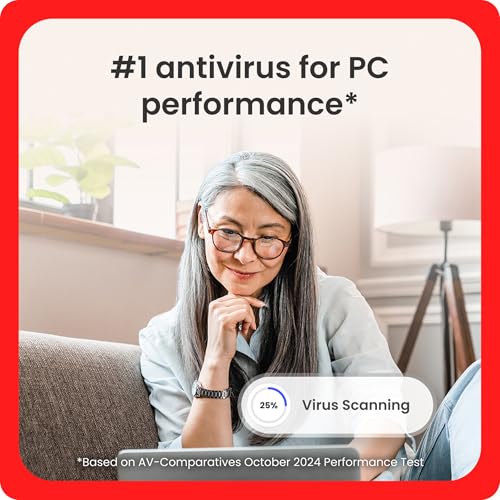
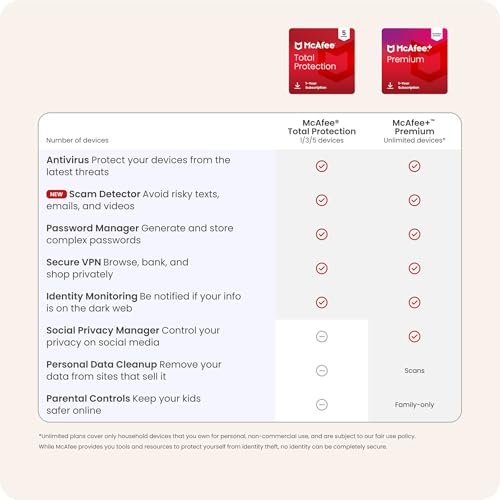
- •MCAFEE TOTAL PROTECTION IS ALL-IN-ONE PROTECTION – antivirus, security, identity, and privacy protection for 3 device
- •CHECK THE HEALTH OF YOUR ONLINE PROTECTION – our industry-first Protection Score will identify weak spots and guide you to improve your security
- •MONITOR UP TO 10 EMAILS ON THE DARK WEB - if your info is found we'll notify you so you can act before your info ends up in the wrong hands
- •BANK AND SHOP PRIVATELY – McAfee's basic Secure VPN (500 MB/Month) automatically turns on to protect your personal data and credit card info
McAfee Total Protection 3-Device | AntiVirus Software 2026 for Windows PC & Mac, AI Scam Detection, VPN, Password Manager, Identity Monitoring | 1-Year Subscription with Auto-Renewal | Download
List Price: $43.63$39.27DEALYou Save: $4.36 (10%)
Free shippingFree Returns – 30 daysFree Order CancellationSecure Payment2–3 Days DeliveryGet It October 27, 2026In Stock (2)No marketing spamNo account requiredFulfilment by FedEx / Amazon / UPS / ShipwirePayPal / Card Buyer Protection
Customer Reviews
Reviews sourced from verified Amazon purchasers4.1
out of 5
Based on 10 reviews
5★
50%
4★
50%
3★
0%
2★
0%
1★
0%
Great product
Ree Scout✓ Verified Purchase•January 20, 2024
Product does it's purpose
Renew instructions via Amazon 2023 McAfee Total Protection software purchase
road_warrior✓ Verified Purchase•January 16, 2024
We've used McAfee for several years purchased via Amazon.com including recent renewals. These are the instructions how to RENEW an existing active 2022 McAfee Total Protection install AFTER buying via Amazon the regular (3-device for me) 2023 McAfee Total Protection software.
1) You will need from prior registration your McAfee account username and password as it's needed to activate the new subscription code. Would exxpect your username is email address, and if you don't know your password, can reset it during the account credentials entry process/window.
2) The Amazon.com purchase of the 2023 McAfee Total Protection software will send you and email. Click on the email's 'Access Your Content' button. This will open a web browser and list your Amazon.com (computer software) subscriptions including the recent McAfee purchase.
3) The web page entry for your purchase will have both the subscription activation (i.e., also use for renewal) code, and a LINK right above the code to 'activate your subscription'. Copy/paste into computer memory or write down the subscription activation code.
4) Click on the hyperlink to 'activate your subscription'.
5) A new web page will open to the McAfee website where you will need to log-in with your username (email address) and password. There is a link in case you forgot your password.
6) Once Logged in to McAfee website, click on the link to view your Subscriptions. The page will refresh and list all the separate purchases' history. Find the entry for the
EXISTING INSTALLED ACTIVE software purchase that you want to apply the new software renewal registration code. Click on that entry to pretend renewing your subscription
but at this point be careful going forward you DO NOT BUY NOR ENTER ANY CREDIT CARD/PAYMENT INFORMATION NOR ACCEPT ANY AUTORENEWAL OPTIONS.
7) Once in the renewal screen, there should be a link (although easily overlooked) that allows you to access another page to enter the software activation code you already just purchased for 2023.
8) The browser will progress to a page that should mention near the top of the text that activation occurred BUT YOU'RE NOT DONE and the software is NOT YET RENEWED!!!! THE REST OF THE SCREEN WILL HAVE AUTO-RENEWAL CONTENT in an attempt to get you to buy the annual renewal at a higher prices. IGNORE THAT TEXT but you still have another step. Near the bottom of the page will be a obscure hyperlink with text such as ignore offer/continue activation. Click on this link to finally apply/activate the additional year.
9) Another browser page will display stating your subscription is renewed.
10) Go back to your account main page then access your subscriptions. The expiration date for your subscriptin should have extended by 365 days.
1) You will need from prior registration your McAfee account username and password as it's needed to activate the new subscription code. Would exxpect your username is email address, and if you don't know your password, can reset it during the account credentials entry process/window.
2) The Amazon.com purchase of the 2023 McAfee Total Protection software will send you and email. Click on the email's 'Access Your Content' button. This will open a web browser and list your Amazon.com (computer software) subscriptions including the recent McAfee purchase.
3) The web page entry for your purchase will have both the subscription activation (i.e., also use for renewal) code, and a LINK right above the code to 'activate your subscription'. Copy/paste into computer memory or write down the subscription activation code.
4) Click on the hyperlink to 'activate your subscription'.
5) A new web page will open to the McAfee website where you will need to log-in with your username (email address) and password. There is a link in case you forgot your password.
6) Once Logged in to McAfee website, click on the link to view your Subscriptions. The page will refresh and list all the separate purchases' history. Find the entry for the
EXISTING INSTALLED ACTIVE software purchase that you want to apply the new software renewal registration code. Click on that entry to pretend renewing your subscription
but at this point be careful going forward you DO NOT BUY NOR ENTER ANY CREDIT CARD/PAYMENT INFORMATION NOR ACCEPT ANY AUTORENEWAL OPTIONS.
7) Once in the renewal screen, there should be a link (although easily overlooked) that allows you to access another page to enter the software activation code you already just purchased for 2023.
8) The browser will progress to a page that should mention near the top of the text that activation occurred BUT YOU'RE NOT DONE and the software is NOT YET RENEWED!!!! THE REST OF THE SCREEN WILL HAVE AUTO-RENEWAL CONTENT in an attempt to get you to buy the annual renewal at a higher prices. IGNORE THAT TEXT but you still have another step. Near the bottom of the page will be a obscure hyperlink with text such as ignore offer/continue activation. Click on this link to finally apply/activate the additional year.
9) Another browser page will display stating your subscription is renewed.
10) Go back to your account main page then access your subscriptions. The expiration date for your subscriptin should have extended by 365 days.
Quality
Paul✓ Verified Purchase•December 16, 2023
Good protection unfortunately I can't get the vpn to work. Keeps saying can't connect so I had to get a separate vpn product.
Follow up :
I had do an uinstall and reinstall to get the vpn work. Working so far.
Follow up :
I had do an uinstall and reinstall to get the vpn work. Working so far.
Great price and easy to install and use on my phone!
Colleen✓ Verified Purchase•December 14, 2023
It's holiday time and I often don't have enough money to make it through the month on my very limited income, so I was very happy to find this 3 device total protection for only $20.08 after discounts and tax.
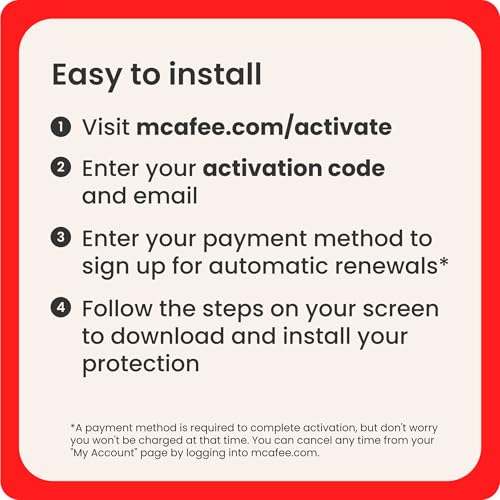
I was a little intimidated by all the negative reviews centering around how difficult it is to install it. Frankly, I don't see what all the fuss is about the install process. They must have never installed a program like this and/or changing a few permissions in the settings (which McAfee took me there), proved to confusing for them.
I did not buy the renew option. So, as always, my first step to my install was to uninstall my old McAfee Total Protection program in my settings. No program like this works well with other security programs who's job is pretty much the same. They'd be fighting it out for dominance all the time 😂.
Then, I just followed the information on the email, but when I logged into McAfee with the code I was brought to a page, which didn't make it clear if I was in my new or old subscription and wanted me to fill out my address and credit information so auto pay could be set up. I backed out of there and went to my account, subscriptions, and my new subscription instead. I never use auto renew cause it's always too pricey, anyways.
Yes, it helps if you've done this before, but I didn't find it anymore difficult to install than all programs in this class.
Haven't installed on my laptop, yet.
I was a little intimidated by all the negative reviews centering around how difficult it is to install it. Frankly, I don't see what all the fuss is about the install process. They must have never installed a program like this and/or changing a few permissions in the settings (which McAfee took me there), proved to confusing for them.
I did not buy the renew option. So, as always, my first step to my install was to uninstall my old McAfee Total Protection program in my settings. No program like this works well with other security programs who's job is pretty much the same. They'd be fighting it out for dominance all the time 😂.
Then, I just followed the information on the email, but when I logged into McAfee with the code I was brought to a page, which didn't make it clear if I was in my new or old subscription and wanted me to fill out my address and credit information so auto pay could be set up. I backed out of there and went to my account, subscriptions, and my new subscription instead. I never use auto renew cause it's always too pricey, anyways.
Yes, it helps if you've done this before, but I didn't find it anymore difficult to install than all programs in this class.
Haven't installed on my laptop, yet.
Awesome
Tyler8382✓ Verified Purchase•December 6, 2023
It was good
Page 1 of 2
![Max Secure Software Antivirus Plus for PC 2019 | 3 Device | 1 Year [PC Online code]](https://m.media-amazon.com/images/I/519sBo9O-nL._SL500_.jpg)
![Avast Premium Security 2022 | Antivirus Protection Software | 1 PC, 1 Year [Download]](https://m.media-amazon.com/images/I/41uCZKAF0CL._SL500_.jpg)


![AVG Internet Security 2022 | Antivirus Protection Software | 1 PC, 2 Years [Download]](https://m.media-amazon.com/images/I/51wiCrbO5WL._SL500_.jpg)