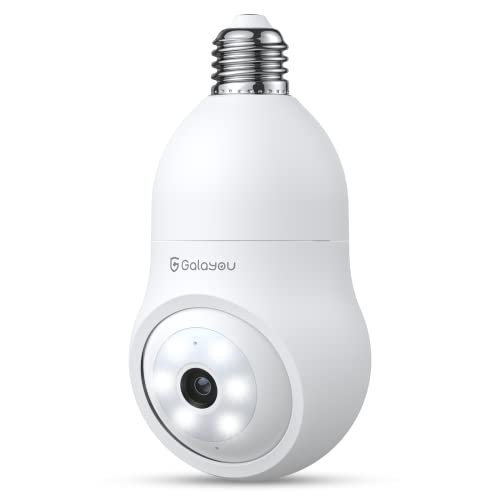
GALAYOU 360 Light Bulb Security Camera - Socket Wireless for Home Recording Indoor&Outdoor, WiFi Lightbulb Video Surveillance with 2K Resolution, Motion Tracking,Works Alexa


Key features
- •【Wireless & Easy Installation】Simply screw the light bulb security camera into a normal E27 light socket (110V ~ 240V). NO ADDITIONAL POWER SUPPLY, real wireless camera. Open the phone app and follow the Installation Guide or in-app instructions to set up the WiFi camera within minutes. NOTE: This camera works with 2.4GHz WiFi only, 5GHz WiFi is NOT supported.
- •【2K Crystal Image & Color Night Vision】Unlike regular 1080P resolution, Galayou light bulb camera has 2K Ultra resolution to provide crystal day and night vision. With 6 floodlights and 6 IR lights, the lightbulb security camera allows you to see clearly colored images even in the dark.
- •【Motion Tracking/Siren & 24/7 Recording】The wireless WiFi bulb camera will detect a moving object, follow it to move, alarm the siren, give out white light and save the motion video. You will receive a real-time app notification. The bulb camera supports recording motion videos or 24/7 footage to the cloud or a TF card (up to 128GB, not included).
- •【2-Way Audio & 360 Camera】The security camera outdoor is equipped with a built-in mic & speaker. Talk and listen to the courier, baby, or pet via this porch camera. Warn unwanted guests at home, driveway, hallway, garage, or back door. The wireless security camera has a 355° pan and 65° tilt range to achieve a 360-degree view.
- •【Multi-device&user Share & Supports Alexa】 Support adding multiple cameras for home security on your mobile phone app or PC software, simultaneously displaying 4 home cameras' feeds. You can create several family accounts and share the light socket security camera with your family and friends. Supports RTSP, compatible with Alexa and Google Assistant.
GALAYOU 360 Light Bulb Security Camera - Socket Wireless for Home Recording Indoor&Outdoor, WiFi Lightbulb Video Surveillance with 2K Resolution, Motion Tracking,Works Alexa
List Price: $50.62$45.56DEALYou Save: $5.06 (10%)
Free shippingFree Returns – 30 daysFree Order CancellationSecure Payment2–3 Days DeliveryGet It October 26, 2026In Stock (2)No marketing spamNo account requiredFulfilment by FedEx / Amazon / UPS / ShipwirePayPal / Card Buyer Protection
Customer Reviews
Reviews sourced from verified Amazon purchasers4.1
out of 5
Based on 10 reviews
5★
50%
4★
50%
3★
0%
2★
0%
1★
0%
Wonderful for my needs
tweet✓ Verified Purchase•July 26, 2023
I'm using this in my basement storage, it works great for me and my needs. The fact that it follows anything that it comes in contact with, helps me identify unwanted ppl in my place. Easy to install and I didnt need to use any cords or battery's make it very convenient. The reason for the 4stars is because it went offline when I was out of town and I had to reset it when I got back.
An Unusual WiFi Camera That Really Works!
fromjustus✓ Verified Purchase•July 13, 2023
Recently, I saw what is called a Galayou G6 "light bulb camera" that just screws into an overhead light bulb socket. Intrigued by this somewhat unconventional mounting, I decided to try it out. I already have several wireless cameras installed, so I am very familiar with wireless WiFi cameras. I was very pleasantly surprised. The specs on the camera indicate that it can show 2 levels of image resolution. One is called "SD" which I assume means Standard Definition. The other is "2K". Interestingly enough, even the SD mode is quite sharp, and the 2K is Ultra sharp.
The first thing to consider is when it comes to mounting, as most WiFi cameras install on a wall, not a ceiling, or in a wall light fixture. You need to remember that the lower camera portion of this device moves up and down as well as side to side, so you don't want to block any part of where the camera can move.
The second thing is that, THAT light socket fixture wherever it is, MUST stay powered up at all times. If the power is turned off the camera will instantly stop working until power is restored. So if it's controlled by a light switch, that switch needs to be "locked" on so it cannot be turned off accidentally. Most hardware stores carry a plastic light switch device that screws on to the light switch cover, either for a toggle or Decora paddle style wall switch, and that will definitely keep the switch locked on.
One more thing to also be aware of. This camera is not waterproof, so make sure that it isn't in a direct path of rain. Usually with an over head mounting that isn't a problem, such as a porch ceiling or recessed porch wall with an overhang.
Next comes activating the camera. Remember, that the camera ONLY works with 2.4GHz WiFi. 5GHz WiFi is NOT supported. Most all WiFi cameras do not support 5GHz. You have to download the Wansview Cloud App to your cell phone, register and create an account, or sign in if you already have one, and then add the new G6 light bulb camera to your Wansview Cloud app account. Just follow the directions enclosed with the camera. The installation of the camera should be easy as long as you have decent 2.4 GHz WiFi. It's best to get it paired when close to your router, and then it usually will work if you don't too far away. Check it first before final mounting for connection.
This camera permits you to install up to a 128GB Micro SD card to record and store images and video to. Very, very helpful to have this.
The camera is a true "PTZ" (Pan-Tilt-Zoom) camera, in that there is a control in the Wansview cell phone app that allows you to control exactly where you want the camera to point. It also has a funtion that will let you set up to 4 preset, preferred positions that you can choose for quickly locating the camera just where you preset it to go. Neat! There also has several other interesting features. Whereas most cameras switch to black and white at night, which this one also does, it also has a night color mode feature that turns on a light on, and allows the camera to switch back to color mode at night. I've attached 2 photos showing day mode and night color mode.
In addition, if someone or something comes into view at night that you "don't" want around, a very bright spotlight comes on as well, and a loud siren is available to scare away whatever came into view. This camera also has two-way voice communication capability.
There is also motion detection as well as motion tracking of whatever is moving, and the camera can and will move to track whatever is detected. It takes some practice to try to set the motion detection sensitivity so it won't alarm you by the smallest object, whatever that may be. You can set the camera to notify you on your phone of camera detection. It's kind of fun to watch the camera suddenly move and track an object. As mentioned earlier, you also can control the camera in the app with the PTZ control. Also fun. Motion detection can be recorded to the Wansview Cloud if you pay for a subscription for it, or, if not, then to an SD card if you have installed one. Another thing is that it will work with Amazon Alexa for Google Home. I added my G6 to Alexa, and now I can view it just by asking it to show me it on screen. How easy is that?
Overall, this camera has lots of neat features that make sense. And the camera works well. Glad that I got it. I think Galayou/Wansview has a winner on their hands.
The first thing to consider is when it comes to mounting, as most WiFi cameras install on a wall, not a ceiling, or in a wall light fixture. You need to remember that the lower camera portion of this device moves up and down as well as side to side, so you don't want to block any part of where the camera can move.
The second thing is that, THAT light socket fixture wherever it is, MUST stay powered up at all times. If the power is turned off the camera will instantly stop working until power is restored. So if it's controlled by a light switch, that switch needs to be "locked" on so it cannot be turned off accidentally. Most hardware stores carry a plastic light switch device that screws on to the light switch cover, either for a toggle or Decora paddle style wall switch, and that will definitely keep the switch locked on.
One more thing to also be aware of. This camera is not waterproof, so make sure that it isn't in a direct path of rain. Usually with an over head mounting that isn't a problem, such as a porch ceiling or recessed porch wall with an overhang.
Next comes activating the camera. Remember, that the camera ONLY works with 2.4GHz WiFi. 5GHz WiFi is NOT supported. Most all WiFi cameras do not support 5GHz. You have to download the Wansview Cloud App to your cell phone, register and create an account, or sign in if you already have one, and then add the new G6 light bulb camera to your Wansview Cloud app account. Just follow the directions enclosed with the camera. The installation of the camera should be easy as long as you have decent 2.4 GHz WiFi. It's best to get it paired when close to your router, and then it usually will work if you don't too far away. Check it first before final mounting for connection.
This camera permits you to install up to a 128GB Micro SD card to record and store images and video to. Very, very helpful to have this.
The camera is a true "PTZ" (Pan-Tilt-Zoom) camera, in that there is a control in the Wansview cell phone app that allows you to control exactly where you want the camera to point. It also has a funtion that will let you set up to 4 preset, preferred positions that you can choose for quickly locating the camera just where you preset it to go. Neat! There also has several other interesting features. Whereas most cameras switch to black and white at night, which this one also does, it also has a night color mode feature that turns on a light on, and allows the camera to switch back to color mode at night. I've attached 2 photos showing day mode and night color mode.
In addition, if someone or something comes into view at night that you "don't" want around, a very bright spotlight comes on as well, and a loud siren is available to scare away whatever came into view. This camera also has two-way voice communication capability.
There is also motion detection as well as motion tracking of whatever is moving, and the camera can and will move to track whatever is detected. It takes some practice to try to set the motion detection sensitivity so it won't alarm you by the smallest object, whatever that may be. You can set the camera to notify you on your phone of camera detection. It's kind of fun to watch the camera suddenly move and track an object. As mentioned earlier, you also can control the camera in the app with the PTZ control. Also fun. Motion detection can be recorded to the Wansview Cloud if you pay for a subscription for it, or, if not, then to an SD card if you have installed one. Another thing is that it will work with Amazon Alexa for Google Home. I added my G6 to Alexa, and now I can view it just by asking it to show me it on screen. How easy is that?
Overall, this camera has lots of neat features that make sense. And the camera works well. Glad that I got it. I think Galayou/Wansview has a winner on their hands.
Low cost home security. High quality color pic. Easy free app on cell phone.
Anthony V.✓ Verified Purchase•May 29, 2023
Overall, we are pleasantly surprised (4*) at this low cost home security 2K color 2.4G camera. No 5G on this cam. No monthly fee, but can pay ($3.99/mo) if you want extra pic storage and more special features. You can position the cam to watch the front door or scan around your yard when you want. We don't have the best WiFi in the woods where we live, but the cam seems to work fine. Right now the cam is working, even with an extension cord from a outdoor porch outlet up to the porch ceiling light socket. Until we hardwire it someday. Cam Not waterproof but It's located under the front porch ceiling protected off to one side to see anything that walks up. Uses a 128gb micro-CD card for free video/pic storage that you need to purchase separately ($16 @Wal.mart). On the phone app you will see a volume button, siren button, light button, talk button, console arrow button, replay button and more. All included. You may have to turn off the motion alert feature in warmer weather because of flying bugs. Otherwise you'll quickly accumulate hundreds of pics of insects you.ll have to delete! Videos or still pics. You can adjust the sensitivity of the motion sensor. But should work fine in cooler/winter weather with motion alert turned on. . . NOTE: One feature I wish this cam had is: after motion detected and cam follows it, the cam does Not go back to original home/starting position. You will notice cam has moved on your cell phone app and you will have to move cam (with cell phone app) back to desired position. The phone app moves the cam and instructs it what to do. When you first screw in the light bulb cam, you don't have to touch it again! Use your phone. Anywhere you go. Thousands of miles away! We plan to use this cam while we are away from home for vacations, weekends etc. We plan on getting a 2nd same cam for the back patio. Then the app will show a split screen with 2 cams operating. . . Cheap protection and seems to do the job. Would buy again.
Great Product for a Great Price, Flawless Integration with Google Home
Dad in Maine✓ Verified Purchase•May 25, 2023
I connected this camera through my Google Wi-Fi. Google Wi-fi supports both 5Ghz and 2.4Ghz. That's important, because this camera works on 2.4Ghz only. It connected without any issues whatsoever and the process was simple.
Inserting the SD Card is easy. Just gently move the lens down to reveal the slot and insert the card. I formatted the card as exFAT on my PC first, and the camera recognized the card right away. 128 GB card. When the card gets full, it overwrites the earliest clips. Based on how much motion you get in the area, you could have weeks worth of recordings on a card that size before it needs to start overwriting.
The lights on the device obviously aren't going to light up an area like a floodlight, but that's ok. It lights enough for when you need to see in color. The Infrared (Black & White) view is good enough as well.
Getting the camera onto my Google Home was easy too. In the Google Home app I linked my Wansview account and the camera appeared in the Google Home app. I added it to a new room called "Driveway" since that's where the camera is. Now I just tell my Google Hub "Show me the camera" and I can see the feed!
Here are some cool things about the camera I appreciate.
1) The range of motion and the ability to control the direction of the camera with the app.
2) The ability to set 4 favorite positions so I can quickly move between them.
3) The intelligent tracking, as it detects something in its field of view, it follows it until it is no longer in the field of view. This can be disabled so you can keep it in a fixed position.
4) The ability to stream previous clips directly from the camera. No need to remove the SD Card, you can view the timeline and view all the clips right from the app and download what you need.
5) Remote control of the light. We live in Maine and we have a Brown Tail Moth problem so we have to keep our lights off at night to avoid attracting them to our property. But there are times when we're coming home late a little light to see our house is needed. We can open the app, turn on the light, and then turn it off as soon as we're home. You can even set a schedule for when that light comes on and off. It's great.
6) Being able to stream over cellular data without massive lag. Whatever this camera does to stream video to the app makes it work perfectly over cellular data. I also appreciate how the app reminds you you're on cellular so you don't burn up data in case you didn't realize you weren't connected to wifi.
All in all, this camera is a great value for the money. If you're looking for a little peace of mind but don't have hundreds of dollars to invest in one of the "top brands" for cameras, you can't go wrong with this. I'm very happy with this camera and will gladly purchase more of this brand as my needs expand.
Inserting the SD Card is easy. Just gently move the lens down to reveal the slot and insert the card. I formatted the card as exFAT on my PC first, and the camera recognized the card right away. 128 GB card. When the card gets full, it overwrites the earliest clips. Based on how much motion you get in the area, you could have weeks worth of recordings on a card that size before it needs to start overwriting.
The lights on the device obviously aren't going to light up an area like a floodlight, but that's ok. It lights enough for when you need to see in color. The Infrared (Black & White) view is good enough as well.
Getting the camera onto my Google Home was easy too. In the Google Home app I linked my Wansview account and the camera appeared in the Google Home app. I added it to a new room called "Driveway" since that's where the camera is. Now I just tell my Google Hub "Show me the camera" and I can see the feed!
Here are some cool things about the camera I appreciate.
1) The range of motion and the ability to control the direction of the camera with the app.
2) The ability to set 4 favorite positions so I can quickly move between them.
3) The intelligent tracking, as it detects something in its field of view, it follows it until it is no longer in the field of view. This can be disabled so you can keep it in a fixed position.
4) The ability to stream previous clips directly from the camera. No need to remove the SD Card, you can view the timeline and view all the clips right from the app and download what you need.
5) Remote control of the light. We live in Maine and we have a Brown Tail Moth problem so we have to keep our lights off at night to avoid attracting them to our property. But there are times when we're coming home late a little light to see our house is needed. We can open the app, turn on the light, and then turn it off as soon as we're home. You can even set a schedule for when that light comes on and off. It's great.
6) Being able to stream over cellular data without massive lag. Whatever this camera does to stream video to the app makes it work perfectly over cellular data. I also appreciate how the app reminds you you're on cellular so you don't burn up data in case you didn't realize you weren't connected to wifi.
All in all, this camera is a great value for the money. If you're looking for a little peace of mind but don't have hundreds of dollars to invest in one of the "top brands" for cameras, you can't go wrong with this. I'm very happy with this camera and will gladly purchase more of this brand as my needs expand.
Galayou 360° Lightbulb Camera - Wireless; Additional Considerations if Purchasing.
Horrell Townsend✓ Verified Purchase•May 22, 2023
For a purchase price of $24.99, its functions, and quality of video in daylight or dark, it definitely is 5 stars in my book. I use it for front door, front of house security.
It lived up to its claim of easy setup after downloading Wamsview cloud app and linking with my Alexa app and doing a code scan, it basically started itself. Important to do the linking/setup of the bulb camera CLOSE to router, as recommended, and then can move bulb to desired location. I used the table lamp on my office desk that is 3 ft. from router-first try and success! Aah-that's a first for me!
WHAT YOU SHOULD KNOW PRIOR TO PURCHASE:
1) You may need a socket extender, as I did, so the camera lens has full unobstructed view-this will depend on the vertical length of the light fixture versus camera bulb length.
I didn't want to change out fixture, so I got an extender (2 pack $9, so $4.50 ea.) otherwise the top of all views was cut off by my fixture about an inch.
2) Has micro SD card slot-found by gently pulling down on rotating camera sphere-hidden when camera operational. Be sure camera powered off when inserting due to possible damage to microSD card. I saw nothing ever mentioned about card storage in camera--only CLOUD storage-first month free, then a monthly fee.
I found the slot, bought a 1 T micro SD memory card for essentially the SAME price as the CAMERA. It worked automatically on insertion and a video record made of any motion detection that activates camera. There is a 10-15 sec. lag time if positioning camera manually.. Records audio also but sound of vehicles on road quite distorted.
Can take still pics-resolution and color is great! Alarm siren is loud and would deter most of those you don't want at door, plus get the attention of others.
You can get notified of movement/activity if away via phone.
3) The "light bulb" function can be turned on/off thru app with one tap, or can be set to auto "on" at dusk, "off" at daybreak.
Frankly, the light is disappointing and insufficient--not enough lumens by far.
So, in summary in my case,
the light bulb camera was $24.99, 1T micro SD card $24.00, and socket extension $4.50--total 53.50,
Still 5 star, still worth it, in my opinion. The lower light emitted is the only real drawback but sufficient to see by and not so poor as to deduct a star.
It lived up to its claim of easy setup after downloading Wamsview cloud app and linking with my Alexa app and doing a code scan, it basically started itself. Important to do the linking/setup of the bulb camera CLOSE to router, as recommended, and then can move bulb to desired location. I used the table lamp on my office desk that is 3 ft. from router-first try and success! Aah-that's a first for me!
WHAT YOU SHOULD KNOW PRIOR TO PURCHASE:
1) You may need a socket extender, as I did, so the camera lens has full unobstructed view-this will depend on the vertical length of the light fixture versus camera bulb length.
I didn't want to change out fixture, so I got an extender (2 pack $9, so $4.50 ea.) otherwise the top of all views was cut off by my fixture about an inch.
2) Has micro SD card slot-found by gently pulling down on rotating camera sphere-hidden when camera operational. Be sure camera powered off when inserting due to possible damage to microSD card. I saw nothing ever mentioned about card storage in camera--only CLOUD storage-first month free, then a monthly fee.
I found the slot, bought a 1 T micro SD memory card for essentially the SAME price as the CAMERA. It worked automatically on insertion and a video record made of any motion detection that activates camera. There is a 10-15 sec. lag time if positioning camera manually.. Records audio also but sound of vehicles on road quite distorted.
Can take still pics-resolution and color is great! Alarm siren is loud and would deter most of those you don't want at door, plus get the attention of others.
You can get notified of movement/activity if away via phone.
3) The "light bulb" function can be turned on/off thru app with one tap, or can be set to auto "on" at dusk, "off" at daybreak.
Frankly, the light is disappointing and insufficient--not enough lumens by far.
So, in summary in my case,
the light bulb camera was $24.99, 1T micro SD card $24.00, and socket extension $4.50--total 53.50,
Still 5 star, still worth it, in my opinion. The lower light emitted is the only real drawback but sufficient to see by and not so poor as to deduct a star.
Page 1 of 2