Epson EcoTank ET-2803 Wireless Color All-in-One Cartridge-Free Supertank Printer with Scan, Copy and AirPrint Support



Key features
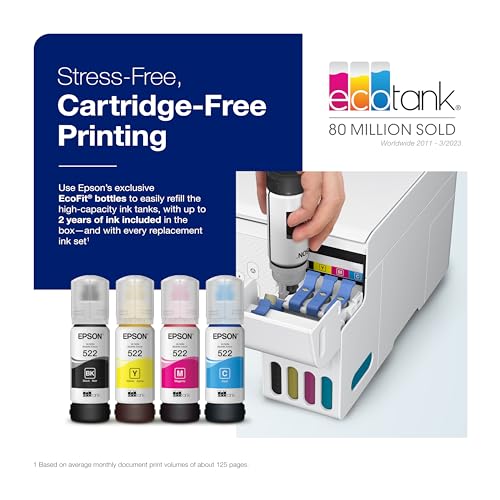
- •Innovative Cartridge-Free Printing ― High-capacity ink tanks mean no more tiny, expensive ink cartridges; Epson's exclusive EcoFit ink bottles make filling easy and worry-free
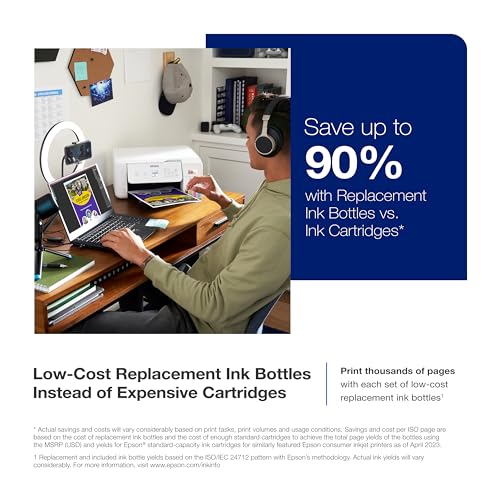
- •Dramatic Savings on Replacement Ink ― Save up to 90% with replacement ink bottles vs. ink cartridges (1) – that's enough to print up to 4,500 pages black/7,500 color (2), equivalent to about 90 individual ink cartridges (3)
- •Stress-Free Printing — Up to 2 years of ink in the box (4) – and with every replacement ink set – for fewer out of ink frustrations
- •Zero Cartridge Waste – By using an EcoTank printer, you can help reduce the amount of cartridge waste ending up in landfills
- •Impressive Print Quality ― Unique Micro Piezo Heat-Free Technology produces sharp text – plus impressive color photos and graphics – on virtually any paper type
- •Built-in Scanner & Copier ― High-resolution flatbed scanner and a color display for easy document copying and navigation
Epson EcoTank ET-2803 Wireless Color All-in-One Cartridge-Free Supertank Printer with Scan, Copy and AirPrint Support
List Price: $260.45$234.41DEALYou Save: $26.04 (10%)
Free shippingFree Returns – 30 daysFree Order CancellationSecure Payment2–3 Days DeliveryGet It October 26, 2026In Stock (30)No marketing spamNo account requiredFulfilment by FedEx / Amazon / UPS / ShipwirePayPal / Card Buyer Protection
Customer Reviews
Reviews sourced from verified Amazon purchasers4.5
out of 5
Based on 10 reviews
5★
70%
4★
30%
3★
0%
2★
0%
1★
0%
Epson ET 2803 **EXCELLENT PRODUCT!
Lola✓ Verified Purchase•September 30, 2023
So, I am giving 3 stars only because it took more than 20-25 tries to get the ink to come through at setup. That being said, the print quality is great! The ink supply L A S T S period! This was a gift to my mother, who at this time is printing thousands of pages of genealogy for our family. The ink seems to have an endless supply for each ink well! The black ink does go down just a little more than the other colors, but, it has lasted like I said, through thousands of pages! She has not refilled the ink wells as of yet from the initial setup fill (Dec 25th, 2022). Needless to say, she has received MUCH MUCH MORE from the ET 2803 than she did from 3 other HP products with ink cartridges!! She has spent sooo much money on ink cartridges (more than $2,000 in the last 2 months!). I KNOW without a doubt, she will definitely not have to spend anything close to that with this product! Excellent Product! Thank you, Epson for giving my mother so much joy!
Minimum deliverable build quality, but works for sublimation. Conditionally Recommended
C. Okamuro✓ Verified Purchase•September 1, 2023
I've had a number of Epson printers over the years, starting with a 9-pin FX dot-matrix, and ending with a Stylus Photo R3000. While I never expected to get back into low-end inkjet printers again, my wife's foray into sublimation printing brought me to the Epson EcoTank ET-2803.
At first glance, you realize that the ET-2803 is an exercise in cost cutting taken to the extreme. For about $250 you get a paper handling mechanism, a print head, a flatbed scanner, an ink delivery system, wireless connectivity, a screen, and actual interface buttons. Oh, and it's all jammed in a cheap plastic box. Despite that, and the fact that the screen is the size of a postage stamp, the entire package works. It's hard to know longevity on something like this, but I'd imagine that it will survive long enough to go through a few maintenance tanks. What's a maintenance tank, you ask? More on that later...
As far as the setup of the ET-2803 goes, there's very little to it. Unfurl the printer, load the ink, and let it go through the process of drawing the ink down the tubes - you're in business in less than 10 minutes. Things were a little different for me because I didn't load the OEM ink, and instead opted to put in Hippoo sublimation ink. I have seen the ET-2083's OEM ink performance on plain and glossy paper. It's fine, but not great. Printing is fast, but does not yield sharp text OR photo-realistic prints. This makes sense, as the ET-2803 has a cheap printhead, and the printer is only working with 3 colors (plus black). The driver is pretty barebones, not really allowing for much in terms of settings adjustment. While this may be good for the plug-and-play crowd, it really doesn't do you any favors when trying to dial in the quality of your printed output.
I definitely have had some clogging issues with my printer, but acknowledge that is probably due to the 3rd-party ink that I've put in my printer, and not an inherent problem with the Epson. I mention it, though, because I have run through the various cleaning procedures on the printer's maintenance menu. The design of the printer incorporates a "last-resort" cleaning method, beyond normal head cleaning, that flushes all of the ink in the tubes into the maintenance box. That's a LOT of ink. I don't imagine most users will run a power clean, but it may be necessary if your printer sits unused for long periods. If you do run the power clean, plan to go through ink more quickly than expected, and expect to replace your maintenance tank within your printer's lifespan (fortunately, it's not difficult or expensive).
My issues with the ET-2803 are likely self-inflicted through the use of sublimation ink. The ET-2803 is an OK sublimation printer, and is one of the least expensive ways to enter the hobby. As far as a general-use printer goes, the ET-2803 is a mixed bag. Consumables are much less expensive than cartridge-based inkjet printers, which is great. Print quality is usable, but not great. The main thing is that this printer makes sense in some use cases, but not in others. For example, if you print semi-regularly, occasionally scan, and sometimes need color printing, this is a good choice. If you want to dabble with sublimation printing, this is a entry-level choice. However, if you rarely print, you're probably better off with a b/w laser printer. Conditionally Recommended
At first glance, you realize that the ET-2803 is an exercise in cost cutting taken to the extreme. For about $250 you get a paper handling mechanism, a print head, a flatbed scanner, an ink delivery system, wireless connectivity, a screen, and actual interface buttons. Oh, and it's all jammed in a cheap plastic box. Despite that, and the fact that the screen is the size of a postage stamp, the entire package works. It's hard to know longevity on something like this, but I'd imagine that it will survive long enough to go through a few maintenance tanks. What's a maintenance tank, you ask? More on that later...
As far as the setup of the ET-2803 goes, there's very little to it. Unfurl the printer, load the ink, and let it go through the process of drawing the ink down the tubes - you're in business in less than 10 minutes. Things were a little different for me because I didn't load the OEM ink, and instead opted to put in Hippoo sublimation ink. I have seen the ET-2083's OEM ink performance on plain and glossy paper. It's fine, but not great. Printing is fast, but does not yield sharp text OR photo-realistic prints. This makes sense, as the ET-2803 has a cheap printhead, and the printer is only working with 3 colors (plus black). The driver is pretty barebones, not really allowing for much in terms of settings adjustment. While this may be good for the plug-and-play crowd, it really doesn't do you any favors when trying to dial in the quality of your printed output.
I definitely have had some clogging issues with my printer, but acknowledge that is probably due to the 3rd-party ink that I've put in my printer, and not an inherent problem with the Epson. I mention it, though, because I have run through the various cleaning procedures on the printer's maintenance menu. The design of the printer incorporates a "last-resort" cleaning method, beyond normal head cleaning, that flushes all of the ink in the tubes into the maintenance box. That's a LOT of ink. I don't imagine most users will run a power clean, but it may be necessary if your printer sits unused for long periods. If you do run the power clean, plan to go through ink more quickly than expected, and expect to replace your maintenance tank within your printer's lifespan (fortunately, it's not difficult or expensive).
My issues with the ET-2803 are likely self-inflicted through the use of sublimation ink. The ET-2803 is an OK sublimation printer, and is one of the least expensive ways to enter the hobby. As far as a general-use printer goes, the ET-2803 is a mixed bag. Consumables are much less expensive than cartridge-based inkjet printers, which is great. Print quality is usable, but not great. The main thing is that this printer makes sense in some use cases, but not in others. For example, if you print semi-regularly, occasionally scan, and sometimes need color printing, this is a good choice. If you want to dabble with sublimation printing, this is a entry-level choice. However, if you rarely print, you're probably better off with a b/w laser printer. Conditionally Recommended
Good printer
Buster The Buzzard✓ Verified Purchase•August 23, 2023
I bought my printer a few weeks ago, it was easy to set up, and prints ok.
My only concern is with the print quality on pictures, that all has white lines through them.
If anyone else has had this problem, please let me know how you fixed it.
My only concern is with the print quality on pictures, that all has white lines through them.
If anyone else has had this problem, please let me know how you fixed it.
Ink Saver!!
Kelly B✓ Verified Purchase•July 22, 2023
Not a high dollar unit, but boy is it a money saver when it comes to the ink!
Waited for a model affordable for occasional use
JR✓ Verified Purchase•July 14, 2023
Normally print 10 pages a week. Previous model Fx410 I used after market ink cartridges. Even they were relatively inexpensive in comparison for the low usage. 6 months and working well at low volume use.
Epson s are good value for quality and ease of use.
Epson s are good value for quality and ease of use.
Page 1 of 2


