Meta Quest 3 512GB — The Most Powerful Quest — Ultimate Mixed Reality Experiences — Get a 3-Month Trial of Meta Horizon+ Included



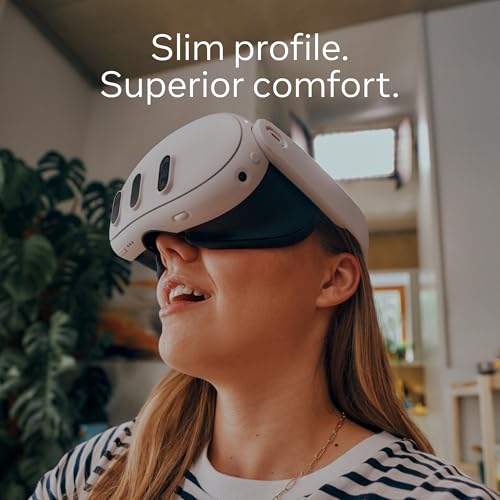
Key features
- •Get epic games when you buy Meta Quest 3 512GB — including the new Asgard's Wrath 2 (a $59.99 value)* and 2 free games a month with a 6-month Meta Quest+ trial (a $47.99 value)*
- •Dive into extraordinary experiences with a mixed reality headset that transforms your home into an exciting new playground, where virtual elements blend into your actual surroundings.
- •It's the most powerful Quest yet*, featuring next-level performance with more than double the graphic processing power of Quest 2. (*Based on the graphic performance of the Snapdragon XR2 Gen 2 vs Meta Quest 2.)
- •Experience more immersion with dazzling visuals with the 4K+ Infinite Display (a nearly 30% leap in resolution from Quest 2) and rich 3D audio with enhanced sound clarity, bass performance and a 40% louder volume range than Quest 3
- •Reach out and touch virtual worlds with Touch Plus controllers that give you fine-tuned precision, realistic sensations and more intuitive interactions. You can even navigate without controllers with Direct Touch that follows your gestures, so you can use just your hands to find your way.
- •Explore the world's best library of 500+ immersive apps and find your favorite content across gaming, fitness, wellness, entertainment, social experiences and more.
Meta Quest 3 512GB — The Most Powerful Quest — Ultimate Mixed Reality Experiences — Get a 3-Month Trial of Meta Horizon+ Included
List Price: $727.49$654.74DEALYou Save: $72.75 (10%)
Free shippingFree Returns – 30 daysFree Order CancellationSecure Payment2–3 Days DeliveryGet It October 25, 2026In Stock (7)No marketing spamNo account requiredFulfilment by FedEx / Amazon / UPS / ShipwirePayPal / Card Buyer Protection
Customer Reviews
Reviews sourced from verified Amazon purchasers4.4
out of 5
Based on 10 reviews
5★
90%
4★
10%
3★
0%
2★
0%
1★
0%
I've had 'em all - This is BIG WIN!
JC✓ Verified Purchase•November 18, 2023
So, I started with the original Oculus Developer Kit 1, then on to 2, then the consumer Rift, Rift S, Quest 2, and temporarily had a Quest Pro (a great piece of tech, but too expensive..returned in 1 week). We've come a long way with Quest 3....
- The clarity of the new "pancake" lenses are a marvel after dealing for years with the now primitive, Fresnel lenses. No more having to reposition the flipping headset around, over and over just to find that one tiny spot of clarity while their outer area remains blurry. These flat pancake lenses are just super clear all around, from edge to edge.
- The resolution bump from the Q2 is another nice welcome. The blacks are not jet black like you would find on an OLED screen (like the PlayStation VR2), but that would bring the cost up. When you're playing games or experiences, you won't even be thinking about it. Would you rather have fresnel lenses like PS2VR? I don't think so. In addition to these new features, the fieild of view has widened on Quest 3, another upgrade that makes a difference.
- The sound is beefier and louder. No more tin can alley like the Q2, and the fantastic spatial sound adds more to the immersion. I went back and played some older games, finding sounds that I've never quite heard on Quest 2, which really surprised me. The haptics are also very much improved over the Q2, though not as potent as I would have liked. The Pro controllers are more advanced in this department, as is the PSVR2.
- The controller wrap around rings over the hands are a thing of the past, and good riddance. These controllers feel great, and track without a hitch. I'm super glad that they are sticking to regular AAA batteries for the controllers. They last a sick amount of time, as opposed to the Quest Pro controllers which are rechargeable. Some people prefer that style, but I prefer having to simply replace batteries and continue playing, rather than waiting for yet another device to recharge Plus, I remember getting overheating warnings with the Pro Controllers, and they never felt warm. If you didn't put the controllers down for a bit, the warning would not go away. There's a number of complaints about this odd issue in the Oculus forums. Not sure if they fixed this by now, but I do remember the Oculus mods being dumbfounded by this ordeal.
The Mixed Reality / Passthrough
As someone who's been around the tech industry for over 35 years, this is a new level of entertainment. Mixed Reality puts virtual objects right in your real space. Imagine sitting on your couch, viewing your entire room, while watching a spaceship break through your ceiling and land on your couch. Following that, you'll view in amazement as alien fuzzballs start breaking apart the walls to your surroundings, trying to get in, while revealing a complete alien landscape as you race to catch those critters with the supplied blaster as they pop in and land on your floor, and furniture! You have to see it to believe it. You're still in your room, but now all the walls have been blown out. This all works convincingly thanks to the new room scanning feature, which is something right out of the Matrix. You simply walk and look around your room(s) as it automatically detects walls and obstacles during setup.
How about playing a dungeon crawling board game ON YOUR ACTUAL TABLE, or break into a sweat as zombies smash through your doorways, and climb in from the windows. If that's too much, then why not set up a giant TV screen that would dwarf the real TV in your room. Dozens of games and apps already have been updated to support mixed reality, so there's already many things to try out. Every day seems to bring more.
The beauty of Mixed Reality is that you're not fully engulfed in Virtual Reality. You're still seeing all of your real world, but the virtual stuff comes to you! This is a wonderful way to introduce newcomers to VR who may not feel comfortable completely cut off from their surroundings. So, now you can exercise with a virtual trainer, box against a computer opponent in your own living room, or explore your house which can be haunted with ghosts. All this can be done without worrying about kicking your dog, watching if your baby wanders away or smashing your skull into a real TV set. One other advantage, it cuts down the possibility of motion sickness which can be a problem for certain people. The one big complaint about mixed reality - the passthrough is kind of fuzzy, so your real world has kind of a grainy film over it, and when combined with the stunning virtual objects, there's a stark difference. Good lighting helps the situation, but ultimately, it becomes a non-issue because once your play area is combined with the virtual world, you won't even be much concerned about the quality; your room becomes the backdrop as your eyes are mainly focused on the virtual parts, leaving the whole mix to be quite convincing, and for this price point, to have this feature? Are you kidding me? It's amazing!
Of course, you can alway play in total virtual reality, because that's still the popular choice for hardcore VR enthusiasts. Speaking of which, I've seen many comments on various forums where VR veterans were knocking mixed reality, saying things like "who wants this? I don't need mixed reality, I will only play in complete Virtual". After a few days, I already saw a change of heart. Now it's, "oh wow, I never thought I'd get into this, now I want more!". Yeah, mixed reality is here to stay and grow.
The comfort
Well, here's where I personally find a negative. The default strap provided with the Meta Quest 3 is similar to the strap on the Quest 2, however, this has a bit more stability, with its adjustable Y-shaped back. It's one of those things, you try on, and think - oh, this isn't bad at all, only to find shortly after, either your forehead, cheeks or both feel a bit too much pressure. It's not as bad as the Quest 2, as the Quest 3, doesn't protrude as much, due to its new design, but it's no way good for long play sessions. I simply purchased a 3rd Party Elite-style strap on Amazon.. so mission accomplished there as it's a very comfortable, halo-style ($37.00) which is the way to go.
Battery life
...is still short - around two hours, though some complained it's even shorter. I tend to use an ultra-long C cable plugged into an Anker power supply and I can go all day, and only take it off if I'm playing something like Beat Saber, or anything else that requires a lot of crazy hand movements.
PCVR
Like its predecessor, the Q3 will work with your PC Oculus and Steam VR games, providing you have a powerful PC. With the new resolution, wider FOV and lenses, PCVR games look better than ever!
Overall - I absolutely love the Quest 3, even my spouse who had no interest in VR was amazed by the mixed reality and now wants one as well.
- The clarity of the new "pancake" lenses are a marvel after dealing for years with the now primitive, Fresnel lenses. No more having to reposition the flipping headset around, over and over just to find that one tiny spot of clarity while their outer area remains blurry. These flat pancake lenses are just super clear all around, from edge to edge.
- The resolution bump from the Q2 is another nice welcome. The blacks are not jet black like you would find on an OLED screen (like the PlayStation VR2), but that would bring the cost up. When you're playing games or experiences, you won't even be thinking about it. Would you rather have fresnel lenses like PS2VR? I don't think so. In addition to these new features, the fieild of view has widened on Quest 3, another upgrade that makes a difference.
- The sound is beefier and louder. No more tin can alley like the Q2, and the fantastic spatial sound adds more to the immersion. I went back and played some older games, finding sounds that I've never quite heard on Quest 2, which really surprised me. The haptics are also very much improved over the Q2, though not as potent as I would have liked. The Pro controllers are more advanced in this department, as is the PSVR2.
- The controller wrap around rings over the hands are a thing of the past, and good riddance. These controllers feel great, and track without a hitch. I'm super glad that they are sticking to regular AAA batteries for the controllers. They last a sick amount of time, as opposed to the Quest Pro controllers which are rechargeable. Some people prefer that style, but I prefer having to simply replace batteries and continue playing, rather than waiting for yet another device to recharge Plus, I remember getting overheating warnings with the Pro Controllers, and they never felt warm. If you didn't put the controllers down for a bit, the warning would not go away. There's a number of complaints about this odd issue in the Oculus forums. Not sure if they fixed this by now, but I do remember the Oculus mods being dumbfounded by this ordeal.
The Mixed Reality / Passthrough
As someone who's been around the tech industry for over 35 years, this is a new level of entertainment. Mixed Reality puts virtual objects right in your real space. Imagine sitting on your couch, viewing your entire room, while watching a spaceship break through your ceiling and land on your couch. Following that, you'll view in amazement as alien fuzzballs start breaking apart the walls to your surroundings, trying to get in, while revealing a complete alien landscape as you race to catch those critters with the supplied blaster as they pop in and land on your floor, and furniture! You have to see it to believe it. You're still in your room, but now all the walls have been blown out. This all works convincingly thanks to the new room scanning feature, which is something right out of the Matrix. You simply walk and look around your room(s) as it automatically detects walls and obstacles during setup.
How about playing a dungeon crawling board game ON YOUR ACTUAL TABLE, or break into a sweat as zombies smash through your doorways, and climb in from the windows. If that's too much, then why not set up a giant TV screen that would dwarf the real TV in your room. Dozens of games and apps already have been updated to support mixed reality, so there's already many things to try out. Every day seems to bring more.
The beauty of Mixed Reality is that you're not fully engulfed in Virtual Reality. You're still seeing all of your real world, but the virtual stuff comes to you! This is a wonderful way to introduce newcomers to VR who may not feel comfortable completely cut off from their surroundings. So, now you can exercise with a virtual trainer, box against a computer opponent in your own living room, or explore your house which can be haunted with ghosts. All this can be done without worrying about kicking your dog, watching if your baby wanders away or smashing your skull into a real TV set. One other advantage, it cuts down the possibility of motion sickness which can be a problem for certain people. The one big complaint about mixed reality - the passthrough is kind of fuzzy, so your real world has kind of a grainy film over it, and when combined with the stunning virtual objects, there's a stark difference. Good lighting helps the situation, but ultimately, it becomes a non-issue because once your play area is combined with the virtual world, you won't even be much concerned about the quality; your room becomes the backdrop as your eyes are mainly focused on the virtual parts, leaving the whole mix to be quite convincing, and for this price point, to have this feature? Are you kidding me? It's amazing!
Of course, you can alway play in total virtual reality, because that's still the popular choice for hardcore VR enthusiasts. Speaking of which, I've seen many comments on various forums where VR veterans were knocking mixed reality, saying things like "who wants this? I don't need mixed reality, I will only play in complete Virtual". After a few days, I already saw a change of heart. Now it's, "oh wow, I never thought I'd get into this, now I want more!". Yeah, mixed reality is here to stay and grow.
The comfort
Well, here's where I personally find a negative. The default strap provided with the Meta Quest 3 is similar to the strap on the Quest 2, however, this has a bit more stability, with its adjustable Y-shaped back. It's one of those things, you try on, and think - oh, this isn't bad at all, only to find shortly after, either your forehead, cheeks or both feel a bit too much pressure. It's not as bad as the Quest 2, as the Quest 3, doesn't protrude as much, due to its new design, but it's no way good for long play sessions. I simply purchased a 3rd Party Elite-style strap on Amazon.. so mission accomplished there as it's a very comfortable, halo-style ($37.00) which is the way to go.
Battery life
...is still short - around two hours, though some complained it's even shorter. I tend to use an ultra-long C cable plugged into an Anker power supply and I can go all day, and only take it off if I'm playing something like Beat Saber, or anything else that requires a lot of crazy hand movements.
PCVR
Like its predecessor, the Q3 will work with your PC Oculus and Steam VR games, providing you have a powerful PC. With the new resolution, wider FOV and lenses, PCVR games look better than ever!
Overall - I absolutely love the Quest 3, even my spouse who had no interest in VR was amazed by the mixed reality and now wants one as well.
WOW!!! Improves upon the Quest 2 in almost every way
Theo✓ Verified Purchase•November 4, 2023
Disclosure: I paid for this item with my own money
Sixteen months ago, I bought a Q2 [for PCVR¹, thus far the native apps aren't of interest] and didn't use it as much as I'd expected.² With this in mind, frankly, I had some serious reservations about getting a Q3, but now that I have one in hand and can compare them side-by-side, I've ZERO regrets.
😺 Resolution: improved, but not enough to be the sole reason to upgrade.
I can still, just barely, see the space between pixels. The rendering of small text elements is more readable as they are better formed and there is less shimmer.
😻 Lenses: WOW!
The difference in clarity between the Q2's Fresnel lenses and the Q3's pancake optics is night and day. Not only is the clarity improved, but the "sweet-spot" is huge in comparison. Definitely a reason to upgrade.
😺 Field of View: noticeably improved both horizontally and vertically.
While still constrained, it feels less like I'm viewing the world through a scuba mask.
😿 Contrast: comparable
Black is still dark grey. I really wish they had used micro-LED (as they did on the QPro) or OLED displays.
😻 Pass through cameras: a significant QoL improvement
As a glasses wearer (I bought a set of third party prescription lens inserts), it's really nice not to have to take off the headset to do a lot of things which, on the Q2 required removing the headset, putting on my glasses, doing the thing, taking off my glasses, putting the headset back on, and adjusting it for comfort. I should acknowledge that a privacy/security minded individual might well find the improved pass through cameras disturbing. You may find yourself, as I did, doing things like unlocking your phone or entering your computer's password with the headset on. 😬😬😬😬
😻 IPD settings: significantly improved
The Q3 offers fine grained control, while the Q2 coarse-grained control gives you a choice of just 3 settings.
😠Controllers: neutral
I liked the rings on the Q2's because they served as built-in stands; there are no rings on the Q3's. Otherwise, they feel good in the hand and work just fine.
Things I've not specifically tested, but are noted in the reviews I've read while doing my pre-purchase research:
"¢ battery life: reportedly worse than on the Q2
"¢ sound quality: reportedly worse than on the Q2
"¢ eye-relief mechanism: the Q3 has a built-in mechanism to adjust the lens distance, while the Q2 required the installation of spacers
"¢ native gaming experience: the Q3 reportedly has 2.6X GPU power and 2.1X CPU power as the Q2
Overall: while I'm sad there weren't any BF/CM deals for the base model Q3, at $500+tax, it's a still terrific bargain. It's a shame about the contrast though 😹
BTW: setup requires pairing with the Oculus app on your phone. Neither the app nor the screen in the headset tells you that the phone must be connected to the same wifi network as the Q3 AND bluetooth must be enabled. I didn't have wifi enabled and couldn't figure out why it wouldn't pair until a trip to the interwebs revealed the fix.
_____
¹ "” For PCVR I'm using Virtual Desktop. Some folks swear by Meta's own Quest Link (some preferring the WiFi version, others, the wired version using USB), but it seems they are predominately owners of Green Team graphics cards. I've got a Red Team 6800XT and Virtual Desktop gives me the best results by far. To minimize latency, the headset is connected directly to the PC, which is hosting a dedicated hotspot. I've not tried yet Quest Link with the Q3, but Virtual Desktop handles it just fine. [A curious aside: on my system, Virtual Desktop's "HVEC 10-bit" encoder, which graphically is better than the plain "HVEC" encoder, also has a lower latency!]
² "” Considering the price I paid vis-à -vis. what it can do, I still regard the Q2 as a true bargain. In a sense, even its limitations were a positive, because it made me aware of what I wanted out of my next headset.
Sixteen months ago, I bought a Q2 [for PCVR¹, thus far the native apps aren't of interest] and didn't use it as much as I'd expected.² With this in mind, frankly, I had some serious reservations about getting a Q3, but now that I have one in hand and can compare them side-by-side, I've ZERO regrets.
😺 Resolution: improved, but not enough to be the sole reason to upgrade.
I can still, just barely, see the space between pixels. The rendering of small text elements is more readable as they are better formed and there is less shimmer.
😻 Lenses: WOW!
The difference in clarity between the Q2's Fresnel lenses and the Q3's pancake optics is night and day. Not only is the clarity improved, but the "sweet-spot" is huge in comparison. Definitely a reason to upgrade.
😺 Field of View: noticeably improved both horizontally and vertically.
While still constrained, it feels less like I'm viewing the world through a scuba mask.
😿 Contrast: comparable
Black is still dark grey. I really wish they had used micro-LED (as they did on the QPro) or OLED displays.
😻 Pass through cameras: a significant QoL improvement
As a glasses wearer (I bought a set of third party prescription lens inserts), it's really nice not to have to take off the headset to do a lot of things which, on the Q2 required removing the headset, putting on my glasses, doing the thing, taking off my glasses, putting the headset back on, and adjusting it for comfort. I should acknowledge that a privacy/security minded individual might well find the improved pass through cameras disturbing. You may find yourself, as I did, doing things like unlocking your phone or entering your computer's password with the headset on. 😬😬😬😬
😻 IPD settings: significantly improved
The Q3 offers fine grained control, while the Q2 coarse-grained control gives you a choice of just 3 settings.
😠Controllers: neutral
I liked the rings on the Q2's because they served as built-in stands; there are no rings on the Q3's. Otherwise, they feel good in the hand and work just fine.
Things I've not specifically tested, but are noted in the reviews I've read while doing my pre-purchase research:
"¢ battery life: reportedly worse than on the Q2
"¢ sound quality: reportedly worse than on the Q2
"¢ eye-relief mechanism: the Q3 has a built-in mechanism to adjust the lens distance, while the Q2 required the installation of spacers
"¢ native gaming experience: the Q3 reportedly has 2.6X GPU power and 2.1X CPU power as the Q2
Overall: while I'm sad there weren't any BF/CM deals for the base model Q3, at $500+tax, it's a still terrific bargain. It's a shame about the contrast though 😹
BTW: setup requires pairing with the Oculus app on your phone. Neither the app nor the screen in the headset tells you that the phone must be connected to the same wifi network as the Q3 AND bluetooth must be enabled. I didn't have wifi enabled and couldn't figure out why it wouldn't pair until a trip to the interwebs revealed the fix.
_____
¹ "” For PCVR I'm using Virtual Desktop. Some folks swear by Meta's own Quest Link (some preferring the WiFi version, others, the wired version using USB), but it seems they are predominately owners of Green Team graphics cards. I've got a Red Team 6800XT and Virtual Desktop gives me the best results by far. To minimize latency, the headset is connected directly to the PC, which is hosting a dedicated hotspot. I've not tried yet Quest Link with the Q3, but Virtual Desktop handles it just fine. [A curious aside: on my system, Virtual Desktop's "HVEC 10-bit" encoder, which graphically is better than the plain "HVEC" encoder, also has a lower latency!]
² "” Considering the price I paid vis-à -vis. what it can do, I still regard the Q2 as a true bargain. In a sense, even its limitations were a positive, because it made me aware of what I wanted out of my next headset.
The Quest 3 is the best looking headset under $1000, it's worth it even if you only ever use PCVR.
Compton✓ Verified Purchase•November 3, 2023
Buy the Quest 3, DO NOT BUY THE QUEST 2. I still use my Quest 2 it's great but I don't care how cheap it is, the Quest 3 is that much better in both performance and visuals. Even games not updated still look and play smoother. The Quest 3 is good enough to get into VR gaming without a PC. The Quest 1 felt like a gimmick , the Quest 2 was good but still felt compromised but the Quest 3 (while obviously not as a good the average PCVR gaming pc) is able to get much closer and provide a PCVR like experience on newer games. Mixed reality was not something I was interested in but after trying it I think it's awesome, even if you consider it a gimmick it's very cool and fun tech. As someone who really only cared about PC based VR gaming I've been very impressed with the Quest 3. After going on a VR binge in 2019 and some of 2020 I've mostly only played VRChat now but because of the Quest 3 I started exploring VR games again trying out new and old games and even mixed reality stuff too. It's that good but I'd recommend an aftermarket headstrap. The included headstrap seems pretty bad but if you fiddle with it A LOT it can get comfy. Also I returned my 128GB model and bought the 512GB one. It should not cost that much more in price but honestly there's so much cool stuff and games are slowly getting bigger. If you have fast internet , you can buy the 128GB and be fine.
There's tons of amateur and professional unboxing videos of the Quest 3 that you can look at if you want to see what it looks like. As for what it's like to buy and own it? It's amazing.
Background info: I've been a computer based VR player since 2017 when I got the original Oculus Rift also known as the CV1 on a Black Friday sale. Since then I've bought an Index in 2020 with vive trackers for full body tracking, a Quest 1 as a backup headset, a Quest 2 and now a Quest 3. I have about 6000 hours in VR 5000 of that is in VRChat.
Review: The Quest 3 is incredible. It's my first VR headset that uses pancake lens and it's beautiful. I dabbled in standalone gaming on my Quest 2 with games like Resident Evil 4 VR and Iron Man VR which were both great. Iron Man felt a little held back resolution wise with aggressive foveated rendering BUT THE Quest 3 fixes that mostly with higher resolution in literally everything. Everything from the interface to all old and new games feel snappy. I started playing mixed reality mini games like the Ghost Busters one and Synth Riders and the free built in Alien one and everything has been super cool. it's all surprisingly fun. Audio is also great, about as good as the Index. The whole thing feels more reliable though as my Index cable is annoying with how heavy and thick it is. I'm on my third cable in 3 years and still the Index needs to be unplugged sometimes to make it work. I've had no such problems on my Quest 2 and Quest 3. The only reason I still use my Index is for easy full body tracking in VRChat otherwise I play everything on my Quest 3.
There's tons of amateur and professional unboxing videos of the Quest 3 that you can look at if you want to see what it looks like. As for what it's like to buy and own it? It's amazing.
Background info: I've been a computer based VR player since 2017 when I got the original Oculus Rift also known as the CV1 on a Black Friday sale. Since then I've bought an Index in 2020 with vive trackers for full body tracking, a Quest 1 as a backup headset, a Quest 2 and now a Quest 3. I have about 6000 hours in VR 5000 of that is in VRChat.
Review: The Quest 3 is incredible. It's my first VR headset that uses pancake lens and it's beautiful. I dabbled in standalone gaming on my Quest 2 with games like Resident Evil 4 VR and Iron Man VR which were both great. Iron Man felt a little held back resolution wise with aggressive foveated rendering BUT THE Quest 3 fixes that mostly with higher resolution in literally everything. Everything from the interface to all old and new games feel snappy. I started playing mixed reality mini games like the Ghost Busters one and Synth Riders and the free built in Alien one and everything has been super cool. it's all surprisingly fun. Audio is also great, about as good as the Index. The whole thing feels more reliable though as my Index cable is annoying with how heavy and thick it is. I'm on my third cable in 3 years and still the Index needs to be unplugged sometimes to make it work. I've had no such problems on my Quest 2 and Quest 3. The only reason I still use my Index is for easy full body tracking in VRChat otherwise I play everything on my Quest 3.
A billion times better than the Quest 2.
shopathomeguy✓ Verified Purchase•October 25, 2023
Update: Five Weeks Later
The Quest 2 was so unbearably painful and uncomfortable for me, no matter what I did, that I ended up returning it a day later.
I was actually afraid that the Quest 3 wasn't worth getting because it weighs the same as the Quest 2, even 12 grams more.
But the Quest 3, with its default strap, is wonderful to wear. It doesn't feel heavy at all. I like how the facial interface, headset weight, and straps feel. I can wear the Quest 3 for many hours, maybe even the entire day. If I do feel some discomfort, I can easily and quickly adjust the headset so that the pressure points are relocated to somewhere else.
I originally didn't care about passthrough and foolishly wished that they had made a lighter headset without the upgraded passthrough, but now passthrough is everything to me. It let's me be entertained and productive while also being fully aware of my surroundings. Some games and apps that I have used with passthrough are Immersed, Virtual Desktop, Eleven Table Tennis, and Meta Quest Browser for AR female hologram eye candy. One of the first AR games that I tried is a free game called First Encounters. It's a game where the walls of your house become cracked, exposing another world in another dimension, and these furry spaceball creatures jump through that world into your house and you have to capture as many as you can within a time limit.
Another thing that I like about the Quest 3 is that there is a smart guardian. On the Quest 2, if you step outside a small circle, you get kicked out of the app that you were using and get told to create a new boundary. On the Quest 3, I have my entire house as my boundary. Well, to be specific, I only drew the boundary in the rooms that I needed. So for me, the boundary including my living room, kitchen, bathroom, and hallways in between. It's so great to be able to walk around the entire apartment and be able to continue using my VR and AR apps with no interruptions.
I bought the 128 GB version, and it seems to be good enough for me. If there had been a 256 GB version, I might have bought that, but I didn't think I would need a 512 GB version and I think that is definitely still true for me. Even as time goes by and more and more interesting apps become available, I don't think that I will regret my decision and wish that I had more memory. It's super fast and easy to uninstall and reinstall apps, so that's a way to manage memory if I start running out of room. Out of the 128 GB, 18 GB is being used for System apps, but one month later I have installed around 30 apps and games and I still have 51 GB available. Of those 30 apps and games that I installed, there are less than 10 that I am sure that I will keep installed and the other 20 will eventually be uninstalled and replaced by different apps.
I can use some apps while lying down, like Immersed, Virtual Desktop, Meta Quest Browser, and DeoVR. I love how I can see and use apps when I am doing exercises or I have my face buried in a yoga mat. The Quest 3 may end up being a life changer and game changer for me. It might help me be way more productive and it might make me a happier person in general.
The Quest 3 is something that every single person on this planet should get if they can afford it. It cost me $499 plus tax and came to $533. I didn't think that I would need any additional accessories, and one month later that is still true for me. I don't need a different headstrap or extra battery packs. I just use an extension cord in which I plug in the default Quest 3 wall charger and link cable. The extension cord that I use is a 15-feet one that I bought seven years ago for $15 (https://www.amazon.com/gp/product/B0000BYC1I) and it lets me go into every room in the house without unplugging the cord or the Quest 3 cable. I wear a velcro back brace during the day because of my bad back, and I just tuck the extension cord into the front part of my back brace. I saw advertisements for VR Covers to keep the interface clean, but even though I have been using the headset every day I don't feel like my interface has become gross or unhygienic. It still looks and feels new.
Battery life while plugged in is good. On some apps and games, the battery level stays around the same. On other games and apps, there is a drain while the Quest 3 is plugged in but I usually play a long time and then take a break when the battery gets down to 80%. I can only imagine how many hours of gameplay I would get if I let the battery drain all the way to 5%. Too many hours. I would never play that long. I definitely do not suggest using the Quest 3 unplugged. Two hours goes by too fast, and that is two hours maximum. If you are using AR and passthrough stuff, or some demanding apps and games, it could be a lot less than that like 0.5 to 1.5 hours.
I just can't get over how great the Quest 3 is. I hated the Quest 2. I don't know what other VR headsets are like, but the fact that most of them at least 200 grams heavier doesn't appeal to me. But the Quest 3 is delightful.
Some apps and games that I really like are as follows...
Virtual Desktop. I prefer it over the Oculus Link. If you decide to use Virtual Desktop, you only need to buy the Quest version (don't buy the Steam version), and then go to the computer browser Virtual Desktop website and download the free Streamer App for your PC. The free Virtual Desktop Streamer App lets you stream your PCVR games to your Quest headset, wirelessly. By the way, wireless does not have any lag or loss of performance, so don't think that you need a cable to connect your Quest 3 to your computer for PCVR gaming. It's better to use a wireless connection. It has been advised to have a good WIFI router and to use an Ethernet Cable to connect your WIFI router to your PC. I did use an Ethernet Cable, but my router is a four year old ARRIS SURFboard SBG6900AC Docsis 3.0 16x4 Cable Modem/ Wi-Fi AC1900 Router that I bought for $106 and it works well, so maybe you don't need the best WIFI routers. Virtual Desktop lets you have a virtual desktop in passthrough mode, but Immersed lets you too and in Immersed you can have up to four computer screens and you get to be around other users and their avatars. I still use Virtual Desktop for the head lock feature, which keeps the desktop screen in front of your face no matter what direction are are facing or where you move or walk to. I use it to read manhua while walking around the house for exercise. I am hoping that the headlock feature will be added to Immersed soon.
Resident Evil 4. I never cared for any of the RE computer games, but maybe it's because it is VR or something but it truly is fun walking around in a realistic setting. I like the scenery better than Arizona Sunshine or The Walking Dead. The first Red Matter game was great, but sadly it was short and doesn't really have any replay value once you've completed the story. Green Hell looks really interesting. It's a realistic survival game. Survival Nation is a zombie apocalypse RPG game that is sorta interesting if co-op RPG games are your thing. It is a satisfying feeling stabbing zombies in the head with a knife in The Walking Dead: Saints and Sinners. Arizona Sunshine is a decent zombie game. Genotype is a bit interesting. but the texture detail isn't as high as I would like.
For fitness, I like Eleven Table Tennis and FitXR.
I also suggest getting custom app launchers like Lighting Launcher, but also Quest Games Optimizer ($10) which lets you increase the resolution of native apps and games (not PCVR). On QGO, if you increase the resolution of Horizons Home, the environment and mirror you see when you first turn your Quest 3 headset on, there is a remarkable difference.
As far as PCVR goes, I haven't really played much PCVR content. I wanted to play and enjoy Contagion VR: The Outbreak, but I get too much motion sickness from it because the left joystick moves my character way too fast. There is a plugin for SteamVR called OVR Advanced Settings, but the only thing that I like about it is that you can do an emergency y-offset if your character glitches and falls through the floor in PCVR games. It has other features like key binding, but I don't care about changing my controller keybinds. OVR lets you change the snap rotation angle, but I don't like how it is done because you have to use buttons for snap rotation and not the joystick. So instead of tilting the joystick left to rotate left a custom number of degrees and tilting the joystick right to rotate right a custom number of degrees, you'd have to use buttons like A for rotate left and B for rotate right. Really stupid. And not only that but the dev told me he can't let us adjust movement speed, but the reason he gave me was so idiotic and seemed so insincere and untruthful. He said "it will vary game to game..... additionally different acceleration profiles will have drastically different effects on your comfort". It sounds beyond stupid because I was already at extreme discomfort, so being able to adjust the movement speed temporarily would have been a good thing and not at all bad. And I can always change the speed back when I am done. It's not hard to change the speed from 100% to 10% and then back to 100% again.
As far as PCVR gaming goes, I am using the Quest 3 with a Laptop - GTX 1650, i5-9300H, and I haven't had any problems.
One thing about Oculus Link (Wireless) and Oculus Link (Wired) is that they might not work right unless you go to Go to Oculus Desktop App > Settings > Beta > and enable Public Test Channel and let the app update. I don't use Oculus Link, but that is important to know so please make note of it. Some apps and games only work with Oculus Link, like 3DXChat seems to only work with Oculus Link and won't work with Virtual Desktop.
I think that it is kinda weird that the Quest 2 has 85% five star ratings on Amazon, and this Quest 3 which is a billion times better has only 65% five star ratings. If you can't appreciate better technology and advancements, then go have yourself frozen for 50 years and stop discouraging other people to try the Quest 3. Possibly the more people that buy the Quest 3 and use it, the more Meta will devote themselves to VR technology in the future. This could ensure better VR headsets in the future and maybe guarantee more Quest headsets (Quest 4, Quest 5, Quest 6, and so on). I just don't get how everyone had Pintos two years ago, this BMW comes out, and instead of being happy at how much better the BMW is than the Pinto you complain that it isn't a Porsche. Entitled much?
The Quest 2 was so unbearably painful and uncomfortable for me, no matter what I did, that I ended up returning it a day later.
I was actually afraid that the Quest 3 wasn't worth getting because it weighs the same as the Quest 2, even 12 grams more.
But the Quest 3, with its default strap, is wonderful to wear. It doesn't feel heavy at all. I like how the facial interface, headset weight, and straps feel. I can wear the Quest 3 for many hours, maybe even the entire day. If I do feel some discomfort, I can easily and quickly adjust the headset so that the pressure points are relocated to somewhere else.
I originally didn't care about passthrough and foolishly wished that they had made a lighter headset without the upgraded passthrough, but now passthrough is everything to me. It let's me be entertained and productive while also being fully aware of my surroundings. Some games and apps that I have used with passthrough are Immersed, Virtual Desktop, Eleven Table Tennis, and Meta Quest Browser for AR female hologram eye candy. One of the first AR games that I tried is a free game called First Encounters. It's a game where the walls of your house become cracked, exposing another world in another dimension, and these furry spaceball creatures jump through that world into your house and you have to capture as many as you can within a time limit.
Another thing that I like about the Quest 3 is that there is a smart guardian. On the Quest 2, if you step outside a small circle, you get kicked out of the app that you were using and get told to create a new boundary. On the Quest 3, I have my entire house as my boundary. Well, to be specific, I only drew the boundary in the rooms that I needed. So for me, the boundary including my living room, kitchen, bathroom, and hallways in between. It's so great to be able to walk around the entire apartment and be able to continue using my VR and AR apps with no interruptions.
I bought the 128 GB version, and it seems to be good enough for me. If there had been a 256 GB version, I might have bought that, but I didn't think I would need a 512 GB version and I think that is definitely still true for me. Even as time goes by and more and more interesting apps become available, I don't think that I will regret my decision and wish that I had more memory. It's super fast and easy to uninstall and reinstall apps, so that's a way to manage memory if I start running out of room. Out of the 128 GB, 18 GB is being used for System apps, but one month later I have installed around 30 apps and games and I still have 51 GB available. Of those 30 apps and games that I installed, there are less than 10 that I am sure that I will keep installed and the other 20 will eventually be uninstalled and replaced by different apps.
I can use some apps while lying down, like Immersed, Virtual Desktop, Meta Quest Browser, and DeoVR. I love how I can see and use apps when I am doing exercises or I have my face buried in a yoga mat. The Quest 3 may end up being a life changer and game changer for me. It might help me be way more productive and it might make me a happier person in general.
The Quest 3 is something that every single person on this planet should get if they can afford it. It cost me $499 plus tax and came to $533. I didn't think that I would need any additional accessories, and one month later that is still true for me. I don't need a different headstrap or extra battery packs. I just use an extension cord in which I plug in the default Quest 3 wall charger and link cable. The extension cord that I use is a 15-feet one that I bought seven years ago for $15 (https://www.amazon.com/gp/product/B0000BYC1I) and it lets me go into every room in the house without unplugging the cord or the Quest 3 cable. I wear a velcro back brace during the day because of my bad back, and I just tuck the extension cord into the front part of my back brace. I saw advertisements for VR Covers to keep the interface clean, but even though I have been using the headset every day I don't feel like my interface has become gross or unhygienic. It still looks and feels new.
Battery life while plugged in is good. On some apps and games, the battery level stays around the same. On other games and apps, there is a drain while the Quest 3 is plugged in but I usually play a long time and then take a break when the battery gets down to 80%. I can only imagine how many hours of gameplay I would get if I let the battery drain all the way to 5%. Too many hours. I would never play that long. I definitely do not suggest using the Quest 3 unplugged. Two hours goes by too fast, and that is two hours maximum. If you are using AR and passthrough stuff, or some demanding apps and games, it could be a lot less than that like 0.5 to 1.5 hours.
I just can't get over how great the Quest 3 is. I hated the Quest 2. I don't know what other VR headsets are like, but the fact that most of them at least 200 grams heavier doesn't appeal to me. But the Quest 3 is delightful.
Some apps and games that I really like are as follows...
Virtual Desktop. I prefer it over the Oculus Link. If you decide to use Virtual Desktop, you only need to buy the Quest version (don't buy the Steam version), and then go to the computer browser Virtual Desktop website and download the free Streamer App for your PC. The free Virtual Desktop Streamer App lets you stream your PCVR games to your Quest headset, wirelessly. By the way, wireless does not have any lag or loss of performance, so don't think that you need a cable to connect your Quest 3 to your computer for PCVR gaming. It's better to use a wireless connection. It has been advised to have a good WIFI router and to use an Ethernet Cable to connect your WIFI router to your PC. I did use an Ethernet Cable, but my router is a four year old ARRIS SURFboard SBG6900AC Docsis 3.0 16x4 Cable Modem/ Wi-Fi AC1900 Router that I bought for $106 and it works well, so maybe you don't need the best WIFI routers. Virtual Desktop lets you have a virtual desktop in passthrough mode, but Immersed lets you too and in Immersed you can have up to four computer screens and you get to be around other users and their avatars. I still use Virtual Desktop for the head lock feature, which keeps the desktop screen in front of your face no matter what direction are are facing or where you move or walk to. I use it to read manhua while walking around the house for exercise. I am hoping that the headlock feature will be added to Immersed soon.
Resident Evil 4. I never cared for any of the RE computer games, but maybe it's because it is VR or something but it truly is fun walking around in a realistic setting. I like the scenery better than Arizona Sunshine or The Walking Dead. The first Red Matter game was great, but sadly it was short and doesn't really have any replay value once you've completed the story. Green Hell looks really interesting. It's a realistic survival game. Survival Nation is a zombie apocalypse RPG game that is sorta interesting if co-op RPG games are your thing. It is a satisfying feeling stabbing zombies in the head with a knife in The Walking Dead: Saints and Sinners. Arizona Sunshine is a decent zombie game. Genotype is a bit interesting. but the texture detail isn't as high as I would like.
For fitness, I like Eleven Table Tennis and FitXR.
I also suggest getting custom app launchers like Lighting Launcher, but also Quest Games Optimizer ($10) which lets you increase the resolution of native apps and games (not PCVR). On QGO, if you increase the resolution of Horizons Home, the environment and mirror you see when you first turn your Quest 3 headset on, there is a remarkable difference.
As far as PCVR goes, I haven't really played much PCVR content. I wanted to play and enjoy Contagion VR: The Outbreak, but I get too much motion sickness from it because the left joystick moves my character way too fast. There is a plugin for SteamVR called OVR Advanced Settings, but the only thing that I like about it is that you can do an emergency y-offset if your character glitches and falls through the floor in PCVR games. It has other features like key binding, but I don't care about changing my controller keybinds. OVR lets you change the snap rotation angle, but I don't like how it is done because you have to use buttons for snap rotation and not the joystick. So instead of tilting the joystick left to rotate left a custom number of degrees and tilting the joystick right to rotate right a custom number of degrees, you'd have to use buttons like A for rotate left and B for rotate right. Really stupid. And not only that but the dev told me he can't let us adjust movement speed, but the reason he gave me was so idiotic and seemed so insincere and untruthful. He said "it will vary game to game..... additionally different acceleration profiles will have drastically different effects on your comfort". It sounds beyond stupid because I was already at extreme discomfort, so being able to adjust the movement speed temporarily would have been a good thing and not at all bad. And I can always change the speed back when I am done. It's not hard to change the speed from 100% to 10% and then back to 100% again.
As far as PCVR gaming goes, I am using the Quest 3 with a Laptop - GTX 1650, i5-9300H, and I haven't had any problems.
One thing about Oculus Link (Wireless) and Oculus Link (Wired) is that they might not work right unless you go to Go to Oculus Desktop App > Settings > Beta > and enable Public Test Channel and let the app update. I don't use Oculus Link, but that is important to know so please make note of it. Some apps and games only work with Oculus Link, like 3DXChat seems to only work with Oculus Link and won't work with Virtual Desktop.
I think that it is kinda weird that the Quest 2 has 85% five star ratings on Amazon, and this Quest 3 which is a billion times better has only 65% five star ratings. If you can't appreciate better technology and advancements, then go have yourself frozen for 50 years and stop discouraging other people to try the Quest 3. Possibly the more people that buy the Quest 3 and use it, the more Meta will devote themselves to VR technology in the future. This could ensure better VR headsets in the future and maybe guarantee more Quest headsets (Quest 4, Quest 5, Quest 6, and so on). I just don't get how everyone had Pintos two years ago, this BMW comes out, and instead of being happy at how much better the BMW is than the Pinto you complain that it isn't a Porsche. Entitled much?
I own a Quest 2 and bought this as a gift for my father. I will DEFINITELY be getting myself one!
Mike Mitchell✓ Verified Purchase•October 4, 2023
As an owner of the Quest 2, I wasn't too sure how much of an upgrade this would be, but let me tell you, this thing is a significant upgrade that I think is well worth the cost.
The way the weight is distributed, this thing feels lighter on my face than the Quest 2 ever did, and while I'm probably still going to buy the BOBOVR strap replacement for the Quest 3 (like I did for my Quest 2), it's not because I think the Quest 3 is uncomfortable to wear. On the contrary, this thing is definitely more comfortable out of the box than the Quest 2 was, so anyone on the fence about comfort can lay those worries to rest immediately.
I'll be honest: When this thing first arrived and I tried it on, I wasn't wowed like I expected to be by some monumental leap in clarity, crispness, and screen resolution. No, it wasn't until that same night when I used my own Quest 2 again that I was blown away by the difference. Is it a staggering difference? No, it's not. Is it VERY obvious when comparing the new and the old side-by-side? You better believe it.
The Quest 3 is more comfortable to wear, improves upon the Quest 2's already impressive motion responsiveness (which is huge for folks who suffer from motion sickness if the scene they're viewing doesn't move *precisely* in lockstep with their head movements), has UNBELIEVABLE hand tracking capabilities (this thing makes the Quest 2 look like a knockoff product in that regard), offers a noticeable bump in clarity and responsiveness, and takes the rudimentary pass-through visibility system from the Quest 2 and instead gives you a true "I can see everything around me, in color, without visible skewing or synchronization issues" experience when you're wearing the headset and need to be able to see the world around you.
Heck, even the built-in speakers (which were already excellent in the Quest 2) got a really nice bump in terms of volume AND fidelity. I don't know if this thing is *actually* louder than the Quest 2 (at max volume), or if it just *sounds* louder because the speakers are positioned more intelligently when you're wearing the headset, but either way it's yet another significant upgrade.
Bottom-Line: The Quest 3 is truly an upgrade over the Quest 2 in every way. This is an absolute home run product for Meta that I think literally everyone who enjoys gaming at any level will enjoy.
If you own a Quest 2 and are still in love with the thing, I wouldn't call this a "must buy," but I *can* guarantee that you'll be significantly impressed by the upgrade should you choose to pull the trigger.
As for anyone who's never owned a VR headset and is on the fence about taking the plunge? I'll just say this: Back when the Quest 2 was first released in 2020 I told anyone who would listen that right then was *the* time to get into VR. The Quest 3 just made 2020 me look foolish, because this thing is a slam dunk experience, and NOW is objectively the time to hop on the VR train. You will NOT be disappointed!
The way the weight is distributed, this thing feels lighter on my face than the Quest 2 ever did, and while I'm probably still going to buy the BOBOVR strap replacement for the Quest 3 (like I did for my Quest 2), it's not because I think the Quest 3 is uncomfortable to wear. On the contrary, this thing is definitely more comfortable out of the box than the Quest 2 was, so anyone on the fence about comfort can lay those worries to rest immediately.
I'll be honest: When this thing first arrived and I tried it on, I wasn't wowed like I expected to be by some monumental leap in clarity, crispness, and screen resolution. No, it wasn't until that same night when I used my own Quest 2 again that I was blown away by the difference. Is it a staggering difference? No, it's not. Is it VERY obvious when comparing the new and the old side-by-side? You better believe it.
The Quest 3 is more comfortable to wear, improves upon the Quest 2's already impressive motion responsiveness (which is huge for folks who suffer from motion sickness if the scene they're viewing doesn't move *precisely* in lockstep with their head movements), has UNBELIEVABLE hand tracking capabilities (this thing makes the Quest 2 look like a knockoff product in that regard), offers a noticeable bump in clarity and responsiveness, and takes the rudimentary pass-through visibility system from the Quest 2 and instead gives you a true "I can see everything around me, in color, without visible skewing or synchronization issues" experience when you're wearing the headset and need to be able to see the world around you.
Heck, even the built-in speakers (which were already excellent in the Quest 2) got a really nice bump in terms of volume AND fidelity. I don't know if this thing is *actually* louder than the Quest 2 (at max volume), or if it just *sounds* louder because the speakers are positioned more intelligently when you're wearing the headset, but either way it's yet another significant upgrade.
Bottom-Line: The Quest 3 is truly an upgrade over the Quest 2 in every way. This is an absolute home run product for Meta that I think literally everyone who enjoys gaming at any level will enjoy.
If you own a Quest 2 and are still in love with the thing, I wouldn't call this a "must buy," but I *can* guarantee that you'll be significantly impressed by the upgrade should you choose to pull the trigger.
As for anyone who's never owned a VR headset and is on the fence about taking the plunge? I'll just say this: Back when the Quest 2 was first released in 2020 I told anyone who would listen that right then was *the* time to get into VR. The Quest 3 just made 2020 me look foolish, because this thing is a slam dunk experience, and NOW is objectively the time to hop on the VR train. You will NOT be disappointed!
Page 1 of 2


![Meta Quest 3 512GB + Meta Quest Digital Currency $25 [Digital Code]](https://m.media-amazon.com/images/I/31CvooZpn+L._SL500_.jpg)


![Snowkids 16Ft Link Cable [for Oculus Quest 2/Pico 4] VR Accessories PC Steam, High Speed Data Transfer Cord, USB 3.0 to USB C Cable for VR Headset Gaming](https://m.media-amazon.com/images/I/31+CHgEtz5L._SL500_.jpg)