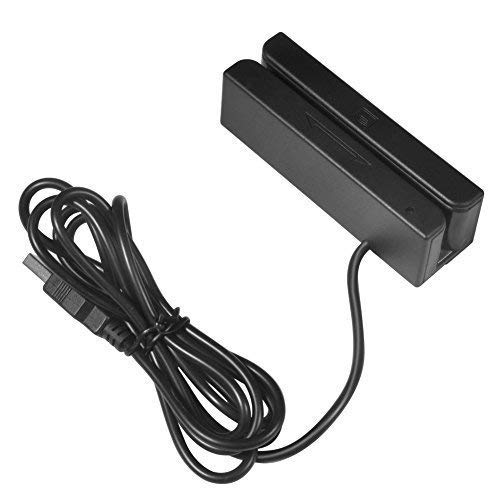
MSR123 Magnetic Stripe Swiper Reader Magstripe Credit Card Reader 3 Track for Quickbooks Online POS System Cashier Registry Cash Register


Key features
- •Plug and Play: MSR123 Magnetic credit card reader is easy to operate.USB interface, keyboard emulation. Connect it to your laptop or desktop computer with the provided USB cable, and you're ready to go– no further software or power supply necessary. The swiper light turns green, and it's ready to go.
- •Powerful:Read data from all 3 tracks, high and low coercivity cards, ISO7811, AAMVA, CA DMV and most magnetic card data formats.
- •Compact size: with 145cm USB cord, two 3mm-diameter screw holes for fixing at the bottom, a LED indicator light
- •Cost effective: This low-cost card reader has three tracks, allowing it to perform triple duty in your business, accept payments, collect data, limit access, verify identification, and keep track of time using it. Compatibility: Work on Windows, Mac and other USB capable systems. Work with TXT, notepad, Word, Excel, POS systems and son on.
- •Application extensive:Perfect for POS, Banking, Loyalty, Access Control, ID verification and other applications.
MSR123 Magnetic Stripe Swiper Reader Magstripe Credit Card Reader 3 Track for Quickbooks Online POS System Cashier Registry Cash Register
List Price: $32.96$29.66DEALYou Save: $3.30 (10%)
Free shippingFree Returns – 30 daysFree Order CancellationSecure Payment2–3 Days DeliveryGet It October 28, 2026In Stock (30)No marketing spamNo account requiredFulfilment by FedEx / Amazon / UPS / ShipwirePayPal / Card Buyer Protection
Customer Reviews
Reviews sourced from verified Amazon purchasers4.4
out of 5
Based on 3 reviews
5★
67%
4★
33%
3★
0%
2★
0%
1★
0%
A nice reader. Works fine, but I can't turn off the beep.
Dan✓ Verified Purchase•March 10, 2024
It took a few weeks to arrive, which is ok, I didn't need it overnight. But it seems like false advertising saying it'll ship "Prime Two-Day" and then takes 26 days to arrive.
When you plug it in, it gets recognized as a "keyboard" for basic input. If you open notepad or some text file and swipe a card, the device reads the bits, and types them out as text. Nice.
There is no instruction manual, but they include a slip of paper with the URL/QR code to download a "config" tool from a website in China. https://fileus.tinylock.cn/file/MSR123Config.zip
"tinylock.cn" is owned by Alibaba, I think. This is what I could find out about the website:
Registrant:Shenzhen Guobangtaifu Technology Co., Ltd.
Sponsoring Registrar:Alibaba Cloud Computing Co., Ltd. (Wanwang)
NSLOOKUP shows the site being hosted by ALISOFT/Aliyun Computing Co., LTD base out of Beijing.
Virus scans show the files are clean at this time.
Looks it's a "Windows Only" config tool.
Using the config tool, you can load the current device settings by clicking "Load". The "Message" window will show you the status of the device/functions. There is a check box for "Beep: Enable" that is checked by default. When you uncheck the box then click the "Download" button to send the config to the device, it doesn't actually disable the beep. Kind of annoying, but I guess I can open it up and take the speaker out.
Looking through the settings you can see how the bits are typed out. There are 5 card types, each with it's own "Prefix"/"Suffix" character. By default, all of the card types have Track one start with % and end with ?, Track two starts with ; and ends with ?, Track three starts with + and ends with ?. So you'll see output like this for a two track card:
%123456?;654321?
You can change the behavior of the [Enter] key too. You can make it press [Enter] after each track, or not at all. And you can also have it send "error" or "empty" data too. So a card swipe might look like:
%123456?;E?+N?
(Track one is 123456, Track two has a bad read, Track three is Empty (null).
For each card type, you can change the Prefix/Suffix characters. I've edited mine to output like this:
ISO%123456?;654321?
Be sure to click "Download" after making changes to "write" them to the reader.
There is a "config.ini" file with some settings, but it's not very descriptive or intuitive. I wouldn't edit it unless instructed to.
Overall, it seems pretty flexible for whatever software you might need to use. The price is great, if you don't mind waiting almost a month for it to arrive. (I could probably have found one cheaper on Aliexpress that reads and writes, and waited the same number of days for shipping.) I just wish it would stop beeping.
When you plug it in, it gets recognized as a "keyboard" for basic input. If you open notepad or some text file and swipe a card, the device reads the bits, and types them out as text. Nice.
There is no instruction manual, but they include a slip of paper with the URL/QR code to download a "config" tool from a website in China. https://fileus.tinylock.cn/file/MSR123Config.zip
"tinylock.cn" is owned by Alibaba, I think. This is what I could find out about the website:
Registrant:Shenzhen Guobangtaifu Technology Co., Ltd.
Sponsoring Registrar:Alibaba Cloud Computing Co., Ltd. (Wanwang)
NSLOOKUP shows the site being hosted by ALISOFT/Aliyun Computing Co., LTD base out of Beijing.
Virus scans show the files are clean at this time.
Looks it's a "Windows Only" config tool.
Using the config tool, you can load the current device settings by clicking "Load". The "Message" window will show you the status of the device/functions. There is a check box for "Beep: Enable" that is checked by default. When you uncheck the box then click the "Download" button to send the config to the device, it doesn't actually disable the beep. Kind of annoying, but I guess I can open it up and take the speaker out.
Looking through the settings you can see how the bits are typed out. There are 5 card types, each with it's own "Prefix"/"Suffix" character. By default, all of the card types have Track one start with % and end with ?, Track two starts with ; and ends with ?, Track three starts with + and ends with ?. So you'll see output like this for a two track card:
%123456?;654321?
You can change the behavior of the [Enter] key too. You can make it press [Enter] after each track, or not at all. And you can also have it send "error" or "empty" data too. So a card swipe might look like:
%123456?;E?+N?
(Track one is 123456, Track two has a bad read, Track three is Empty (null).
For each card type, you can change the Prefix/Suffix characters. I've edited mine to output like this:
ISO%123456?;654321?
Be sure to click "Download" after making changes to "write" them to the reader.
There is a "config.ini" file with some settings, but it's not very descriptive or intuitive. I wouldn't edit it unless instructed to.
Overall, it seems pretty flexible for whatever software you might need to use. The price is great, if you don't mind waiting almost a month for it to arrive. (I could probably have found one cheaper on Aliexpress that reads and writes, and waited the same number of days for shipping.) I just wish it would stop beeping.
Dead simple.
DC✓ Verified Purchase•February 10, 2024
I plugged it into my laptop, swiped a card, and it read it fast and easy - I didn't have to install any drivers, because it speaks the USB HID protocol, i.e. it emulates a USB keyboard. It came with a QR code that contained a URL that let me download a configuration utility and some documentation - but frankly I didn't need any of that, it just worked out of the box. The brass threaded inserts on the bottom, so I can screw it down instead of gluing/taping it down, are a very nice touch.
Msr scanner (edit)
Thehomiealfred✓ Verified Purchase•January 7, 2024
Works great lightweight. Easy to transport does not come with software tho (edit not sure where cards scanned are going to a few cards that were scanned by this msr has be compromised and skimmed)