3M Wired Ergonomic Optical Mouse, Patented Vertical Grip Design Keeps Your Hand and Wrist at a Neutral Angle for Comfort, USB/PS2 Plug and Play Compatibility, 6.5' Cord, Large Size, Black (EM500GPL)


Key features
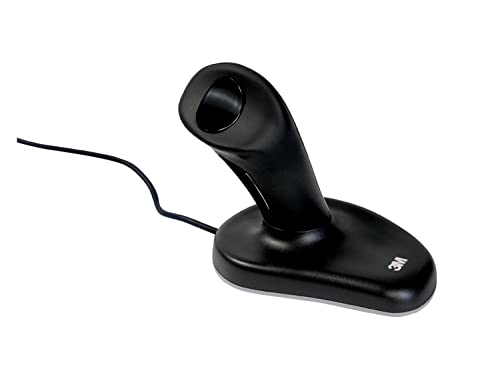
- •The 3M Ergonomic Mouse has earned an Ease-of-Use Commendation from the Arthritis Foundation for its patented, vertical grip design that keeps your hand and wrist at a neutral angle, while the mouse works as a regular optical mouse
- •Vertical grip design that keeps your hand and wrist at a neutral angle, while the mouse works as a regular optical mouse
- •Use your thumb to left and right click
- •Optical sensor, USB/PS2 plug and play compatibility and a 6.5 feet
- •2 year warranty
3M Wired Ergonomic Optical Mouse, Patented Vertical Grip Design Keeps Your Hand and Wrist at a Neutral Angle for Comfort, USB/PS2 Plug and Play Compatibility, 6.5' Cord, Large Size, Black (EM500GPL)
List Price: $145.49$130.94DEALYou Save: $14.55 (10%)
Free shippingFree Returns – 30 daysFree Order CancellationSecure Payment2–3 Days DeliveryGet It October 24, 2026In Stock (1)No marketing spamNo account requiredFulfilment by FedEx / Amazon / UPS / ShipwirePayPal / Card Buyer Protection
Customer Reviews
Reviews sourced from verified Amazon purchasers4.2
out of 5
Based on 10 reviews
5★
60%
4★
40%
3★
0%
2★
0%
1★
0%
Much better than the cordless version
Brian Campbell✓ Verified Purchase•September 19, 2023
Cordless/Bluetooth option lasted only 5 years of heavy daily use. The hardwired version that I used prior to the bluetooth model lasted 13 years.
my wrist relies on this Joystick
Heruy Ejigu✓ Verified Purchase•September 17, 2023
I used to have wrist problem with using a ps2 mouse type. over the years I have tried several types of mice and the only one that really worked for me is the Joystick! first few days was difficult to get used to but once you get the hang of it, you will no look back. the joystick is shaped and can be grabbed with your palm and fingers natural posture without bending your wrist and I believe that is the main reason I don't experience any more wrist pain.
If your hand/wrist needs a comfortable break from other mice configurations, use THIS for a change.
Henry Thoreau✓ Verified Purchase•September 13, 2023
I bought this mouse in Like New "used" condition from Amazon Warehouse for about half price. I actually like it better than I thought I would, at least as an intermittent break from using mice of other configurations (including even such ostensibly fully "ergo" designs as Microsoft's "Sculpt" and the LuguLake "vertical" mouse). Thus, if you can find a fine specimen at a reasonable price, this mouse makes sense for anybody seeking ergonomic wrist/hand/finger relief. I like how the pinky finger rests comfortably upon the mouse's base (instead of dragging across the tabletop as with the LuguLake "vertical" mouse).
Also note: I'm a six-foot-one male whose hand perfectly fits the typical "Large" glove, but this 3M mouse's "Small" version fits my hand perfectly, and so I'm glad I didn't order the "Large" version, which would've felt uncomfortably unwieldy to me. (That said, if my hand were any larger--or my thumb any lengthier--it'd be too large for this "Small" 3M mouse.)
Though this mouse's tracking and (especially) unconventional scrolling approach do take a bit of getting used to (and may never seem 100% as good as most other mice), its uniquely ergonomic shape provides my hand and wrist significant relief, and so I'd rate it a solid "four out of five stars."
Finally, don't fret excessively about the somewhat notorious "wireless-connectivity" nature of this mouse and its USB dongle. If you have the mouse already switched on while starting your PC, the mouse and dongle conveniently AUTOMATICALLY communicate. However, it's true that if you switch off the mouse or remove the dongle while using your PC, you'll either need to (somewhat tediously) press their respective "linking" buttons OR simply restart your PC to restore their functionality. Even so, it's well worth putting up with such minor, occasional inconvenience in order to enjoy the unique ergonomic benefits of this 3M mouse. [BTW, to avoid overusing/stressing your THUMB, I suggest that (every day) you sensibly ALTERNATE using this mouse with using some other type of (preferably "ergo") mouse that lets you left/right-click with one of your other fingers.]
Also note: I'm a six-foot-one male whose hand perfectly fits the typical "Large" glove, but this 3M mouse's "Small" version fits my hand perfectly, and so I'm glad I didn't order the "Large" version, which would've felt uncomfortably unwieldy to me. (That said, if my hand were any larger--or my thumb any lengthier--it'd be too large for this "Small" 3M mouse.)
Though this mouse's tracking and (especially) unconventional scrolling approach do take a bit of getting used to (and may never seem 100% as good as most other mice), its uniquely ergonomic shape provides my hand and wrist significant relief, and so I'd rate it a solid "four out of five stars."
Finally, don't fret excessively about the somewhat notorious "wireless-connectivity" nature of this mouse and its USB dongle. If you have the mouse already switched on while starting your PC, the mouse and dongle conveniently AUTOMATICALLY communicate. However, it's true that if you switch off the mouse or remove the dongle while using your PC, you'll either need to (somewhat tediously) press their respective "linking" buttons OR simply restart your PC to restore their functionality. Even so, it's well worth putting up with such minor, occasional inconvenience in order to enjoy the unique ergonomic benefits of this 3M mouse. [BTW, to avoid overusing/stressing your THUMB, I suggest that (every day) you sensibly ALTERNATE using this mouse with using some other type of (preferably "ergo") mouse that lets you left/right-click with one of your other fingers.]
Pain free at last
FSUlawyer✓ Verified Purchase•August 12, 2023
I have been having steadily worsening pain in my right hand, which is the hand I use for my computer mouse. I had numbness, tingling, and aching. In the search for relief, I bought an ergonomic keyboard and a Logitech trackball. Logitech M570 Wireless Trackball Microsoft Natural Ergonomic Keyboard 4000 My hand immediately felt better, but within a week or two it was as bad as ever. I still use the trackball but I took it home for use with my laptop. I set the trackball on the arm of my easy chair and use it instead of the trackpad. I realized part of the problem was a cramped keyboard tray so I replaced that with a 3M Under-Desk Keyboard Drawer, Gel Wrist Rest with Antimicrobial Product Protection (KD45) . At the same time, I began looking for an even more ergonomic mouse.
I discovered this "mouse" and the Evoluent vertical mouse. Evoluent VM4 Vertical Mouse Right Handed - The Patented Shape Supports Your Hand Because part of my problem seemed to be not only wrist angle, but also pressure along the length of my index finger I chose the 3M Wireless mouse with some trepidation.
My trepidation was related to the reviews that described it as poorly made and that it caused thumb pain.Figuring that I could return it, I ordered the 3M. 3M Wireless Ergonomic Mouse, Small (EM550GPS)
I have had it about a week. So far I have found it to be pretty solidly built. It has survived two falls from my keyboard tray. After one fall, the grip felt a little odd and I realized it had slightly sprung open. This was easily remedied by pressing it back together. Although it looks like a joystick, you actually grasp it and move the entire mouse. A toggle switch provides left click and right click. A button on the side of the grip that falls under my finger tips provides scrolling. The scroll is very sensitive and easily stopped by either left clicking with your thumb or clicking the scroll button again. It scrolls up and down and left and right.
MY RIGHT HAND IS NOW COMPLETELY PAIN FREE!! That makes this mouse well worth money.
As for some of the complaints that others have made, I think they must be talking about older versions or something. I have the following to say:
1. As for the claim that is cheaply built and easily broken, it feels very solid to me and has survived two falls from my keyboard tray onto industrial carpeting with no padding.
2. As for the claim that it has no software for adjustment, it is adjustable for scroll speed, sensitivity, etc. through Windows.
3. As for the claim that the learning curve is too steep, it is true that it will feel very awkward at first. That is absolutely true. It will. So did the Logitech trackball when I first got that. I figure I'll have mastered it in a week or two. Slowing the speed of the mouse and scroll in Windows actually helped. Maybe I can speed it back up after I've mastered it.
4. As for the claim that the mouse speed is too slow or not sensitive enough so you can't get from one part of a page to another without picking up the mouse and moving it around, I found this to be totally not the case. If anything I found the mouse to be too fast and too sensitive at first. This made it hard for me to precisely land on small boxes, "x"s and the like. Going into the Windows 7 mouse settings and slowing it down helped. Of course, I can always speed it back up too. See the above comment about the alleged lack of adjustments.
5. As for the claims of thumb pain, this ergonomic mouse comes in two sizes. I suspect getting the right size is important. My hand was at the upper range of the recommended size for small and at the bottom of large. I chose the small and it is fine. My thumb falls right on the toggle switch without stretching. My thumb feels fine and used to have a lot of thumb pain.
I highly recommend this mouse to anyone who is having hand and wrist pain. My hand feels 100% better.
UPDATE 12/30/12: I have now had this mouse for more than 8 months. I'm still using it. It has survived more falls from the keyboard to the carpet without breaking. My right hand continues to be free of pain, numbness, and tingling. If you are having problems with your mouse hand related to poor ergonomics, I still highly recommend this mouse.
I discovered this "mouse" and the Evoluent vertical mouse. Evoluent VM4 Vertical Mouse Right Handed - The Patented Shape Supports Your Hand Because part of my problem seemed to be not only wrist angle, but also pressure along the length of my index finger I chose the 3M Wireless mouse with some trepidation.
My trepidation was related to the reviews that described it as poorly made and that it caused thumb pain.Figuring that I could return it, I ordered the 3M. 3M Wireless Ergonomic Mouse, Small (EM550GPS)
I have had it about a week. So far I have found it to be pretty solidly built. It has survived two falls from my keyboard tray. After one fall, the grip felt a little odd and I realized it had slightly sprung open. This was easily remedied by pressing it back together. Although it looks like a joystick, you actually grasp it and move the entire mouse. A toggle switch provides left click and right click. A button on the side of the grip that falls under my finger tips provides scrolling. The scroll is very sensitive and easily stopped by either left clicking with your thumb or clicking the scroll button again. It scrolls up and down and left and right.
MY RIGHT HAND IS NOW COMPLETELY PAIN FREE!! That makes this mouse well worth money.
As for some of the complaints that others have made, I think they must be talking about older versions or something. I have the following to say:
1. As for the claim that is cheaply built and easily broken, it feels very solid to me and has survived two falls from my keyboard tray onto industrial carpeting with no padding.
2. As for the claim that it has no software for adjustment, it is adjustable for scroll speed, sensitivity, etc. through Windows.
3. As for the claim that the learning curve is too steep, it is true that it will feel very awkward at first. That is absolutely true. It will. So did the Logitech trackball when I first got that. I figure I'll have mastered it in a week or two. Slowing the speed of the mouse and scroll in Windows actually helped. Maybe I can speed it back up after I've mastered it.
4. As for the claim that the mouse speed is too slow or not sensitive enough so you can't get from one part of a page to another without picking up the mouse and moving it around, I found this to be totally not the case. If anything I found the mouse to be too fast and too sensitive at first. This made it hard for me to precisely land on small boxes, "x"s and the like. Going into the Windows 7 mouse settings and slowing it down helped. Of course, I can always speed it back up too. See the above comment about the alleged lack of adjustments.
5. As for the claims of thumb pain, this ergonomic mouse comes in two sizes. I suspect getting the right size is important. My hand was at the upper range of the recommended size for small and at the bottom of large. I chose the small and it is fine. My thumb falls right on the toggle switch without stretching. My thumb feels fine and used to have a lot of thumb pain.
I highly recommend this mouse to anyone who is having hand and wrist pain. My hand feels 100% better.
UPDATE 12/30/12: I have now had this mouse for more than 8 months. I'm still using it. It has survived more falls from the keyboard to the carpet without breaking. My right hand continues to be free of pain, numbness, and tingling. If you are having problems with your mouse hand related to poor ergonomics, I still highly recommend this mouse.
Good, not ideal
Gribbly Snard✓ Verified Purchase•July 10, 2023
Overall, I'm pretty happy with my ergonomic mouse. It's serves my primary purpose, but there is some give and take. I do not suffer from carpal tunnel syndrome, my issue is with over-use of the roller wheel to scroll inside windows using my middle finger. After extended use I get pain in my middle finger that radiates out to the two adjacent fingers. I use to just use an plain three-button mouse, but I can't seem to find new ones any more.
I like the position of my wrist, I think it would be good if for people who do suffer from carpal tunnel syndrome. The left and right clicks using the two position thumb switch took a little getting use to, but it seems natural now. The thumb seems better equipped for this repetitive motion. The middle button is on the grip. I think it's too larger and it would be better if it only spanned one or two fingers instead of all four. It serves my main purpose of not using the roller which was so damn convenient, but painful. Instead you have to rely on the software to work with a depressed middle mouse button to scroll up and down. Most programs I work with have this feature, but some basic ones like Windows Explorer do not. Some programs work a little differently, some expect the mouse to be depressed while you scroll, others use the button as an on/off switch for scrolling.
The major difficulty in getting use to the mouse is that very fine movements can be difficult to achieve. It is easier in some directions (side to side by flicking the wrist) versus other directions (up and down, arcing from upper right to lower left). It depends on whether you can just move your wrist, or whether you need to move your whole arm. I think I will get better over time, but some programs require very precise positioning of the cursor, and I find it takes me longer to acquire the target in a few cases. It is particularly difficult when using the scrolling feature., The scrolling speed in controlled by up and down motions (arm movement), making precise speed control difficult. Perhaps some adjustments to mouse speed would help.
I don't regret the purchase at all, its a good compromise to prevent the pain. I do wish I had bought the wireless version instead.
I like the position of my wrist, I think it would be good if for people who do suffer from carpal tunnel syndrome. The left and right clicks using the two position thumb switch took a little getting use to, but it seems natural now. The thumb seems better equipped for this repetitive motion. The middle button is on the grip. I think it's too larger and it would be better if it only spanned one or two fingers instead of all four. It serves my main purpose of not using the roller which was so damn convenient, but painful. Instead you have to rely on the software to work with a depressed middle mouse button to scroll up and down. Most programs I work with have this feature, but some basic ones like Windows Explorer do not. Some programs work a little differently, some expect the mouse to be depressed while you scroll, others use the button as an on/off switch for scrolling.
The major difficulty in getting use to the mouse is that very fine movements can be difficult to achieve. It is easier in some directions (side to side by flicking the wrist) versus other directions (up and down, arcing from upper right to lower left). It depends on whether you can just move your wrist, or whether you need to move your whole arm. I think I will get better over time, but some programs require very precise positioning of the cursor, and I find it takes me longer to acquire the target in a few cases. It is particularly difficult when using the scrolling feature., The scrolling speed in controlled by up and down motions (arm movement), making precise speed control difficult. Perhaps some adjustments to mouse speed would help.
I don't regret the purchase at all, its a good compromise to prevent the pain. I do wish I had bought the wireless version instead.
Page 1 of 2