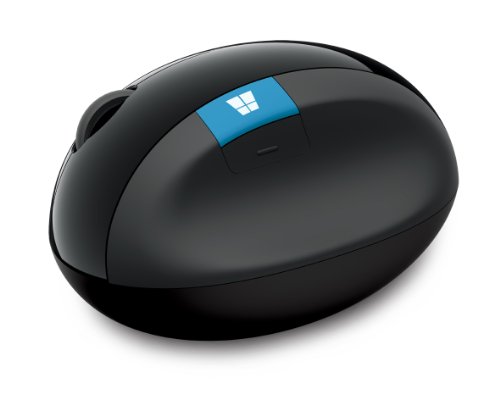
Microsoft MAIN-35956 Sculpt Ergonomic Mouse (L6V-00001)



Key features
- •Advanced ergonomic design with thumb scoop encourages natural hand and wrist postures.
- •Mouse angle and height are designed to place wrist in a comfortable position.
- •MicrosofTrack Technology in the mouse gives you precise control on virtually any surface.
- •Windows button for one-touch access to the Start Menu.
Microsoft MAIN-35956 Sculpt Ergonomic Mouse (L6V-00001)
List Price: $113.47$102.12DEALYou Save: $11.35 (10%)
Free shippingFree Returns – 30 daysFree Order CancellationSecure Payment2–3 Days DeliveryGet It October 24, 2026In Stock (1)No marketing spamNo account requiredFulfilment by FedEx / Amazon / UPS / ShipwirePayPal / Card Buyer Protection
Customer Reviews
Reviews sourced from verified Amazon purchasers4.5
out of 5
Based on 10 reviews
5★
70%
4★
30%
3★
0%
2★
0%
1★
0%
Ergo Mouse
Rykardu Magalhães✓ Verified Purchase•August 15, 2023
I got this mouse since the oem started to break down; I had the other one for 10 years before it gave me problems.
Wonderful Mouse
Michael P - Kirkland, WA✓ Verified Purchase•August 4, 2023
I love this mouse. It set up flawlessly. It feels great and works great. It's super comfortable in my hand.
My favorite mouse
A.K.✓ Verified Purchase•July 16, 2023
I love this mouse. No more pain when I use this!
Great Mouse - Bad Connector?
Amazon Customer✓ Verified Purchase•July 13, 2023
I've used this ergonomic mouse and keyboard since I started my career 8 years ago. I've had two keyboards that eventually stopped working so I don't buy those anymore. But I love the mouse. My first mouse held up great! I wore out the bottom! I've bought two more mice in the last 6 months because the usb connector doesn't seem to stay connected. I have to use my other hand to push the connector in farther and it is perfect. But that's super inefficient"¦ I might just be getting unlucky in the ones I received. Huge supported of this mouse though! Very comfortable! I'm going to try plugging it into a usb c converter and taping it down right so it works!
sideways ergonomics is the way to go (but I liked the 6000 better)
William Doerner✓ Verified Purchase•July 8, 2023
I am a firm believer in an ergonomic keyboard and mouse---specifically the ones made by Microsoft. Like many people these days, I spend far too much time sitting at a computer desk. A few years ago, I started to get sharp pains in my wrist...and I am fairly young so I knew this was a very bad sign.
To circumvent carpal tunnel problems later in life, I became a little obsessed with testing out anything that might alleviate the pain. I tried a variety of options like raised gel pads in front the mouse and keyboard, raised keyboards, different chair and desk heights, a mouse with a trackball, etc. Sometimes they brought a little comfort but nothing really solved the trick completely. Well, that is nothing until I tried out Microsoft! The ergonomic keyboard and mouse took away the pains better than I had expected (I don't have them anymore). A few weeks later, I bought another set for my office and threw out my father's stuff for a replacement at his house and office, too.
My mouse of choice was the Microsoft Natural Wireless Laser Mouse 6000 until my second one went downhill. I was not willing to pay $220 for a replacement (what the heck?!). Instead, I took a risk on the Microsoft Sculpt Ergonomic Mouse (L6V-00001) . I am quite happy with its out of the box performance. It took me all of about 15-30 seconds to get it running.
WHY A RISK?
FEAR #1: Review quality. Most of the reviews are from people on Vine. I like the idea of Vine (wouldn't mind being on it myself!) but I wasn't sure if the company was trying to drum up reviews by sending out freebies.
RESPONSE: The reviews are legit and detailed. I don't think they're exaggerations.
FEAR #2: Size. Some reviewers touched on the different sizes of the mice. I was perfectly happy with my other model and didn't want an upgrade to send my good luck into a tailspin.
RESPONSE: This mouse actually feels smaller in my hand. For people not used to the siderest (like on the Natural Wireless Laser Mouse 6000), I see how the size could feel awkward or terribly large. Actually, I wish it was slightly larger to fill out my hand a little more. Oh well!
FEAR #3: The new laser. I am enchanted by Logitech's darkfield technology and enjoy its products. I wanted to get such a mouse for my desktop (already have one for travel with my laptop and it is awesome) but I was fearful of not having a tried-and-true ergonomic mouse. Microsoft's laser claimed it wouldn't work on glass tables when I looked around. My desk is glass but has a tinted shade.
RESPONSE: Indeed, it does not work well on the glass. There is a jittery movement. No getting rid of my mousepad for now. Nothing changed here. I'd take away 1/2 a star if I could but this was my own risky decision so I can't fault the mouse all the way.
FEAR #4: New buttons on the side. I love my zoom and back buttons on the other mouse.
RESPONSE: Eh, I think I'll adjust. I am still not completely used to it even after a month of heavy usage. The back button is located a little too far toward the front of the mouse given how I used my old Microsoft ergonomic mouse (maybe it wasn't perfect for use but it was comfortable). The Windows button is kinda weird, too. I miss my old zoom button because I sometimes work with graphics where zooming in fast is pretty nice. The scroll wheel seems a little more "clicky" but has less friction than my other mouse. This mouse loses points for getting rid of my zoom. I bet I could reprogram the Windows button but that takes a few seconds of effort and I don't want to be constantly reminded of the Windows logo (I do use Unix and Mac systems sometimes). I'm docking a star without hesitation because of the poor placement of the back button and the useless Windows button.
FEAR #5: Ease of movement. The other mouse I have glides fairly well as I move back and forth. I've gotten used to a lack of friction.
RESPONSE: This mouse is actually a little better in its movement. Out of the box, it felt slightly lighter (indeed the product page says 10.4 ounces vs 1 lb but it's nothing to write home about). I don't care about whether these ergonomic mice are a lot heavier than most mice because I use them for desktop computers---not travel---and I don't plan to pick it up much. If you have a laptop, this may not be the ideal mouse to be lugging around! Sitting next to the older Microsoft ergonomic mouse, the new one reminds me of a smaller yet cool oval rock you might find in a mountain stream while the older one looks like something out of Area 51. This sculpt mouse has a sleeker and lower profile.
OVERALL
I'm happy. I still like the fit and buttons a little better with its predecessor but the new design is cool and equally as useful. I can get rid of the wireless receiver now. The USB one does stick out a little farther than other competitors' products but I put it in the back of my computer.
Would I choose this mouse or the older 6000?
Probably the 6000 for comfort but this one for looks. Usability (in its glide and basic clicking) seems slightly better with this one. We'll see how the battery power holds up...
***
UPDATE after 2 months: Still works fine and without any complaints. I tossed the v6000. I have gotten a little more used to the new button on the side for clicking "back". Seems like I hold it a little higher and that gives me a better grip as well as an ability to touch the button. I continue to believe the Windows button is rather worthless. I'd rather have something cool (like a transparent window or a glowing light) rather than that button. Scrolling is great with this mouse (both by moving the mouse and with the scroll wheel). I'm happy. When the v6000 goes dead in my office, I'll upgrade to another one or see if Microsoft has another innovation on the market. I don't see a point in trying out other companies any more. No, I'm not getting paid or endorsed by them...I like good products and don't mind raving about them when they improve my life :-)
UPDATE after 5 months: Review holds. A solid product. I believe I have replaced the batteries only once and I usually spend a few hours on my CPU on a daily basis. One thing that has impressed me has been the range of movement of the mouse to the scroll icon on the screen (not sure about a range distance from the CPU ). On the older model, I would have to pick it up and move it some to go back and forth across my widescreen dual monitors. This one can almost always go back and forth and, when I do have to pick it up, it's not as heavy to move around.
To circumvent carpal tunnel problems later in life, I became a little obsessed with testing out anything that might alleviate the pain. I tried a variety of options like raised gel pads in front the mouse and keyboard, raised keyboards, different chair and desk heights, a mouse with a trackball, etc. Sometimes they brought a little comfort but nothing really solved the trick completely. Well, that is nothing until I tried out Microsoft! The ergonomic keyboard and mouse took away the pains better than I had expected (I don't have them anymore). A few weeks later, I bought another set for my office and threw out my father's stuff for a replacement at his house and office, too.
My mouse of choice was the Microsoft Natural Wireless Laser Mouse 6000 until my second one went downhill. I was not willing to pay $220 for a replacement (what the heck?!). Instead, I took a risk on the Microsoft Sculpt Ergonomic Mouse (L6V-00001) . I am quite happy with its out of the box performance. It took me all of about 15-30 seconds to get it running.
WHY A RISK?
FEAR #1: Review quality. Most of the reviews are from people on Vine. I like the idea of Vine (wouldn't mind being on it myself!) but I wasn't sure if the company was trying to drum up reviews by sending out freebies.
RESPONSE: The reviews are legit and detailed. I don't think they're exaggerations.
FEAR #2: Size. Some reviewers touched on the different sizes of the mice. I was perfectly happy with my other model and didn't want an upgrade to send my good luck into a tailspin.
RESPONSE: This mouse actually feels smaller in my hand. For people not used to the siderest (like on the Natural Wireless Laser Mouse 6000), I see how the size could feel awkward or terribly large. Actually, I wish it was slightly larger to fill out my hand a little more. Oh well!
FEAR #3: The new laser. I am enchanted by Logitech's darkfield technology and enjoy its products. I wanted to get such a mouse for my desktop (already have one for travel with my laptop and it is awesome) but I was fearful of not having a tried-and-true ergonomic mouse. Microsoft's laser claimed it wouldn't work on glass tables when I looked around. My desk is glass but has a tinted shade.
RESPONSE: Indeed, it does not work well on the glass. There is a jittery movement. No getting rid of my mousepad for now. Nothing changed here. I'd take away 1/2 a star if I could but this was my own risky decision so I can't fault the mouse all the way.
FEAR #4: New buttons on the side. I love my zoom and back buttons on the other mouse.
RESPONSE: Eh, I think I'll adjust. I am still not completely used to it even after a month of heavy usage. The back button is located a little too far toward the front of the mouse given how I used my old Microsoft ergonomic mouse (maybe it wasn't perfect for use but it was comfortable). The Windows button is kinda weird, too. I miss my old zoom button because I sometimes work with graphics where zooming in fast is pretty nice. The scroll wheel seems a little more "clicky" but has less friction than my other mouse. This mouse loses points for getting rid of my zoom. I bet I could reprogram the Windows button but that takes a few seconds of effort and I don't want to be constantly reminded of the Windows logo (I do use Unix and Mac systems sometimes). I'm docking a star without hesitation because of the poor placement of the back button and the useless Windows button.
FEAR #5: Ease of movement. The other mouse I have glides fairly well as I move back and forth. I've gotten used to a lack of friction.
RESPONSE: This mouse is actually a little better in its movement. Out of the box, it felt slightly lighter (indeed the product page says 10.4 ounces vs 1 lb but it's nothing to write home about). I don't care about whether these ergonomic mice are a lot heavier than most mice because I use them for desktop computers---not travel---and I don't plan to pick it up much. If you have a laptop, this may not be the ideal mouse to be lugging around! Sitting next to the older Microsoft ergonomic mouse, the new one reminds me of a smaller yet cool oval rock you might find in a mountain stream while the older one looks like something out of Area 51. This sculpt mouse has a sleeker and lower profile.
OVERALL
I'm happy. I still like the fit and buttons a little better with its predecessor but the new design is cool and equally as useful. I can get rid of the wireless receiver now. The USB one does stick out a little farther than other competitors' products but I put it in the back of my computer.
Would I choose this mouse or the older 6000?
Probably the 6000 for comfort but this one for looks. Usability (in its glide and basic clicking) seems slightly better with this one. We'll see how the battery power holds up...
***
UPDATE after 2 months: Still works fine and without any complaints. I tossed the v6000. I have gotten a little more used to the new button on the side for clicking "back". Seems like I hold it a little higher and that gives me a better grip as well as an ability to touch the button. I continue to believe the Windows button is rather worthless. I'd rather have something cool (like a transparent window or a glowing light) rather than that button. Scrolling is great with this mouse (both by moving the mouse and with the scroll wheel). I'm happy. When the v6000 goes dead in my office, I'll upgrade to another one or see if Microsoft has another innovation on the market. I don't see a point in trying out other companies any more. No, I'm not getting paid or endorsed by them...I like good products and don't mind raving about them when they improve my life :-)
UPDATE after 5 months: Review holds. A solid product. I believe I have replaced the batteries only once and I usually spend a few hours on my CPU on a daily basis. One thing that has impressed me has been the range of movement of the mouse to the scroll icon on the screen (not sure about a range distance from the CPU ). On the older model, I would have to pick it up and move it some to go back and forth across my widescreen dual monitors. This one can almost always go back and forth and, when I do have to pick it up, it's not as heavy to move around.
Page 1 of 2