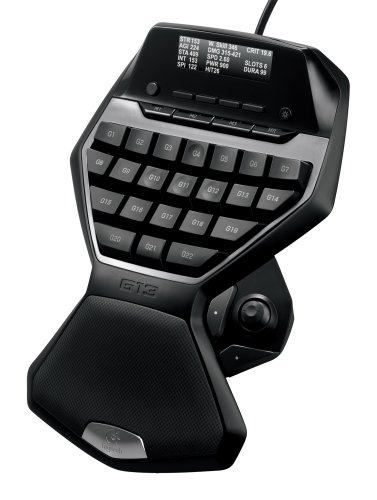
Logitech G13 Programmable Gameboard with LCD Display


Key features
- •Naturally contoured design follows the natural shape of your hand and fingers for increased comfort during long sessions
- •Onboard memory lets you program up to 5 ready-to-play profiles, so you can take your personal preferences with you
- •Customizable backlighting lets you choose your colors and easily locate the right key in low-light conditions or lights-out play
- •25 programmable keys allow you to assign keyboard functions to suit your style of play and create macros on the fly
- •The high-visibility GamePanel LCD displays game stats, system info, and communications from fellow players
Logitech G13 Programmable Gameboard with LCD Display
List Price: $663.47$597.12DEALYou Save: $66.35 (10%)
Free shippingFree Returns – 30 daysFree Order CancellationSecure Payment2–3 Days DeliveryGet It October 25, 2026In Stock (9)No marketing spamNo account requiredFulfilment by FedEx / Amazon / UPS / ShipwirePayPal / Card Buyer Protection
Customer Reviews
Reviews sourced from verified Amazon purchasers4.0
out of 5
Based on 10 reviews
5★
10%
4★
60%
3★
30%
2★
0%
1★
0%
Not a fan of the buttons.
Lyn•August 12, 2017
CONS:
Not of fan of the hard press keys. After 30 min of game play, I had to quit as the tendons in my left hand were sore, (i usually game for hours at a time on weekends with no issues) Also, it shuts off randomly and reboots during GW2 game play. I haven't tried it on any other game as I specifically purchased it for GW2.
PROS:
highly customizable, profiles can be saved on to hardware or your pc.
Not of fan of the hard press keys. After 30 min of game play, I had to quit as the tendons in my left hand were sore, (i usually game for hours at a time on weekends with no issues) Also, it shuts off randomly and reboots during GW2 game play. I haven't tried it on any other game as I specifically purchased it for GW2.
PROS:
highly customizable, profiles can be saved on to hardware or your pc.
Warped but works
T. M.•July 22, 2017
Works good as a gaming keyboard and as described. Ordered from Amazon but it was warped and did not sit flat on my desk. This was very annoying and made it hard to use since it wobbled. Returned it and waiting for a replacement. This is an automatic 2 star deduction due to lack of quality control by Logitech. Hopefully the new unit is perfect, otherwise it too will go back and I will try a different brand.
4/5 A good addition for MOBA players
J.W. Stevens•March 18, 2017
This is an awesome product especially for MOBA players. The Overwolf software (an optional"‹ piece of software) is just okay. The available also are quite good and I like that I can see in game stats on the display like CS per minute for LoL. The con is Overwolf - only because it seems to cause FPS drops due to it records kills/deaths during game. In fact there is no way to turn off the recording"‹ feature. Fix the FPS drops and the ability to turn recording off would make this 5 stars.
Very good game controller sadly i don't use it much anymore ...
Mark M.•March 12, 2017
Very good game controller sadly i don't use it much anymore it just sits mostly due to the lack of support. By this i mean you have to keymap each game not many people have posted there settings for easy setup the software lacks support for new games. I play a lot of games so that might make me different then average user idk.
I wanted to give it 5 stars but due to lack of software support i had to remove a star i would not recommend this hardware unless you know what you're doing when it comes to finding each games keybinds and adding a comfortable configuration for each game which takes a bit of time and thought other than tilting to one side when i got it which was an easy fix. I just pulled a rubber square off the cable box and put it on the bottom of this i would say it was well built to last like most of Logitech products!
I wanted to give it 5 stars but due to lack of software support i had to remove a star i would not recommend this hardware unless you know what you're doing when it comes to finding each games keybinds and adding a comfortable configuration for each game which takes a bit of time and thought other than tilting to one side when i got it which was an easy fix. I just pulled a rubber square off the cable box and put it on the bottom of this i would say it was well built to last like most of Logitech products!
Great for productivity and gaming with learning curve
Shane W.•December 3, 2016
I love the G13 for productivity along with PMC, a macro program. In the default profile I have one setting for windows commands, one for web browsing, and one for Wordpress at work. While before I used VoiceAttack as voice/key controlled macros, now I can do much more complex commands with PMC and the G13, one involving 130 steps. With a little work you can set up the G13 as a virtually unlimited productivity king
Gaming on it is an interesting experience. While I much prefer a mechanical keyboard, the G13 keys are tactile enough with the only problems being the larger outside keys which drag when pressing the edge. At first I struggled to see how using the G13 was any advantage, but I now have the hang of it and competitive multiplayer has improved
The main benefit is freeing up your pinky and thumb for more actions, however you lose the functionality of number keys. If you only need 4 number keys then it's great, and above that it still works fine. Many users recommend the thumb stick as a 4 way switch, but I much prefer a 2 way switch which allows less precise and faster movement - up/left = 1, down/right = 2
Gaming on it is an interesting experience. While I much prefer a mechanical keyboard, the G13 keys are tactile enough with the only problems being the larger outside keys which drag when pressing the edge. At first I struggled to see how using the G13 was any advantage, but I now have the hang of it and competitive multiplayer has improved
The main benefit is freeing up your pinky and thumb for more actions, however you lose the functionality of number keys. If you only need 4 number keys then it's great, and above that it still works fine. Many users recommend the thumb stick as a 4 way switch, but I much prefer a 2 way switch which allows less precise and faster movement - up/left = 1, down/right = 2
Page 1 of 2