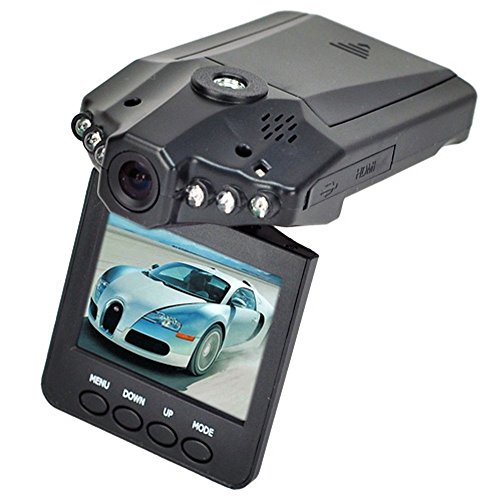
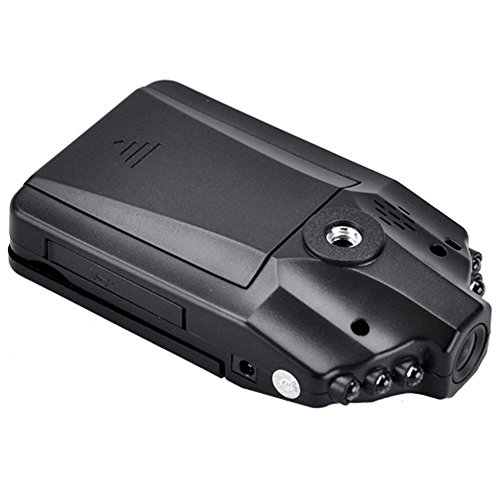
Aketek 2.5-Inch HD Rotatable LED IR DVR Video Camcorder with Camera Holder
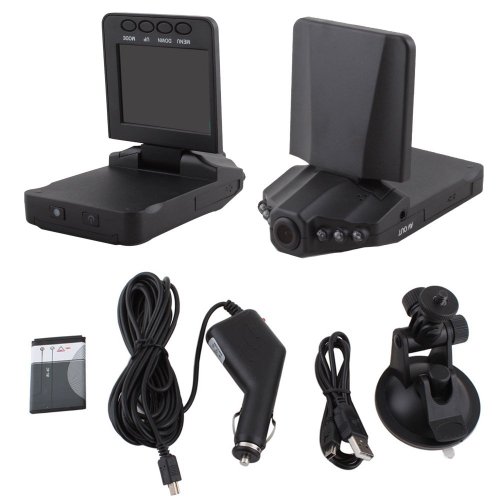
Key features
- •Traffic Dashboard Camcorder
- •Video Camera Recorder Traffic Dashboard Camcorder
Aketek 2.5-Inch HD Rotatable LED IR DVR Video Camcorder with Camera Holder
List Price: $38.03$34.23DEALYou Save: $3.80 (10%)
Free shippingFree Returns – 30 daysFree Order CancellationSecure Payment2–3 Days DeliveryGet It October 25, 2026In Stock (1)No marketing spamNo account requiredFulfilment by FedEx / Amazon / UPS / ShipwirePayPal / Card Buyer Protection
Customer Reviews
Reviews sourced from verified Amazon purchasers2.8
out of 5
Based on 10 reviews
5★
60%
4★
40%
3★
0%
2★
0%
1★
0%
Decent dash cam at a low price
Brock M•July 5, 2015
The only reason I decided to buy this camera was because it was under $15. I figured I couldn't go wrong at that price. After opening the packaging I was worried by how cheap it felt. It is made with very low quality plastic and you can certainly feel the cheapness to it. While it is cheap, I am not disappointed in the purchase at all. It captures audio and video just fine (may not be the best quality but I expected that). I tested all three video quality modes and decided to stick with the 640x480. I couldn't tell a difference in quality between the three; however, the 640x480 resolution captured the widest and tallest video. The two higher defs captured the same width, but the height was shorter. Also, you can record more video at the lower definition. I was a little worried that the timer showed only being able to record 1.5 hours in 640x480 quality with a 32gb SD card. It should be able to hold much more space, but I have yet to use it enough to see if it holds more or not. Other reviewers say they get over 9 hours which sounds more accurate, so might just be an inaccurate timer.
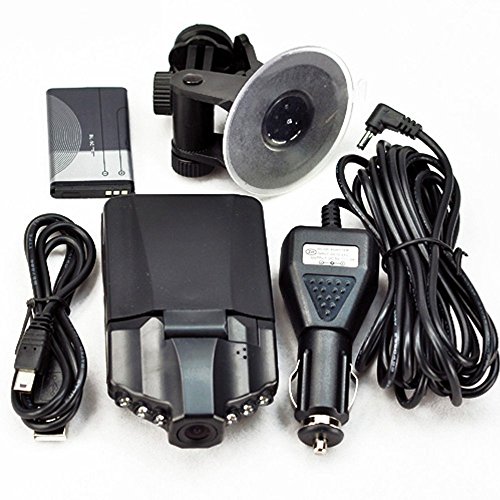
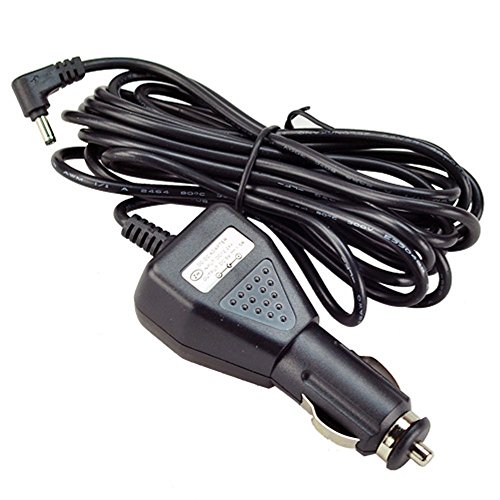
The car charger it comes with has a very long cable so you can tuck it up through the roof and around the side. The suction cup mount works great and is easy to install and remove. I really like the flip down screen. I only use it to set up the settings and then line up the camera for the best view. I don't drive with it down and it hides nicely behind my rear view mirror.
While the listing states it gets 120 degree site, I have to question that. When mounted underneath my rear view mirror, I cannot see the sides of my car by the bumper. If someone were to side swipe me, it may not capture that. It would show that I stayed in my lane so that may be enough evidence to prove your case.
Pros:
Auto records when vehicle starts
Auto shuts off when vehicle is turned off
Auto deletes older clips once memory card is full
Flip down screen lets you see exactly what it is recording
Easy to swivel and record police out the side window
Cons:
Cheap plastic (worried about melting in heat)
Only shows 1 hour 30 minutes available on 32gb SD card (in lowest definition - only 30 minutes in HD)
Not the best video/audio quality
Overall Impression:
8/10 for value (price to quality ratio). It records video and audio and was only $15. Can't beat that!
4/10 for overall quality. Plastic is very cheap and might melt in the sun, but again, it was only $15.
I have no regrets with this purchase and plan on continuing to use it. I have no need for a better dash cam at the moment but may upgrade one day.
The car charger it comes with has a very long cable so you can tuck it up through the roof and around the side. The suction cup mount works great and is easy to install and remove. I really like the flip down screen. I only use it to set up the settings and then line up the camera for the best view. I don't drive with it down and it hides nicely behind my rear view mirror.
While the listing states it gets 120 degree site, I have to question that. When mounted underneath my rear view mirror, I cannot see the sides of my car by the bumper. If someone were to side swipe me, it may not capture that. It would show that I stayed in my lane so that may be enough evidence to prove your case.
Pros:
Auto records when vehicle starts
Auto shuts off when vehicle is turned off
Auto deletes older clips once memory card is full
Flip down screen lets you see exactly what it is recording
Easy to swivel and record police out the side window
Cons:
Cheap plastic (worried about melting in heat)
Only shows 1 hour 30 minutes available on 32gb SD card (in lowest definition - only 30 minutes in HD)
Not the best video/audio quality
Overall Impression:
8/10 for value (price to quality ratio). It records video and audio and was only $15. Can't beat that!
4/10 for overall quality. Plastic is very cheap and might melt in the sun, but again, it was only $15.
I have no regrets with this purchase and plan on continuing to use it. I have no need for a better dash cam at the moment but may upgrade one day.
Review includes installation instructions
Bob M•May 23, 2015
Update 2/19/2016 I made changes to my prior update. And after being run off the road by a driver who came up behind me fast, went around me to the left, and then cut in between me and the car in front of me and off the exit, a maneuver that caused me to go onto the shoulder of the exit to avoid a crash, I've decided to put a camera in my rear window to compliment the recordings from the front windshield.
Update 2/6/16: This particular camera had been running in my vehicle for a year without any intervention. It turns itself on when I start the car (because it is plugged into a cigarette lighter that has power only when the key is on). I had occasion this month to remove the SD card to provide the recording of an incident to police. Picture quality from the SD card on a 19" computer monitor wasn't outstanding but was pretty good. But the stunning thing was the officer said my recording was about as good as the recordings from their squad cars on cameras that cost hundreds of dollars. The biggest difference is that this camera is more "wide angle" so distant objects are smaller (but you take in more of in front of your vehicle so it shows things coming from the side which would be good in the case of a crash from the side at an intersection). And to my surprise the sound (including my comments about the incident - so watch it!) was a lot better than I originally believed it was. And I discovered that based on my driving history (I drive about 1,000 miles a month, more than half at highway speeds) a 32 Gbyte card holds a month's worth of driving. I'm upping my rating from four to five stars with a caveat - I've purchased nine of these cameras, three were defective, and two I have not installed yet. At under $20 each it is not worth returning them - especially as I had sent the defective ones (unopened) to family members out of state so shipping costs were exceeding the cost of the cameras just to find they were defective. Condition seems to depend on the seller (based on when I forwarded them), and unfortunately I cannot associate defective cameras with particular seller(s) as I didn't keep records.
Note to reviewers that complain that this camera does not record long on the built in battery. It appears the battery is intended primarily to maintain stored information. On SOME of the cameras there is a choice of whether to power solely from an external source (which I elected when offered) or from the battery. Others don't seem to offer an option. I did by accident put one camera in battery mode and it recorded for about 40 minutes while I was in a restaurant - but whether that was the cause or whether I'd done something else, the wrap-around when the card was full didn't function. I have therefore (2/19/2016) executed a "reset" and reprogrammed the camera. Based on experience when doing the programming I chose the 5 minute segments. I still would not expect the camera to function for hours on the built-in battery. But with external power it works well and even keeps pretty accurate time over months.
And one more thought (which is why I've purchased nine cameras). With a 120 V to 12V cigarette plugged adapter this would make an extremely inexpensive security camera. Now to find time to install and try out this idea.
UPDATE 6/12/2016 Have only tried one camera from Elecmall. After three weeks it is working fine.
UPDATE 9/2/2015 First the good news. Driving through a town with 10K population I saw a town owned vehicle make a dangerous maneuver. I decided to write a complaint to the police department because it was so egregious and dangerous (there'd have been a head-on crash if I had not been alert). I wrote the letter and then attempted to copy the recording of the incident from my dash cam. Watching the dash cam I saw why the vehicle had done what it did and cannot fault the driver (hit my car or a child). Tore up the letter. Convinced me these things are useful. I purchased two dash cameras from FX Victoria in response to a reviewer recommending that vendor. The two dash cams from FX Victoria are still working perfectly and producing very clear images and time stamps.
I was so pleased with the dash cams that I ordered three more, but FX Victoria was out and Amazon placed my order with Beelike.
Now the bad news. Beelike must sell reconditioned or defective dash cams. First one was bad out of the box. Second one developed fuzzy green lines before the first time I tried playing back my SD card. I tried to order three more from FX - Victoria and Amazon is listing Elecmall as the seller. As another reviewer rating the dash cams a one-star said, apparently some sellers are selling knock offs or refurbs or simply bad units returned for a refund. Be suspicious of low prices. There are huge profits to be made by selling, even for a low price, stuff that should have gone in the trash bin. I'll update later on the quality from Elecmall (for $13.50 each).
Original review with installation instructions:
Seems to be a good device for the cost. Picture is pretty clear on the device screen but I suspect it will be pretty "grainy" on a large computer monitor. Mount is reasonably rigid and suction cup holds well. 120 degree field of view is a good compromise between being so broad you can't recognize anything 25 feet in front of the vehicle and being so narrow that nothing coming from the side is not recorded prior to impact.
Caveat "“ I have just installed and tested this device. I have at this point no long-term experience with it.
I spent hours setting up the device. The instructions are not as bad as with some Chinese products, but are clearly a translation. After one has gone through the installation process in great detail, the instructions make a lot of sense.
In hopes of saving others a lot of time setting up the device, I will share my insights to date.
Caveat "“ This review is written in American English in American English (Arabic) characters. I apologize, but I am not fluent enough in any other language to express the subtleties involved in other than English.
Caveat "“ This device is complex. Apparently there are several variations to the basic device available and the sellers do not make it clear which variant of the device they are selling/shipping. For example, the "Features" listed for the ones I purchased stated: "Recording resolution:1280x960 / 720x480 / 640x480 pixels." I didn't realize that the little box above the list of features which said "Only 720P" meant I was choosing a variant that only had a single recording resolution. (The little box is similar to the boxes which appear when the product is available in a variety of colors.)
Here is what I recommend when setting up the device.
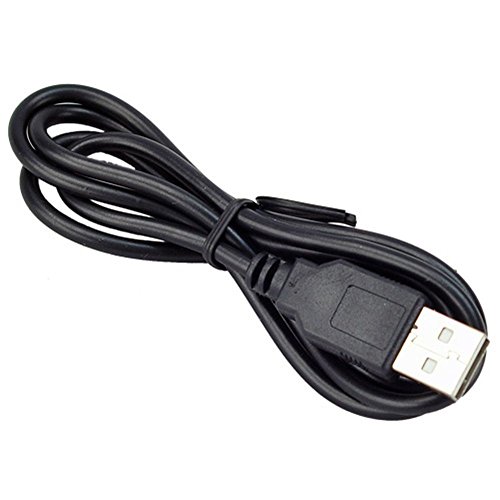
1. Plug the power cable which comes in the box with the device into the USB connection on the device under the flip-open panel on the left side, and then plug the cable into a power source on your vehicle (a cigarette lighter "plug" most likely). Allow the camera "to charge" for at least an hour (one seller recommends 2 - 3 hours) before you do anything else. Disconnect the device from the external power source. [It is easier and just as effective to unplug the end of the power cable that is not connected to the device.]
2. There are two ways to "turn on" the device. On the back there is a red (on mine) button on the left and white (on mine) button on the right. The red button is the power On /Off. Press and hold the red button for 3 seconds. The device should power up. Allow the device operate for 30 seconds. If you are going to power the device from an external source (12 or 24 volts from a vehicle via the USB connection via the supplied cable and a "cigarette lighter" plug) press the red button again to power off the device. [I have not operated the device using the internal battery, so I'm not sure how one would proceed if one planned to do so.] If you are going to power the device from an external source (a vehicle most likely) there is no need to turn the device on and off ever again using the red button. If power is on continually at your cigarette lighter plug I'd recommend unplugging the cable from the lighter plug rather than using the red power On / Off button, but I believe either approach is viable. If the power is turned off at your cigarette lighter plug when you turn your ignition key off, then the device will power up and down "automatically" when you turn your vehicle on and off.
3. Plug the power cable into the vehicle. The device should power up in the video recording mode. Fold the device's display window down so it "hangs" below the device.
NOTE "“ It is important to know that the device has THREE operating MODES and FOUR MENUS. Many of the criticisms in reviews appear to result from the user not realizing this.
[The "Main Menu" which is reached by pressing MENU twice when in any mode, provides for entering such things as Date and Time, Language, "Light Frequency (50 or 60 Hz), Image format, Voice recording on / off, and most importantly "System Reset" which I presume erases all entries and "restarts" the entire system. While my manual says to reset the system by pressing a 1mm shaft gently into the "Reset Hole" I cannot find such a hole on my variant.]
4. I found it necessary at the start of the process to press the white button "to get the device's attention." Until I did this the device didn't respond to any other buttons except the red button. The white button is thereafter the "Select" button which one pushes to choose a selection highlighted on a menu. On my variant the white button is labeled REC and I will hereinafter refer to it by that designation.
5. Just to familiarize yourself with the operation, press MODE (the right most button on the display screen bottom edge) three times at two second intervals. You should see each of the three operating modes. The modes are Video recording; Still image recording; and Playback. On my variant of the device these displays for the modes are labeled "Video" "Capture" and "Play" on the screen. In the first two modes the image on the screen "moves" when the camera is moved, following what the camera lens is "seeing". In the third mode, "Play", the image is fixed. What you see on the screen when in "Play" mode is the first frame recorded for the time segment during which recording happened. The date and time will appear on the bottom of the screen indicating when that segment, or photo, was recorded if the user selected to display date or date and time. At this point it doesn't matter much, you will learn about this attribute when you get the device configured as you want it. The date and time are how you find the segment you wish to view, so I STRONGLY recommend you elect to display date and time during set-up. In the "Play" mode you Up / Down to the desired segment to view, choosing by looking at the first frame and the associated date or date and time. Some users in reviews have complained that the screen is "frozen" and I suspect it is because they have the device in "Play" mode but have not initiated playback of the "chosen" segment.
NOTE "“ If the display is not in English (the other alternatives are four languages in non-Arabic characters) proceed as follows, otherwise skip to step #6 below.
a. When in any Mode with no menu present on the screen (if there is, press MENU to remove the menu from the screen), press MENU. Press MENU again.
Press "DOWN" once. You are on the Language select line of the fourth menu. Press the REC (white on my variant) button to select Language. Up / Down to English and press the REC button to select. (On my variant English is the language at the top of the list and the word English is in English. Press MENU to exit from menus and continue as described below. If the language displayed is Chinese after doing this, repeat this step and select in turn each of the other languages listed. As there are only four languages, you ought to get English sooner or later.
6. To get to the menu for any Mode, press MENU when you in the mode for which you wish to select the attributes you desire for that mode. The types of selections the user can make for that mode are listed. Up / Down to the items you wish to set. Press the REC button to make selections. It is beyond the scope of my review to explain further how to navigate in menus. To set the date and time use Up / Down to obtain the correct digits for the various entities and REC (white button) to lock in the digits for each category of entry when it is correct (e.g. press REC after the digits for hours is correct, for example. REC is pressed for each category of the Date and Time when they are correct.
7. Put the device in each of its three modes in turn and press MENU once. This will bring up the menu for that mode. Make your selections as to how you wish the device to operate. I STRONGLY recommend that you turn Motion Activation OFF if you are using this device as a drive cam. I would only use Motion Activation if I were using the device as a security camera. I STRONGLY recommend recording in five minute segments.
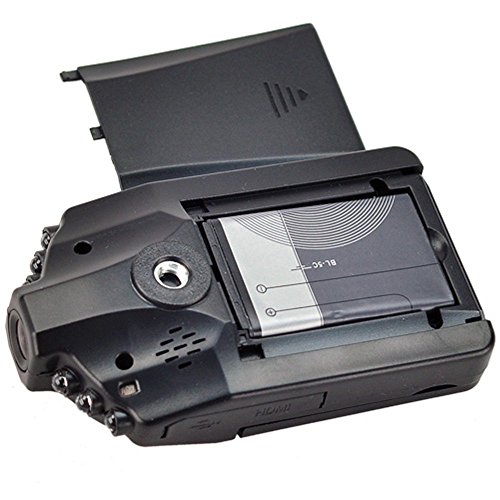
NOTE: Some sellers recommend removing the lithium ion battery unless you are operating the device on battery power or are in the process of charging the battery. Those sellers say that after charging the battery can get "very hot" if it is left in place with the device powered with the external power cable. Unfortunately, in my experience, if you remove the battery you lose all the menu settings after a period of time. That makes the device pretty useless for me. I'm not going to enter all the settings each time I drive my vehicles; I want the camera to come on when I turn on the key and shut off when I turn off the key. HOWEVER, as the device is exposed to the hot sun by being in the windshield, I have covered the top of the device with aluminum foil to reduce heat absorption. Several reviewers have complained the battery compartment cover has warped in the sun. This may be a fatal flaw in the design for devices used in hot climates.
I will update this review in the coming weeks or months as I gain experience with the device.
One reviewer recommended not using more than a 16 gig card because otherwise there are too many segments to sort through. My opinion is that most of the time you are going to want to access a recent segment so having stored many is not an issue as they are accessed in date order with the most recent last. And if there is an issue about something that happened several days or weeks ago, the bigger the card the more likely you can at least find a recording of the event. Another reviewer recommended recording one minute segments. If the quantity of segments to search through is an issue, having a segment for every minute of recording would maximize the number of segments to be handled. Some reviewers complain about lines on the screen. My unit had what looked like thick blue thread or felt tip pen doodling on the screen. The lines turned out to be on the protective film. The film is not easy to get off. Peel it up carefully with a pointed tooth pick.
Update 2/6/16: This particular camera had been running in my vehicle for a year without any intervention. It turns itself on when I start the car (because it is plugged into a cigarette lighter that has power only when the key is on). I had occasion this month to remove the SD card to provide the recording of an incident to police. Picture quality from the SD card on a 19" computer monitor wasn't outstanding but was pretty good. But the stunning thing was the officer said my recording was about as good as the recordings from their squad cars on cameras that cost hundreds of dollars. The biggest difference is that this camera is more "wide angle" so distant objects are smaller (but you take in more of in front of your vehicle so it shows things coming from the side which would be good in the case of a crash from the side at an intersection). And to my surprise the sound (including my comments about the incident - so watch it!) was a lot better than I originally believed it was. And I discovered that based on my driving history (I drive about 1,000 miles a month, more than half at highway speeds) a 32 Gbyte card holds a month's worth of driving. I'm upping my rating from four to five stars with a caveat - I've purchased nine of these cameras, three were defective, and two I have not installed yet. At under $20 each it is not worth returning them - especially as I had sent the defective ones (unopened) to family members out of state so shipping costs were exceeding the cost of the cameras just to find they were defective. Condition seems to depend on the seller (based on when I forwarded them), and unfortunately I cannot associate defective cameras with particular seller(s) as I didn't keep records.
Note to reviewers that complain that this camera does not record long on the built in battery. It appears the battery is intended primarily to maintain stored information. On SOME of the cameras there is a choice of whether to power solely from an external source (which I elected when offered) or from the battery. Others don't seem to offer an option. I did by accident put one camera in battery mode and it recorded for about 40 minutes while I was in a restaurant - but whether that was the cause or whether I'd done something else, the wrap-around when the card was full didn't function. I have therefore (2/19/2016) executed a "reset" and reprogrammed the camera. Based on experience when doing the programming I chose the 5 minute segments. I still would not expect the camera to function for hours on the built-in battery. But with external power it works well and even keeps pretty accurate time over months.
And one more thought (which is why I've purchased nine cameras). With a 120 V to 12V cigarette plugged adapter this would make an extremely inexpensive security camera. Now to find time to install and try out this idea.
UPDATE 6/12/2016 Have only tried one camera from Elecmall. After three weeks it is working fine.
UPDATE 9/2/2015 First the good news. Driving through a town with 10K population I saw a town owned vehicle make a dangerous maneuver. I decided to write a complaint to the police department because it was so egregious and dangerous (there'd have been a head-on crash if I had not been alert). I wrote the letter and then attempted to copy the recording of the incident from my dash cam. Watching the dash cam I saw why the vehicle had done what it did and cannot fault the driver (hit my car or a child). Tore up the letter. Convinced me these things are useful. I purchased two dash cameras from FX Victoria in response to a reviewer recommending that vendor. The two dash cams from FX Victoria are still working perfectly and producing very clear images and time stamps.
I was so pleased with the dash cams that I ordered three more, but FX Victoria was out and Amazon placed my order with Beelike.
Now the bad news. Beelike must sell reconditioned or defective dash cams. First one was bad out of the box. Second one developed fuzzy green lines before the first time I tried playing back my SD card. I tried to order three more from FX - Victoria and Amazon is listing Elecmall as the seller. As another reviewer rating the dash cams a one-star said, apparently some sellers are selling knock offs or refurbs or simply bad units returned for a refund. Be suspicious of low prices. There are huge profits to be made by selling, even for a low price, stuff that should have gone in the trash bin. I'll update later on the quality from Elecmall (for $13.50 each).
Original review with installation instructions:
Seems to be a good device for the cost. Picture is pretty clear on the device screen but I suspect it will be pretty "grainy" on a large computer monitor. Mount is reasonably rigid and suction cup holds well. 120 degree field of view is a good compromise between being so broad you can't recognize anything 25 feet in front of the vehicle and being so narrow that nothing coming from the side is not recorded prior to impact.
Caveat "“ I have just installed and tested this device. I have at this point no long-term experience with it.
I spent hours setting up the device. The instructions are not as bad as with some Chinese products, but are clearly a translation. After one has gone through the installation process in great detail, the instructions make a lot of sense.
In hopes of saving others a lot of time setting up the device, I will share my insights to date.
Caveat "“ This review is written in American English in American English (Arabic) characters. I apologize, but I am not fluent enough in any other language to express the subtleties involved in other than English.
Caveat "“ This device is complex. Apparently there are several variations to the basic device available and the sellers do not make it clear which variant of the device they are selling/shipping. For example, the "Features" listed for the ones I purchased stated: "Recording resolution:1280x960 / 720x480 / 640x480 pixels." I didn't realize that the little box above the list of features which said "Only 720P" meant I was choosing a variant that only had a single recording resolution. (The little box is similar to the boxes which appear when the product is available in a variety of colors.)
Here is what I recommend when setting up the device.
1. Plug the power cable which comes in the box with the device into the USB connection on the device under the flip-open panel on the left side, and then plug the cable into a power source on your vehicle (a cigarette lighter "plug" most likely). Allow the camera "to charge" for at least an hour (one seller recommends 2 - 3 hours) before you do anything else. Disconnect the device from the external power source. [It is easier and just as effective to unplug the end of the power cable that is not connected to the device.]
2. There are two ways to "turn on" the device. On the back there is a red (on mine) button on the left and white (on mine) button on the right. The red button is the power On /Off. Press and hold the red button for 3 seconds. The device should power up. Allow the device operate for 30 seconds. If you are going to power the device from an external source (12 or 24 volts from a vehicle via the USB connection via the supplied cable and a "cigarette lighter" plug) press the red button again to power off the device. [I have not operated the device using the internal battery, so I'm not sure how one would proceed if one planned to do so.] If you are going to power the device from an external source (a vehicle most likely) there is no need to turn the device on and off ever again using the red button. If power is on continually at your cigarette lighter plug I'd recommend unplugging the cable from the lighter plug rather than using the red power On / Off button, but I believe either approach is viable. If the power is turned off at your cigarette lighter plug when you turn your ignition key off, then the device will power up and down "automatically" when you turn your vehicle on and off.
3. Plug the power cable into the vehicle. The device should power up in the video recording mode. Fold the device's display window down so it "hangs" below the device.
NOTE "“ It is important to know that the device has THREE operating MODES and FOUR MENUS. Many of the criticisms in reviews appear to result from the user not realizing this.
[The "Main Menu" which is reached by pressing MENU twice when in any mode, provides for entering such things as Date and Time, Language, "Light Frequency (50 or 60 Hz), Image format, Voice recording on / off, and most importantly "System Reset" which I presume erases all entries and "restarts" the entire system. While my manual says to reset the system by pressing a 1mm shaft gently into the "Reset Hole" I cannot find such a hole on my variant.]
4. I found it necessary at the start of the process to press the white button "to get the device's attention." Until I did this the device didn't respond to any other buttons except the red button. The white button is thereafter the "Select" button which one pushes to choose a selection highlighted on a menu. On my variant the white button is labeled REC and I will hereinafter refer to it by that designation.
5. Just to familiarize yourself with the operation, press MODE (the right most button on the display screen bottom edge) three times at two second intervals. You should see each of the three operating modes. The modes are Video recording; Still image recording; and Playback. On my variant of the device these displays for the modes are labeled "Video" "Capture" and "Play" on the screen. In the first two modes the image on the screen "moves" when the camera is moved, following what the camera lens is "seeing". In the third mode, "Play", the image is fixed. What you see on the screen when in "Play" mode is the first frame recorded for the time segment during which recording happened. The date and time will appear on the bottom of the screen indicating when that segment, or photo, was recorded if the user selected to display date or date and time. At this point it doesn't matter much, you will learn about this attribute when you get the device configured as you want it. The date and time are how you find the segment you wish to view, so I STRONGLY recommend you elect to display date and time during set-up. In the "Play" mode you Up / Down to the desired segment to view, choosing by looking at the first frame and the associated date or date and time. Some users in reviews have complained that the screen is "frozen" and I suspect it is because they have the device in "Play" mode but have not initiated playback of the "chosen" segment.
NOTE "“ If the display is not in English (the other alternatives are four languages in non-Arabic characters) proceed as follows, otherwise skip to step #6 below.
a. When in any Mode with no menu present on the screen (if there is, press MENU to remove the menu from the screen), press MENU. Press MENU again.
Press "DOWN" once. You are on the Language select line of the fourth menu. Press the REC (white on my variant) button to select Language. Up / Down to English and press the REC button to select. (On my variant English is the language at the top of the list and the word English is in English. Press MENU to exit from menus and continue as described below. If the language displayed is Chinese after doing this, repeat this step and select in turn each of the other languages listed. As there are only four languages, you ought to get English sooner or later.
6. To get to the menu for any Mode, press MENU when you in the mode for which you wish to select the attributes you desire for that mode. The types of selections the user can make for that mode are listed. Up / Down to the items you wish to set. Press the REC button to make selections. It is beyond the scope of my review to explain further how to navigate in menus. To set the date and time use Up / Down to obtain the correct digits for the various entities and REC (white button) to lock in the digits for each category of entry when it is correct (e.g. press REC after the digits for hours is correct, for example. REC is pressed for each category of the Date and Time when they are correct.
7. Put the device in each of its three modes in turn and press MENU once. This will bring up the menu for that mode. Make your selections as to how you wish the device to operate. I STRONGLY recommend that you turn Motion Activation OFF if you are using this device as a drive cam. I would only use Motion Activation if I were using the device as a security camera. I STRONGLY recommend recording in five minute segments.
NOTE: Some sellers recommend removing the lithium ion battery unless you are operating the device on battery power or are in the process of charging the battery. Those sellers say that after charging the battery can get "very hot" if it is left in place with the device powered with the external power cable. Unfortunately, in my experience, if you remove the battery you lose all the menu settings after a period of time. That makes the device pretty useless for me. I'm not going to enter all the settings each time I drive my vehicles; I want the camera to come on when I turn on the key and shut off when I turn off the key. HOWEVER, as the device is exposed to the hot sun by being in the windshield, I have covered the top of the device with aluminum foil to reduce heat absorption. Several reviewers have complained the battery compartment cover has warped in the sun. This may be a fatal flaw in the design for devices used in hot climates.
I will update this review in the coming weeks or months as I gain experience with the device.
One reviewer recommended not using more than a 16 gig card because otherwise there are too many segments to sort through. My opinion is that most of the time you are going to want to access a recent segment so having stored many is not an issue as they are accessed in date order with the most recent last. And if there is an issue about something that happened several days or weeks ago, the bigger the card the more likely you can at least find a recording of the event. Another reviewer recommended recording one minute segments. If the quantity of segments to search through is an issue, having a segment for every minute of recording would maximize the number of segments to be handled. Some reviewers complain about lines on the screen. My unit had what looked like thick blue thread or felt tip pen doodling on the screen. The lines turned out to be on the protective film. The film is not easy to get off. Peel it up carefully with a pointed tooth pick.
i have recorded many bad things while having it
Alberto Garcia Jr•February 3, 2015
for the buck you cant beat it.i have recorded many bad things while having it ,worth it. Recorded a kid breaking my head lights . got to i.d her and get a new headlight
Really good camera. It works.
DA•October 17, 2014
I use this camera for driving and as a dashboard cam. Before I get into this review, let me say what I flat out like about this camera:
1) The video goes in a loop once the memory card is full. So I have a 16GB card, and this records about 3-5 hours of video on it. Once that 3-5 hours is used, it goes back to the start and starts recording from the oldest point. You can still see the most recently recorded video whenever you want.. I use it on my car. This is the main feature I love since I don't have to do anything and I don't have to worry about the memory card getting full and me having to delete it or potentially not record when I need it to. There is a setting on the setup to make it so that when the card gets full, it doesn't overwrite the oldest point to record again. I have no need for that and want it to record in a loop.
2) I can plug it into my power supply and when I unplug it the camera turns off. Also when you plug it in, it automatically starts recording without touching or pressing anything. The only time you need to press the record button is the initial point. This makes getting in and out of the car a breeze. So I plug it in when I drive, then I unplug it when I get home. Super easy and nothing need to be messed with. When I'm at a store I can still have it plugged in and record in case.
3) Good quality videos. I live in a city so at night it's bright enough to see everything in front of me. Not super clear but good enough to see at least what needs to be seen which is right in front of your car as well as any sort of signs and lights.
Now for things I don't like:
1) Ultra cheap plastic piece of junk. I mean literally a piece of junk plastic is what this is. It comes with a mount and I broke it one day just by touching it. As such, the way it's hanged on my car is by a bungee cord wrapped around the rear view mirror. Not pretty but it works. This can be a pro as well since if someone breaks into your car, you only lose a cheap camera that can easily be replaced.
2) You can't replay the video on the camera itself (or at least not that I can figure out). You have to remove the card and play it on a computer. I found this to be a major issue especially if you need to see the video right away for whatever reason.
3) Videos are segmented to 3 minutes. So even if the card is capable of storing 90 minutes, each video file is 3 minutes in length. So if something happened, chances are it's spread across in files. You'd have to use a video software of some type to combine the videos into one continuous video.
4) A couple of times the camera went all crazy. I mean it froze and either didn't turn off when I unplugged it or I would plug it in and it would freeze. I would have to unplug everything and take out the battery. This only happened about three times for me. It's very rare for it to happen.
5) I have no idea on the battery life of this thing. So I can't really comment on that. However, for my purpose, I only need it powered while I'm in the car.
I have five of these cameras each with 16gb cards. I had it for about a year or so now and I love it and use it everyday. To date, it hasn't failed me yet other than the cheap plastic mount breaking.
Now for story time. One day while driving to the store for lunch, I was waiting for a left turn. The light turned green and I turned left as well as the person across the street turned left since we both had the green light. Unknowing to the driver across me, the person next to me went forward as well but had the red light. The two cars collided and with a loud bang. Knowing I had video evidence of me having green light, and the forward light was red, I decided to talk to the officer at the scene of the accident. Not really for being a "good samaritan" but more like I wanted to test if these videos would hold any merit. The police officer on scene told me both people said they had the green light, and I explained I had a dash video that might show that I had the green light, and the light was red. He agreed to watch the video and we got in my car and tried to look at it. We found that you couldn't play it back on the camera itself. So I told him I was going back to my office and that I could email him the video. He agreed and he gave me his card.
I went back to my office and got the video off the memory stick and emailed it to the officer. The video was clear as day. It showed the car next to me clearly, and showed that I had the green light, and the forward light was red. It also clearly showed all cars involved. Even though it didn't show the actual accident, you can clearly make out each car moments before the accident and exactly who had the red light or green light. I explained to the officer this and he saw the video. He loved it and said he would show the judge the video and would charge the woman who ran the red light. He said I might have to show up to court to explain that I had the video. He also said I had to turn in the original file to him and I agreed. All said and done, the person pleaded guilty to running the red light merely from the fact that the video was there and I didn't even need to show up.
In conclusion, YES this camera system does work. While I didn't experience an actual accident, I indirectly helped someone else from being falsely accused of running or not running a light. Since nobody else was there to help or be a witness, this video did just that for them.
I can definitely say that while this camera is poorly constructed, it does work. I live in a area that has four seasons and it can get ice cold at night during winter months. Since I only had this camera through one winter, it still works. It even stayed in the car in extreme heat during the summer time. I shall see if this thing can last for two years which I'm sure it will. I rarely touch it and just plug and unplug it as I get in the car
1) The video goes in a loop once the memory card is full. So I have a 16GB card, and this records about 3-5 hours of video on it. Once that 3-5 hours is used, it goes back to the start and starts recording from the oldest point. You can still see the most recently recorded video whenever you want.. I use it on my car. This is the main feature I love since I don't have to do anything and I don't have to worry about the memory card getting full and me having to delete it or potentially not record when I need it to. There is a setting on the setup to make it so that when the card gets full, it doesn't overwrite the oldest point to record again. I have no need for that and want it to record in a loop.
2) I can plug it into my power supply and when I unplug it the camera turns off. Also when you plug it in, it automatically starts recording without touching or pressing anything. The only time you need to press the record button is the initial point. This makes getting in and out of the car a breeze. So I plug it in when I drive, then I unplug it when I get home. Super easy and nothing need to be messed with. When I'm at a store I can still have it plugged in and record in case.
3) Good quality videos. I live in a city so at night it's bright enough to see everything in front of me. Not super clear but good enough to see at least what needs to be seen which is right in front of your car as well as any sort of signs and lights.
Now for things I don't like:
1) Ultra cheap plastic piece of junk. I mean literally a piece of junk plastic is what this is. It comes with a mount and I broke it one day just by touching it. As such, the way it's hanged on my car is by a bungee cord wrapped around the rear view mirror. Not pretty but it works. This can be a pro as well since if someone breaks into your car, you only lose a cheap camera that can easily be replaced.
2) You can't replay the video on the camera itself (or at least not that I can figure out). You have to remove the card and play it on a computer. I found this to be a major issue especially if you need to see the video right away for whatever reason.
3) Videos are segmented to 3 minutes. So even if the card is capable of storing 90 minutes, each video file is 3 minutes in length. So if something happened, chances are it's spread across in files. You'd have to use a video software of some type to combine the videos into one continuous video.
4) A couple of times the camera went all crazy. I mean it froze and either didn't turn off when I unplugged it or I would plug it in and it would freeze. I would have to unplug everything and take out the battery. This only happened about three times for me. It's very rare for it to happen.
5) I have no idea on the battery life of this thing. So I can't really comment on that. However, for my purpose, I only need it powered while I'm in the car.
I have five of these cameras each with 16gb cards. I had it for about a year or so now and I love it and use it everyday. To date, it hasn't failed me yet other than the cheap plastic mount breaking.
Now for story time. One day while driving to the store for lunch, I was waiting for a left turn. The light turned green and I turned left as well as the person across the street turned left since we both had the green light. Unknowing to the driver across me, the person next to me went forward as well but had the red light. The two cars collided and with a loud bang. Knowing I had video evidence of me having green light, and the forward light was red, I decided to talk to the officer at the scene of the accident. Not really for being a "good samaritan" but more like I wanted to test if these videos would hold any merit. The police officer on scene told me both people said they had the green light, and I explained I had a dash video that might show that I had the green light, and the light was red. He agreed to watch the video and we got in my car and tried to look at it. We found that you couldn't play it back on the camera itself. So I told him I was going back to my office and that I could email him the video. He agreed and he gave me his card.
I went back to my office and got the video off the memory stick and emailed it to the officer. The video was clear as day. It showed the car next to me clearly, and showed that I had the green light, and the forward light was red. It also clearly showed all cars involved. Even though it didn't show the actual accident, you can clearly make out each car moments before the accident and exactly who had the red light or green light. I explained to the officer this and he saw the video. He loved it and said he would show the judge the video and would charge the woman who ran the red light. He said I might have to show up to court to explain that I had the video. He also said I had to turn in the original file to him and I agreed. All said and done, the person pleaded guilty to running the red light merely from the fact that the video was there and I didn't even need to show up.
In conclusion, YES this camera system does work. While I didn't experience an actual accident, I indirectly helped someone else from being falsely accused of running or not running a light. Since nobody else was there to help or be a witness, this video did just that for them.
I can definitely say that while this camera is poorly constructed, it does work. I live in a area that has four seasons and it can get ice cold at night during winter months. Since I only had this camera through one winter, it still works. It even stayed in the car in extreme heat during the summer time. I shall see if this thing can last for two years which I'm sure it will. I rarely touch it and just plug and unplug it as I get in the car
As you will see from this video upload...
Andrew T. Wootten•July 16, 2013
This is the whole reason I bought this camera for myself! While I haven't gotten the time stamp issue corrected, this video will be turned over to the insurance company of the person in the vehicle in front of me. This happened just yesterday evening! I actually forgot for a few minutes that I had the dashcam running! I think for less than $20 bucks I have more than gotten my money's worth. I have edited out the sound, because of the F-bomb that flew out of my mouth at the time of the accident! But sound is very legible, I could hear my radio playing in the background, and myself at the time of the accident. I hope this convinces someone to buy this if you are on the fence. Had this lady not gotten on front of me right before that intersection, this may have well been me, which is why I purchased it!! Both drivers were ok, btw.
Update 6/24/15: I have had this camera for nearly two years. I had a few glitches with it, such as not powering on properly, or going blank. I just pop the battery out for about 20 seconds, then replace it, and continue just fine. I never had any further problems, it worked fine. I recorded a couple of more accidents, that fortunately did not involve ME! The video was copied and turned over to the respective parties. I placed this in my wife's car over this weekend, and she went to work with it. Yesterday, she left it attached to the windshield in 97° outside temps ... the entire camera melted under the extreme heat conditions and now needs to be replaced. After owning this for nearly 2 years, and capturing 3 car accidents, I will not hesitate to buy this again. Well worth the money, as inexpensive as it is.
Update 6/24/15: I have had this camera for nearly two years. I had a few glitches with it, such as not powering on properly, or going blank. I just pop the battery out for about 20 seconds, then replace it, and continue just fine. I never had any further problems, it worked fine. I recorded a couple of more accidents, that fortunately did not involve ME! The video was copied and turned over to the respective parties. I placed this in my wife's car over this weekend, and she went to work with it. Yesterday, she left it attached to the windshield in 97° outside temps ... the entire camera melted under the extreme heat conditions and now needs to be replaced. After owning this for nearly 2 years, and capturing 3 car accidents, I will not hesitate to buy this again. Well worth the money, as inexpensive as it is.
Page 1 of 2